Good cosmetic ecommerce website design starts with one idea: a shopper cannot touch, smell or test your product, so the page has to do that job with words, photos and simple tools. If the page answers her questions, she buys. If it leaves her guessing, she goes back to Facebook and asks in the comments.
This guide is for small and medium shops in Bangladesh that sell lotion, lip care, face cream, makeup or baby care online. It covers what to plan, what to put on each page, how to take payment and deliver, and which mistakes cost the most sales. You can follow it with any WordPress setup, and near the end there is one ready-made option.
What a cosmetics shopper wants from your website
Before you open a design tool, think about the person on the other side of the screen. Cosmetics are personal. People worry about skin type, ingredients, texture, shade and whether the product is original. A good site answers these worries quickly.
Most buyers arrive with one of three needs:
- A fix for a problem. Dry heels, split lips, oily skin, dark spots. They search for the problem, not for a brand.
- A product they already know. They saw it from a friend or a page and want the price and a safe way to pay.
- A gift or a top-up. They want a set, a pack or a quick reorder.
Your homepage should serve all three without making the visitor think. Put problem-based shortcuts near the top, a clear search box, and a bright area for packs and offers. Everything else is detail.
Plan your cosmetic ecommerce website design on paper first
Many shop owners start by looking at layouts. Start with paper instead. Write down what you sell, who buys it and how you want to sell it. Good cosmetic ecommerce website design always begins with these answers. Ten minutes of planning saves weeks of rework.
- List your products. Count them. A shop with 20 products needs a different homepage from a shop with 500.
- Group them. Use two levels at most: for example Face, Body, Lips, Hair, Baby. Add a filter for skin type or concern later.
- Name your buyer. Is she a student buying a lip balm, or a mother buying for the whole family? The language and photos change.
- Decide how you will deliver. Dhaka only, nationwide, or both? This changes your delivery charge text and your checkout.
- Decide how you will be paid. Cash on delivery, bKash, Nagad, card, or a mix.
- Collect your photos. Good pictures matter more than any theme. Plan to shoot every product again if needed.
With this sheet in hand, every later choice becomes easier. You will know which pages you need and which features are only nice to have.
Choose a platform and a structure that fits a small shop
For most Bangladeshi shops, WordPress is a sensible base. It is free, you own the site, and you can add features as you grow. You need hosting, a domain, a theme and a shop plugin that handles the cart and checkout.
When you compare options, check these points:
- Does the shop plugin support bKash, Nagad and cash on delivery without extra paid add-ons?
- Can you connect a courier such as Steadfast or Pathao?
- Does the theme load fast on a mid-range phone and a slow mobile connection?
- Can you change the homepage yourself, without a developer?
- Are the product page, cart and checkout already designed, or only the homepage?
The last point is often missed. Many beauty ecommerce website design templates look good on a demo homepage and then fall apart on the cart and account pages. Open every page of the demo before you decide.
Cosmetic ecommerce website design: the pages you need
A cosmetics store does not need fifty pages, and a lean cosmetic ecommerce website design is easier to keep tidy. It needs a few pages that work very well. Here is the minimum set.
- Homepage. The shop window. It sends people to products, offers and guides.
- Category page. A grid with filters and sorting.
- Product page. The most important page. More on this below.
- Cart and checkout. Short, clear and safe.
- Account page. Order history and saved address.
- Track order page. Saves you from answering "where is my parcel" all day.
- About, contact and policy pages. Return policy, delivery times and a real phone number.
Add a small blog or guide section later. Articles about dry skin, sunscreen or hair care bring people from search and help them trust you.
Design the homepage in a clear order
A homepage is a story told from top to bottom, and it is the heart of cosmetic ecommerce website design. A good order for a cosmetics shop looks like this:
- Header. Logo, search box, bag icon, a link to account. Keep the menu short.
- Hero banner. One strong offer or one season message. Do not stack five sliders of equal weight.
- Trust strip. Original products, delivery time, easy returns, cash on delivery.
- Shop by concern or category. Large tiles with clear names.
- Best sellers. Eight to twelve products.
- Offers. A deal with an honest end date and real stock.
- Reviews. Short, real comments with the product name.
- Guide or blog. Two or three helpful posts.
- Footer. Contact, payment icons, delivery and return links.
Resist the urge to add everything. A crowded homepage on a small phone screen is tiring, and tired visitors leave.
Make the product page do the selling
The product page is where the sale is won or lost. A shopper who cannot try the product needs facts. Include the following on every product page:
- Three to five clear photos: front, back, texture, in use, and size comparison.
- The price, the pack size and the price per unit when you sell different sizes.
- A short description in plain words: who it is for and what it does.
- Ingredients, in full, and a note about common allergens.
- How to use it, how much and how often.
- Texture and finish. Is it light, rich, sticky, oily, matte? This is a top question for creams and lotions.
- Shelf life or expiry information.
- Delivery time and return rule, right near the button.
- Reviews with a star rating.
Use a sticky add-to-cart bar on phones so the button is always within reach. Show size or shade options as clear buttons, not a hidden drop-down. If a product comes in colours, show colour dots on the product card and a second photo on hover.
Photography and content that build trust
Fake or copied pictures are the fastest way to lose trust in this category. Take your own photos with a plain background and natural light. Use the same angle and size for every product so the grid looks tidy.
A simple photo checklist:
- Square or 4:5 images, at least 1000 pixels on the long side.
- Compress them so each file is under 200 KB.
- Add descriptive file names and alt text, such as "petroleum jelly 100 g jar".
- Show the real product in the real packaging, because buyers compare it with what arrives.
- Add one photo with a hand or a model to show scale.
For text, write like a helpful shop assistant. Say "good for dry heels in winter" rather than "advanced moisture complex". Short sentences work best on a phone.
Colour, fonts and layout for a beauty store
You do not need to be a designer to choose well. Strong cosmetic ecommerce website design for a small shop is mostly about restraint. Follow a few rules and you will avoid most problems.
- Pick one main colour and one accent. Use the accent only for buttons and sale tags. A cool blue, a soft green or a warm cream all work, if the contrast is strong enough to read.
- Use two fonts at most. One for headings, one for text. Check that they support Bangla if your shop writes in both languages.
- Leave space. White space makes products look better and easier to scan.
- Keep buttons big. A thumb should hit them without zooming.
- Make text readable. Body text at 16 px or larger, with dark text on a light background.
Good beauty ecommerce website design also fits the mood of your products. A clinical, cool look suits pharmacy-style skin care. A warm look suits handmade goods. A dark, gold look suits premium perfume. Choose the mood first, then the colours. If you plan a wider beauty ecommerce website design, with makeup, hair and perfume, keep one shared style across all ranges.
Checkout, payment and delivery for Bangladesh
Checkout is where many carts die. Keep it short and familiar.
- Ask only for what you need: name, phone, address and area. An email can be optional.
- Show the delivery charge before the final step, not after.
- Offer cash on delivery for first-time buyers, because many are not yet ready to pay online.
- Add bKash and Nagad, with clear instructions if payment is by Send Money.
- Add an online gateway for card buyers if your volume justifies it.
- Show a clear order summary and a confirmation message with an order number.
- Send the order to your phone through email or a message app so you see it at once.
For delivery, connect a courier you trust. Printing parcel labels and booking pickups from the admin panel saves hours every week. Add a track order page so buyers can follow the parcel themselves.
A small tip: cash on delivery orders have a higher return rate. Confirm each one by phone or message before shipping, and ask for a small advance on high-value orders.
Speed, mobile and basic SEO
Most of your visitors will use a phone, often on a mobile connection that is not fast. A slow site loses them before they see a single product.
- Choose a theme with light scripts and no heavy sliders.
- Compress images and load below-the-fold images lazily.
- Use a cache plugin and good hosting.
- Test your pages on a real phone, not only on a desktop window.
- Keep pop-ups to a minimum. One login or newsletter popup is enough.
For search, give every product a unique title and description. Write category pages with a short intro of two or three sentences. Use clear URLs such as /product/vitamin-e-lip-balm. Add the product schema that your shop plugin provides, so prices and ratings can show in results. Do not expect overnight results. Search traffic builds slowly, and steady work wins.
Tools that help shoppers choose
A simple tool often does more than a big banner. Cosmetics buyers love help with choosing. A few ideas that work well:
- A skin type quiz that ends with three products.
- A body map where a tap on "heels" or "lips" shows the right care.
- A texture meter that tells how light or rich a cream feels.
- A shade finder with colour dots.
- A pack saver that shows how much a family pack saves over single items.
These tools cut the number of messages you answer, and they raise the average order. You can build them with plugins, or choose a theme that already has them.
A ready-made option: Tushar
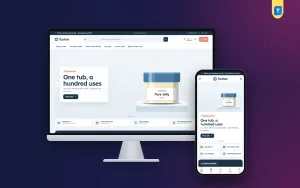
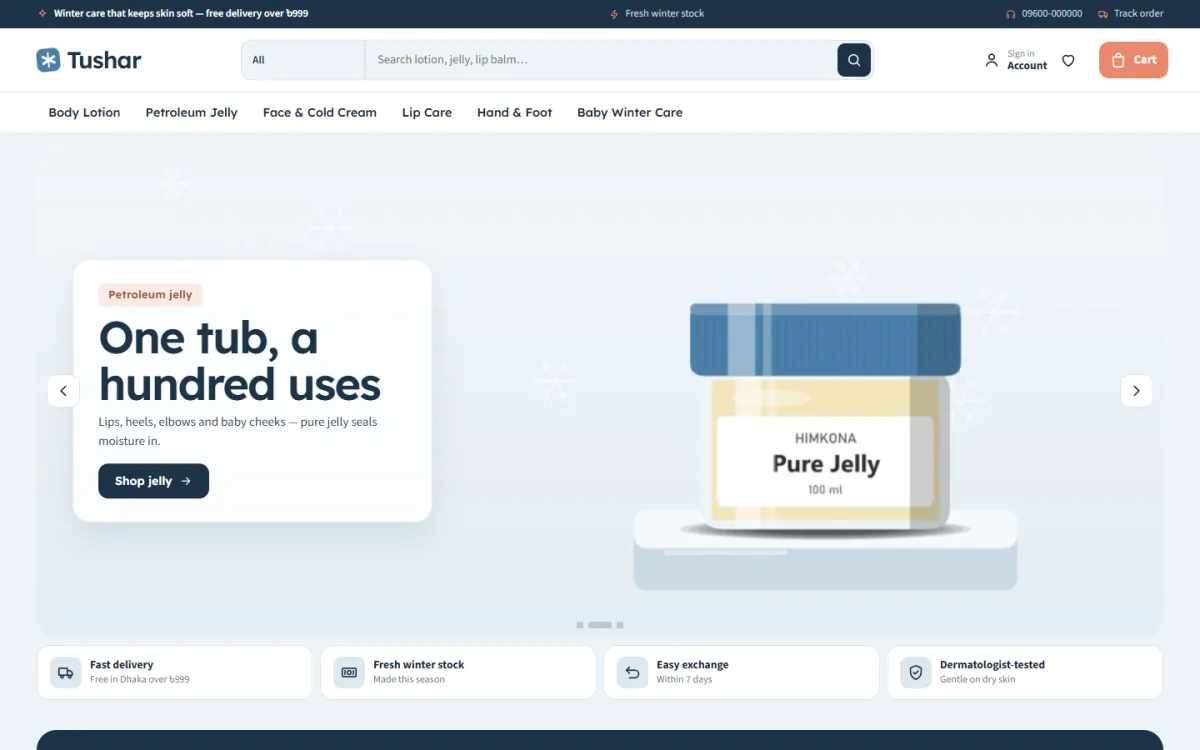
If you do not want to build every block yourself, a ready-made theme can save weeks. Tushar is a cosmetic store WordPress theme made for lotion, petroleum jelly, lip care, baby care and glycerin shops. It follows many of the ideas in this guide.
Here is what it includes, in plain terms:
- 24 homepage blocks that you can switch on, off and re-order.
- Skin weather tabs with a dryness meter, and a body map with six dry-skin zones.
- A texture meter, absorb time and a winter tip on product pages.
- Size variations for lotions and jellies.
- Deals with a countdown and stock bars.
- Five colour palettes and four font pairs.
- bKash, Nagad, SSLCommerz and cash on delivery, with Steadfast and Pathao courier and a track order page.
- A one-click demo with 33 products from 5 brands, so you can see a full shop before you add your own.
The shop plugin, Themeve Commerce, is part of the package, so you do not need WooCommerce. The Theme Options dashboard works on phones, which helps if you manage the shop from your handset. Visit the Tushar page to open the live demo and judge it with your own products in mind.
A launch checklist
Before you tell your customers, go through this list slowly.
- Place three test orders: one with cash on delivery, one with bKash, one as a guest.
- Check the order email and your phone alert.
- Open every page on a phone and a tablet.
- Read the delivery, return and privacy pages for mistakes.
- Check that the phone number and WhatsApp or Messenger link work.
- Test the search box with three product names and one misspelling.
- Set up a backup and an uptime alert.
- Install analytics so you can see what visitors do.
- Remove demo text and sample products you do not sell.
Then announce the site on your Facebook page, pin the link and add it to your profile. Offer a small welcome discount for first orders from the website.
Common mistakes in cosmetic ecommerce website design
- Too many banners. Visitors do not know where to click.
- No ingredient list. Careful buyers leave at once.
- Stock photos that do not match the product. Buyers notice.
- Hidden delivery charges. A surprise at the last step ends the sale.
- Fake countdowns. A timer that resets every day damages trust. Use real end dates.
- Slow pages. Each extra second costs orders.
- No reviews. Ask happy customers for a short comment and a photo.
- Ignoring the phone layout. Design for the small screen first.
How to grow after launch
Launching is the start. Cosmetic ecommerce website design is never finished in one go. Check your orders every week and note which pages people visit. Fix the weak points one at a time.
- Add the five best-selling products to the homepage top.
- Write one helpful guide a month, such as how to care for dry skin in winter.
- Collect reviews by message after each delivery.
- Send a simple offer to past buyers before each season.
- Test one change at a time, such as a new banner or a shorter checkout, and watch the result.
Small steady improvements add up. A shop that is clear, fast and honest will win repeat buyers, and repeat buyers are where profit comes from.
If you want to read more on the technical side, the official WordPress documentation is a good, reliable reference.
Frequently asked questions
What is the best cosmetic ecommerce website design for a small shop?
Keep it simple. Use a clean homepage, large product photos, a clear product page with ingredients and texture, and a short checkout. Add local payment options and a trusted courier. Fancy effects matter far less than speed and clarity.
How many products do I need to start?
You can start with 15 to 20 well-photographed products. It is better to have a small, complete catalogue than a large one with missing details.
Do I need WooCommerce for a cosmetics store?
No. Any shop plugin that handles the cart, checkout and payments will work. Pick one that supports bKash, Nagad and cash on delivery, and a courier you use.
How can I build trust with first-time buyers?
Show real photos, full ingredient lists, a phone number, clear return rules and honest reviews. Offer cash on delivery and confirm each order by phone.
What makes a good cosmetic ecommerce website design on mobile?
Big buttons, a sticky add-to-cart bar, short forms and fast pages. Test on a real phone with a normal mobile connection.
Can I manage the store from my phone?
Yes, if your theme has a mobile-friendly admin area. Some themes let you switch and move homepage blocks from a phone, which is handy when you are away from a computer.
How long does it take to set up a cosmetics shop?
With a ready-made theme and a demo import, a basic store can be ready in a few days. Most of the time goes into photos, product text and testing, not the design itself.