A fashion mart website design template has a harder job than a template for a single-label boutique. Your shop sells shirts, sarees, kidswear, shoes and bags together, and a shopper should find each one in a few taps. If the menu is confusing or the page is slow, she will go back to Facebook and buy from someone else.
This guide shows how to plan an online fashion mart in Bangladesh. You will see how to organise departments, build the homepage, run offers, set up payments and delivery, and launch without mistakes. The advice works with any platform.
What a fashion mart website design template must handle
A mart is busy by nature. It has many departments, many sizes and many price points. Visitors come for different things: a mother wants a frock for her daughter, a student wants shoes, a father wants a shirt under taka 1,000. A fashion mart website design template must let each of them reach the right section fast.
Check that the template offers these:
- A department menu with sub-categories, ideally with photos.
- A wide search box, preferably with a department picker.
- Product cards that stay compact, so many items fit on one phone screen.
- Filters and size guides for men, women, kids and shoes.
- Sale blocks with countdowns and stock bars.
- Price-based browsing, such as "shop by budget".
- A cart, a one-page checkout, and local payment and courier options.
If most of these are missing, you will need plugins, and each plugin adds weight and risk.
Plan departments before choosing a fashion mart website design template
Before you touch any design, decide how the mart is divided. Write the departments on paper and list the sub-categories under each. Keep the depth to two levels, because three levels are hard to use on a phone.
A sample department plan
- Men: shirts, T-shirts, panjabis, trousers, jeans, winter wear.
- Women: sarees, kurtis, three-piece, tops, scarves, winter wear.
- Kids: boys, girls, school wear, baby wear.
- Footwear: men's, women's, kids', school shoes.
- Bags and accessories: bags, belts, sunglasses, watches.
Use the words your customers use. If they say "three-piece", use "three-piece". Match the names on your Facebook page, so people see the same words everywhere.
Design the menu around real shoppers
Picture a mother shopping before Eid. She wants a saree for herself, a shirt for her husband, a frock for her daughter and school shoes for her son. In a good mart, that is one menu and one cart, not four separate searches.
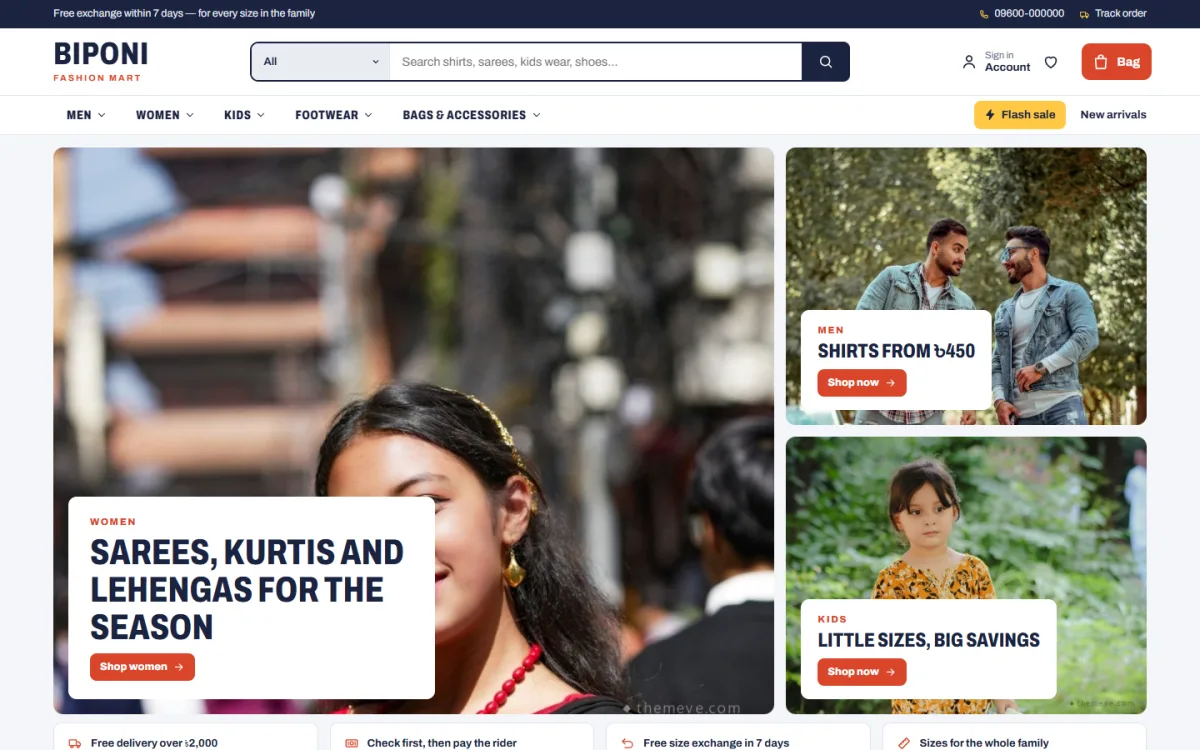
These menu ideas help:
- Show five to seven departments in the main bar. More than that gets crowded.
- Open a panel on hover (desktop) with sub-categories and a photo.
- On phones, show a menu button, the logo and the cart. Nothing else is needed in the top bar.
- Add a search box with a department picker, so a shopper can look for shoes inside Kids only.
- Keep sale and new arrivals easy to reach.
Write short, plain labels. "Women" is better than "Ladies collection and more". Avoid long names that wrap onto two lines on a phone. Test the menu with someone who has never seen your shop. Ask her to find a pair of school shoes. If she needs more than three taps, simplify.
Build the homepage with a fashion mart website design template
A mart homepage can be longer than a boutique page, but the order still matters. Think in blocks and decide which ones earn their place.
A block order that works
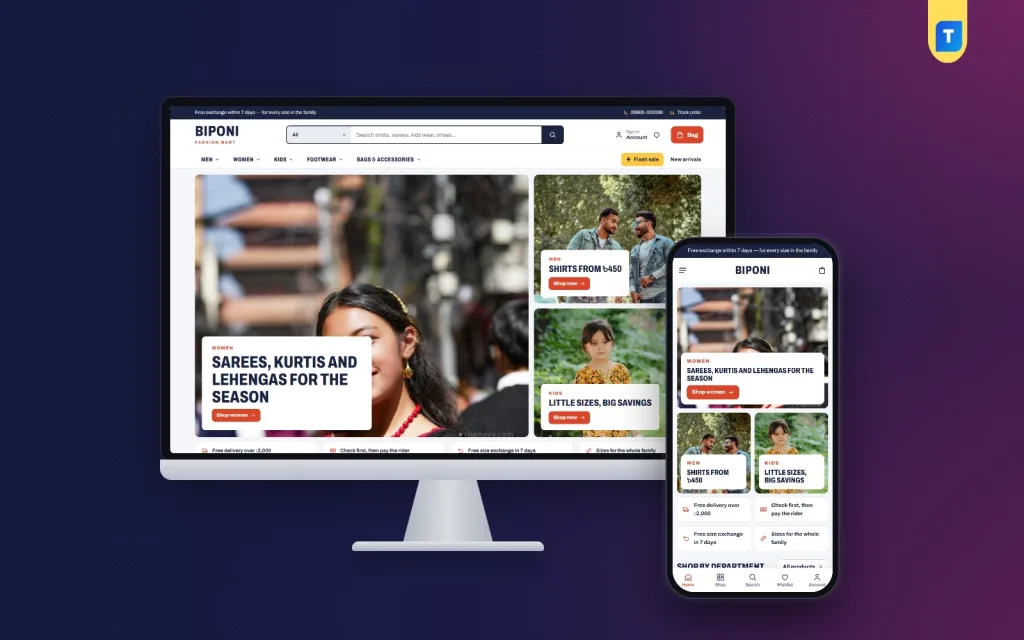
- Hero tiles: one big photo and two smaller ones, each with a label, a headline and a link.
- A service strip: delivery, exchange, cash on delivery.
- Shop by department: one photo card for each department with sub-category links.
- Department rows: a portrait photo plus a sliding row of products for Men, Women and Kids.
- A flash sale with a countdown and stock bars.
- Shop by budget: tiles set in taka, such as under 500, under 1,000, under 2,000.
- New arrivals and top sellers in tabs.
- Customer reviews.
- A "just for you" grid with a load more button.
- Latest blog posts.
You may not need all of them. A shop with 40 products should use fewer blocks than one with 400.
Good fashion mart website design for clothing brand owners follows the shoppers, not the designer. Look at your Facebook insights to see which posts get the most clicks, and give those categories a place near the top. Review the homepage every month. A block that nobody clicks should be moved down or removed. A fashion mart changes with the season, so the homepage must change too.
Why shop by budget works so well
Many Bangladeshi shoppers start with a number in mind, not a product. A father with taka 1,000 in his pocket wants to see what he can buy for that money. If your page makes him scroll through the whole price list, he may give up.
Set up four budget tiles in taka. Link each to a price filter, and show a few matching products below the tiles. Change the limits for each season. Before Eid, the tiles might be 800, 1,500, 3,000 and 5,000. In winter, you might raise them for jackets.
Run flash sales and offers honestly
A flash sale can lift sales fast, but only when buyers trust it. Follow a few rules:
- Use a real end time, and end the sale when the timer ends.
- Show a stock bar only if it reflects real stock.
- Choose a handful of products, not the whole shop.
- Tell your Facebook followers a day before the sale starts.
- Keep the discount clear: show the old price and the new price.
False timers and fake stock numbers damage trust quickly. A smaller sale that is honest brings repeat customers.
Make product cards quick to scan
Mart shoppers scroll fast, so cards must be compact and clear. Each card should show a photo, the name, the price, the old price if discounted, and the star rating. A small bag button lets people add an item without opening the page.
Choose what to show and what to hide. Colour dots help for clothes. Units sold can build confidence, but only when the numbers are real. A discount tag in a bright colour draws the eye to offers. A second photo on hover helps on desktop.
Shoot all photos with the same shape, such as 3:4 portrait, so the grid looks tidy. Resize each image before upload.
Add size guides for each department
One size table cannot serve a whole mart. Men's shirts, kids' clothes and shoes all use different measures. Create separate guides:
- Men: chest, shoulder, length, sleeve.
- Women: bust, waist, hip, length.
- Kids: age range, height, chest.
- Shoes: foot length in centimetres, with a note on sizing.
Link the right guide from each product page. A clear table lowers returns and saves you many phone calls.
Payments, delivery and tracking
Customers in Bangladesh expect familiar choices at checkout:
- bKash and Nagad.
- Card payment through a gateway such as SSLCommerz.
- Cash on delivery.
- Manual payment with a transaction ID.
For delivery, use a courier that offers tracking. Steadfast and Pathao are common. Show delivery charges early, with separate rates for inside and outside Dhaka. Add a track order page. When customers can check their own parcel, the number of "where is my order" calls drops.
Consider a small advance payment for cash on delivery orders above a set amount. It lowers the number of refused parcels. State the rule at checkout, so no one is surprised.
For big seasons such as Eid, Puja and winter, write a clear note about last order dates. Customers appreciate honesty more than a late parcel.
Keep a big catalogue fast
A mart website carries many images, so speed needs attention. A slow page costs sales, especially on mobile data.
- Resize photos to the size you display, and keep file sizes small.
- Use lazy loading, so images below the first screen load later.
- Limit sliders and animations.
- Use system fonts or only one or two web fonts.
- Remove plugins you do not use.
- Check speed on a real phone every month.
Product photos are the heaviest part of a mart. If you have 500 products with five photos each, the weight adds up. Compress each photo, keep the main one sharp, and let the extra ones load later. Do the same for banners, which are often the largest files on the homepage.
Hosting matters too. A shared server that is overloaded in the Eid season can slow even a light site.
Move from a Facebook page to your own mart
Many mart owners run on Facebook for years. Orders come in Messenger, prices change in comments, and stock is hard to track. A website fixes these problems.
- Start with your top 30 selling products and add them with good photos.
- Link every Facebook post to its product page.
- Pin the website link at the top of your page.
- Use the website's order list to track what is sold and what is left.
- Ask regular customers to order through the website next time.
- Share one product link per post, so the buyer lands on the exact piece and can pay in a minute.
This is the main idea behind fashion mart website design for clothing brand owners who want to grow: keep the page for talking and the website for selling.
A ready-made option for a family clothing store
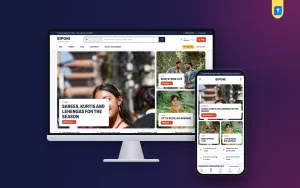
If you want a theme built for a mart, Biponi is one option. It is a WordPress theme for stores that dress the whole family, with men's shirts, women's sarees and kurtis, kidswear, footwear, bags and sunglasses in one shop. The look is a busy, friendly mart in navy, coral and yellow.
Facts that match the points in this guide:
- 14 homepage blocks you can hide or re-order.
- A department menu with sub-category photo panels, and a header search with a department picker.
- Three department blocks with sliding product rows.
- A coral flash sale with a countdown and stock bars.
- Shop by budget tiles set in taka.
- Compact cards with units sold and a bag button.
- Size guides for men, kids and shoes.
- bKash, Nagad, SSLCommerz and cash on delivery, with Steadfast and Pathao courier and order tracking.
- Four colour palettes, six font pairs and a one-click demo with 55 products in 18 categories.
You can try the live demo and admin panel on the product page: see Biponi. Whichever theme you choose, test it against the checklist below.
Launch checklist for your fashion mart
A launch is a small event, so treat it with care. A rushed launch with broken links costs more than a delay of two days.
- Place test orders with each payment method.
- Check the order email and the order placed message.
- Open the shop on two phones and one laptop.
- Click every menu panel, banner and budget tile.
- Proofread product names, prices and size tables.
- Check delivery charges for each area.
- Publish your return and exchange policy.
- Add phone, WhatsApp and social links to the footer.
- Take a backup before the announcement.
After launch, look at the shop weekly. Find products with many views and few orders, and improve their photos or text. Track which departments sell best, and give them more space on the homepage. A fashion mart website design template is only a starting point. Your own updates make it work.
If you want to read more on the technical side, the official WordPress documentation is a good, reliable reference.
Frequently asked questions
What is the best fashion mart website design template for a family clothing store?
Choose one with a department menu, compact product cards, size guides for each group and local payments. Test the demo on your phone before you decide.
Do I need WooCommerce to build a fashion mart?
No, not always. Some themes include their own shop system. Biponi runs without WooCommerce, so payments and couriers do not need extra plugins.
How many categories should a fashion mart have?
Five to seven main departments and a few sub-categories under each. Keep the depth to two levels so the menu stays easy on a phone.
Can a fashion mart website design template handle seasonal sales?
Yes. Look for a flash sale block with a countdown and stock bars, and a homepage you can re-order before Eid, Puja or winter.
How do I keep a large catalogue fast?
Resize photos, use lazy loading, limit animations and choose good hosting. Test the speed on a mid-range phone every month.
Should I keep my Facebook page after building a website?
Yes. Use the page for posts and conversation, and link each post to the product page so buyers can pay on the website.