A freelancer portfolio website is the one place online that belongs fully to you. Marketplace profiles change their rules, social feeds bury your posts, and a shared drive of PDFs looks rushed. This guide is for designers, illustrators and small creative studios in Bangladesh who already find work through Fiverr, Upwork, Behance, LinkedIn or friends, and who want a site that turns a curious visitor into a paying client with a clear brief.
Direct clients almost always ask for a link before they hire. A startup founder in Dhaka or an agency abroad wants to see your best projects, understand what you offer and get a rough idea of cost, all within a few minutes. If your link answers those questions, the first message you get is a real project. If it does not, you spend days in chat explaining things a page could have shown.
Our example is Rupkar – Designer Portfolio WordPress Theme, built for logo and identity designers, UI and UX freelancers, packaging and web designers and illustrators. It has no shop to set up, only your work and a clear path to hiring you. Before looking at the theme, though, let us work out what your site needs to say.
What Clients Look for Before They Hire a Freelancer
Clients are usually nervous buyers. They worry that you will disappear halfway, that the result will not match their taste, or that the bill will grow. Your site has to calm each fear. Strong work samples answer the taste question. A clear process with timing shows you will finish. Visible services and packages, even with rough ranges, show that you will not surprise them with a bill they never expected.
They also judge small signals. Is the designer available right now? Is there a simple way to start? Do other clients speak well of them? A freelancer portfolio website that shows availability, testimonials and an obvious contact button removes friction at every step. None of this needs fancy effects. It needs a layout that puts the right answer in front of the visitor at the moment they think of the question.
Planning a Freelancer Portfolio Website That Wins Clients
Start by choosing six to eight projects, not thirty. Pick the work that matches the jobs you want next, even if older work was bigger. If you want more branding clients, lead with identities. If you want app work, lead with UI. Group projects into two to four types, such as Branding, Web, UI and UX and Packaging, so a visitor can filter straight to what they need.
Write case studies, not captions
A row of pretty images tells a client very little. For each project, write who the client was, what problem they had, what you did and what changed afterwards. Keep it short: a facts line, a headline result, three or four paragraphs and a few images. A shop that sold more after a packaging refresh, or an app whose sign-ups rose after a redesign, is far more convincing than a mood board.
Decide your services and price signals
List three or four services you actually want to sell, each with what is included and a starting point for cost. Then decide on packages: perhaps a small, a standard and a full option, with one marked as the usual choice. You do not have to publish exact quotes, but ranges stop people who cannot afford you from filling your inbox, and they reassure serious clients that you work in a professional way.
How Rupkar Presents a Designer
The Rupkar demo opens with a floating, rounded header bar. On the left is the designer's name with a small accent dot, then menu links for Work, Services, About, Journal and Contact. On the right sit a green Available for new projects pill, a light and dark switch and a Let's talk button. You can set the pill to booked when your calendar is full, and if you have no logo yet, the name with the dot is shown instead.
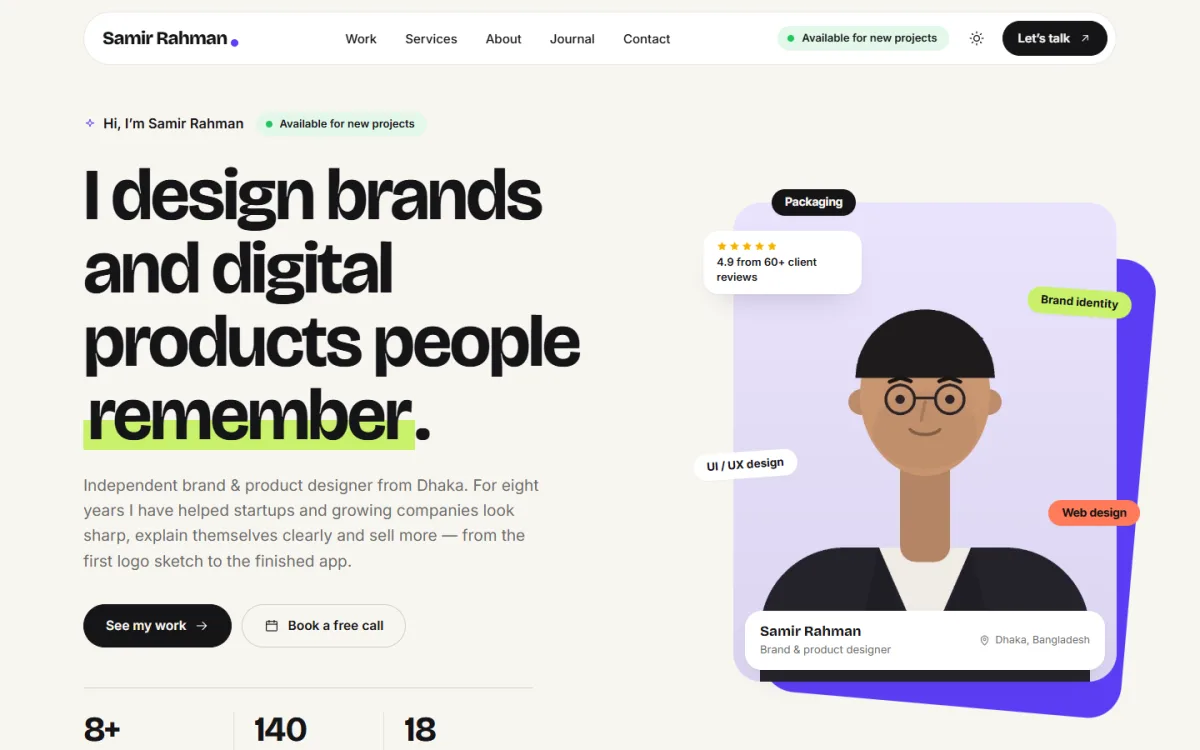
Below the header, the intro uses a very large headline with one word highlighted in lime, a short paragraph about the designer and two buttons, See my work and Book a free call. Beside it, an illustrated portrait carries floating tags for skills such as packaging, brand identity, UI and UX and web design, plus a rating badge and a name card. A row of key numbers follows, and in the theme a moving line of skills comes next.
Twelve blocks that tell your story
Rupkar's homepage has 12 blocks, each one easy to switch off or drag into a new order, with arrows on a phone. After the intro come a quiet row of client logos, Services with four offers showing price and what is included, Process with four steps and timing, and About me with your photo, story, skill bars and tools. Packages shows three options with one highlighted, followed by a testimonials slider, an FAQ, the three latest journal articles and a closing contact band.
Selected work and real case studies
Projects are ordinary posts in the Work category. Sub-categories such as Branding or Web become filter pills above the grid, and the newest project shows first. Hovering a project turns the cursor into a View label. Each project opens as a proper case study with a facts row for client, year, role, timeline and a live link, then the headline result, a what I did section and a link to the next project.
The project estimator
This is the block clients enjoy. A visitor picks a project type, adds extras and chooses a deadline, and Rupkar shows a price range and a timeline. You set the base prices in Theme Options, and the range runs from 10% below to 20% above that base. When the visitor clicks Send this to me, the contact form opens with their choices already written in, so their first message is close to a finished brief.
Handling Enquiries Without Endless Chat
The contact form has tap-to-choose chips for project type and budget, so people do not have to type long messages on a phone. Beside it are an email copy button and a booking link for clients who prefer to talk first. Every message is stored under Rupkar, Enquiries, so nothing gets lost in a busy inbox. The form sits on the Contact page, and a shortcode places it on any other page too.
One more useful touch for freelancers who work across time zones is the live clock in the footer, which shows the time in your city. A client in London or Toronto can see at a glance that it is late evening in Dhaka and that a reply may come in the morning. Small details like this set expectations without you writing a word.
Choosing a Personal Portfolio Website Template
When you compare any personal portfolio website template, check four things. First, does it let your work lead, or does decoration compete with your images? Second, can a project open as a full case study? Third, is there a clear, short path to contact you? Fourth, does it work well on a phone, because many clients will tap your link from a messaging app or LinkedIn on their mobile.
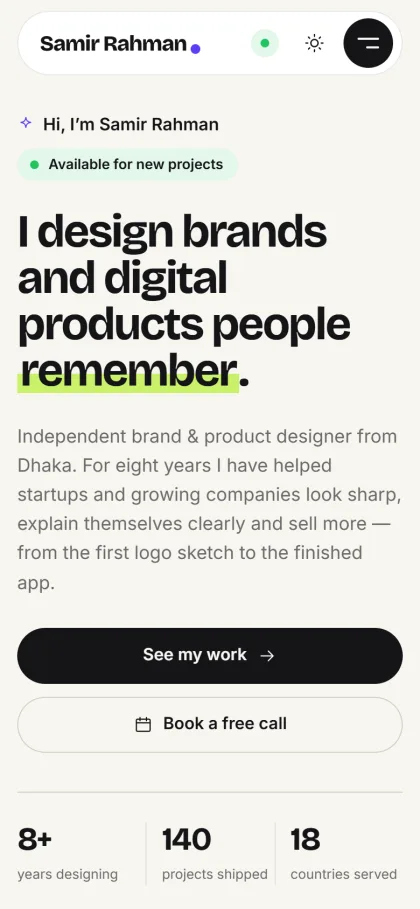
On a phone, the Rupkar demo squeezes the header into one rounded bar with the name, a green status dot, the light and dark switch and a round menu button that opens the menu full screen. The headline still fills the screen, the two buttons stretch to full width for easy tapping, and the key numbers sit in a neat row of three. Visitors can switch to dark mode with the moon button whenever they like.
Setting Up Rupkar Step by Step
Rupkar needs WordPress 6.0 or newer and PHP 7.4 or higher, and it is tested up to WordPress 7.1. Upload the zip in Appearance, Themes, Add New, Upload Theme and click Activate. Open Rupkar, Setup and install the bundled Themeve Commerce engine in one click; in the dashboard it appears as Site engine, and there is no store to manage. Then enter your licence key under Rupkar, License, using the details from My Account, Licenses on Themeve.
Run Rupkar, Demo Import to build the sample designer site: 8 case studies across branding, UI and UX, web and packaging, 6 journal articles, services, packages, estimator prices, testimonials, the FAQ, the contact form, menus and every page. All pictures are original illustrations and every name is a sample, so replace them with your own projects and story. The WordPress documentation explains posts, categories and menus if you are new to them.
Then open Rupkar, Theme Options. Homepage layout comes first, and each block has its own settings, with a Live Customizer in the same menu. Choose from six palettes, Violet and lime, Tomato, Forest, Ocean, Rose and Mono, or set each colour by hand, and pick one of five font pairs such as Bricolage Grotesque with Inter or Syne with DM Sans. Menus live in Rupkar, Menus, with a main menu, footer links and legal links.
Before you decide, spend a few minutes in the live demo. Try the estimator, filter the work grid and open a case study on your phone. Then look around the demo dashboard to see how projects, enquiries and theme settings are organised.
Tips for Freelancers in Bangladesh
Write your site in clear, simple English if most of your clients are abroad, and add a short Bangla line on the contact page if you also serve local businesses. Buy a domain with your own name or studio name rather than using a free subdomain. Link your site from every marketplace profile where the rules allow it, from LinkedIn and from your Behance or Dribbble page, so every channel points back to one home.
Keep your availability honest. If you are fully booked, switch the pill and say when you will open again. Update the work grid every few months with one fresh case study, and post the same story on LinkedIn and Facebook with a link back. Over time, your freelancer portfolio website becomes the place where referrals land, and the estimator does the first round of pricing questions for you.
Common Portfolio Mistakes to Avoid
The first mistake is showing everything you have ever made. Too many weak pieces hide the strong ones. The second is skipping context, so clients see images but not results. The third is hiding how to contact you, or asking for twenty form fields. Another frequent problem is slow pages full of huge image files; compress images before upload and check the site on mobile data, not only on office Wi-Fi.
Finally, many freelancers forget basic search setup, so their own name does not even bring up their site. Give each case study a clear title and a short description, and read Google's Search Central documentation for simple starter advice. A freelancer portfolio website that is easy to find, quick to load and clear about how to start a project will outperform a prettier site that does none of these.
Frequently Asked Questions
Is Rupkar a portfolio or an online store?
It is a portfolio. Rupkar is a personal website for showing your work, explaining your services and collecting enquiries. There is no store to run, so you can focus on projects, case studies and the conversations that lead to new work.
Do I need to know code to set it up?
No. Projects are normal posts, and the homepage, colours, fonts, estimator and contact details are all set in Rupkar, Theme Options. Adding a project is as simple as publishing a post in the Work category and filling in its Project details box.
How does the estimator help me win clients?
Visitors see a price range and a timeline before they write to you, which filters out people with no budget and warms up serious buyers. With Send this to me, their choices land in the contact form, so you start the chat with a clear brief.
What if I am a developer or run a company?
If you write more code than you draw, look at Akkhor – Developer Portfolio WordPress Theme, the developer sister theme with a terminal intro. For a company site with offices and careers, see Shikhor – Corporate Consulting WordPress Theme. Rupkar stays the right choice for a designer.
Final Thoughts
Winning clients online comes down to showing the right work, explaining it well, being clear about services and price ranges, and making the first step easy. A good freelancer portfolio website handles all of that while you sleep or work on other projects. If you are a designer who wants a site that lets the work speak first and turns visits into clear briefs, start with Rupkar – Designer Portfolio WordPress Theme and publish your first three case studies.