Good frozen food website design sells two promises at once: dinner in minutes, and food that stayed frozen all the way to the door. Buyers of frozen parathas, nuggets, kebabs and ice cream want speed in the kitchen and safety in the box. This guide covers the look, categories, product pages, cooking help, cold-chain trust, delivery and phone layout for a frozen food shop in Bangladesh.
Every idea here is practical and cheap. Try a few, watch your weekly reorders and keep what works.
Why frozen food website design needs its own plan
Frozen food is bought differently from fresh food. Buyers stock up for a week or a month, often for tiffin, guests or iftar. They care about three things:
- Speed: how many minutes from freezer to plate?
- Safety: did it stay frozen, or thaw and refreeze on the way?
- Value: how many pieces per pack, and what does each cost?
A frozen food homepage that answers these three questions in the first two screens is already ahead of most shops.
Frozen food is also visual in a tricky way. A frozen samosa in a bag does not look tasty. The cooked samosa does. Your design must show both.
A cool look with a warm accent
Icy blues and deep navy say "frozen" at a glance. On their own they can feel cold and unappetising, so add one warm accent, such as orange or red, for prices, buttons and cooking times. The contrast tells the story: frozen in the box, hot on the plate.
Light touches such as frosted-glass panels or a few falling snowflakes in the hero make the theme memorable. Keep them light. A heavy video background slows the page on mobile data and adds nothing to sales.
Fonts and icons
Use a clear, rounded heading font and a plain body font. Simple icons for pan, air fryer and oven help buyers who read little English understand cooking methods at a glance.
Categories for a freezer shop
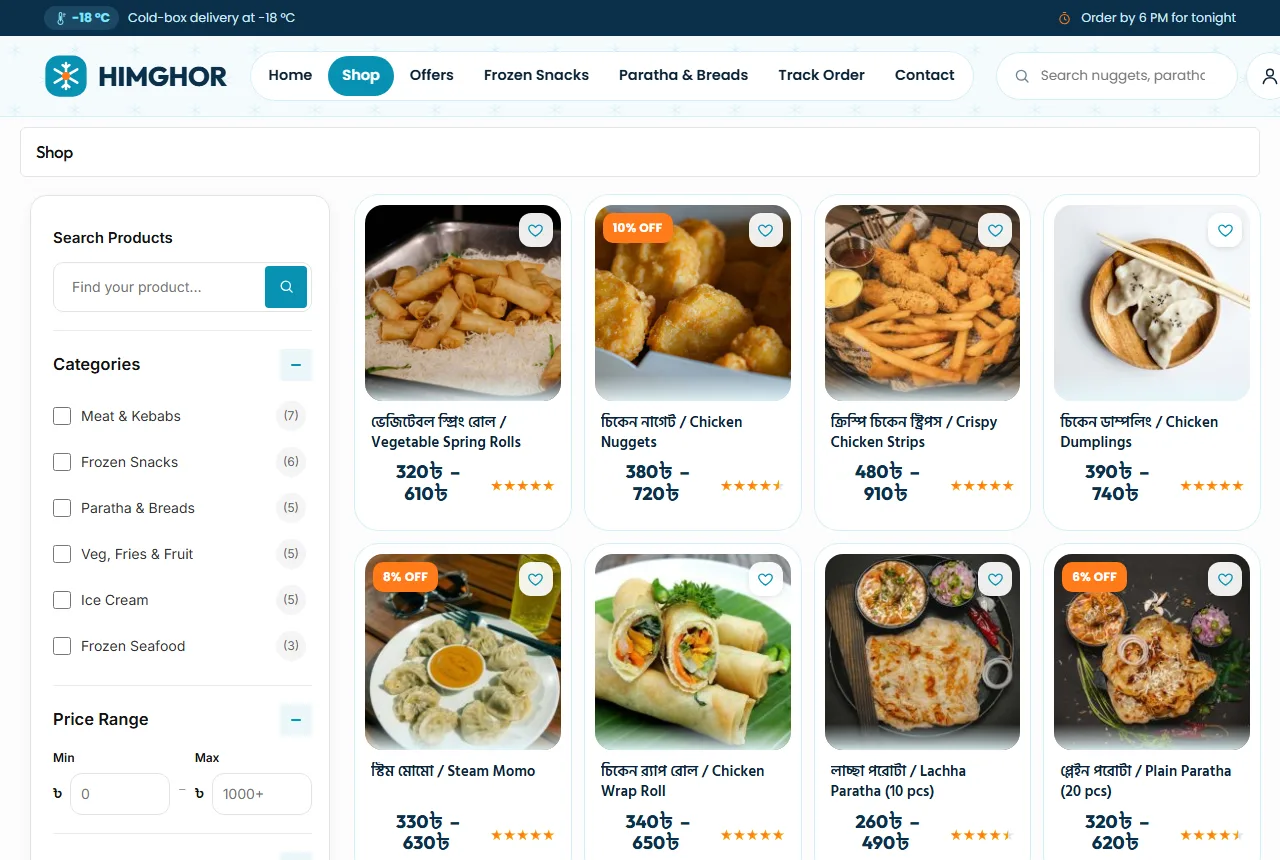
Keep the menu short and familiar: Frozen Snacks, Paratha & Breads, Meat & Kebabs, Frozen Seafood, Veg, Fries & Fruit and Ice Cream. Put details such as piece counts and flavours inside product names.
Frosted tiles with one clear photo each work well. Use cooked photos on category tiles, not frozen packs, because the tile is where appetite starts.
Add Bangla names where buyers use them: "পরোটা / Paratha", "শিক কাবাব / Sheek Kebab", "চিকেন নাগেট / Chicken Nuggets". Many buyers search in English letters, so add words like "porota" or "samucha" to tags.
A homepage order for frozen food website design
Here is an order that works for most frozen food shops:
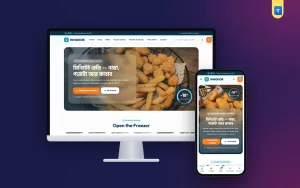
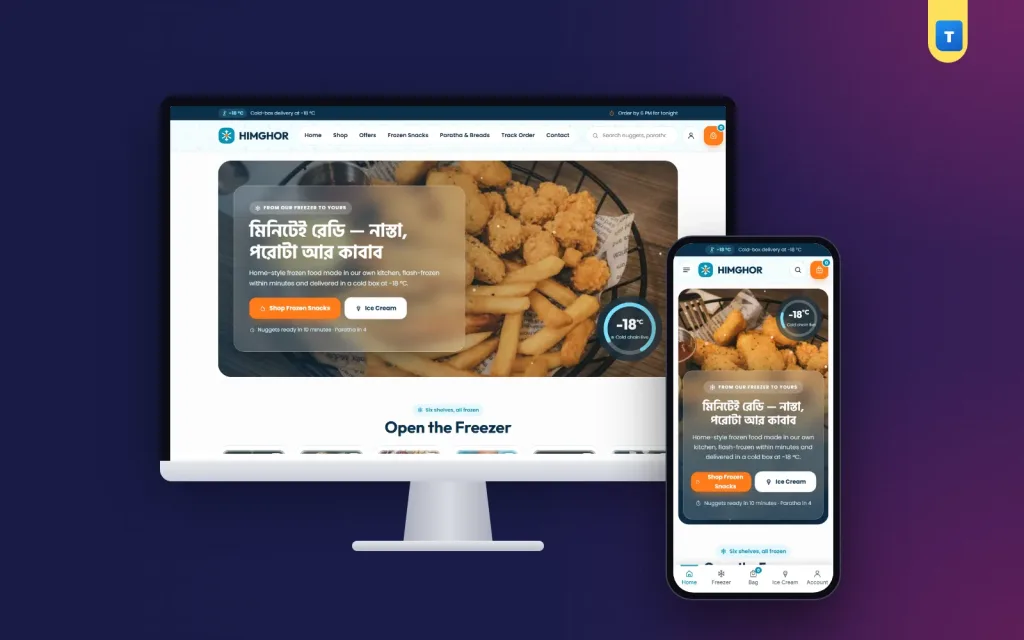
- Hero with a cooked dish photo, a headline such as "Ready in minutes", two buttons and a cold-chain badge, such as a -18 °C gauge.
- Category tiles to open the freezer.
- Ready in minutes: three cooking-method cards with times.
- Freezer deals for the week.
- Freezer packs: three bundles with contents and prices.
- Cold chain timeline: four steps from kitchen to door.
- Ready to fry: snacks and kebabs in a rail.
- Reviews, FAQ and blog.
Each block should end with one clear button. "Shop snacks" beats "Discover more".
Show cooking time everywhere
The main reason people buy frozen food is to save time. Put cooking times in front of buyers at every step:
- A short line in the hero: "Nuggets in 10 minutes, paratha in 4".
- Cooking-method cards: pan fry, air fryer and oven, each with a time.
- One line on every product: "Deep fry from frozen, 4–5 minutes".
- A cooking photo on every product page, so buyers know what to expect.
Never tell buyers to thaw products at room temperature if your product should be cooked from frozen. Clear, safe instructions protect buyers and your name.
Product pages for frozen packs
Near the top of every product page, show:
- Two photos: the pack as it arrives and the food cooked on a plate.
- Pack sizes, such as 500 g and 1 kg, or 12 and 24 pieces, each with a price.
- Pieces per pack and the price per piece.
- Cooking method and time.
- Ingredients and whether the meat is halal.
- Storage: "keep at -18 °C; use within 3 months".
- An "In Stock" pill and Add to Cart and Buy Now buttons.
Price per piece matters in this trade. A buyer comparing a 12-piece pack with a 24-piece pack wants to see the saving at once.
Ingredients and allergens
List the main ingredients and common allergens, such as wheat, egg, milk and shellfish. Parents buying nuggets for children read this closely, and good frozen food website design never hides it.
Photos that make frozen food tempting
A frozen pack under a phone flash looks grey and icy. A few habits fix this. Cook each product the way buyers will, plate it simply and shoot it in daylight from a slight angle, with a little steam or a dip on the side.
Then shoot the pack itself on a clean, light surface with the label readable. Keep every photo square and use the same plate for a category, so the grid looks calm. Strong, honest photos are the cheapest upgrade in frozen food website design.
Avoid photos from the supplier's catalogue if your product looks different. A buyer who gets small, pale nuggets after seeing big golden ones will not order again, and frozen food website design depends on that second order.
Prove the cold chain
Buyers worry about thawing and refreezing. Show how you keep food frozen, honestly and simply:
- A timeline with four steps: made in our kitchen, blast frozen, kept in the cold store, delivered in a cold box.
- The temperature at each step, if you measure it.
- A photo of your cold box and ice packs.
- A clear rule: if a product arrives soft, the buyer can refuse it.
Only promise what your riders can do. A -18 °C badge is a strong signal, but only if your boxes keep that temperature for the whole route.
Freezer packs and bundles
Many families fill the freezer once a week or before Ramadan. Ready bundles make that easy:
- Tiffin pack: nuggets, fries and parathas for school and office boxes.
- Family pack: kebabs, samosas and parathas for a week.
- Iftar pack: samosas, spring rolls, chicken pops and beguni.
Each bundle card needs its full contents, the total price and the saving compared with buying each item. Bundles raise the order value and make delivery more worthwhile for you.
Frozen meat website design template ideas
Many frozen food shops also sell raw frozen meat and seafood: chicken cuts, beef cubes, prawns and fish fillets. These buyers need slightly different information, and a frozen meat website design template should include it:
- Cut and weight in the title: "Chicken drumsticks, 1 kg".
- Whether pieces are individually frozen, so buyers can take out only what they need.
- Source and halal status.
- Thawing advice: in the fridge overnight, never on the counter.
Keep raw meat in its own category, apart from ready-to-fry snacks, so each buyer finds the right shelf. A good frozen meat website design template shows raw cuts on a clean board, not in a wet bag.
Delivery that keeps food frozen
Delivery is where a frozen food shop wins or loses buyers. Be clear about:
- Areas you deliver to with cold boxes, and areas you do not.
- Charges for each area, such as ৳80 inside Dhaka and ৳120 outside.
- Order cut-off times, such as "order by 6 PM for tonight".
- Delivery windows, so buyers can be home to put food in the freezer.
Set your shop's delivery zones to match your cold-box routes. Ice cream and seafood should only be sold where you can deliver them frozen.
Show the delivery charge in the cart, before the last step. A free-delivery bar, such as "Add ৳700 more for free delivery", turns a small order into a freezer pack.
Checkout and payment
Keep checkout short: name, mobile number, area, address and a note for the delivery window. Cash on delivery is still common. Add bKash, Nagad and cards as you grow, and show their logos on product pages.
Accounts help with weekly restocks. A pop-up sign-in with a Bangladeshi mobile number or email saves the address, keeps a wishlist of favourite packs and shows past orders. Reordering last week's tiffin pack should take less than a minute.
Frozen food website design on phones
Most frozen food orders come from phones, often in the evening. Plan that view first:
- A menu button, the logo and the cart in the top bar.
- One main banner with the cooking-time promise.
- Category tiles two or three per row.
- Product cards two per row with pack size and price.
- A bottom tab bar with Home, Shop, Cart and Account.
Test on a cheap Android phone over mobile data. Snow effects and large photos can be heavy, so compress images and use a light theme. In frozen food website design, a page that loads fast matches the promise of a meal that cooks fast.
Content that sells
A small blog with cooking ideas helps frozen food shops a lot:
- Five iftar plates from one freezer pack.
- Air fryer times for nuggets, fries and samosas.
- How to store frozen food at home safely.
- Quick tiffin ideas for school mornings.
Write in plain words with one clear photo and link to the products at the end. Google's guide to helpful content rewards this kind of useful, people-first writing.
Seasons and peaks
Frozen food demand follows the calendar:
- Ramadan: iftar snacks lead the homepage for the whole month.
- School terms: tiffin packs for busy mornings.
- Summer: ice cream and cold desserts move up.
- Winter and weddings: party packs and kebab platters.
Plan stock and photos a month before each season. Change the hero, the top bar and the first bundles on the first day of the season.
Common mistakes
- Only frozen pack photos, never the cooked food.
- No cooking times or methods.
- No piece count or price per piece.
- Delivering to areas the cold box cannot reach.
- Cold-chain promises the riders cannot keep.
- Delivery charges shown only at checkout.
Fixing these does more for frozen food website design than any new banner. Most take an afternoon.
A launch checklist
- Every product has a pack photo, a cooked photo, pieces, price and cooking time.
- Ingredients and allergens are listed.
- Three freezer bundles are ready with contents and prices.
- The cold-chain timeline matches what really happens.
- Delivery zones match your cold-box routes.
- You placed three test orders from a phone and checked the temperature on arrival.
After launch
Track weekly reorders and complaints about soft products. The first tells you if buyers like the food; the second tells you if the cold chain works. Fix the cold chain first, always.
Building a frozen food shop with Himghor
These ideas are easier when the theme already has them. The Himghor frozen food website template for WordPress and WooCommerce has a frosted-glass header with a cold-chain bar, a hero with falling snow and a -18 °C gauge, frosted category tiles, ready-in-minutes cooking cards, freezer deals, freezer packs, a cold-chain timeline, a ready-to-fry rail, reviews, FAQ and a blog block.
Every demo product has 500 g and 1 kg packs. Delivery zones, cash on delivery, mobile or email sign-in, a wishlist and a phone tab bar are ready after the demo import, so you can open your freezer shop within days.
Frequently asked questions
What should frozen food website design show first?
A cooked dish, a cooking-time promise and your categories. Buyers want to see how fast and how tasty dinner can be.
How do I show that food stayed frozen?
Show a simple cold-chain timeline, your cold box and a clear rule for products that arrive soft.
Should I show frozen or cooked photos?
Both. Use the cooked photo on cards and tiles, and add the frozen pack photo on the product page.
Which colours suit frozen food website design?
Icy blue and navy with one warm accent, such as orange, for prices and cooking times.
Can I deliver frozen food outside my city?
Only if you can keep it frozen. Most shops limit frozen delivery to the areas their cold boxes reach.