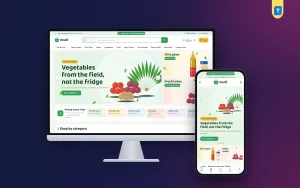
Before you pick a grocery website template for your neighbourhood shop, it helps to know exactly what that template has to do every single day. This guide is for mudi dokan owners, small grocery and general stores, and the freelancers who set up their websites. Instead of a feature list, we go job by job: what a local grocery site must handle, why it matters to your customers, and how to set it up so orders keep coming back.
Grocery shoppers are not browsing for fun. They have a list, a budget and a few spare minutes between work and cooking. They buy the same rice, dal, oil and eggs again and again, often for a whole family. Margins are thin, so a grocery site wins by being fast, familiar and dependable, not by looking fancy. Every extra tap between the customer and a full basket costs you orders.
As our example we use Mudi – Grocery Shop WordPress Theme, made for the neighbourhood mudi dokan that now takes orders online. Rice, dal, oil, spices, fresh vegetables, eggs and dairy, tea and snacks, household goods and combo packs all fit on its shelves. Each job below starts with the shop owner's need and then shows how Mudi handles it.
What a Grocery Website Template Should Do for a Local Shop
Think of five jobs. A grocery website template should make a big basket quick to fill, remember how families shop, give people a reason to come back, work well on a cheap phone with patchy data, and handle the way Bangladeshi customers pay and receive orders. If a template does these five things well, the colours and fonts are a matter of taste. If it fails at any of them, no amount of design will save it.
Job One: Make a Big Basket Quick to Fill
A weekly grocery order can easily hold twenty or thirty items. If each one needs a product page visit, a quantity box and a back button, shoppers give up halfway. A good store shows the pack size right on the card, lets people change quantities in place and puts search front and centre, so someone can type onion, add two kilos and move on in seconds.
Mudi does this on every card. The pack size, such as 1 kg or 500 ml, sits under the product name, and you set it in its own Pack size box in the product editor. Tap Add and the button turns into a quantity stepper (− 1 +), so amounts change right on the card. On a desktop, a light top bar carries your delivery note, followed by a basket logo and a big search with a category picker.
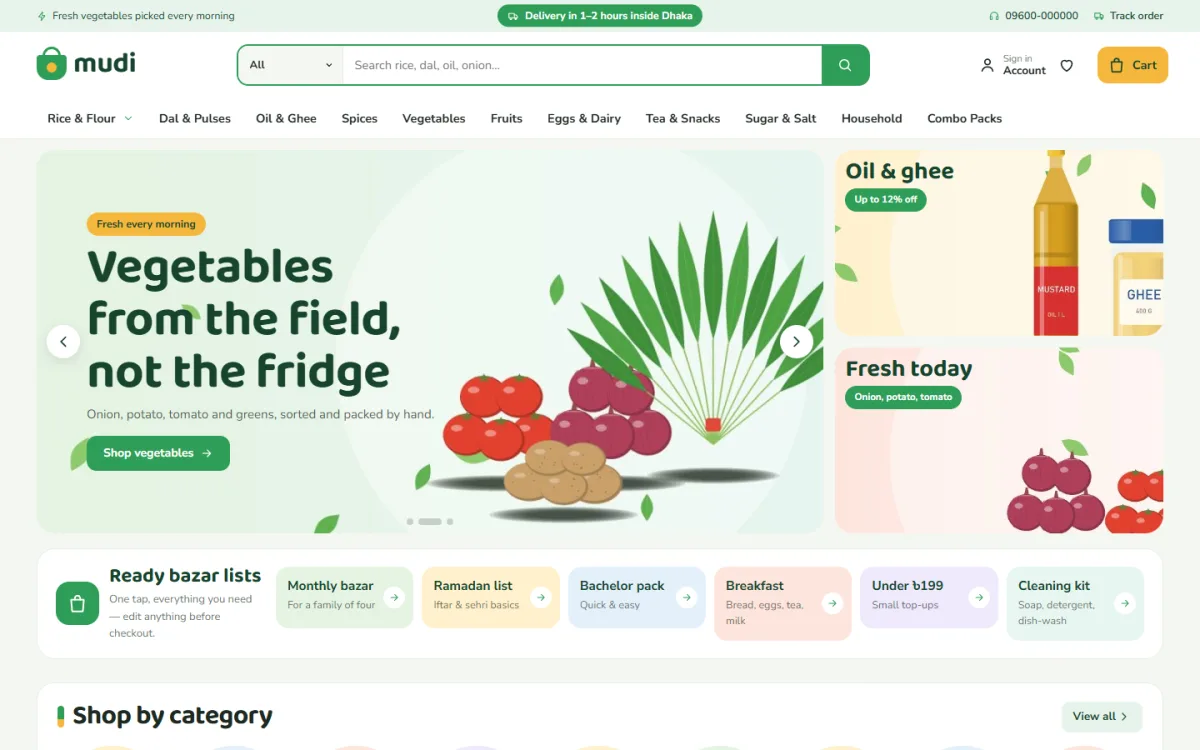
The desktop screenshot of the demo shows how much fits above the fold. The top bar holds a freshness note, a delivery note, a phone number and a Track order link, all sample wording you replace with your own. The search suggests rice, dal, oil and onion, and the menu runs across Rice & Flour, Dal & Pulses, Oil & Ghee, Spices, Vegetables, Fruits, Eggs & Dairy, Tea & Snacks, Sugar & Salt, Household and Combo Packs. A vegetables slide sits beside two promo cards for oil and ghee and fresh produce.
Job Two: Remember How Families Shop
Most households buy in patterns. There is the monthly bazar, the Ramadan list for iftar and sehri, the quick top-up when guests arrive and the cleaning supplies that run out together. A grocery site that understands these patterns saves customers from building the same basket from scratch every time, and it gives your shop a personal feel that big apps rarely manage.
Mudi's Ready bazar lists block offers six ready-made lists, each with its own link, for the shopper who wants the usual week of groceries without thinking. You write and link the lists yourself in Theme Options. In the demo they include a monthly bazar for a family of four, a Ramadan list, a bachelor pack, breakfast basics and a cleaning kit, which shows the idea well. Build yours from what your regulars actually order.
Job Three: Give People a Reason to Come Back
Grocery is a habit business. Customers who order once a week are worth far more than one large order. Small daily offers, clear price steps and seasonal combos give people a reason to open your site before they open a delivery app. Keep offers genuine and limited, and change them often enough that regulars notice something new each visit.
Mudi has 22 homepage blocks you can switch off and reorder. Today's price drop runs daily deals with a countdown and stock bars. Shop by budget shows price tiles with matching products, and you choose the price steps yourself to suit local spending. Combo packs get their own banner, and further blocks include shop by need, daily essentials in tabs, just arrived, brand of the week, cook something today, a Load more grid and kitchen tips from your blog.
Job Four: Work Well on a Cheap Phone
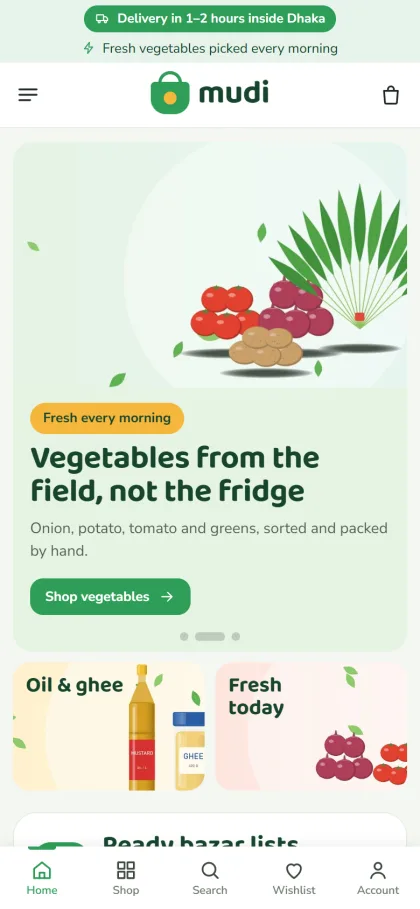
Most of your orders will come from mid-range Android phones, often on mobile data. In the Mudi mobile screenshot, the delivery and freshness notes sit at the top, the header shrinks to menu, logo and cart, and the vegetables slide stacks above its button. Two promo cards for oil and ghee and fresh produce follow, then the Ready bazar lists begin. A bottom bar shown in the demo offers Home, Shop, Search, Wishlist and Account.
Cards stay compact on phones and the stepper buttons are easy to tap with a thumb. Shoppers can sign in or register in a popup without losing their basket, which matters when someone has already added fifteen items. Test your own store on an older phone in a weak signal area. If it feels slow there, trim large images before launch.
Job Five: Handle Local Payment and Delivery
Mudi runs on the bundled Themeve Commerce plugin. Checkout is a single page, and customers pay with bKash, Nagad, SSLCommerz, cash on delivery or manual payment. An Order placed popup confirms the order, and the Track Order page lets shoppers follow it. Behind the counter you get Steadfast and Pathao courier, coupons, invoices, SMS and OTP, and new orders ping you on Telegram.
Fresh food changes the delivery plan. Vegetables, fish, eggs and dairy should go with your own rider inside a short radius, while dry goods like rice, dal and household items can travel further by courier. Set delivery slots, a minimum order and clear charges. Agree on a substitution rule, such as calling when an item is out, and carry change for cash on delivery so riders are not stuck at the door.
The demo's promise strip reads fast delivery, cash on delivery, fresh promise and fair price. Adjust the wording to match your own service and never promise delivery times your riders cannot meet. Facebook Pixel and the Conversion API are ready for ads, and an Our Stores page lists your shop locations, so local buyers know where to find the online grocery shop they ordered from.
Setting Up Mudi Step by Step
Mudi needs WordPress 6.0 or newer and PHP 7.4 or newer, and it is tested up to WordPress 7.1. From Appearance, Themes, Add New, Upload Theme, choose the Mudi zip and activate it. Open Mudi, Setup and install the bundled Themeve Commerce plugin with one click, then activate your license in Mudi, License using your Themeve account. The WordPress documentation covers menus and pages if you need a refresher.
Run Mudi, Demo Import to add the Everyday Grocery demo. It brings 51 products from 6 brands, kitchen tips posts, menus and every page, including About Mudi, Delivery, FAQ, Returns & Refunds, Our Stores and Track Order. The brand names are invented, so replace them with your own stock. Then write your bazar lists, budget steps and colours in Mudi, Theme Options, where the Start here tab holds the homepage layout.
Five palettes are ready, Fresh green, Mustard, Tomato, Leaf & sky and Aubergine, with four font pairs led by Baloo Da 2 and Nunito Sans. A settings search, a save bar that stays on screen and backup, restore and reset options keep changes safe. Before launch, fill a basket in the live demo on your phone and check the order screens in the demo admin.
Mistakes When Choosing a Grocery Website Template
The most common mistake is choosing a grocery website template for its hero photos instead of its basket. Pretty slides do not help someone add thirty items quickly. Others include hiding pack sizes, uploading blurry phone photos of products, forgetting delivery charges until checkout and letting stock fall out of date so customers order things you do not have. An online grocery shop lives or dies on accurate stock, so update it daily.
Frequently Asked Questions
Can customers change quantities without opening each product?
Yes. In Mudi, tapping Add turns the button into a − 1 + stepper on the card, so shoppers raise or lower the amount right there. That keeps a long weekly list moving quickly, especially on a phone where every extra page load feels slow.
Where do I set the pack size, like 1 kg or 500 ml?
In the product editor there is a Pack size box. Whatever you write there shows under the product name on the card. Use the same style for every product, such as 1 kg, 500 g or 1 L, so customers can compare items at a glance.
Is Mudi right for a large supermarket?
Mudi is built for the corner shop that knows its customers. If you run a bigger supermarket with many departments, look at Protidin – Supermarket WordPress Theme instead, which suits that larger scale and a much wider spread of departments and stock.
What if my store focuses on organic food?
If organic produce is the heart of your business, compare Tazaa – Organic Grocery WordPress Theme before deciding. Mudi is the everyday choice for a neighbourhood shop selling rice, dal, oil, spices, vegetables and household goods to the same regular families every week.
Choosing With Your Customers in Mind
The best grocery website template is the one that makes your regulars' weekly shop quicker than walking to your counter: clear pack sizes, quantity steppers, ready lists, honest daily deals and reliable local delivery. Get those right and an online grocery shop becomes part of your neighbours' routine. To build yours, start with Mudi – Grocery Shop WordPress Theme, stock your shelves and take the first order.