If you are wondering how to sell digital products without a website, the short answer is that you can start today with tools you already have: a Facebook page, WhatsApp, a mobile wallet and a way to send files. Many sellers in Bangladesh begin this way, and some never need more. Others reach a point where a website makes life easier.
This guide shows the practical steps, the limits of each method and the signs that tell you it is time to build a proper site. It is written for small sellers of software keys, gift cards, ebooks, courses, templates and similar items.
What you can sell without a website
Almost any digital item can be sold through chat, as long as you can deliver it and take payment. Common examples are:
- Software and antivirus licence keys.
- Gift cards and vouchers.
- Game top-ups and subscriptions.
- Ebooks, notes and study guides.
- Design templates, presets and printables.
- Online courses and recorded classes.
- Services such as logo design or typing work.
Before you start, check the rules. Make sure you are allowed to resell what you list, that your supplier's terms permit it and that you are not copying other people's work. Selling without a site does not remove those duties.
How to sell digital products without a website: the basic setup
You need five small things. None of them cost much.
- A clear product list. Write each item, its price and what the buyer receives.
- A place to show it. A Facebook page, an Instagram profile or a WhatsApp Business catalogue.
- A way to take payment. A bKash or Nagad merchant or personal number, or a payment link.
- A way to deliver. Email, WhatsApp, a cloud folder link or a messaging file share.
- A way to record orders. A simple spreadsheet is enough at first.
Set these up in a day. This is the core of how to sell digital products without a website, and it needs no coding. Next, put your first three products on the page with real photos or clear graphics, short descriptions and prices.
Choose where to sell
You do not need every channel. Pick the one or two where your buyers already spend time.

Facebook page and groups
This is the most common start in Bangladesh. Post your products, pin an offer, and answer comments and messages. Join groups where it is allowed and share useful posts, not only prices.
WhatsApp Business
A catalogue, a business name and quick replies make chat orders faster. Use labels to track new, paid and delivered orders.
Instagram or TikTok
Good for visual products like templates and presets. Short videos showing the product can bring buyers to your chat.
Online marketplaces and course platforms
Some platforms host and deliver digital products for a fee or a share of each sale. They bring their own traffic, but you follow their rules and pay their charges.
Link-in-bio pages and payment links
A simple page with your products and a pay button can work like a tiny shop. Check the fees and whether payment in taka is supported.
Take payments safely
Payment is where most beginners lose money, so be careful.
- Give the exact number and the exact amount, and ask for the transaction ID and the sender number.
- Check the payment in your own wallet app. Do not trust a screenshot alone, as screenshots can be edited.
- Deliver only after the money shows in your account.
- Write the order number in your sheet next to the transaction ID.
- Keep personal and business money apart if you can.
- Give a receipt, even a short message, after each sale.
If you grow, consider a business payment account so that customers see a business name when they pay.
Deliver in a way that protects you and the buyer
Delivery of a file or key must be fast and traceable.
- Send keys by email or WhatsApp and keep a copy in your sheet.
- For files, use a link that you can switch off, and share a copy only with the buyer.
- Add a short guide on how to use or activate the item.
- Say how long delivery takes and keep that promise.
- If a buyer says a key does not work, check it quickly and reply the same day.
A real example: a seller of Windows and Office keys can keep a folder per product on a phone, with each key written on its own line in a private sheet. When an order is paid, the seller copies one key, sends it with a short activation note and marks the line as sold. It takes two minutes per order and prevents double sales.
Never sell the same single-use key twice. Mark each key as sold at once. This one habit protects your name more than anything else.
Build trust when you have no website
Buyers fear being cheated. Without a site, you must show that you are real.
- Use a clear page name, logo and a phone number you answer.
- Post proof of delivery with the buyer's permission and with private details hidden.
- Pin a post that explains how to order, pay and receive.
- Write simple refund rules and keep to them.
- Reply to messages quickly and politely.
- Do not oversell. Say what the product does and what it does not.
Consistency also builds trust. Post on a regular schedule, use the same name and logo everywhere and keep prices the same in chat as on the page. Buyers notice when a seller changes a price after they ask.
Reviews matter. Ask happy customers to leave a short comment, and thank them in public.
Keep simple records from day one
A small sheet saves you from confusion. Make one row per order and add these columns:
- Date and order number.
- Buyer name and phone.
- Product and price.
- Payment method and transaction ID.
- Key or file sent, and when.
- Status: new, paid, delivered or refunded.
Review it at the end of each week. You will see which products sell, which hours are busiest and where buyers get stuck. If you plan to file taxes or register a business later, these records will also help you.
The limits of selling without a website
Chat selling works, but it has costs. Be honest about them, because they tell you when to change.
- You are always online. Every order needs a person to reply, check and send.
- Mistakes grow. More orders mean more typing errors and wrong keys.
- No search traffic. People cannot find you through Google.
- Weak trust. A page with no site can look temporary to new buyers.
- Hard to scale. Team orders, coupons, invoices and reports are difficult by hand.
- Platform risk. A page can be restricted, and you may lose your audience overnight.
The platform risk deserves a second thought. If a page is reported or restricted, you can lose messages, followers and your product posts in one day. Keep a copy of your customer list in your own sheet, and ask buyers to join a WhatsApp broadcast list, so you can reach them elsewhere.
None of these is a reason to wait. They are reasons to plan the next step.
Signs it is time to build a website
Look for these signals:
- You answer the same questions every day.
- You spend more time checking payments than finding new products.
- Buyers ask if you have a website.
- Business buyers ask for an invoice or a bulk price.
- You want a shop that works while you sleep.
- You have more than about twenty products.
If three or more apply, a website will pay for itself in saved time. You can keep your Facebook page and add the site beside it.
What to look for in the best ecommerce website for digital products
When you decide to build, choose a platform and design made for digital goods. The best ecommerce website for digital products has these features:
- A checkout with no address and no delivery charge.
- bKash and Nagad support, plus a card gateway if you want one.
- Delivery of keys or files by email, with an invoice.
- Product details for platform, validity, devices or format.
- Coupons and bulk or team pricing.
- A fast, light design that works on a phone.
- Control of the homepage without code.
Think about the buyers you serve. A student wants one licence at the lowest price. A small office wants five or ten seats, a bulk rate and an invoice. A site that shows team pricing and a clear invoice saves you from writing quotes by hand each time.
Avoid shop designs made for clothes or furniture. They carry shipping and size options you do not need, and they confuse buyers.
A ready-made option when you are ready
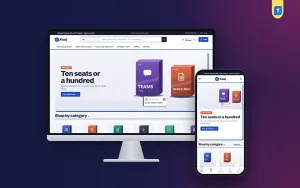
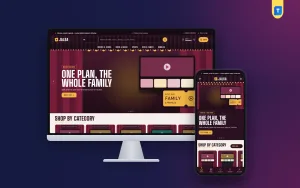
When your chat sales outgrow your time, Kaaj – Digital Store WordPress Theme is one option for a WordPress site. The demo sells work software, and it suits any item delivered online.
It includes:
- Work kits by role, with a live total and a one-button add to cart.
- A team seats slider with TEAM5, TEAM10 and TEAM15 volume coupons.
- Quick facts for platform, validity, devices, licence and delivery.
- Keys and an invoice sent by email.
- Checkout with no address and no delivery charge.
- bKash, Nagad, SSLCommerz and manual Send Money payments.
- 17 homepage blocks, five colour palettes and four font pairs.
It runs on the Themeve Commerce plugin, which is bundled, so you do not need WooCommerce. You can try the demo and read the full list on the Kaaj product page.
Move to a website without losing your buyers
Moving over is easier when you prepare. Write product titles, prices and short descriptions in a sheet first, then copy them into the site. Take clear pictures or graphics, and write the delivery time and refund rules in plain words before you launch.
Do not close your Facebook page. Use it to bring buyers to the site.
- Start the site with your top ten products.
- Pin a post with the site link and a line on how to order.
- Reply to chat enquiries with the product page link.
- Offer a small coupon for the first site order.
- Keep taking chat orders for a month while buyers learn the site.
- Move products over in groups until the site holds your full range.
Test the site yourself before you invite buyers. Place an order from your phone, pay with a small amount, and check that the email, key and invoice arrive. Fix anything that confuses you, since it will confuse buyers too.
Within a few weeks, repeat buyers learn that the site is faster than chat. Your workload falls, and you can spend the time on new products.
Common mistakes when learning how to sell digital products without a website
- Delivering before payment is confirmed. Always check your wallet first.
- Selling products you cannot supply. Remove them quickly when stock ends.
- Copying other sellers' pictures and text. Write your own.
- Promising instant delivery at night. Show your support hours.
- Keeping no records. You will lose track when orders grow.
- Ignoring complaints. One unhappy buyer posting publicly can cost many sales.
If you want to read more on the technical side, the official WordPress documentation is a good, reliable reference.
Frequently asked questions
Can I really learn how to sell digital products without a website?
Yes. Use a Facebook page or WhatsApp Business for orders, take payment by bKash or Nagad, and deliver by email or chat. Keep a sheet of every order.
Is it safe to sell digital products without a website?
It can be, if you check each payment in your wallet before delivering and keep records. The main risks are fake screenshots and duplicate keys, and both are easy to avoid.
What is the best ecommerce website for digital products?
The best choice is one built for digital goods: no address at checkout, local payments, delivery by email and a fast mobile layout. A WordPress theme made for this purpose is a good fit.
How many products do I need before building a site?
There is no fixed number. Many sellers build a site once they have about twenty products or spend hours each day answering chats.
Can I take bKash payments without a website?
Yes. Share your number, ask for the transaction ID and verify the payment in your wallet. For larger volume, look into a business or merchant account.
Do I still need Facebook after I launch a website?
Yes. Keep your page for reach and support, and send buyers to the site to order.