Newspaper online design is the way a paper's stories, photos, menus and ads are arranged on a screen. It covers the front page, the story page, the section pages and the small details, such as fonts and spacing. Good design helps a reader find the news quickly and helps the publisher earn from it.
This guide is for anyone moving a paper online, or starting a Bangla news site from nothing. You will learn what the pieces are, how to plan them, how to build the pages and how to avoid the usual mistakes. Near the end, we show one WordPress theme that fits this job.
Online news website meaning, in plain words
Let us start with the basics. Before any talk of newspaper online design, it helps to be sure what we are building. The online news website meaning is simple: a website that publishes news reports, usually many a day, grouped into sections such as national, sports and business. Readers open it on a phone or computer instead of buying a paper.
It differs from a printed paper in several ways.
- It updates all day, not once every morning.
- It can carry video, photo galleries and live updates.
- Readers can share a story in one tap.
- You can see exactly how many people read each story.
- Ads can change by page, place and time.
It also differs from a blog. A news site has several writers, a fixed set of sections and a front page that changes through the day.
From print to screen: what changes in newspaper online design
People who come from print often try to copy the paper onto the screen. That rarely works. A page in print is fixed and large. A screen is small, scrolls and changes shape from phone to phone.
Some print habits still help:
- The most important story goes first and biggest.
- Headlines are short and clear.
- Sections are easy to find.
- Photos carry captions.
Other habits must change. Do not use tiny columns of text. Do not fill the front page with forty headlines. On a phone, the reader sees one story at a time, so the order of stories matters more than the layout of the whole page.
The building blocks of a news home page
Most good news sites use the same parts. Learn them, then arrange them for your own readers.
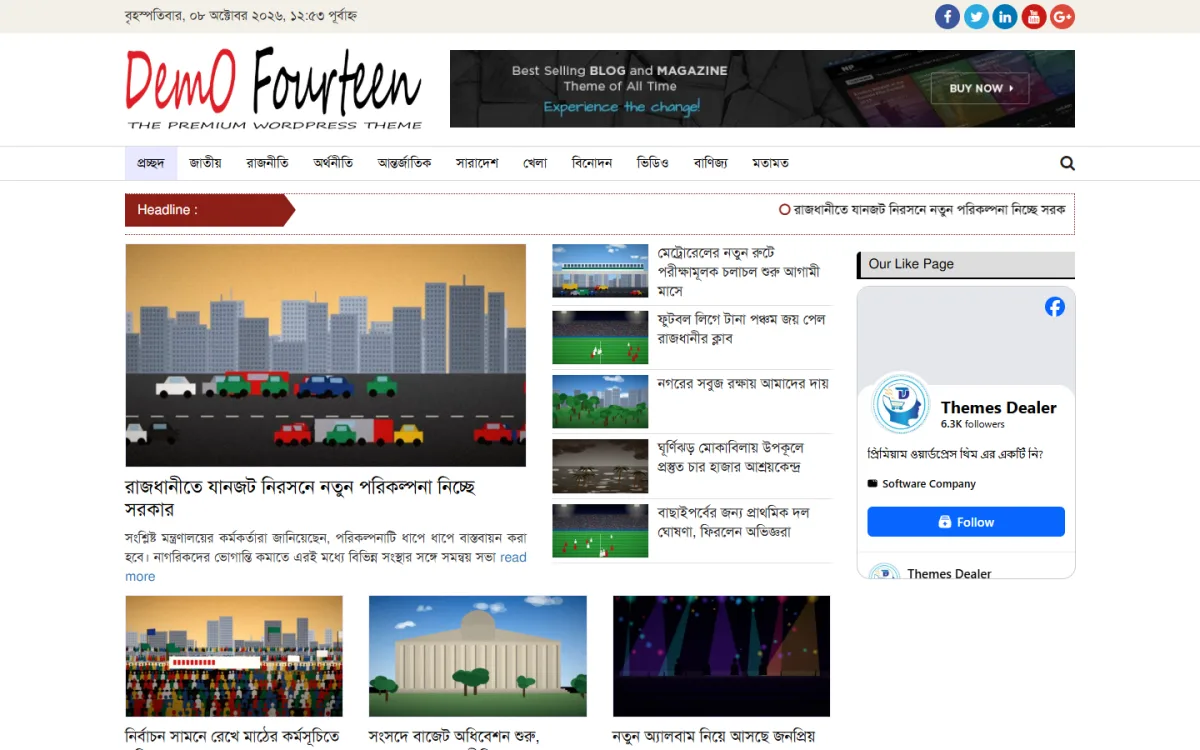
- Header. Logo, date, search and the main menu.
- Breaking news line. The newest headlines in one narrow strip.
- Lead area. One big story and a few smaller ones beside it.
- Trending or most read. Shows what other people are reading.
- Section blocks. One group of recent stories for each desk.
- Gallery or video block. For photo stories and short clips.
- Ad spaces. Banner places that fit the layout.
- Footer. About, contact, privacy and social links.
How to plan your newspaper online design
Planning saves money. Do these steps in order before you pick any theme or hire any designer.
- Name your readers. Write one sentence about who they are and what device they use.
- List your sections. Choose three to eight. Only keep a section if you can add new stories every week.
- Decide your daily output. Count the stories you can truly publish each day.
- Sketch the home page. Use pencil and paper. Draw boxes for the blocks listed above.
- Sketch the story page. Headline, photo, text, share buttons, related stories.
- Plan the ads. Mark where banners will sit.
- Pick a tool. For most publishers that means WordPress and a news theme.
A rough sketch is enough. It helps you judge whether a theme matches your needs. Good newspaper online design always starts from the reader's habits, not from what looks fashionable this year.
Designing the story page
Most readers arrive from Facebook, WhatsApp or Google. They land on a story, so this page deserves as much care as the home page.
- Show the headline in large type, then the date and the writer's name.
- Place one strong photo near the top, with a caption.
- Write short paragraphs. Two or three sentences each works well on a phone.
- Use sub-headings in long reports.
- Add share buttons for Facebook and WhatsApp.
- Finish with related stories so readers keep going.
Keep the page calm. Too many boxes around the text make reading tiring.
Also think about what happens after the last paragraph. A reader who finishes a story is at the best moment to read another one. Show three or four related stories with small photos, and add a link back to the section page. Many sites lose readers here because the page simply ends.
If you publish opinion or analysis, make the author box clear. Name, short note, photo. It builds trust, and readers who like a writer will come back for more.
Writing headlines that fit the design
Design and writing work together. A great layout cannot save a vague headline, and a great headline can be ruined by a layout that cuts it off.
- Keep headlines under about 12 words, so they fit on two lines on a phone.
- Put the key fact first. Readers scan the first three words.
- Use active verbs and plain Bangla. Avoid long, heavy phrases.
- Do not promise what the story does not deliver.
- Write a short summary line under the headline for long reports.
Set a rule with your team and keep to it. Consistent headlines make the whole site look more professional.
Fonts, colours and spacing
Small choices make a site feel professional. This part of newspaper online design costs nothing but care, and it changes how serious your site looks.
Fonts
Choose one font for headlines and one for body text. Test both with real Bangla text, because some fonts break joined letters. Body text should be at least 17 or 18 pixels on mobile.
Colours
Pick one main colour and one accent. Use the main colour for the header and links, and the accent for the breaking news strip. Keep strong contrast between text and background.
Spacing
Leave air between blocks and lines. White space is not wasted space. It guides the eye from one story to the next.
Newspaper online design for phones first
In Bangladesh, most readers use a phone. Design for that screen first, then check the larger ones.
- Use one column on small screens.
- Make buttons and links big enough for a thumb.
- Keep the menu short, or tuck it behind a simple menu icon.
- Place the best story first in the scroll.
- Do not use hover effects, because phones have no hover.
- Test on an older, cheaper phone as well as your own.
- Keep forms and comment boxes short.
A site that looks fine on your new phone can feel slow on an old one. Test on both.
An example home page layout
Here is one simple order for a district news site. You can adjust it to your own sections.
- Header with logo, Bangla date and search.
- Breaking line with the newest five headlines.
- Lead story with four smaller headlines beside it.
- Banner space.
- Local news block, with six stories.
- National and international blocks side by side.
- Photo gallery strip.
- Sports and entertainment blocks.
- Editorial picks and most read.
- Footer.
This order puts local news first, because that is what a district reader values most. A national paper would reverse it. Newspaper online design should always follow what your own readers care about.
Speed and technical care
Speed is part of design. A beautiful page that takes ten seconds to open has failed.
- Compress photos before upload.
- Use a light theme with clean code.
- Limit plugins to the ones you need.
- Turn on caching.
- Choose reliable hosting.
- Keep WordPress, the theme and plugins updated.
- Make regular backups.
These steps also protect you from many common attacks on news sites. A news site is a busy target, so a short weekly check of updates and backups is time well spent.
Making money without spoiling the page
Most news sites earn from ads. Plan the places early so that the page stays tidy.
- One banner under the header.
- One or two spaces in the sidebar.
- One inside each story, after the second paragraph.
- One at the bottom, before related stories.
Do not place more ads than stories above the fold. Local advertisers, such as shops and coaching centres, often prefer a simple banner with a clear link, and they may pay a fixed monthly fee. This can be steadier than network ads while your traffic is still small.
Ads should resize for each screen and never hide the headline. If you plan to apply to an ad network, publish real, original reports first. Approval is decided by the network, not by your theme.
A ready-made option: WP Bangla News Theme
If you want a theme built for Bangla papers, one option is WP Bangla News Theme. It is a WordPress theme made for Bangla newspapers, magazines and news portals, so many of the blocks above come ready.
The home page has breaking headlines, trending and featured blocks, an editorial picks widget and category sections. It has photo and video galleries and AdSense-ready ad areas that adapt to phone, tablet and desktop. You import the demo in one click, then change colours, fonts, logo and footer from the dashboard. The code is light and the structure is friendly to search engines.
For a publisher, the main gain is time. The blocks you would have to design and test yourself are already there, so you can spend your days on reporting. You can use it on unlimited websites with no renewal fee, and WhatsApp support is available. Look at the demo on the WP Bangla News Theme page. Remember that Google decides AdSense approval.
Setting up your site
Once the plan is done, the build is quick. Allow a few days for the first version, and a few more for testing. Rushing the launch is the most common cause of a messy first impression.
- Buy a domain and hosting, and install WordPress.
- Install the theme and import the demo.
- Remove demo stories and write your own.
- Create the sections and the menu.
- Fill the home page blocks using widgets.
- Add the logo and choose colours and fonts.
- Publish the about, contact, privacy and editorial pages.
- Test on two phones, one tablet and one computer.
- Connect analytics and search console.
Treat the first month as a trial. Watch which stories get read, ask readers what they find hard, and adjust the layout in small steps. Steady care is what makes newspaper online design work over the long run.
Mistakes that hurt a news site
- Copying a print page. Screens are not paper.
- Too many headlines at once. The reader cannot tell what matters.
- Weak photos. Small, dark or blurry pictures make a site look cheap.
- Hiding the date. News with no date cannot be trusted.
- Pop-ups and auto-playing video. They annoy readers and slow the page.
- Using another paper's name or logo. Build your own identity.
- Letting the site go quiet. A news site that stops updating loses its readers fast.
Keeping your site fresh over time
Design does not end at launch. Review it every few months.
- Look at which sections readers open most, and give them more room.
- Remove blocks that nobody clicks.
- Check speed again after you add new features.
- Read comments and messages for design complaints.
- Keep the look steady. Readers like a familiar site.
If you want to read more on the technical side, the official WordPress documentation is a good, reliable reference.
Frequently asked questions
What is newspaper online design?
It is the planning of how a paper's stories, menus, photos and ads appear on a website. It includes the home page, the story page, fonts, colours, speed and mobile use.
What is the online news website meaning?
An online news website is a site that publishes news reports through the day, sorted into sections, and read on phones and computers. It can include video, galleries and ads.
How do I start newspaper online design with no coding skills?
Use WordPress with a news theme. Import the demo, replace the content, and change colours, fonts, logo and footer from the dashboard.
How many sections should a news site have?
Start with three to eight sections that you can fill every week. Add more later.
Can I use the theme on more than one site?
WP Bangla News Theme can be used on unlimited websites with no renewal fee.
Is the theme mobile friendly?
Yes. The layout is responsive on phones, tablets and desktops.