Online clothing store ecommerce website design decides whether a visitor from Facebook or Instagram turns into a paying customer. The visitor arrives on a phone, looks at your first screen for a few seconds and either keeps scrolling or leaves. Your job is to make staying and buying easy.
This guide explains how to plan and build a clothing shop online, step by step, for sellers in Bangladesh. It covers the structure, product pages, sizes, payments, couriers, speed and launch. A section near the end also looks at design ideas for t-shirt brands, which have their own style and selling rhythm.
Start with a plan, not a template
Most weak shops start by picking colours. Start instead with these decisions:
- What you sell. List your product types: tees, hoodies, joggers, caps, kids, women's wear.
- Who buys. Age, city, budget, and the way they find you.
- How you sell. Ready stock, pre-order, limited batches or custom prints.
- How you ship. Which couriers, which areas, which charges.
- How you get paid. Cash on delivery, bKash, Nagad, cards.
These answers shape every page. A brand that releases small batches needs a homepage that shows what is new and when the next batch arrives. A brand with a big everyday range needs strong filters and categories.
The parts of online clothing store ecommerce website design
A working clothing shop has the same core parts, whatever the style. Know them before you build.
- Homepage: a banner, category links, new items, best sellers and an offer.
- Category pages: a grid of products with filters for size, colour and price.
- Product page: photos, price, sizes, fabric, delivery date and an Add to cart button.
- Cart and checkout: short, clear, one page if possible.
- Customer pages: order tracking, wishlist, saved address.
- Policy pages: delivery, returns, privacy and contact.
- Admin dashboard: orders, stock, coupons and reports.
Each part should work on a phone first. If you only check on a laptop, you will miss problems that most of your buyers see.
Plan online clothing store ecommerce website design around the homepage
Treat the homepage like a shop window. It has one job: send people to a product. Keep it simple and put the best content first.

A homepage order that works
- A banner with one clear message and one button.
- Category tiles so a visitor can choose in one tap.
- New arrivals in a row of cards.
- Best sellers.
- A size helper or a short guide, if your products need one.
- A sale block with a real end date and stock level.
- Reviews and customer photos.
- A strip with delivery, payment and return notes.
Use real countdowns and real stock numbers. Fake urgency harms trust when buyers notice it.
Product pages in online clothing store ecommerce website design
The product page is where the sale happens, so it needs the most care. A buyer should find every answer without leaving the page.
Put these items on every product page:
- Four or five photos, including front, back, a close-up and one on a person.
- Price, any discount and the stock status.
- Size buttons, with a link to the size guide.
- A fit note: slim, regular, oversized.
- Fabric weight and print method.
- Expected delivery date by area.
- A visible Add to cart button that stays on screen on mobile.
- Reviews with photos, when you have them.
Write product names in plain words. "Black Oversized Tee, Back Print" is better than "Drop 4 Item 7".
Solve the size problem
Wrong size is the largest cause of returns in clothing. Every return costs courier fees both ways and a delay for the buyer. Strong sizing tools save real money.
- Show a size chart in inches with chest, length and shoulder.
- Explain how to measure a tee the buyer already likes.
- Say how each fit runs: regular, oversized or drop shoulder.
- Show the model's height and size.
- Offer a simple size finder that asks for chest size and preferred fit.
Print brands should be careful here. Oversized tees confuse buyers because "L" in one brand is "XL" in another. Your own measurements remove the guesswork.
Payments and couriers for Bangladesh
Local habits matter more than design trends. Many first-time buyers prefer cash on delivery, and many regular buyers pay by bKash or Nagad.
Offer a mix:
- Cash on delivery, with a confirmation call or SMS to filter fake orders.
- bKash and Nagad through a gateway, or manual Send Money with a transaction ID field.
- Card payment through a gateway such as SSLCommerz when your volume grows.
Show delivery charges for inside Dhaka and outside Dhaka before the final step. Connect Steadfast or Pathao if you can. Booking parcels from the order screen and tracking them there saves hours each week and reduces address mistakes.
Build the shop in stages
You do not need every feature on day one. A staged plan for online clothing store ecommerce website design keeps the cost low and the shop moving. Use this order:
- Week one: choose the theme, install it, import the demo and replace the sample products with five of your own.
- Week two: photograph and upload the rest of your range, write the size guide and set delivery charges.
- Week three: connect payments and the courier, place test orders and fix what feels slow.
- Week four: launch to a small group, collect feedback and adjust the homepage.
What to postpone
Some things can wait until the shop earns its first orders:
- A loyalty programme.
- Complex discount rules.
- A blog with many posts.
- Advanced reports.
A launched shop with ten good products teaches you more than a perfect plan on paper. Buyers will show you what they want to see, mostly by the questions they send you.
Keep your stock and orders under control
Clothing has many variations: sizes, colours and fits. A small mistake in stock leads to cancelled orders and unhappy buyers.
- Track stock for every size and colour, not only for the product.
- Show a low-stock note when only a few pieces are left.
- Turn off sold-out sizes so buyers cannot order them.
- Check new orders at set times each day.
- Confirm cash on delivery orders by phone before you pack them.
- Keep a simple sheet of returns and reasons, and review it every month.
The return reasons tell you which products have size or photo problems. Fix those first, and your return rate will drop.
Speed, mobile and basic search visibility
Most clothing buyers click a link from a social post on a phone, often on mobile data. A slow page loses them.
Keep the shop quick with these habits:
- Resize photos before upload, and use modern formats where possible.
- Load images as the visitor scrolls.
- Limit plugins and animations.
- Choose reliable hosting with a server near your buyers.
- Test with a cheap phone and a weak connection.
For search visibility, write clear product titles, add original descriptions, name your image files sensibly and give images alt text. Keep the page addresses short. No one can promise a ranking, but clean pages give you a fair chance.
Design ideas for t-shirt brands
T-shirt labels sell differently from general clothing shops. They release designs in batches, talk to followers daily and depend on a strong identity. These t shirt brand website design ideas fit that style:
- Numbered drops. Show each release as Drop 01, Drop 02 and so on, with its own story and products.
- A next-drop countdown. It gives followers a reason to return.
- A tee size lab. A slider for chest size and a choice of fit, with a result that names the size to order.
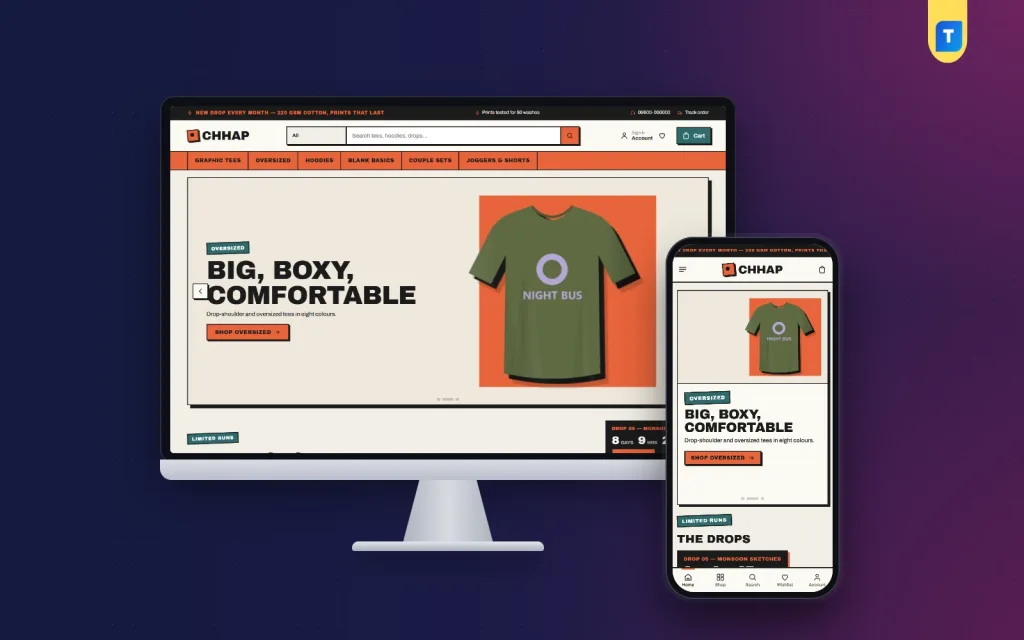
- Bold identity. Thick borders, strong colour blocks and big headings suit a print studio feel.
- Large artwork photos. Show the print up close, front and back.
- Sticker-style badges for "Just dropped", "Few left" and "Sold out".
- Customer photos wearing the tees, since social proof matters for small labels.
Good t shirt brand website design ideas stay consistent. If your brand is loud, keep every button and badge loud in the same way. If it is quiet, let the artwork speak and keep the page clean.
A ready-made option for tee labels
If you want these ideas without building from scratch, Chhap is a WordPress theme made for t-shirt brands. Its look is bold on purpose, with thick ink borders, hard shadows and sticker badges.
From the product page, it includes:
- A tee size lab with a chest slider and three fits.
- Numbered drops with a next-drop countdown.
- A fit meter and delivery date on product pages.
- 24 homepage blocks to switch on and re-order.
- A flash sale block with countdown and stock bars.
- Five colour palettes and four font choices.
- A one-click demo with 27 products.
- bKash, Nagad, SSLCommerz and cash on delivery, with Steadfast and Pathao courier support.
The demo shows a graphic tee label, but the layout also suits streetwear, sportswear or club merchandise. If you do not run numbered releases, switch that block off. You can read more on the Chhap product page.
Content and photos that build a brand
Clothes sell better when the shop has a clear voice and a consistent look. Plan your content in advance.
- Use the same background and light for all product photos.
- Take a mix of studio shots and street or lifestyle shots.
- Write a short About page that explains who makes the clothes and why.
- Keep the tone of captions and product descriptions consistent.
- Add a gallery of customers wearing your pieces, with permission.
Photograph in daylight and avoid heavy filters. If the tee looks darker in the photo than in real life, you will get returns.
Mistakes to avoid
These problems appear often in small clothing shops:
- Too many popups before the visitor sees a product.
- No size chart, or a chart that does not match the real garment.
- Delivery charges that appear only at the end of checkout.
- A forced account before the first order.
- Photos that are too large and make pages slow.
- Outdated stock, with sold-out items still shown as available.
- Copying another brand's layout instead of building your own identity.
Fix the first three, since they cost you the most orders.
Launch checklist
Run through this list before you share the link:
- Place test orders with every payment method.
- Check that orders show in your dashboard and that you get a notice.
- Open each product page on a phone and look for errors.
- Read the delivery and return pages.
- Test the courier booking with one real parcel.
- Check SSL, backups and the contact form.
- Prepare your first posts and a small launch offer.
After launch, review sales and drop-off points each week. Small changes to photos, sizes and checkout steps often lift orders more than any redesign.
If you want to read more on the technical side, the official WordPress documentation is a good, reliable reference.
Frequently asked questions
What is online clothing store ecommerce website design?
It is the planning of the pages, layout, product information, checkout and payment steps that let people browse and buy clothes online. Good design makes each step clear on a phone.
Which platform is best for a clothing shop?
WordPress with a shop plugin is a popular choice because it is flexible and affordable. Pick a theme that already includes a cart, checkout and local payments, so you spend less time on setup.
How do I reduce returns for t-shirts?
Give exact measurements, describe each fit and show a size finder. Add the model's height and size on each photo.
Do I need online payment?
Not at first, but it helps. Offer cash on delivery and add bKash or Nagad so buyers can choose.
How many products should I launch with?
Start with 15 to 30 products with good photos. A small, tidy shop looks better than a large one with weak images.
Which t shirt brand website design ideas work best?
Numbered drops, a size finder, a bold consistent identity and large print photos work well. Choose what matches your brand, and avoid decoration that slows the page.
How can I get visitors to my new shop?
Share links on your social pages, add the shop link to your profiles, and put it on packaging. Always link directly to a product or a drop, not just to the homepage.