Good pregnancy clothes ecommerce website design starts with empathy. Your customer is tired, her body is changing every few weeks, and she wants clothes that are comfortable now and still useful after the baby arrives.
A shop that understands this, and shows it in every section, wins her trust and often her family's orders too. This guide explains how to design a maternity and nursing wear shop that feels calm, helpful and easy to buy from, with examples you can use straight away.
We have built online shops for maternity brands and mother-and-baby boutiques. What follows is what their customers value most, page by page.
Who you are designing for
A maternity shop has two kinds of visitors. The first is the mother herself, looking for clothes for the next stage of her pregnancy or for nursing. The second is a partner, parent or friend looking for a gift for a new mother. Pregnancy clothes ecommerce website design has to serve both: clear sizing and stages for the mother, ready-made gifts and bundles for the family.
Create a calm first impression
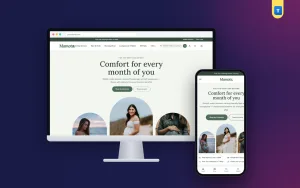
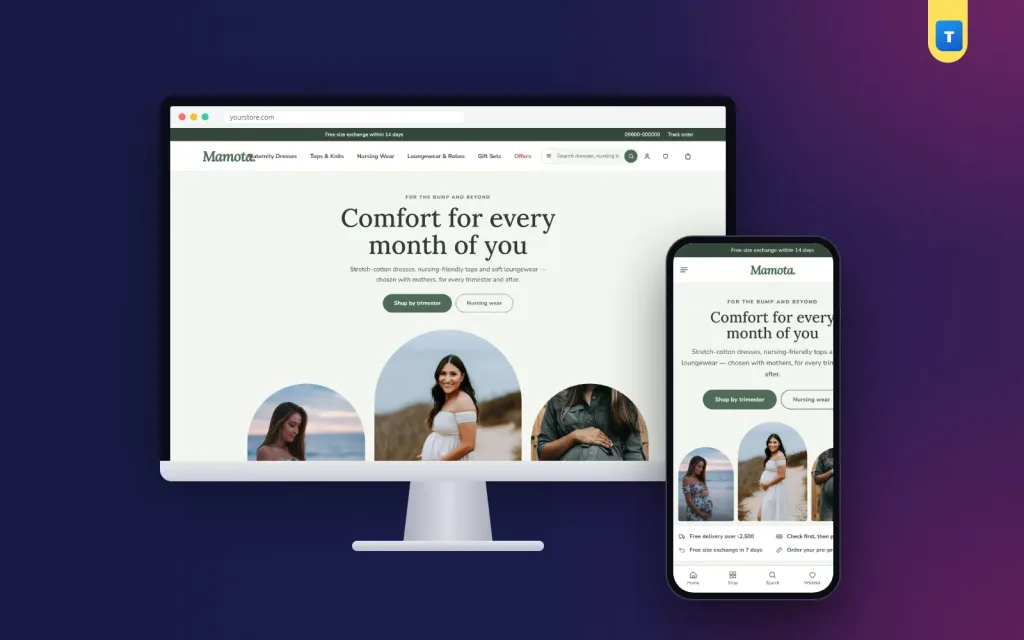
Pregnancy can be stressful, so the shop should feel calm. Use soft colours such as sage, peach, dusty rose or warm sand, with plenty of white space. A centred hero with a short, kind headline and a few gentle photos sets the tone. Avoid loud banners and flashing offers on the first screen; save offers for further down the page.
Under the hero, a short promise line covers the basics: comfortable fabrics, easy exchanges and cash on delivery. These three answers remove the first worries before she starts browsing.
Pregnancy clothes ecommerce website design: organise by stage
The most useful idea in pregnancy clothes ecommerce website design is shopping by stage. A timeline with first trimester, second trimester, third trimester and after birth lets a mother jump straight to what suits her right now. In her seventh month she needs roomy dresses and nursing-friendly tops, not first-trimester basics.
Tag each product with the stages it suits, so the timeline always shows the right pieces. Many items work across several stages, and saying so is a strong selling point.
Explain how long each piece will last
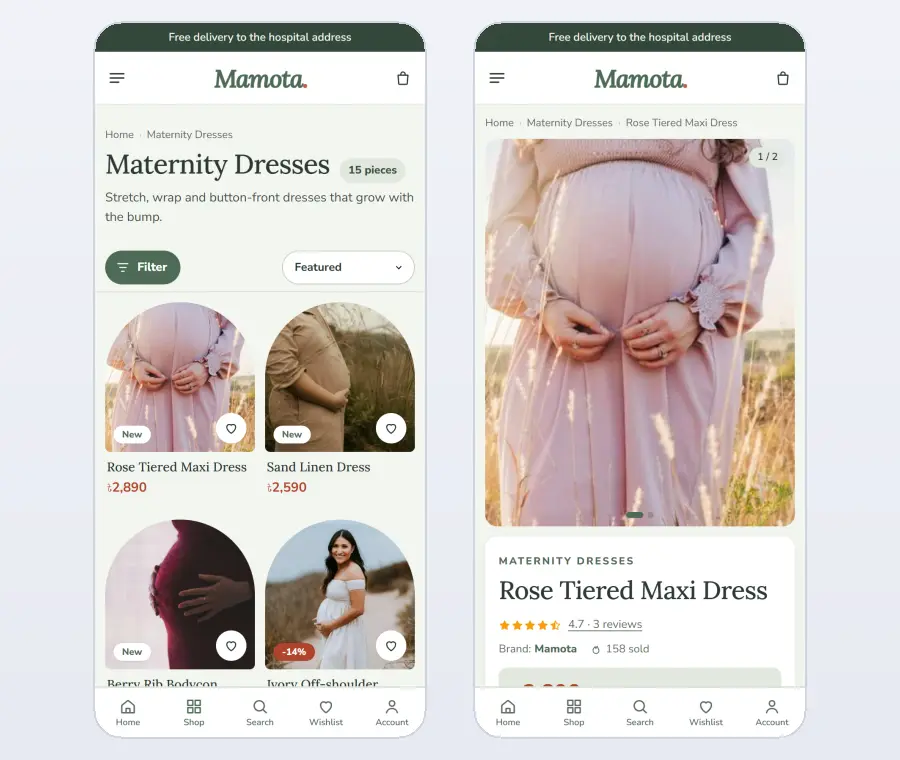
Mothers worry about spending money on clothes they will wear for only a few months. Show clearly which pieces are bump-to-baby (they work during pregnancy and after), which are nursing-friendly and which have stretch fit. A small label under each product name, visible on every card, answers this at a glance.
On the product page, add a short note such as "Wear it through pregnancy, then use the hidden zips for nursing". This is exactly the information that turns hesitation into an order.
Help with the hospital bag
Packing a hospital bag is one of the most searched topics for expecting mothers. A hospital bag checklist on your site is useful content and a gentle way to sell. List what to pack for the mother and the baby, with links to the items you sell.
Make the checklist remember what she has already ticked, so she can come back over several days and finish packing. It turns your shop into a helper she returns to, not just a place to buy clothes.
Maternity wear website design template: what it should include
If you are choosing a maternity wear website design template, check that it supports shopping by stage, fit labels on cards, a gift section and room for helpful content such as checklists and notes. A general fashion template rarely has these, and adding them later costs time and money.
Also check that the template looks calm and soft by default, loads quickly on a phone and makes the checkout short. Expecting mothers have little patience for slow, complicated sites.
Gifts and bundles for the family
Many maternity orders are gifts. Make them easy. Add a "Gifts for a new mother" section with ready presents such as robes, loungewear sets and nursing essentials, and "New mother bundles" that group several pieces at one price. Clear prices and gift-ready packaging notes help family members order quickly, even if they know little about maternity sizes.
If you offer delivery on a chosen date, say so near the gifts. Many families want a present to arrive on the day the baby comes home.
Product pages that answer every question
On each product page, show several photos, ideally on a pregnant model, with her stage and size mentioned. List sizes clearly and link to a size guide that explains how to choose a maternity size. Describe the fabric, the stretch, the length and any nursing features in short, clear lines.
Reviews from other mothers are especially valuable. Encourage reviews after delivery and show them near the add-to-cart button. A review that says "I wore this from month five until three months after birth" sells better than any description.
Content that helps mothers
Expecting mothers search for advice constantly: what to wear at each stage, how to choose a nursing bra, what to pack for the hospital, how to dress after a caesarean. A "Notes for mothers" section with short, practical articles brings these visitors from Google and builds trust in your shop. Each note can link to the right products.
Keep the tone warm and practical. Avoid medical advice; focus on comfort, clothing and preparation. If a topic needs a doctor, say so kindly and keep your note to what to wear and what to pack.
Colours, fonts and photos in pregnancy clothes ecommerce website design
Soft, natural colours and a gentle serif for headings, such as Lora, with a clean sans-serif for text create a calm, caring feel. Use real photos of pregnant women and new mothers in natural light. Rounded or arched photo frames add softness. In pregnancy clothes ecommerce website design, warmth matters more than drama.
Navigation and filters
Keep the main menu short: maternity dresses, tops and knits, nursing wear, loungewear and robes, gift sets and offers. On category pages, offer filters for stage, size, colour and nursing-friendly pieces. A mother who filters for "nursing-friendly" should see only pieces she can actually nurse in.
Photos that reassure
Show each piece on a pregnant model and, where it matters, on a new mother after birth. Mention the model's stage and size under the photo.
Add close-ups of nursing openings, waistbands and fabric. Mothers want to see how a dress grows with the bump and how easily a top opens for feeding. Two or three honest photos answer these questions better than any long description, and they reduce returns at the same time.
A gentle, simple checkout
Keep the checkout to one page: name, phone, address and district. Show the delivery charge straight away and offer bKash, Nagad and cash on delivery. For gifts, add a short note field if your shop offers gift messages. Confirm the order clearly and let customers follow their parcel on a Track Order page.
Design for phones first
Most expecting mothers shop on their phones, often late at night or while resting. Make the stage timeline easy to tap, keep fit labels visible on small cards, make the hospital bag checklist easy to use with a thumb and keep the checkout on one screen. A light, fast site matters more than visual effects.
Size guides for a changing body
Maternity sizing confuses many first-time mothers. Should she buy her usual size or one bigger? Will a dress still fit in the ninth month? Write a simple size guide that answers these questions in plain words, with a table of measurements and a short note for each stage.
Link the guide from every product page and from the stage timeline. A clear guide is one of the most practical parts of website design, because it reduces exchanges and gives mothers the confidence to order online.
Trust and safety signals
Mothers care deeply about what touches their skin and their baby's. Mention fabrics clearly, such as soft cotton, breathable jersey or easy-care blends, and note anything that matters for sensitive skin. Show your exchange policy, contact number and address in the footer. A small "Why us" section with three or four honest promises builds trust faster than long paragraphs.
Seasonal planning
Maternity shops have their own seasons: summer comfort wear, winter layers and gift peaks around Eid and the end of the year. Plan homepage changes a month before each.
Swap the hero photos, update the bundles and add a note for the season, such as how to stay cool in the third trimester. A maternity wear website design template that lets you change these sections from one settings page makes this easy.
Grow with your customer
A maternity customer becomes a baby customer. Plan for this: add baby clothing, nursing accessories and gifts as your shop grows, and invite past customers back with an SMS when new baby items arrive. Good website design keeps the relationship going after the birth.
Loyalty points and a refer-a-friend program work well here, because expecting mothers often share recommendations with friends who are also pregnant.
Marketing a maternity shop
Expecting mothers spend a lot of time in online groups and on social media, looking for advice and recommendations. Share your notes for mothers there, show real customers (with permission) and run gentle offers on bundles rather than heavy discounts. An affiliate program lets bloggers and mother influencers recommend your shop and earn a small commission.
Connect Facebook Pixel and Google Analytics so you can see which posts and ads bring real orders. Then spend more on what works. Good website design makes this easy, because a fast, clear shop turns more of those visitors into buyers.
After the order
Send an SMS when the order is confirmed and when it is on its way, and ask for a review after delivery. Include a small card in the parcel with a kind note and a link to your notes for mothers. These little touches matter at a tender time and are often remembered and shared.
Common mistakes in pregnancy clothes ecommerce website design
Bright, loud designs that feel stressful. No stage-based shopping. No information about nursing features. Photos only on non-pregnant models. Complicated size charts. A long checkout. Each of these makes an expecting mother feel the shop was not made for her.
Build it with a ready theme
You can design all of this from scratch, or start from a theme made for maternity shops. Our maternity clothing ecommerce website template, Mamota, includes a calm centred hero over arched photos, a shop-by-trimester timeline, a hospital bag checklist that remembers what is packed, nursing-friendly, bump-to-baby and stretch-fit labels on every card.
It also has sections for gifts for a new mother, new mother bundles, reviews and notes for mothers.
The included shop plugin handles sizes and stock, bKash, Nagad and cash on delivery, district delivery charges, courier sending, delivery dates for gifts, bundles, loyalty points and exchanges. A one-click demo shows a finished shop that you then make your own.
Checklist before launch
On a phone, check: does the shop feel calm, can a mother shop by stage, are nursing and bump-to-baby pieces marked, is there a gift section, is the hospital bag checklist useful and does the checkout fit on one screen? If all six are yes, your website design is ready for its first orders.
Keep the tone warm and practical throughout, because expecting mothers often shop late at night on their phones.
Want to see these ideas on a working website? Open the Mamota live demo and browse it on your phone and your computer.
Frequently asked questions
What matters most in pregnancy clothes ecommerce website design?
Shopping by stage, clear labels for nursing and bump-to-baby pieces, a calm design and a short checkout.
Should a maternity shop sell gifts?
Yes. Many orders come from family and friends, so gift sections and bundles are important.
Which colours suit pregnancy clothes ecommerce website design?
Soft, natural colours such as sage, peach, dusty rose or warm sand, with plenty of white space.
How can a maternity shop bring customers back?
Add baby items as you grow, send SMS updates about new arrivals and use loyalty points and referrals.