−22%
−22%
Annapurna – Super Shop Website Theme for WooCommerce & Elementor
✦ Key features
- Who this super shop website theme is for
- A design made for big baskets
- The super shop website theme home page, from hero to footer
- Product page and shop page
- Checkout, payments and delivery in Bangladesh
- Store tools in the Shop Kit dashboard
- Edit everything with the free Elementor
- Setup, licence and what you get
Overview
Annapurna is a super shop website theme for WordPress, WooCommerce and the free Elementor. It is made for supermarkets and mini marts with many products: a big live search, a department bar, shelf-tag product cards with quantity pills, a flash sale countdown and a phone bottom bar. It adds Buy Now, a simple Bangladesh checkout with mobile-number accounts, bKash and Nagad, Steadfast courier, a fraud checker, incomplete orders, Facebook Pixel with Conversion API, WhatsApp and a one-click demo import.
Annapurna is a super shop website theme for WordPress that turns a neighbourhood supermarket into an online store with thousands of everyday items: rice, dal, oil, spices, snacks, drinks, soap, detergent and baby care. It runs on WooCommerce and the free Elementor, and it is built for one job: helping a buyer fill a big monthly bazar basket quickly on a phone.
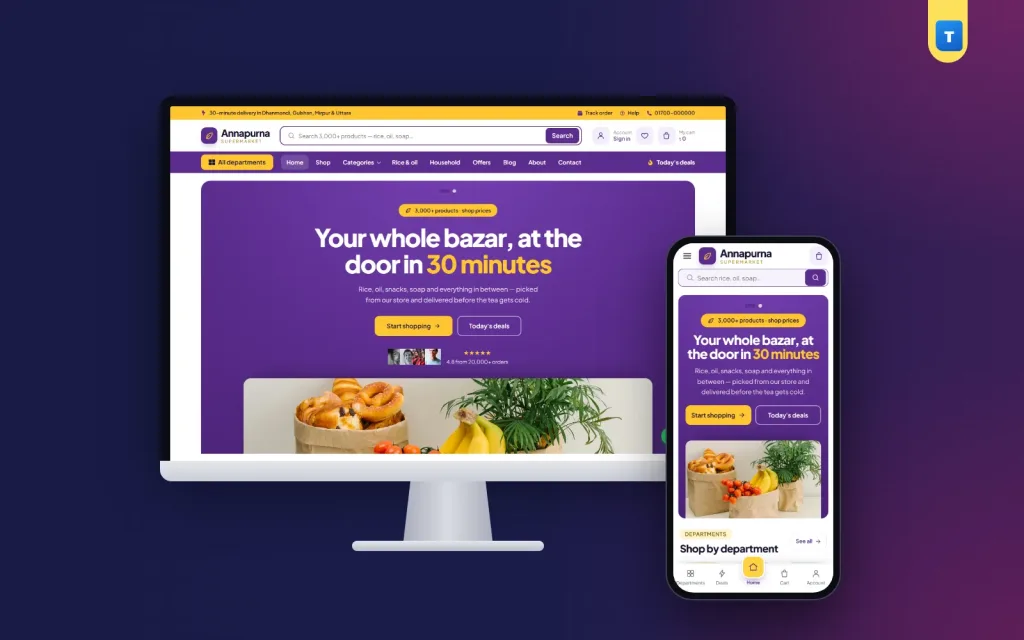
The look is bright and busy in the way a real super shop is: a yellow delivery strip, a white row with a big search box, a purple department bar and a centred purple hero. Yellow saving pills and express tags on every product card keep prices front and centre.
Who this super shop website theme is for
- Super shops and mini marts that already take phone orders and want a cart and order list.
- Area-based grocery delivery services that serve a few neighbourhoods fast.
- Department stores that sell food, household and personal care under one roof.
- Wholesale and bulk sellers who offer monthly staple packs to families and offices.
- Pharmacy and convenience shops that add groceries and toiletries.
- Developers and agencies building a supermarket site for a client on WordPress.
This super shop website theme suits shops with many products and many small orders, where search, departments and quick add to cart matter more than big lifestyle photos.
A design made for big baskets
Supermarket buyers know what they want. They search for "miniket rice" or "soybean oil 5 litre", tap add, and move on. So the header gives search the most space. The search shows live results as the buyer types, and on phones a separate search bar sits right under the header so it is never hidden in a menu.
Below the search row, a purple department bar opens an "All departments" menu and a "Today's deals" link. The top strip carries your delivery promise and links to order tracking and help. Every part of this header is an Elementor template, so you can change the areas, the colours or the order of the icons in minutes.
The "shelf tag" product card
Each card shows the product on a soft tile, a yellow saving pill when there is a sale price, an express tag, the name, the price and an outlined − 1 + quantity pill joined to a yellow add button. Buyers can set the quantity and add to cart right on the card without opening the product page, which is how people shop for twenty items at once.
The super shop website theme home page, from hero to footer
The home page is a sequence of Shop Kit widgets in Elementor containers. Here is what the demo shows, in order:
- Hero slider centred on purple with a wide picture below, one slide for fast delivery and one for bulk staples.
- Shop by department with rounded category tiles.
- Three offer banners: bulk staples, a cleaning week offer and tea-time snacks.
- "Popular in your area" tabs for rice, oil and spices, snacks and drinks, and home care.
- Flash sale countdown for daily deals that end at midnight.
- Monthly bazar essentials, a row of staple products.
- A numbers band with counters for orders, products, delivery time and areas served.
- Household and personal care products, a four-step "how delivery works" row, customer reviews, an FAQ and blog posts on saving money.
You can reorder, delete or duplicate any block in Elementor. Change a tab from "Snacks" to "Frozen food" by picking another category in the widget settings.
Footer with your delivery areas
The footer starts with a trust strip for delivery, fresh stock, payment and returns. Then come your logo and a short text, columns for departments, customer care and account links, and a "We deliver to" list where you write your own areas. The copyright line and payment logos close the page.
Product page and shop page
The product page has a gallery, name, rating, price and short text, then add to cart and a Buy Now button for buyers who want just one item fast.
A WhatsApp order link and call line sit below the buttons. A delivery box shows your charge, the free delivery amount, cash on delivery and the "check, then pay" promise. Tabs hold the description, reviews and a delivery and return note, and related products fill the bottom.
The shop and department pages list products with one compact line for the count, sorting and filters. On phones the filters slide in as a drawer, and two products show per row with the quantity pill still on every card. Pack sizes such as 1 kg, 2 kg and 5 kg work as WooCommerce variations, each with its own price and stock.
Phone layout
On a phone the super shop website theme shows a compact header, the always-visible search bar, a menu drawer and a bottom bar with a raised Home button in the middle. The theme's own script is under 1 KB and the Shop Kit script about 21 KB, so pages stay light on mobile data.
Checkout, payments and delivery in Bangladesh
Shop Kit replaces the long WooCommerce form with a short Bangladesh checkout: name, mobile number, district and address, with email optional. The buyer's account is made at checkout with the mobile number as username, so next month they sign in with the number and see their past orders.
- Cash on Delivery with charges from WooCommerce shipping zones. The demo uses ৳39 inside Dhaka, ৳120 outside and free delivery over ৳999.
- bKash and Nagad, manual mode: the buyer sends money and types the sender number and Transaction ID; the order waits on hold until you check it. You can ask for only the delivery charge in advance.
- bKash and Nagad, API mode, included for shops with merchant credentials.
- Steadfast courier by button, bulk action or automatically at the order status you choose, with tracking code and hourly status updates.
Most super shops deliver inside their own area with their own riders. For those orders you simply move the order status by hand. Steadfast is there for parcels to other districts, or for when you do not want to run riders yourself.
Store tools in the Shop Kit dashboard
A busy grocery supermarket Elementor store gets many orders a day, and some of them are fake. Shop Kit adds the tools a Bangladesh shop needs to keep control:
- Fraud checker: each order shows the buyer's history by mobile number, from your own orders and the Steadfast results of parcels sent from your shop, with a risk level.
- Fraud rules: a block list, a daily order limit per mobile number and an optional "call first" prompt when a number's delivery rate is low.
- Incomplete orders: when a buyer types a mobile number at checkout and leaves, the cart is saved so you can call, message on WhatsApp or turn it into a real order.
- Facebook Pixel and Conversion API: PageView, ViewContent, AddToCart, InitiateCheckout and Purchase, sent from browser and server with one shared event ID.
- WhatsApp: a floating chat button with your number and a ready first message.
- Wishlist, order tracking by order number and mobile, and a customer dashboard with order cards.
- Newsletter list with a CSV download under Shop Kit → Subscribers.
For a super shop, the incomplete orders list is often the quickest win. A buyer who filled a ৳3,000 basket and then left at checkout usually had one small question about delivery time or payment.
Edit everything with the free Elementor
The header, footer, single product, shop and category, single post, blog and 404 are Shop Kit templates. Each has a display rule (whole site, home only, not home or not checkout), and product, category and post templates can be set for chosen categories only. So the baby care department can have its own product page layout if you want.
The home, cart, checkout, account, about, contact, FAQ, shipping, returns, privacy, terms, wishlist and order tracking pages are Elementor pages too. Site-wide colours and fonts live in Elementor's Site Settings. Shop Kit adds 44 widgets for the site parts, shop sections, product page, shop page, store pages and blog. No Elementor Pro and no paid add-on is needed.
If you compare a super shop website theme built this way with a hosted shop builder, the difference is ownership: you keep the site, the data and the design, and there is no fee per order.
Setup, licence and what you get
Upload the zip in Appearance → Themes and activate it. Annapurna → Setup then walks through four steps: activate the licence, install and activate WooCommerce, Elementor and Shop Kit with one button, import the demo with one button, and start editing. The import brings products with photos and reviews, departments, the Elementor designs, menus, delivery charges and payment methods.
One licence key works on one domain. The public site shows a lock page until the key is active, while the dashboard stays open so you can activate it. Local test sites such as localhost or .test do not use up the key, and an active key brings updates.
- The Annapurna theme zip, version 1.0.0, with Themeve Shop Kit inside.
- Elementor designs for every part of the store, plus 44 Shop Kit widgets.
- Buy Now, mobile-number accounts, bKash and Nagad, fraud checker, incomplete orders, Steadfast, Pixel with Conversion API and WhatsApp.
- Step-by-step documentation with screenshots.
- Updates with your active licence.
Requirements: WordPress 6.4 or newer, PHP 7.4 or newer and WooCommerce 8.0 or newer. Payments, courier and Pixel run on your own accounts.
The demo has 30 products in 6 departments, from rice, dal and oil to cleaning and personal care, with reviews and blog posts.
A tip before launch: add your 200 best sellers first with clear photos and correct pack sizes, then add the rest week by week. Many shops use this as a grocery supermarket Elementor starting point and grow the catalogue slowly; a short, accurate list sells better than a long list with wrong prices. When the catalogue grows, this super shop website theme keeps search, departments and filters quick to use.
Open the Annapurna live demo to try the shop pages and the admin dashboard. For more designs, browse our grocery WordPress themes or all WordPress themes.
Reviews
0.0
Write a review
★★★★★
0 reviews from buyersNo reviews yet — be the first to share your experience after buying.
Frequently Asked Questions
01Can this super shop website theme handle thousands of products?
Yes. It uses normal WooCommerce products and categories, with live search, departments, filters and pagination. Speed then depends mostly on your hosting.
02Do I need Elementor Pro?
No. Everything works with the free Elementor plus the bundled Shop Kit plugin.
03Can buyers choose quantities on the product card?
Yes. Each card has a − 1 + quantity pill and an add button, with the mini cart updating at once.
04Which payments does it support?
Cash on Delivery, bKash and Nagad by Send Money with a Transaction ID, and an API mode for merchant accounts.
05Is demo content included with the super shop website theme?
Yes. The Import demo step in Annapurna → Setup imports products, departments, pages, menus, delivery charges and payment methods.
06How many websites can I use one licence on?
One domain per key. Local test sites do not count.
Delivery & Support
1Place your orderAdd to cart, sign in and pay with bKash, Nagad or Rocket.
2Payment verified automaticallyEnter your Transaction ID — the payment is matched automatically, usually within seconds.
3Get your productYour license key and download appear in My Account → Licenses.
- Secure automatic payment verification
- Delivery to your account & e-mail
- Friendly WhatsApp support
Refund Policy
This policy applies to every product in our store.
You get a refund when the product does not work as described and we cannot fix it, when your license will not activate your website, or when a manually delivered product is late and you cancel before delivery. A working license, or a single license already used on a live domain, is not refundable. Approved refunds go back to the number you paid from within one working day, minus the Send Money charge.
More items
View all →