 −27%
−27%
Mayaboti – Cosmetic Shop WordPress Theme for Makeup and Skin Care
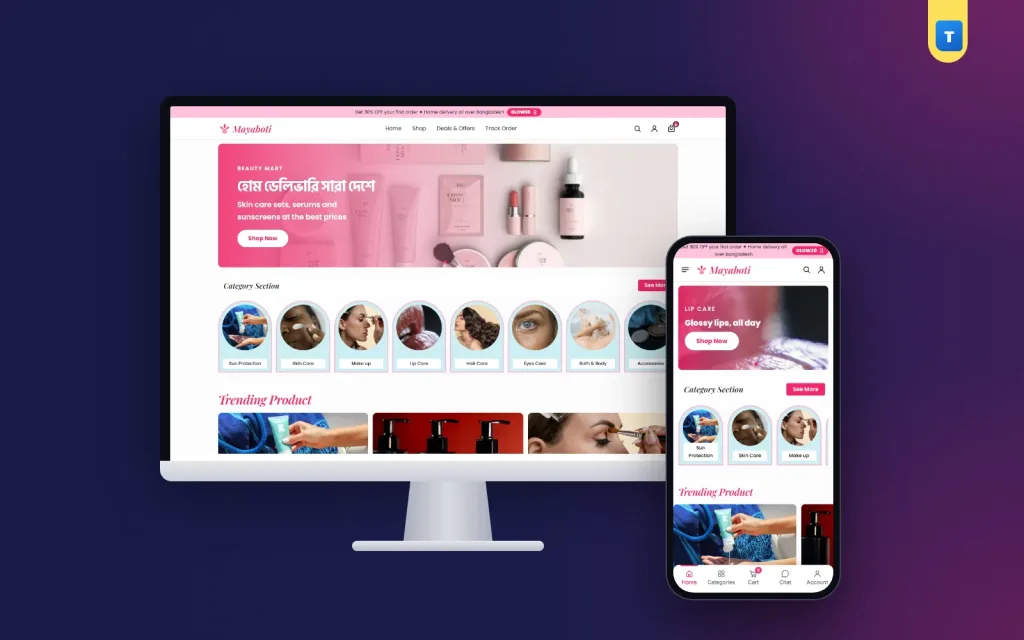
✦ Key features
- Hero slider
- Category section
- Trending tiles
- Flash sale and offer rows
- Promises, reviews, FAQ and blog
- Accounts, wishlist and order tracking
- Theme Options
- Delivery, coupons and payment
- Licence and updates
- Get started in one afternoon
- Tips for a makeup and cosmetics store
Overview
Mayaboti is a cosmetic shop WordPress theme for WooCommerce: a bright look for makeup, lip and eye care, skin care, sun protection, hair care and bath items, with category tiles, product rows and sign-in with a mobile number or email.
Mayaboti is a cosmetic shop wordpress theme for stores that sell makeup, lip care, eye care, sun protection, skin care, hair care, bath and body items and beauty accessories. It is made for the colour side of beauty: lip tints, eyeliners, powders and glosses. The look is bright and playful, with a hot pink colour, a script logo and an italic heading over the trending tiles.
Mayaboti runs on the free WooCommerce plugin, so carts, stock, coupons and orders work the way store owners expect.
Import the demo in one click and you get 16 cosmetic products in 8 categories, the help pages, menus and 3 blog posts.
Who Mayaboti is for
A cosmetics store sells colour, offers and fresh arrivals. Buyers come for a new lip tint and leave with an eyeliner too. Mayaboti fits:
- Makeup shops that sell lip tints, glosses, eyeliners and powder compacts.
- Beauty marts with eight or more small categories under one roof.
- Facebook and Instagram sellers who run flash sales and want a real website.
- Gift set sellers who pack skin care sets for birthdays and Eid.
- Cosmetics importers who sell across Bangladesh with cash on delivery.
- Bath and body shops with body wash, lotions and spa masks.
- Accessory sellers with brushes, puffs and small beauty tools.
If your best days are offer days, this cosmetic shop wordpress theme puts the offer code, the flash sale and the newest items right at the top.
Why Mayaboti works as a cosmetic shop wordpress theme
A makeup buyer scrolls fast and taps on colour. Mayaboti is drawn for that. A pink offer bar runs above the header with a code pill that copies the code when tapped. The main menu sits in the centre, and three icons on the right open search, the account and the bag.
Many cosmetic shop website templates are only a homepage picture. Mayaboti is a full shop: the category page, the product page, the cart, the checkout and the account pages all share the same pink-and-white design.
The homepage, block by block
Every block has an on/off switch in Theme Options, and you can drag the blocks into any order. Here is the order in the demo:
Hero slider
A rounded slider on a soft pink background. Each slide has a photo, a short top line, a large title, a note and a Shop Now button. The demo uses "Beauty Mart" with a Bangla line about home delivery, and a second slide for lip care. Two square side banners can be added beside it.
Category section
Eight photo tiles, each with a name bar along the bottom: Sun Protection, Skin Care, Make up, Lip Care, Hair Care, Eyes Care, Bath & Body and Accessories. On phones the tiles turn into a row that scrolls sideways.
Trending tiles
An italic "Trending Product" heading over three pastel cards. Each card has a photo, a title, a short line and a Shop Now button that opens a category. The demo uses "Self-Care Under 1K", "Hair Day, Every Day" and "Glam it Your Way".
Flash sale and offer rows
Each line in Theme Options makes one row of five cards with a "See More" pill. The demo shows a Flash Sale row and a Best Offer row, picked by product tags, and a Skin Care row picked by category. You decide what appears by tagging products in WooCommerce.
Promises, reviews, FAQ and blog
A strip of four promises (100% Original, Home Delivery, Cash on Delivery and Easy Returns), then three customer review cards with a photo, a name and five stars. The FAQ block shows questions in two columns that open and close, with your phone number and a WhatsApp button. The Beauty Journal block shows the latest three posts.
Product cards and the product page
A product card shows a "% OFF" tag on sale items, a "New" badge on recent arrivals, a heart for the wishlist, a square photo, a two-line name, the price and stars. Under that sit a Buy Now button and a round cart button, so a buyer can add a lip tint without leaving the row.
The product page is one white panel. On the left is the gallery. On the right are the title, the price with an "In Stock" pill, the short text and a "Secure payment" strip with your payment logos.
Below that come the option buttons, Regular and Value Pack in the demo, a quantity box with − and + buttons, Add to Cart and Buy Now. Buy Now goes straight to the checkout. Three promise boxes follow: fast delivery, cash on delivery and a 7-day return.
A second panel holds the Description, Additional information and Reviews tabs, with a score card above the reviews. Related Products follow below. The page uses WooCommerce's own template functions, so plugins that hook into the product summary keep working.
Search, shop pages and filters
The search icon in the header opens a search panel. As the buyer types, matching products appear with photos and prices. Before typing, the panel shows "Shop by category" links and a "Popular right now" list, so a buyer can tap straight to a lip tint.
On the shop and category pages a filter card sits beside the products, three per row:
- Search Products inside the shop.
- Categories, or the current category, locked on category pages.
- Price Range with minimum and maximum in taka.
- Average Rating, from five stars down.
- Stock Status and On Sale.
Apply Filters and Reset All buttons sit at the bottom. On phones a Filters button opens the card. Round category shortcuts sit under the shop heading.
Phones, speed and customer accounts
Most cosmetics orders in Bangladesh come from a phone. On small screens Mayaboti shows a menu button, the logo and the search, account and bag icons. A bottom tab bar gives Home, Categories, Cart, Chat (WhatsApp) and Account. The side drawer holds the menu, a search box, the cart and a sign-in button.
The theme's own JavaScript is one plain-JavaScript file of 57.4 KB, about 14.5 KB compressed. The theme does not need jQuery for its own features and uses no page builder. There is one stylesheet, about 103 KB compressed. WooCommerce still loads its own scripts, as it does with any theme.
A light cosmetic shop wordpress theme matters when a flash sale sends many buyers to your store at once on mobile data. You can also switch web fonts off in Theme Options to use fast system fonts.
Accounts, wishlist and order tracking
Mayaboti has its own sign-in and sign-up popup, and the same card sits on the My Account page. Customers can use a Bangladeshi mobile number (01XXXXXXXXX) or an email with a password. Password reset works by email.
By default guests can order, and the checkout offers to create an account. Switch on "Orders need an account" in Theme Options and everyone signs in first, then returns to the checkout. This helps when flash sales bring in fake cash on delivery orders.
Buyers can tap the heart to save shades they like and find them on the Saved Items page. The Track Order page checks an order by number and email. The Contact page has a form, and every message is kept in the dashboard under Mayaboti → Enquiries, even if email is not set up.
Running the shop with this cosmetic shop wordpress theme
You use the normal WordPress and WooCommerce dashboard. Orders arrive in WooCommerce → Orders. Products, stock, coupons and categories are edited the usual way.
Theme Options
One settings page with a section sidebar and a search box. It holds the homepage layout, colours with ready palettes, fonts and button shape, the header and offer bar, the hero and categories, product rows, reviews, FAQ and blog, the contact form, checkout and accounts, and company details and footer. Each section can be reset, and settings can be saved to a backup file.
Delivery, coupons and payment
The demo sets up a Bangladesh zone with Inside Dhaka at ৳80 and Outside Dhaka at ৳120. Prices show in taka with no decimals. A WELCOME200 coupon gives ৳200 off a first order over ৳2,000. The offer bar text and code are plain text, so create the matching coupon in WooCommerce before you show a code.
Cash on delivery works out of the box. Add bKash, Nagad or card payments with any WooCommerce payment plugin, and a courier plugin later if you need one. Above the footer, three cards promise home delivery, sealed products and free beauty advice.
Licence and updates
Activate the licence once. Updates then arrive in the dashboard and keep your content and settings.
Get started in one afternoon
- Install WordPress and WooCommerce on your hosting.
- Upload Mayaboti in Appearance → Themes → Add New and activate it.
- Activate your licence with the key from your Themeve account.
- Import the demo from Mayaboti → Setup.
- Add your categories and products with photos, shades, prices and stock.
- Set delivery, coupons and payment in WooCommerce.
- Place a test order from your phone, then share the link.
Photos in the demo are free-licence pictures and the brand names are invented, so replace them with your own before launch.
Tips for a makeup and cosmetics store
A good cosmetic shop wordpress theme only helps if buyers can see the colour. Add a swatch photo for every lip and eye product, shot in daylight on real skin. Write the shade name in the title, such as "Lip Tint Trio, Rose".
Keep the flash sale row for items you really want to move this week. Change the products when the sale ends, so the row never shows an old offer.
Use the Value Pack option for items people buy in pairs, such as body wash or shampoo and conditioner. A small saving brings buyers back.
Fill in the FAQ block with the questions you answer every day: are the products sealed, how long is delivery, which one suits sensitive skin.
Some owners start with free cosmetic shop website templates and later find the cart and account pages look different. In Mayaboti every page shares one design, from the homepage to the checkout.
This cosmetic shop wordpress theme works with any WooCommerce plugin, so you can add payment, courier, SMS or analytics plugins as the store grows.
Mayaboti runs on WooCommerce, the free shop plugin used by millions of stores. See all our WordPress themes for more shop designs.
What is included
- The Mayaboti theme zip file
- One-click demo import: 16 products, 8 categories, 11 pages and 3 posts
- Help pages: About, Contact, Blog, FAQs, Shipping, Return, Track Order, Saved Items, Privacy, Terms
- Step-by-step documentation
- Theme updates with your licence
All this cosmetic shop wordpress theme needs is WordPress and the free WooCommerce plugin.
Reviews
0.0
Write a review
★★★★★
0 reviews from buyersNo reviews yet — be the first to share your experience after buying.
Frequently Asked Questions
01What kind of store is this cosmetic shop wordpress theme for?
Makeup, lip and eye care, skin care, sun protection, hair care, bath and body and beauty accessory shops.
02Is Mayaboti a full cosmetic shop wordpress theme or only a design?
It is a full WordPress theme with a working WooCommerce shop, demo products and help pages.
03Do I need any plugin besides WooCommerce?
No. WordPress and the free WooCommerce plugin are enough.
04Can I show an offer code at the top of the site?
Yes. The offer bar shows a line of text and a code pill that copies the code. Create the coupon itself in WooCommerce.
05Can customers sign in with a mobile number?
Yes. They can use a Bangladeshi mobile number or an email with a password.
06Can buyers order without an account?
Yes, by default. Switch on "Orders need an account" in Theme Options if you want everyone to sign in first.
07Can I take bKash or Nagad payments?
Cash on delivery works out of the box. Add bKash, Nagad or cards with any WooCommerce payment plugin.
08Do I need coding skills?
No. Import the demo, then change photos, prices and texts from the dashboard.
Delivery & Support
1Place your orderAdd to cart, sign in and pay with bKash, Nagad or Rocket.
2Payment verified automaticallyEnter your Transaction ID — the payment is matched automatically, usually within seconds.
3Get your productYour license key and download appear in My Account → Licenses.
- Secure automatic payment verification
- Delivery to your account & e-mail
- Friendly WhatsApp support
Refund Policy
This policy applies to every product in our store.
You get a refund when the product does not work as described and we cannot fix it, when your license will not activate your website, or when a manually delivered product is late and you cancel before delivery. A working license, or a single license already used on a live domain, is not refundable. Approved refunds go back to the number you paid from within one working day, minus the Send Money charge.
More items
View all →You may also like
−27%
 −23%
−23%
 −20%
−20%
 −40%
−40%
