 −15%
−15%
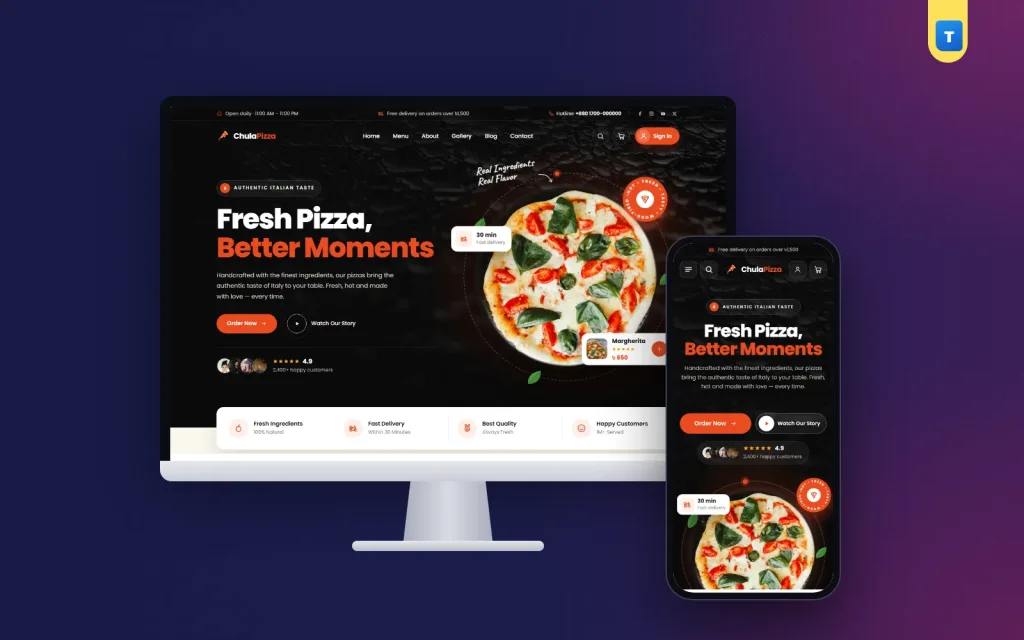
Chula – Pizza Restaurant WordPress Theme
✦ Key features
- A homepage that makes people hungry
- Menu as a real shop
- Sizes and options
- Deals and coupons
- Table booking
- Gallery, chefs and story
- Blog and help pages
- Orders
- Menu items and prices
- Payments and delivery
- Reservations and enquiries
- Theme Options
Overview
Chula is a pizza restaurant WordPress theme for pizzerias, fast food shops and cloud kitchens: an online menu on WooCommerce with sizes, deals, coupons, table booking and sign-in with a mobile number or email.
Chula is a pizza restaurant WordPress theme for pizzerias, fast food shops, cafes and cloud kitchens that want to take orders on their own website. It runs on WooCommerce, so your menu becomes a real online shop with a cart, coupons and order management, while the design stays warm, bold and hungry-looking. Customers see the food, pick a size, add it to the cart and order in a few taps, and you keep the whole order instead of paying a big commission to a delivery app.
The demo comes with 22 menu items in 5 categories, deals, a coupon, a table booking form and every page a restaurant needs. Import it in one click and replace the sample dishes with your own.
Who can use this pizza restaurant WordPress theme
- Pizzerias with dine-in, takeaway and home delivery.
- Fast food shops selling burgers, fries, wings and shakes.
- Cloud kitchens that only deliver and need a clean online menu.
- Cafes and bakeries with pizza, pasta, sandwiches and desserts.
- Restaurant chains with a few branches and one central website.
- Food stalls and home chefs who are moving from Facebook orders to a real shop.
Pizza is in the name, but the pizza restaurant WordPress theme works for any menu that has categories, sizes and add-ons.
A light pizza restaurant WordPress theme for hungry customers on mobile
People order food when they are hungry and in a hurry, almost always from a phone. Chula keeps its own scripts small, about 44 KB of JavaScript, and uses no page builder. Food photos are shown at the right sizes, and the menu loads quickly even on mobile data. The only plugin you need is the free WooCommerce plugin.
Pizza restaurant WordPress theme features
A homepage that makes people hungry
The homepage starts with a big hero for your signature pizza or today's offer. After that come the menu by category, deals, a special offer banner, menu tabs, how ordering works in three steps, why choose us, numbers such as happy customers or pizzas served, your story, your chefs, a food gallery, table booking, reviews and the latest blog posts. Every section can be turned on or off and moved in Theme Options.
Menu as a real shop
Your menu is the WooCommerce shop, renamed to Menu. The demo has 22 items in Pizzas, Sides, Desserts, Drinks and Deals. Each item has a photo, price and add to cart button, and the shop page can be sorted and filtered.
Sizes and options
Use WooCommerce variations for small, medium and large, or for crust types. Each choice can have its own price, so a large pizza costs more without any extra work.
Deals and coupons
Combo meals and family deals sit in their own category and on the homepage. The demo includes the coupon PIZZA20 so you can see how discounts look in the cart. Create your own coupons for first orders, weekends or festivals.
Table booking
A booking form on the homepage lets guests ask for a table. Requests are saved under Chula → Reservations in your dashboard and also emailed to you, so you can confirm by phone.
Gallery, chefs and story
Show your kitchen, your oven and your team. People trust food more when they can see who makes it and where.
Blog and help pages
The demo creates Home, Menu, About, Gallery, Contact, Blog, FAQ, Privacy and Terms pages, plus 4 blog posts and 4 menus. Your site looks finished on the first day.
Customer accounts and ordering
Ordering needs an account. This keeps fake orders down and makes repeat orders faster because the address is saved.
- Customers sign up and sign in with a mobile number (01XXXXXXXXX) or an email, plus a password.
- Visitors who are not signed in are sent to sign in before the checkout.
- For mobile-only accounts, the checkout hides the email step, and the theme never sends mail to a placeholder address.
- The header shows a "Sign In" button, which becomes "My Account" once the customer is signed in.
Running your restaurant from the dashboard
Orders
New orders appear in WooCommerce → Orders with the customer's name, phone, address and items. Change the status as the order moves from kitchen to delivery.
Menu items and prices
Add a dish, change a price or mark an item out of stock in less than a minute, even from your phone.
Payments and delivery
Cash on delivery and pickup are set in WooCommerce. Add bKash, Nagad or card payments with any WooCommerce payment plugin. Delivery charges are set in WooCommerce shipping zones.
Reservations and enquiries
Table requests appear in Chula → Reservations, and contact form messages in the enquiries inbox.
Theme Options
One settings page holds the homepage layout, colours, typography, header and menu, contact form and company details. A search box finds any setting, and you can back up and restore your settings as a file.
Licence and updates
Activate your licence key once to unlock the demo import and theme updates.
Built for the phone first
On a phone, the menu categories are easy to swipe, the cart is always in reach, buttons are thumb-sized and the checkout is short. A customer can go from "I'm hungry" to "order placed" in under a minute.
Why choose Chula over a plain pizza shop website template
A plain pizza shop website template often looks good on the homepage but has no real ordering behind it, or it needs a page builder plus several plugins. Chula styles every WooCommerce page: menu, item, cart, checkout and account. It adds table booking, mobile-number sign-in and a full demo with realistic menu items.
With a pizza shop website template you usually start from empty pages. With Chula you start from a finished restaurant site and only swap in your own photos and prices.
Set up your restaurant site in one afternoon
- Install WordPress and the free WooCommerce plugin.
- Upload and activate Chula, then activate your licence key.
- Import the demo from Chula → Setup.
- Add your logo, colours, address and opening hours.
- Replace the demo dishes with your menu, photos and prices.
- Set delivery charges and payment methods.
- Place a test order from your phone and share the link.
Good food photos sell. Shoot each dish from the same angle in good light, and keep the background simple. The pizza restaurant WordPress theme frames them nicely on both desktop and phone.
What makes a restaurant website sell more food
Restaurant websites win or lose orders in the first few seconds. A few things make the biggest difference:
- The menu is one tap away. Hungry people do not read long stories first. Chula puts the menu and the cart button at the top of every page.
- Prices are visible. Hiding prices behind a phone call loses young customers. Every menu card shows the price clearly.
- Photos look like the real food. Customers forgive a simple photo, but not a dish that looks different when it arrives.
- Offers are easy to find. Deals and combos have their own category and homepage section, so families find the best value quickly.
- Opening hours and address are clear. Show them in the footer and on the contact page, with a map link.
- Ordering is quick. Saved addresses for signed-in customers make the second order much faster than the first.
Each of these is built into the pizza restaurant WordPress theme, so you do not have to design them yourself.
Tips for your first month online
Launch with your ten best sellers rather than your full menu, then add the rest once orders are flowing. Run a simple first-order coupon and share it on your Facebook page and in your shop. Print a small QR code with your website link on pizza boxes and takeaway bags, so dine-in and takeaway guests can order online next time. Check the Reservations list and the orders screen at the same time every day, answer messages quickly, and ask happy customers to leave a review. After a month, look at which items sell most and move them to the top of the homepage. Small steps like these turn a new website into a steady extra source of orders.
Chula runs on WooCommerce, the free shop plugin used by millions of stores. Browse more restaurant themes or see all our WordPress themes.
What is included
- The Chula theme zip file
- One-click demo import: 22 menu items, 5 categories, coupon, pages, 4 posts and 4 menus
- Step-by-step documentation
- Theme updates with your licence
Reviews
0.0
Write a review
★★★★★
0 reviews from buyersNo reviews yet — be the first to share your experience after buying.
Frequently Asked Questions
01Who is the Chula pizza restaurant WordPress theme for?
Pizzerias, fast food shops, cafes, cloud kitchens and small restaurant chains that want to take orders online.
02Do I need WooCommerce?
Yes. Chula runs on the free WooCommerce plugin. No other plugin is required.
03Can customers choose pizza sizes?
Yes. Use WooCommerce variations for sizes or crusts, each with its own price.
04Can guests book a table?
Yes. Booking requests are saved under Chula → Reservations and emailed to you.
05Can customers sign in with a mobile number?
Yes. They can use a mobile number or an email with a password. An account is needed to order.
06Is this pizza restaurant WordPress theme fast on phones?
Yes. There is no page builder, and the theme's own JavaScript is about 44 KB.
07Can I take online payments?
Cash on delivery works out of the box, and you can add bKash, Nagad or card with a WooCommerce payment plugin.
08Do I need coding skills?
No. Import the demo and change everything from the dashboard.
Delivery & Support
1Place your orderAdd to cart, sign in and pay with bKash or Rocket.
2Payment verified automaticallyEnter your Transaction ID — the payment is matched automatically, usually within seconds.
3Get your productYour license key and download appear in My Account → Licenses.
- Secure automatic payment verification
- Delivery to your account & e-mail
- Friendly WhatsApp support
Refund Policy
This policy applies to every product in our store.
You get a refund when the product does not work as described and we cannot fix it, when your license will not activate your website, or when a manually delivered product is late and you cancel before delivery. A working license, or a single license already used on a live domain, is not refundable. Approved refunds go back to the number you paid from within one working day, minus the Send Money charge.
More items
View all →You may also like
−15%
 −34%
−34%
 −27%
−27%
 −30%
−30%
Grocery
Nobanno – Agro Farm WordPress Theme for Rice, Gur & Heritage Pantry Shops
৳1,990
৳2,850Save −30%
