Smart pizza shop website design can bring you orders every night without paying a big commission to delivery apps. When a hungry customer opens your site, they want to see the menu, the prices and how fast the food will arrive. If any of that is hard to find, they go back to the app and order from someone else.
This guide explains how to plan a pizza shop website that sells: the homepage, the menu, sizes and add-ons, deals, ordering, delivery, table booking and mobile layout. The ideas work for pizzerias, burger shops, cafes and cloud kitchens alike.
Why your own website still matters
Delivery apps are useful, but they take a large share of every order and own the customer relationship. Your own website lets you keep the full order value, build a list of loyal customers and run your own offers. Many restaurants use both: the app for discovery and their own site for regular customers who already know and love the food.
To make customers choose your site over the app, it has to be just as easy to use. That is what good pizza shop website design is about.
The homepage: hungry in three seconds
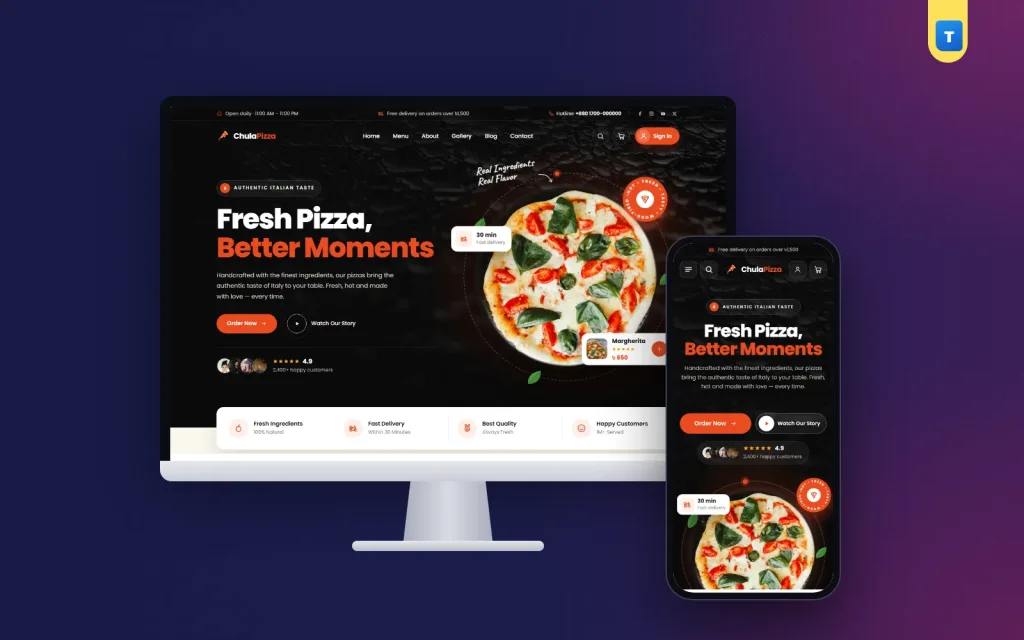
Your homepage has one job: make people hungry and show them how to order. A strong layout looks like this:
- Hero with your signature pizza. A large, mouth-watering photo, one short headline and an "Order now" button.
- Menu categories. Pizzas, sides, pasta, desserts, drinks and deals as large tiles.
- Today's deal. One clear offer, such as a family combo or a weekday lunch price.
- How ordering works. Three simple steps: choose, order, enjoy.
- Why choose us. Fresh dough daily, wood-fired oven, fast delivery, real cheese — whatever is true for you.
- Reviews. Short quotes from happy customers.
- Branches and hours. Address, phone and opening times.
Keep the order button visible as people scroll. On a phone, it should never be more than a thumb away.
Pizza shop website design for the menu
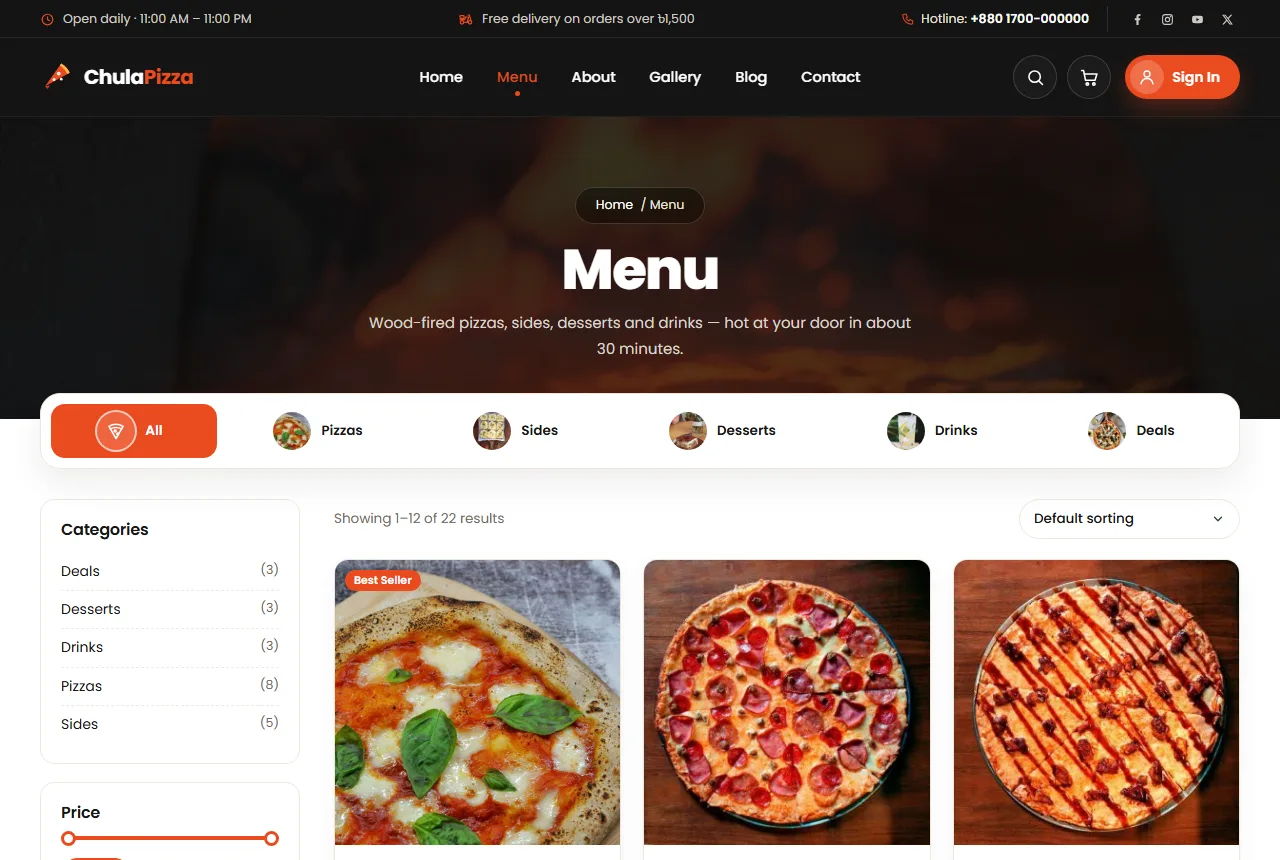
The menu is the heart of the site. Treat it like a real shop, not a PDF.
One photo per item
Every pizza and side should have its own photo, shot from the same angle in good light. A consistent grid looks professional and helps people compare.
Short, clear names
Use names people understand. "Chicken Tikka Pizza" is better than a clever name nobody can pronounce. Add one line under the name with the main toppings.
Prices on every card
Show the starting price directly on the menu card. Hidden prices make people nervous and slow down ordering.
Categories that match how people order
Most people decide the main dish first, then add sides and drinks. Order your categories the same way: pizzas, pasta, burgers, sides, desserts, drinks, then deals.
Sizes, crusts and add-ons
Pizza ordering has more choices than most food. Good design keeps those choices simple:
- Sizes as buttons. Small, medium and large, each with its own price shown clearly.
- Crust options. Thin, regular or stuffed, if you offer them, as a second simple choice.
- Extra toppings. A short list of popular add-ons such as extra cheese, jalapeños or olives, each with a small price.
- Live price update. The total should change as soon as a choice is made, so there are no surprises in the cart.
Avoid long forms with ten dropdowns. Three clear choices are enough for most customers.
Deals and combos that lift the order value
Combos are where many restaurants make their margin, and they also save customers time. Design ideas:
- A separate "Deals" category that is easy to find.
- A homepage section with two or three featured combos and their savings.
- Clear contents for each deal: "1 large pizza, 1 garlic bread, 2 drinks".
- Time-limited lunch or weekday offers to fill slow hours.
- A first-order coupon for new website customers.
Ordering, accounts and checkout
A short, predictable checkout is the difference between an order and an abandoned cart.
- Delivery or pickup choice first. It changes the fee and the time, so ask early.
- Mobile number sign-in. Many customers do not use email. Let them sign up and sign in with a mobile number and a password.
- Saved addresses. The second order should take seconds.
- Few fields. Name, phone, address and payment method are usually enough.
- Clear payment options. Cash on delivery plus mobile payments such as bKash or Nagad cover most customers.
Requiring an account to order can also reduce fake orders, which is a real problem for many restaurants.
Pizza restaurant website design for delivery information
Customers want to know when the food will arrive and how much delivery costs. Put this information in the top bar, the cart and the checkout:
- Delivery areas or radius.
- Delivery fee and any free delivery threshold.
- Estimated delivery time at busy and quiet hours.
- Opening hours and the last order time.
Good pizza restaurant website design is honest about timing. Promising 30 minutes and arriving in 60 loses a customer forever.
Table booking for dine-in
If you have seating, a simple booking form brings in families and groups. Ask for name, phone, date, time and number of guests. Store requests in your dashboard and send yourself an email so nothing is missed. Confirm each booking with a quick call or message.
Show the people and the kitchen
People trust food more when they can see who makes it. A short "our story" section, photos of your chefs, your oven and your dining room, and a small gallery of happy guests all build warmth. Keep the photos real; customers can tell when images come from a stock library.
Designing for phones first
Almost all food orders happen on phones, often late in the evening. On small screens:
- Show menu categories as a swipeable row at the top.
- Use two menu cards per row with large photos.
- Keep the cart button fixed and visible.
- Make buttons large enough for a thumb.
- Keep pages light so they load quickly on mobile data.
Test the full order flow on a real phone before launch, from opening the menu to receiving the confirmation.
Food photography on a small budget
Great photos sell pizza better than any slogan. You can take them yourself with a phone if you follow a few habits:
- Shoot right out of the oven. Cheese looks best in the first two minutes. Have the camera ready before the pizza comes out.
- Use daylight. A table near a window gives soft, natural colour. Avoid the yellow light of the kitchen.
- Shoot from above and at an angle. A top view shows toppings; a low angle shows thickness and melted cheese. Pick one style and use it for the whole menu.
- Keep the background simple. A wooden board or dark slate makes the food stand out.
- Show real portions. If a small pizza is small, show it as it is. Honest photos prevent complaints.
Square photos fit most menu grids. Resize and compress them before uploading so the menu stays fast.
Writing menu descriptions that sell
A short description can turn "maybe" into "add to cart". Keep it to one or two lines and focus on taste and ingredients: "Spicy chicken tikka, red onion and green chilli on our tomato base, finished with fresh coriander." Mention anything special, such as hand-stretched dough or a house-made sauce. Mark spicy, vegetarian or best-selling items with a small label so customers can scan quickly. Avoid long stories on menu items; save those for the About page.
Handling busy hours
Friday nights and holidays can overload the kitchen. Your website can help manage this:
- Show a longer delivery estimate during peak hours instead of over-promising.
- Pause online orders for a short time if the kitchen is full, with a friendly message.
- Encourage pickup with a small discount when delivery riders are busy.
- Mark sold-out items quickly so customers do not order something you cannot make.
Customers forgive a longer wait when you are honest about it. They rarely forgive a promise that is broken. Good pizza restaurant website design plans for the busy night, not only the quiet afternoon.
Speed and search basics
A slow menu costs orders. Compress every food photo, avoid heavy page builders and keep scripts to a minimum. Give each page a clear title, such as "Pizza Delivery in Mirpur | Your Restaurant", so local customers find you in search. Add your restaurant to Google Business Profile with the same name, address and phone as your website. Google explains how local results work in its guide to local ranking.
Building loyalty after the first order
The first order is the hardest to win; the second should be easy. Simple ideas that work for restaurants:
- Send a thank-you message with a small coupon for the next order.
- Offer a free side or drink on every fifth order.
- Remember favourite orders so customers can repeat them in one tap.
- Announce new dishes to past customers before anyone else.
Regulars are the most valuable customers you have. Pizza shop website design that makes reordering effortless turns a one-time buyer into a weekly habit, and that steady income is what keeps a restaurant healthy through slow seasons.
Common mistakes to avoid
- Menu as an image or PDF. It cannot be ordered from and is hard to read on a phone.
- No prices. Customers leave rather than ask.
- Hidden delivery fees. Show them early.
- Too many pop-ups. One offer is enough.
- Out-of-date menu. If a dish is no longer available, remove it or mark it sold out.
- No phone number. Some customers will always want to call.
Measuring what works
After launch, check a few numbers each week: how many visitors open the menu, how many add something to the cart, how many complete an order and how many order again within a month. If many carts are abandoned, look at delivery fees and the checkout steps. If few people return, try a second-order coupon. Change one thing at a time so you can see what helped.
Your first month online
Launch with your ten best sellers and your most popular deals rather than the full menu. Print a QR code with your website link on pizza boxes, receipts and table cards, so takeaway and dine-in customers can order online next time. Share a first-order coupon on your social pages. Ask happy customers for short reviews and add the best ones to the homepage. After a month, move your top sellers to the top of the menu and retire the dishes nobody orders.
Frequently asked questions
Do I need online payment to start?
No. Cash on delivery is enough at first. Add mobile payments when regular customers ask for them.
Should my menu on the website match the app menu?
Mostly yes, but you can offer website-only deals to reward customers who order directly.
How many photos do I need?
One good photo per menu item, plus a few photos of your kitchen, team and dining area. Retake photos whenever a recipe or portion changes, so the menu always matches what customers receive.
Should I show calories or allergens?
Adding common allergens such as nuts, gluten or dairy to each item helps families with dietary needs and shows care. Calories are optional but appreciated by some customers.
How do I stop fake orders?
Require customers to create an account with a mobile number before ordering, and call to confirm large first orders. Most fake orders stop once ordering is tied to a real phone number.
Can I take table bookings and orders on the same site?
Yes. A booking form for dine-in and an online menu for delivery work well together on one site.
Starting with Chula
If you want a ready design built around these ideas, Chula is our pizza restaurant WordPress theme. It turns your menu into a WooCommerce shop with sizes and add-ons, deals, coupons, delivery or pickup, mobile number sign-in and a table booking form whose requests land in your dashboard. The one-click demo adds 22 menu items, 5 categories and every page a restaurant needs.
Whatever you choose, remember the core of good pizza shop website design: make people hungry, show prices clearly, keep ordering quick on a phone and be honest about delivery. Do that, and your own website becomes one of your busiest branches.