 −50%
−50%
Contact Form – Contact Form Plugin for WordPress
✦ Key features
- Name, email and message fields
- One shortcode places the form anywhere
- Uses your theme styling
- Every field validated
- Security check against forged submissions
- Clear thank-you and error messages
- Messages emailed to your chosen address
- Reply-To set to the sender
- Notification email setting
- Field length limits
- No front-end scripts or styles
- Works with any WordPress theme
Overview
Contact Form is a contact form plugin for WordPress with name, email and message fields. Place it anywhere with one shortcode. Every field is checked, a security check blocks forged submissions, and messages reach your inbox with Reply-To set to the sender.
Contact Form is a contact form plugin for WordPress that does one thing well: it lets a visitor send you a message. It gives you a form with name, email and message, a single shortcode to place it anywhere, and an email to the address you choose, with Reply-To set to the sender.
It is for business owners, shop owners and bloggers who want a working contact page today, not a form builder to learn. There is nothing to design and almost nothing to maintain. You set one email address, paste one shortcode and send yourself a test message.
Who can use Contact Form
If you need a contact form for WordPress website pages and want it live in minutes, this plugin fits.
The plugin works on any WordPress site, with any theme. It does not need WooCommerce. Typical users are:
- Business and corporate sites that need a Contact page.
- Tutors, designers, photographers and repair shops.
- Online shops that want a calm channel for pre-sale questions.
- Blogs and news sites that want reader feedback.
- Agencies who need a reliable form for many small client sites.
Why a contact form still matters
Many visitors will not call and do not want to open Messenger. Some are at work. Some prefer writing. Some want to send one detailed question instead of chatting back and forth. A form gives them a quiet way to reach you.
It also looks professional. A contact page with a working form feels more trustworthy than a page with a phone number alone.
Front-end: what your visitors see
The form is plain and short. Visitors see:
- A Name field, limited to 120 characters.
- An Email field, limited to 190 characters, using the browser's email input.
- A Message box with five rows, limited to 5,000 characters.
- A Send message button.
All three fields are required. The form takes the look of your theme, because the plugin does not add its own colours or fonts. It fits your design without extra work.
After the visitor presses send
- If everything is correct, they see: Thank you. Your message has been sent.
- If a field is empty or the email is not valid, they see a message asking them to complete all fields with a valid email.
- If the email could not be sent, they see a clear error asking them to try later, not a blank page.
- If the security check fails, they see a security message and nothing is sent.
Back-end options of the contact form plugin for WordPress
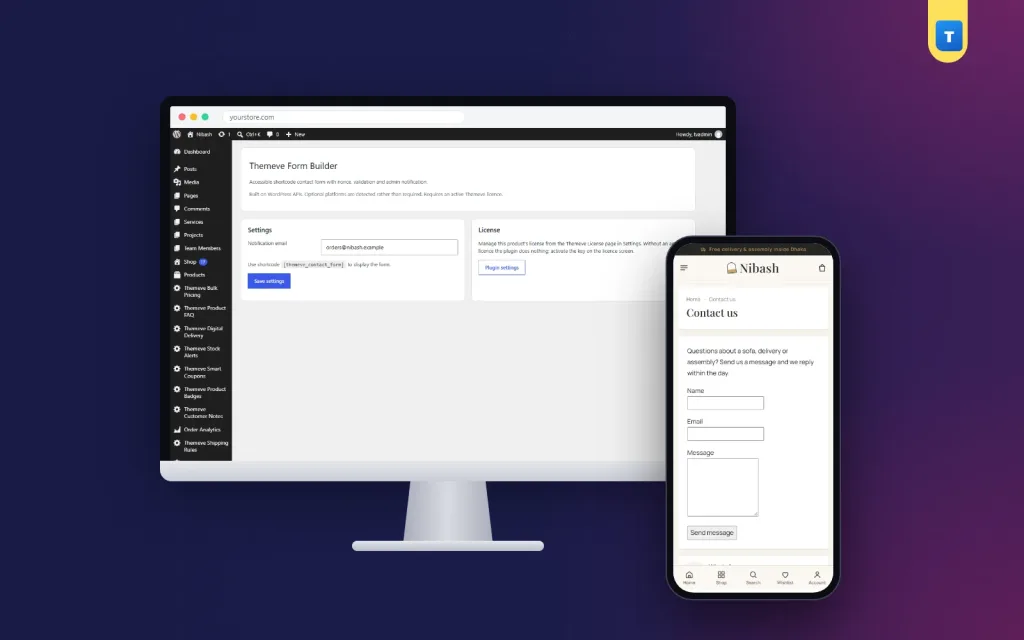
Open Settings › Themeve Form Builder. The settings screen is short and has two cards.
Settings card
- Notification email: the address that receives every message. By default it is your WordPress admin email, so the form works before you change anything.
- A reminder of the shortcode to use:
[themeve_contact_form]. - A Save settings button.
License card
- A link to the licence screen, where you activate or check your licence.
- Without an active licence the form does not work and only the lock screen and the licence screen open.
One shortcode, anywhere
Type [themeve_contact_form] on any page, post or widget area that accepts shortcodes. The form appears in that spot. Most sites use it on a Contact page, but it also works on service pages, landing pages and at the bottom of blog posts.
How the contact form plugin for WordPress protects your site
- Validation: empty fields and invalid email addresses are stopped before anything is sent.
- Security check: a WordPress nonce confirms the form was sent from your own page. This blocks forged submissions from other sites.
- Clean input: name, email and message are sanitised before they are used.
- Field limits: each field has a maximum length.
Messages straight to your inbox
Each message is sent with the standard WordPress mail function. The email subject reads Website contact followed by the sender's name. The body shows the name, the email address and the message.
The Reply-To header is set to the sender, so you answer by pressing Reply in your email app. There is no need to copy addresses or sign in to WordPress.
Make sure emails arrive
Delivery depends on your site's mail. On many hosting plans, WordPress mail lands in spam or never arrives. If that happens, an SMTP plugin makes delivery much more reliable. Mail and SMTP, another Themeve plugin, sends all WordPress email through your SMTP server and lets you send a test email.
Always test after setup. Send a message to yourself and check both the inbox and the spam folder.
Speed and lightness
- No front-end script and no front-end style file is loaded.
- The form is plain HTML and posts back to the same page.
- No outside service and no account are needed.
- No messages are stored in your database, so there is nothing to clean up.
What it does and does not do
- It is one ready-made form with name, email and message.
- It is not a drag-and-drop builder.
- It does not add extra fields, file uploads or multi-step forms.
- It does not keep a list of messages inside WordPress. They go to your email.
For a contact page, this simplicity is a strength. There is nothing to design and nothing to break.
Where to place the form
- Contact page: the usual choice. Add your address, map link and phone number beside the form.
- Service pages: put the form under the service description so interested visitors can ask at once.
- Landing pages: end an offer page with the form instead of a phone number.
- Blog posts: let readers ask a question at the end of an article.
- Widget areas: if your theme renders shortcodes in widgets, the form can sit in a sidebar or footer.
This is a contact form for WordPress website owners who do not want a builder, so keep the page simple. You can use the shortcode on more than one page. All messages go to the same address.
A practical example
A furniture shop makes a Contact page with its address, phone number and the shortcode. A buyer asks if a sofa can be made in another colour. The message arrives in the owner's inbox. The owner presses Reply and answers with photos and a price.
Handling messages well
A contact form plugin for WordPress only brings the message to you. What you do next decides whether the visitor becomes a customer.
- Create a folder or label in your email for website messages, so none are lost.
- Keep two or three short reply templates for common questions, and add one personal line.
- Check your spam folder for the first week after setup.
- If you share the inbox with a team, agree who answers which messages.
Tips for a good contact page
- Add a line above the form that says when you usually reply.
- Show your phone number and address for people who prefer them.
- Test the form after any change to your site or email settings.
- Reply within a set time, such as one working day, and keep to it.
The form brings messages in. Quick, friendly replies turn them into customers.
Setup steps
- Go to Plugins › Add New › Upload Plugin and choose the plugin zip.
- Click Install Now, then Activate.
- Open My Account on the store where you bought it, copy your licence, and activate it on the plugin's licence screen.
- Open Settings › Themeve Form Builder.
- Enter the notification email and click Save settings.
- Create or edit your Contact page and add
[themeve_contact_form]. - Publish the page, send a test message and check that it arrives.
Updates arrive in Dashboard › Updates while your licence is active.
Why choose it over a large form builder
- Setup takes a few minutes, not an afternoon.
- There are no form screens, field types or add-ons to learn.
- No front-end files are loaded, so pages stay light.
- It uses your theme's own styling.
- Fewer options means fewer things that can break.
If you need a survey, a quote calculator or file uploads, a full builder is the right tool. If you need a contact form for a WordPress website that simply works, this plugin is enough.
Works well with other Themeve plugins
If visitors need to create accounts or sign in from the front of your site, Frontend Login and Registration adds login, registration, password reset and account pages with shortcodes. Each plugin does one job, so you add only what you need.
Questions buyers ask before they install
Can I change the labels or the button text?
No. The form has fixed labels: Name, Email and Message, with a Send message button. Your theme controls how it looks.
Can I send messages to two addresses?
The setting takes one notification email. If you need copies, forward them from your mailbox.
Can I use more than one form?
You can place the same form on many pages. All of them use the same settings.
Does it work without WooCommerce?
Yes. It needs only WordPress and a working mail setup.
Requirements
- WordPress 6.2 or newer, tested up to WordPress 7.1.
- PHP 7.4 or newer.
- A working mail setup on your hosting.
- An active licence for this plugin.
What is included
- The plugin zip, ready to upload from Plugins › Add New.
- Your licence, shown in My Account after payment.
- Updates in Dashboard › Updates while the licence is active.
- Documentation after purchase.
- Support for six months through WhatsApp.
Delivery is instant after your payment is checked. Pay with bKash, Nagad or Rocket, enter your Transaction ID, and the download appears in your account. A simple contact form plugin for WordPress is often the first thing a new site needs, and now it takes minutes to add.
Contact Form is built on the official WordPress documentation standards, and you can browse more of our WordPress plugins.
Reviews
0.0
Write a review
★★★★★
0 reviews from buyersNo reviews yet — be the first to share your experience after buying.
Frequently Asked Questions
01What is a contact form plugin for WordPress?
It adds a form to your site so visitors can send you a message without opening their own email app. Contact Form sends each message to your inbox.
02How do I add this contact form plugin for WordPress to a page?
Add the shortcode [themeve_contact_form] to any page, post or widget area that accepts shortcodes.
03Where do messages go?
To the address set under Settings > Themeve Form Builder, with Reply-To set to the sender.
04Can I add more fields?
No. It is one ready-made form with name, email and message, not a drag-and-drop builder.
05Why are messages not arriving?
Delivery depends on your site mail. An SMTP plugin makes delivery much more reliable.
06Are the fields checked?
Yes. Every field is validated and a security check confirms the form was sent from your page.
07Does it match my theme?
Yes. The form uses your theme styling.
08Does it need a licence?
Yes. Without an active licence the form does not work, and only the lock and licence screens open.
Delivery & Support
1Place your orderAdd to cart, sign in and pay with bKash or Rocket.
2Payment verified automaticallyEnter your Transaction ID — the payment is matched automatically, usually within seconds.
3Get your productYour license key and download appear in My Account → Licenses.
- Secure automatic payment verification
- Delivery to your account & e-mail
- Friendly WhatsApp support
Refund Policy
This policy applies to every product in our store.
You get a refund when the product does not work as described and we cannot fix it, when your license will not activate your website, or when a manually delivered product is late and you cancel before delivery. A working license, or a single license already used on a live domain, is not refundable. Approved refunds go back to the number you paid from within one working day, minus the Send Money charge.
More items
View all →You may also like
−50%
 −50%
−50%
 −50%
−50%
 −38%
−38%
