 −50%
−50%
Fraud Shield – Fake Order Protection Plugin WordPress
✦ Key features
- Order history by buyer phone number
- Completed, cancelled, returned and failed counts
- Links from every row to the order screen
- Reads 01, +880, 880 and Bangla digits
- Block or unblock a number in one click
- Blocks classic, block and Themeve Commerce checkout
- Polite message for blocked numbers
- Repeat-order review flag, default 3 orders
- Fraud Shield box on every order screen
- Works on WooCommerce and Themeve Commerce
- Uses only your own site order data
- No outside services
Overview
Fraud Shield is a fake order protection plugin WordPress cash on delivery shops use to check a phone number, see its order history on your own site and block it in one click at checkout.
Fraud Shield is a fake order protection plugin WordPress shops can use to check a buyer before the parcel leaves the door. Type a mobile number and you see every order that number has placed on your website, with completed, cancelled, returned and failed totals side by side. One click blocks the number.
It is built for online shops that sell on cash on delivery. It runs on WooCommerce and on Themeve Commerce, and it reads only the orders stored on your own site. Nothing is sent to an outside courier or fraud service.
Why cash on delivery shops need protection
Every cash on delivery shop knows the pattern. A number orders three items, refuses the parcel at the door, and orders again next week under a new name. Each refusal costs you the delivery charge, the return charge and a few days of stock that could have gone to a real buyer.
The answer is not to stop cash on delivery. The answer is to look at the history before you ship. That is the single job this plugin does, and it takes a few seconds.
Who can use this fake order protection plugin WordPress stores rely on
- Fashion, cosmetics, electronics and grocery shops that take cash on delivery.
- Facebook and social media sellers who moved to a website.
- Shops with several staff who confirm orders by phone.
- Stores that have been hit by prank or repeated refused orders.
- Shops that use WooCommerce, Themeve Commerce, or both.
The lookup is built around Bangladeshi mobile numbers, so it fits shops that deliver in Bangladesh.
Light and quiet
Fraud Shield adds nothing to your public pages. Its stylesheet loads only on its own admin screen. The only moment a buyer meets the plugin is at checkout, and only if their number is blocked.
It uses no outside services. All checks run on the orders already in your database, so there are no extra accounts, no usage limits and no delay while a remote server answers.
Look up a number and see the whole story
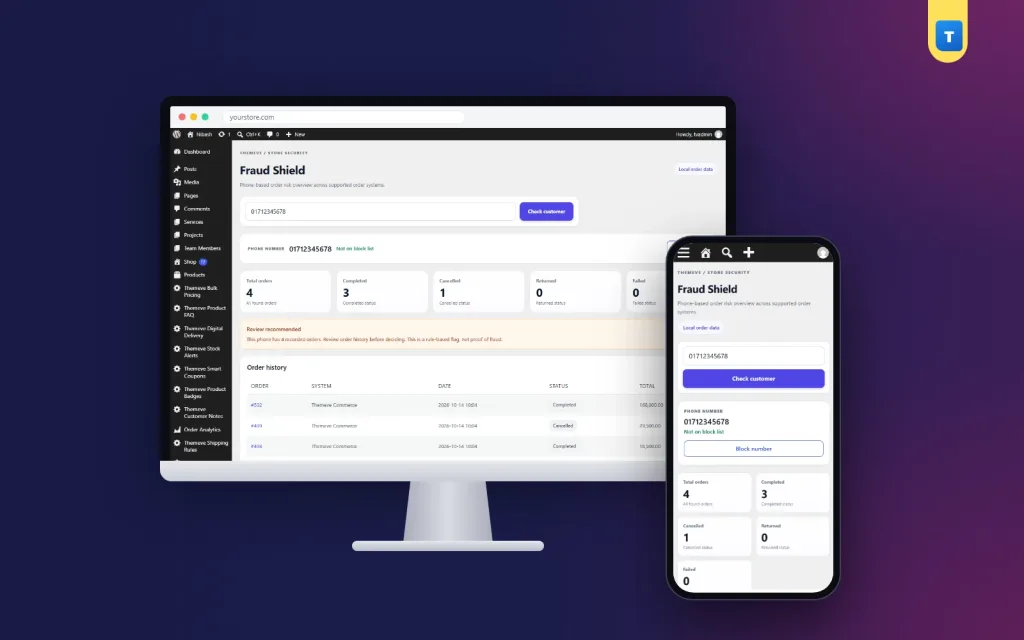
Open Fraud Shield from the left admin menu, type a number and press Check customer. The result screen shows:
- The cleaned phone number and whether it is on your block list.
- Five cards: total orders, completed, cancelled, returned and failed.
- A note that says either Review recommended or No configured rule triggered.
- An order history table with the order number, the shop system, the date, the status and the total. It lists up to 100 orders, newest first.
Each order number links straight to its order screen.
Any way of typing the number
Numbers do not need to be typed in one fixed way. The lookup understands 01 numbers, numbers with a +880 or 880 prefix, numbers with spaces or dashes, and numbers typed in Bangla digits. Staff can paste a number from a chat message without cleaning it first.
Both shop systems in one lookup
If WooCommerce and Themeve Commerce are both on the site, orders from both appear in the same table. The System column tells you which one each order came from.
A history box on every order
You do not even have to open the lookup page. A small Fraud Shield box sits on every order screen. It shows the buyer's number, how many orders that number has placed, how many were cancelled and how many were completed. If the number is blocked, it says so in red. A button opens the full risk history.
On WooCommerce the box appears under the billing address. On Themeve Commerce it sits at the top of the side column. When a new order arrives, one glance tells you whether this is a loyal customer or a number that has refused parcels before.
Block a number in one click
When a number keeps wasting your parcels, press Block number on the lookup screen. From then on that number cannot place an order on any of these checkouts:
- The WooCommerce classic checkout.
- The WooCommerce block checkout.
- The Themeve Commerce checkout.
The buyer sees a short, polite message: this phone number cannot place an order, please contact the store. There is no error page, so honest people who typed a wrong number are not insulted and can reach you by phone.
Changed your mind? Press Remove block and the number is free again. The block list lives on your own site, and you stay in control of every entry.
Repeat-order flag for review
Some fake orders come in bursts. Fraud Shield lets you set a repeat-order rule. Once a number reaches the set number of orders, the lookup shows Review recommended. The default is three orders.
The settings section
- Repeat-order threshold. A number field from 0 to 100. The default is 3. Set it to 0 to turn the rule off.
- How this rule works. A short note on the screen. It explains that the dashboard marks numbers for manual review and does not prove fraud.
- Save settings. A confirmation message appears when the change is saved.
- Privacy note. A reminder that the screen checks only the orders stored on this website.
A flag is a reminder to look, not a verdict. The plugin says so on screen, because a busy wholesale buyer can also order often. You decide what to do after you check the history.
How it helps you run the shop
- A new order arrives for a high-value item.
- You open the order and read the Fraud Shield box. The number has four earlier orders, three cancelled.
- You click through to the full history and see the dates and totals.
- You call to confirm, ask for an advance payment, or block the number.
- The parcel that would have come back never leaves the shelf.
The checks are quick enough for a busy desk. Over a few months, the block list becomes a short record of the numbers that cost you money. This helps you stop WordPress fake orders without turning away good customers.
Set it up in five steps
- In your dashboard, go to Plugins, then Add New, then Upload Plugin. Choose the zip file and install it.
- Activate the plugin.
- Enter your licence key on the License screen. Every feature starts working once the key is active.
- Open Fraud Shield and try a number from one of your recent orders. If you already have orders, the history appears straight away, because the plugin reads the orders you already have.
- Check the repeat-order threshold and save it if you want a different limit.
Orders placed on WooCommerce after you install the plugin also store a cleaned copy of the number, which makes later lookups faster and more exact.
Why this fake order protection plugin WordPress owners choose beats doing it by hand
Many shops keep a notebook or spreadsheet of bad numbers. It works until a staff member forgets to check it, or types the number in a different format and gets no match. Fraud Shield reads the live order data every time, so nothing is out of date.
- One lookup shows the full history of a number.
- Different number formats are matched as one.
- A block stops the order at checkout, not after it.
- No outside service, no monthly fee for lookups, no data leaves your site.
- Works the same on WooCommerce and Themeve Commerce.
Tips for using the lookup well
- Check the history before you pack, not after the courier has left.
- Call buyers whose number shows cancelled or returned orders, and ask for a small advance payment if they still want the item.
- Look at the dates. Three cancelled orders in one week is a different story from three in two years.
- Do not block a number only because it has many orders. A loyal repeat buyer also orders often.
- Teach every staff member who confirms orders to use the Fraud Shield box on the order screen.
These habits keep fake orders under control without making good customers feel watched. Many WordPress fake orders come from the same few numbers, so a short block list goes a long way.
Honest limits
Fraud Shield counts only the orders stored on your own website. It does not see orders a buyer placed with other shops, and it does not call courier companies. A Review recommended flag is advice, not proof of fraud. The lookup expects Bangladeshi mobile numbers that start with 01.
Pair it with other tools
A courier tool can keep delivered and returned records per phone number from your courier slips. A checkout rules tool can hide cash on delivery for very large orders or for chosen districts. Together with Fraud Shield they cover most of the risk in a cash on delivery shop.
Licence, updates and requirements
Fraud Shield needs an active licence key. Until you enter the key, the plugin stays switched off and only its lock screen and License screen open. Once the key is active, every option works and new versions arrive in Dashboard, then Updates, like any other plugin.
- WordPress 6.0 or newer.
- PHP 7.4 or newer.
- Needs WooCommerce or Themeve Commerce, and works with both on one site.
- Works with any WordPress theme.
- Six months of support.
What is included
- The plugin zip file, ready to upload in Plugins, then Add New.
- Your licence key and lifetime updates while the licence is active.
- Documentation after purchase.
- Unlimited re-downloads from your account.
Used with care, a fake order protection plugin WordPress owners trust gives a cash on delivery shop a calm, simple check before every parcel leaves the door.
Fraud Shield is built on the official WordPress documentation standards, and you can browse more of our WordPress plugins.
Reviews
0.0
Write a review
★★★★★
0 reviews from buyersNo reviews yet — be the first to share your experience after buying.
Frequently Asked Questions
01How does a fake order protection plugin WordPress shops use actually work?
Fraud Shield reads the orders on your own site, groups them by phone number and shows completed, cancelled, returned and failed counts. You can then block the number at checkout.
02Can this fake order protection plugin WordPress owners install check other shops?
No. It reads only the orders stored on your own website. It does not connect to couriers or outside fraud lists.
03Can a blocked buyer still order?
No. A blocked number cannot order on the WooCommerce classic checkout, the WooCommerce block checkout or the Themeve Commerce checkout. The buyer sees a polite message.
04Does a review flag mean the buyer is a fraud?
No. It only says the number reached your repeat-order limit. You decide after checking the history.
05Will the lookup work if staff type numbers differently?
Yes. It understands 01 numbers, +880 or 880 prefixes, spaces, dashes and Bangla digits.
06Do I need WooCommerce?
You need WooCommerce or Themeve Commerce. It works with either one, or both on the same site.
07What happens without a licence key?
The plugin stays switched off and only its lock and License screens open.
Delivery & Support
1Place your orderAdd to cart, sign in and pay with bKash or Rocket.
2Payment verified automaticallyEnter your Transaction ID — the payment is matched automatically, usually within seconds.
3Get your productYour license key and download appear in My Account → Licenses.
- Secure automatic payment verification
- Delivery to your account & e-mail
- Friendly WhatsApp support
Refund Policy
This policy applies to every product in our store.
You get a refund when the product does not work as described and we cannot fix it, when your license will not activate your website, or when a manually delivered product is late and you cancel before delivery. A working license, or a single license already used on a live domain, is not refundable. Approved refunds go back to the number you paid from within one working day, minus the Send Money charge.
More items
View all →You may also like
−50%
 −50%
−50%
 −50%
−50%
 −7%
−7%
