How to stop fake orders WooCommerce shops face is a question every cash on delivery seller in Bangladesh asks sooner or later. A buyer orders, refuses the parcel at the door, and you pay for the delivery and the return. This guide gives you a clear plan with steps you can start today, from checking phone numbers to blocking repeat refusers.
You do not need to stop cash on delivery. You need to look at the buyer's history before you ship, set a few simple rules and keep a short record. Each step below is small, and together they cut losses without upsetting honest customers.
What a fake order really is
A fake order is any order placed with no real plan to accept and pay for the parcel. It comes in a few forms:
- Prank orders. Someone types random details for fun or to annoy you.
- Revenge or competitor orders. Another seller fills your queue with orders that never complete.
- Repeat refusers. The same phone number orders again and again, then rejects the parcel.
- Wrong or false numbers. The courier cannot reach the buyer.
- Test orders by bots. Scripts try your checkout with fake data.
Knowing the type helps you pick the right defence. A prank needs a phone check. A bot needs a different tool.
What fake orders cost you
The loss is more than the price of the product. Count every part:
- Packing time and materials.
- The delivery charge you pay the courier.
- The return charge when the parcel comes back.
- Stock that is locked away for days and not sold to a real buyer.
- Your staff time on phone calls and follow-ups.
- A poor record with your courier, which can affect your service.
Add these for one month. Many shops are surprised by the number, and it explains why a small tool is worth the effort.
How to stop fake orders WooCommerce stores get: the core plan
Here is the plan in one list. Each point is explained in the sections below.
- Check the phone number history before you pack.
- Block numbers that keep refusing parcels.
- Flag numbers that order too often.
- Confirm risky orders by phone or message.
- Ask for a small advance on high-risk orders.
- Limit cash on delivery for very large orders.
- Keep a clean record of couriers and returns.
Step 1: look at the phone number history
The phone number is the best identity you have. Names and addresses change, but a person usually keeps one number. Before packing, search your orders by that number and read four counts:
- Completed orders.
- Cancelled orders.
- Returned orders.
- Failed orders.
A number with five completed orders and none returned is safe. A number with three returns and no completed orders is a warning. This takes seconds when the data is in one place.
Normalise numbers first. The same buyer may type 01712..., +88017..., 88017... or use Bangla digits. If your search treats them as different, you will miss repeat offenders.
Step 2: block repeat refusers
When a number has refused two or more parcels, stop it at checkout. A block should:
- Work on every checkout you use, classic and block-based.
- Show a short, polite message, not an error.
- Be easy to undo if you made a mistake.
A polite message matters. Some honest buyers type the wrong number, and a rude page loses a good customer.
Step 3: flag numbers that order too often
Some fake orders come in bursts. Set a simple repeat rule: if one number places three orders in a short time, mark the order for review. A flag is not a verdict. A busy shop owner or a family may order often. You check the history and then decide.
Step 4: confirm risky orders before shipping
For orders you are unsure about, add one extra step. It costs a minute and saves a parcel.
- Call the number and confirm the address and the items.
- Or send a short message and wait for a reply.
- Record the result in the order note.
- Do not ship until the buyer answers.
Honest buyers do not mind. Prank orders usually stop at this point.
Step 5: use advance payment and COD limits
Cash on delivery is trusted by Bangladeshi buyers, so do not remove it. Use it with care instead:
- Ask for a small advance through bKash or Nagad on high-value orders.
- Hide cash on delivery for very large orders.
- Limit it for districts where returns are high.
- Offer a small discount for prepaid orders.
Even a 100 taka advance filters out most pranks, because the prankster does not want to pay.
Step 6: keep a courier and returns record
Your courier slips are a second source of truth. Note for each parcel the phone number, the date, and whether it was delivered or returned. Review the list once a week. Patterns appear fast: the same area, the same time of day or the same product.
Set up your WooCommerce store to resist fake orders
Some settings cost nothing and take minutes. Open your store settings and review these items.
- Make the phone number a required checkout field, and check its format.
- Require a full address, including area and district.
- Turn off guest checkout if most of your buyers have accounts.
- Send an order confirmation e-mail or message at once, so a wrong contact shows quickly.
- Hold new orders as "on hold" until you have checked them.
- Add a short note on the checkout page that you confirm every order by phone.
That last note is powerful. Many prank buyers leave when they learn that a real person will call them.
How to read the signs in an order
Before you call, take thirty seconds to read the order itself. These details often tell the story.
- Time of day. A burst of orders at 3 a.m. is rarely real.
- Odd names. Random letters or the same name with different numbers.
- Strange basket. Many expensive items of the same kind from a new buyer.
- Address problems. A missing area or an address that does not exist.
- Same device. Several orders with different numbers from one IP address.
One sign is not proof. Two or three together are a good reason to confirm by phone first.
What to do when a parcel is refused
- Mark the order as returned or failed, with the date.
- Note the reason the courier gave.
- Check the history of the number. Is this the first refusal or the third?
- If it is the first, send a polite message and keep the number open.
- If it is the second or third, block the number.
- Restock the item and check that it is still in good shape.
Keep your tone calm. Your goal is a clean record, not an argument with the buyer.
Manual checks or a plugin: which is better?
Many shops start by searching the orders list by hand. That works while you get ten orders a day. At fifty orders a day it breaks down, because staff skip the check when they are in a hurry.
A tool that shows the history on the order screen makes the check automatic. When you think about how to stop fake orders WooCommerce shops lose money on, the answer is usually the same: make the safe step the easy step.
- Manual search: free, slow, and easy to forget.
- Spreadsheet of bad numbers: useful, but it does not block the checkout.
- Plugin on your own site: fast, always on, and the data stays with you.
Whatever you choose, test it with a few old orders first. If the numbers match what you remember, you can trust the tool for new ones.
How to train your team
Rules only work when everyone follows them. Hold a short meeting and agree on three things: who checks the history, who calls the buyer, and who is allowed to block a number. Write the rules on one page and keep it near the desk. Review it after a month, and change any rule that causes delays.
Bot orders and checkout spam
If orders arrive in the middle of the night with random names and e-mails, you may be seeing bots. Basic defences are:
- A spam trap field or a challenge on the checkout page.
- A limit on how many orders one IP address can place per hour.
- A firewall plugin on the site.
- Removing guest checkout if you do not need it.
Phone history does not catch bots that use a new number each time, so combine both defences.
Testing your checkout: how to fake order WordPress theme setups safely
Sometimes you need to place a fake order of your own. Maybe you want to see how a new theme shows the checkout, how the confirmation e-mail looks or whether your block rules work. Here is how to fake order WordPress theme tests without harming your real records:
- Create a test product priced at a small amount and keep it private.
- Use a test phone number that you own.
- Place the order from a private browser window.
- Check the e-mail, the order screen and the status changes.
- Mark the order as cancelled and delete the test product when done.
Do this on a staging copy of the site if you can. If you test on the live shop, label the order clearly, so it is not counted in your repeat-order statistics.
A ready-made option for WooCommerce
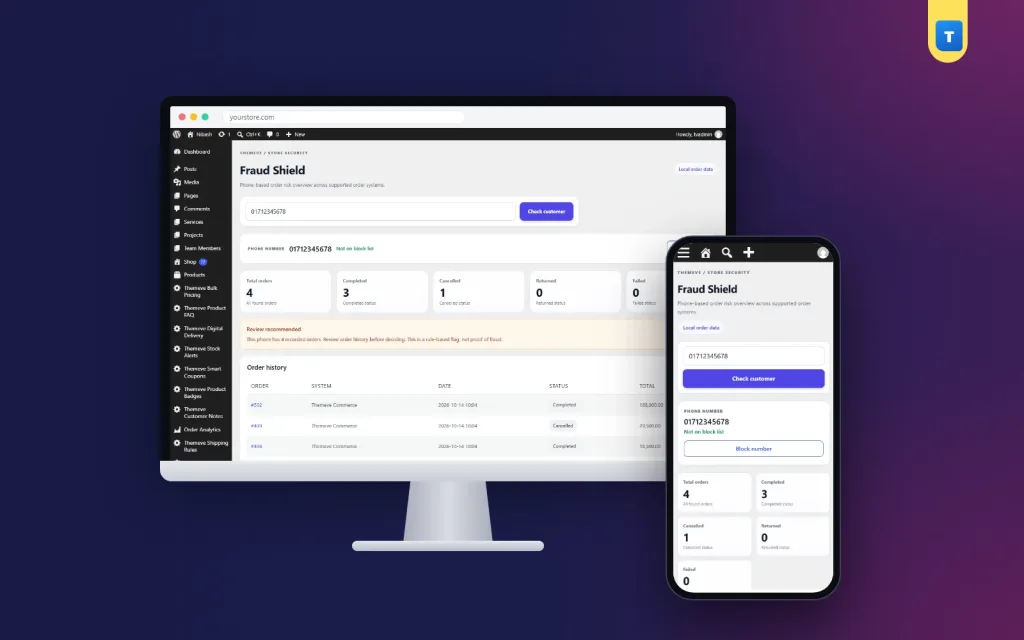
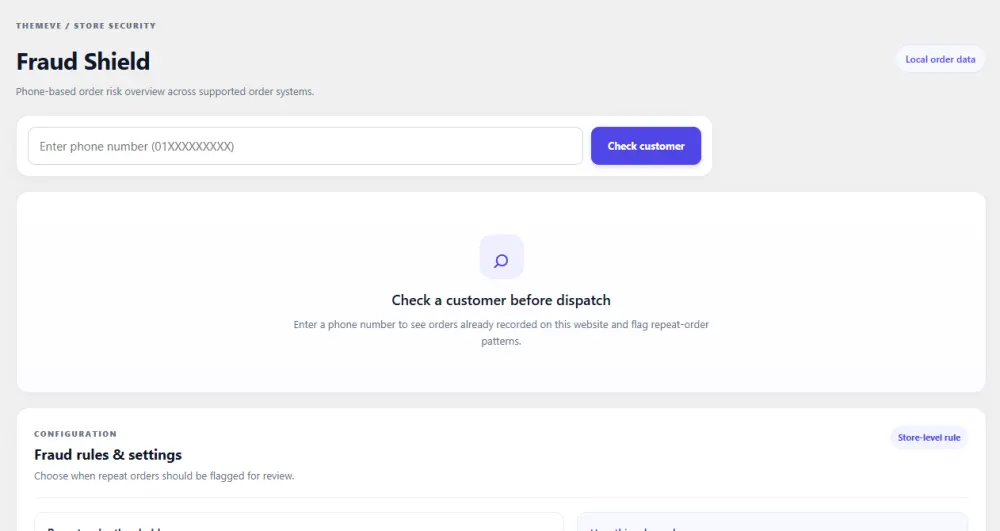
If you want one plugin for the phone checks and blocks above, look at Fraud Shield. It works on WooCommerce and on Themeve Commerce, and it reads only the orders stored on your own site.
- Type a number and see completed, cancelled, returned and failed counts.
- Reads 01, +880 and 880 numbers, spaces, dashes and Bangla digits.
- A Fraud Shield box on every order screen.
- Block or unblock a number in one click, on the classic, block and Themeve Commerce checkouts.
- A polite message for blocked numbers.
- A repeat-order flag, set to three orders by default.
Nothing is sent to an outside courier or fraud service. A flag is a reminder to look, not a verdict, and you stay in control of every decision. The details are on the Fraud Shield page.
Daily routine: how to stop fake orders WooCommerce in ten minutes
- Open the new orders list.
- For each unfamiliar number, check the history.
- Confirm any order with a flag by phone or message.
- Pack the orders that pass.
- Block numbers that refused again.
- At the end of the week, review the returns and update your rules.
A short routine done every day beats a long review done once a month.
Mistakes to avoid when you learn how to stop fake orders WooCommerce
- Blocking after a single failed parcel without checking the reason.
- Treating every repeat buyer as a fraud.
- Showing harsh error messages to blocked buyers.
- Ignoring returns data from your couriers.
- Removing cash on delivery and losing honest customers.
- Believing one tool will stop everything. Use a few small defences together.
If you want to read more on the technical side, the official WordPress documentation is a good, reliable reference.
Frequently asked questions
Is there a simple answer to how to stop fake orders WooCommerce owners can use today?
Check the buyer's phone number history before you pack, and block numbers that keep refusing parcels. This one habit removes most repeat losses.
Does knowing how to stop fake orders WooCommerce mean ending cash on delivery?
No. Keep it, but add checks: history, confirmation calls, a small advance on large orders and a limit on very large ones.
Can I block a customer from checkout?
Yes. A plugin can block a phone number on the checkout so the order cannot be placed. Show a polite message in case the number was a mistake.
How do I know if an order is fake?
Look for refused parcels on the same number, a burst of orders in a short time, unreachable numbers and mismatched names and addresses. No single sign is proof.
How to fake order WordPress theme tests, safely?
Use a private test product, your own number and a private browser window. Cancel the order after and delete the product.
Will blocking numbers hurt honest buyers?
Only if you block too fast. Check the history first and use a polite message, so a buyer with a typing mistake can contact you.
Do fraud tools share my customer data?
That depends on the tool. Some send numbers to outside services. Fraud Shield reads only your own site's order data.