 −14%
−14%
Jhotpot – Grocery Delivery WordPress Theme for Quick Commerce
✦ Key features
- Designed for phones
- Three promo cards
- Dense category tiles
- Lightning deals
- Fresh picks
- How 10 minutes works
- Coupons that copy
- Snack rail, late-night band, reviews, FAQ and blog
- Guest orders or accounts
- Orders and riders
- Theme Options
- Enquiries, subscribers and licence
Overview
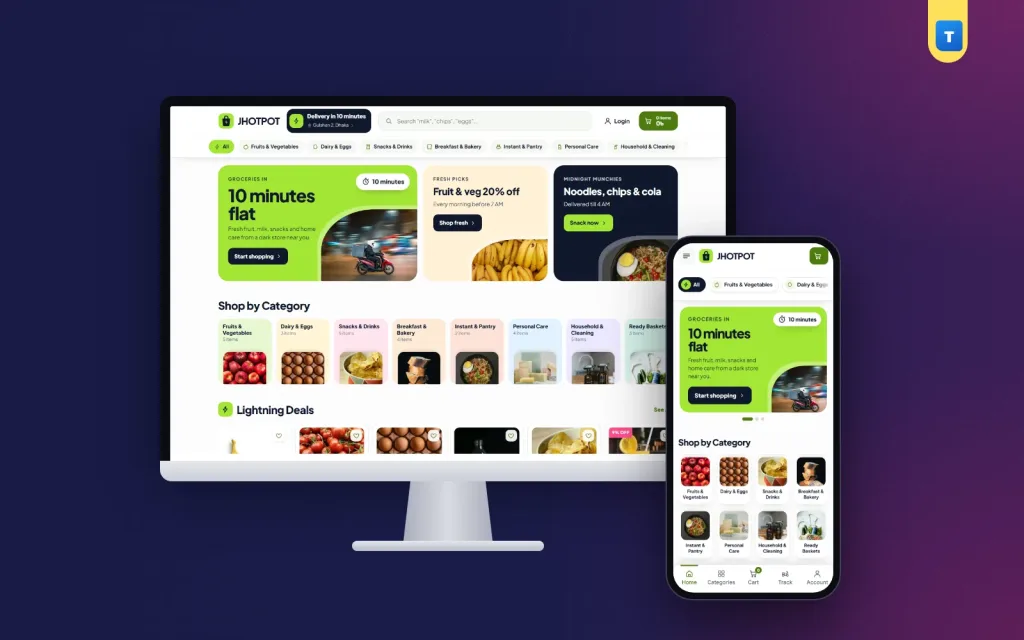
Jhotpot is a grocery delivery WordPress theme for WooCommerce: an app-like quick-commerce shop with a delivery-time pill, sticky search, dense category tiles, quick ADD buttons, coupons that copy and cash on delivery.
Jhotpot is a grocery delivery WordPress theme for quick-delivery supershops and dark stores that bring groceries and daily essentials to the door in minutes. It has an app-like feel in electric lime and midnight ink, with quick ADD buttons, a delivery-time pill in the header and a sticky search.
Buyers tap ADD on milk, eggs, chips or detergent, check out in seconds and pay cash on delivery. Jhotpot runs on the free WooCommerce plugin, so stock, coupons, orders and payments work the normal way, and any WooCommerce plugin can be added later.
The one-click demo brings 31 products in eight categories (Fruits & Vegetables, Dairy & Eggs, Snacks & Drinks, Breakfast & Bakery, Instant & Pantry, Personal Care, Household & Cleaning and Ready Baskets), ready pages and blog posts.
Who this grocery delivery WordPress theme is for
Quick commerce buyers want one thing: the item they forgot, right now. Jhotpot is built for speed of choice and speed of checkout. It fits:
- Quick-delivery supershops promising 10, 15 or 30 minutes in a few areas.
- Dark stores that only deliver, with riders on standby.
- Neighbourhood grocers who want to take app-style orders.
- Late-night convenience stores open 24 hours.
- Campus and housing-society shops delivering to one area.
- Pharmacy-plus-grocery shops selling daily basics.
- Office pantry suppliers who restock snacks and drinks.
If you have looked at a quick commerce website template before, you may have seen app screenshots with nothing behind them. Jhotpot is a working WooCommerce store with a cart, checkout, accounts and order history.
An app-like design built for speed
The header carries a pill with your delivery time and area, such as "10 minutes | Gulshan 2, Dhaka", plus a search bar that stays on screen as the buyer scrolls. Search shows matching products while the buyer types "milk" or "noodles", with photos and prices.
Electric lime on midnight ink makes buttons and prices pop, and small ADD buttons sit on every card. The compact dark footer lists your service areas, hours (such as "Open 24 hours, 7 days"), phone and payment logos. The feel is closer to a delivery app than a shop, which is what buyers expect from a grocery delivery WordPress theme.
Designed for phones
Almost every quick order is placed on a phone. The phone layout has one main promo card, dense category tiles, cards two per row, thumb-sized ADD buttons, a menu sheet from the left and a bottom tab bar with Home, Shop, Cart and Account.
Homepage blocks you can switch on, off and reorder
Every block has its own on/off switch and fields in Theme Options, and you can change their order. No code, no page builder.
Three promo cards
One big card and two small ones instead of a slider, so three offers are visible at once, such as "Fresh fruit in 10 minutes", "Snacks under ৳99" and "Free delivery tonight".
Dense category tiles
A tight grid of category tiles with photos, like a delivery app. Buyers reach any shelf in one tap.
Lightning deals
A rail of products you tag "hot", with quick ADD buttons.
Fresh picks
A rail from your fresh categories, such as fruits, vegetables, dairy and breakfast.
How 10 minutes works
A dark card with four timed steps on a progress line (order, pick, pack, ride) and a small radar drawing of nearby stores. The lime fill runs in a loop to show the idea of speed. The step times and the store line are text you set, so match them to what your riders really do.
Coupons that copy
Ticket-style coupon cards. Buyers tap a code and it is copied, ready to paste at checkout.
Snack rail, late-night band, reviews, FAQ and blog
A rail of snacks and instant food, a dark 24/7 band for late-night orders, three review cards, a FAQ block with a chat line and your latest three posts. The demo reviews and store figures are placeholder text.
Product pages and quick ADD
Every demo product is a variable product with "1 pc" and "2 pcs" options, each with its own price. The card button reads "ADD". Add pack sizes, such as 500 ml and 1 litre, or 6 and 12 eggs, with WooCommerce's normal variations.
- Gallery with a discount tag when an item is on sale.
- Price range and an "In Stock" pill.
- Short text about size, brand and use.
- Secure payment strip with the logos you accept.
- Option buttons, quantity, Add to Cart and Buy Now; Buy Now goes straight to checkout.
- Three promise boxes for delivery, cash on delivery and returns.
- Key highlights card built from the product details.
- Help card with Call and WhatsApp; WhatsApp opens with the product name.
Description, Additional information and Reviews tabs follow, with a score card above the reviews, then related products. Everything uses WooCommerce's own templates, so plugins for delivery slots, minimum orders or rider tracking hook into this grocery delivery WordPress theme normally.
Cart, checkout and delivery
The cart and checkout show a three-step bar (Shopping cart, Delivery & payment, Order placed), a free-delivery progress bar and a row of trust notes.
- Delivery zones: the demo sets Inside Dhaka at ৳80 and Outside Dhaka at ৳120. For quick commerce, replace them with your own small zones and charges.
- Cash on delivery is on. Add bKash, Nagad or cards with their WooCommerce plugins.
- Welcome coupon: WELCOME200 is ready in the demo.
- Service areas listed in the footer, so buyers know if you reach them.
The theme shows your delivery promise; your riders keep it. Set the header pill and the tracker to times you can meet in each area, and limit WooCommerce zones to the places you really cover.
Guest orders or accounts
Guests can order by default. Switch on "Orders need an account" and buyers sign in with a Bangladeshi mobile number or an email and a password in a pop-up, then return to checkout. Signed-in buyers get a My Account dashboard, a wishlist and their order history, so the weekly basket is two taps away.
Shop page and filters
The shop page has a filter sidebar: search, categories, a price range in taka, average rating, stock status and on-sale items, with Apply and Reset. Wishlist hearts sit on every card, and a Track Order page is included.
Out-of-stock items matter more in a grocery delivery WordPress theme than anywhere else: a buyer who orders milk at 2 AM needs to know it is really there. The "In Stock" filter and pills do that job.
How light is it?
- One JavaScript file of 59 KB, about 14.7 KB compressed, in plain JavaScript (slightly larger than our other grocery themes because of the coupon copy and tracker).
- No jQuery needed by the theme itself.
- One stylesheet of about 100 KB compressed.
- No page builder, and web fonts can be switched off for system fonts.
WooCommerce and your plugins still load their own files, which the theme leaves alone. Product photos on a white background compress well, so this grocery delivery WordPress theme stays quick on mobile data.
Running your grocery delivery WordPress theme every day
You work in the normal WordPress and WooCommerce dashboard, plus one Jhotpot menu for the theme's own pages.
Orders and riders
Orders arrive in WooCommerce → Orders. Pick, pack and hand them to a rider, then mark them completed. Keep stock exact; when an item sells out, it stops taking orders.
Theme Options
Colours or a ready palette, fonts, button shape, the header pill, service areas, promo cards, tracker steps, coupons, the late-night band, every homepage block, checkout and accounts, company details, hours, payment logos and footer.
Enquiries, subscribers and licence
Contact form messages are emailed and kept under Jhotpot → Enquiries. Newsletter sign-ups are listed under Subscribers. Activate your licence once and updates arrive in the dashboard.
Works with any WooCommerce plugin
Delivery slot, rider, SMS, POS and payment plugins use WooCommerce's normal hooks, so they work here as on any shop.
Getting started
- Install WordPress and WooCommerce on your hosting.
- Upload Jhotpot in Appearance → Themes and activate it.
- Activate your licence with the key from your Themeve account.
- Import the demo from Jhotpot → Setup.
- Add your products with pack options, prices and stock.
- Set your delivery pill, areas and tracker times.
- Set zones and payment, then place a test order from your phone.
Shoot grocery items on a plain white background, front label facing the camera. Square, matching photos make the dense grids look tidy.
Jhotpot runs on WooCommerce, the free shop plugin used by millions of stores. See all our WordPress themes for more grocery designs.
What is included
- The Jhotpot theme zip file
- One-click demo import with products, categories, options, pages, menus and blog posts
- Enquiries inbox and Subscribers list
- Step-by-step documentation
- Theme updates with your licence
The demo has 31 products in eight categories and the WELCOME200 coupon. A quick commerce website template shows an idea; this grocery delivery WordPress theme takes orders with WordPress and the free WooCommerce plugin.
Reviews
0.0
Write a review
★★★★★
0 reviews from buyersNo reviews yet — be the first to share your experience after buying.
Frequently Asked Questions
01What kind of shop is Jhotpot for?
Quick-delivery supershops, dark stores, neighbourhood grocers, late-night stores and office pantry suppliers.
02Is Jhotpot a grocery delivery WordPress theme with a delivery timer?
It shows your delivery time in the header and a four-step tracker on the homepage. You set the times to match your riders.
03Can buyers copy coupon codes?
Yes. Coupon cards copy the code with one tap, ready for checkout.
04Does this grocery delivery WordPress theme need a page builder?
No. Every block is edited in Theme Options. It needs only WordPress and the free WooCommerce plugin.
05Can buyers order without an account?
Yes, by default. You can switch on a rule that asks buyers to sign in with a mobile number or email first.
06Can I take bKash or Nagad?
Cash on delivery works out of the box. Add bKash, Nagad or cards with any WooCommerce payment plugin.
07Can I limit orders to my areas?
Yes. Use WooCommerce shipping zones and list your areas in the footer.
08Do I need coding skills?
No. Import the demo, then change photos, prices and texts from the dashboard.
Delivery & Support
1Place your orderAdd to cart, sign in and pay with bKash, Nagad or Rocket.
2Payment verified automaticallyEnter your Transaction ID — the payment is matched automatically, usually within seconds.
3Get your productYour license key and download appear in My Account → Licenses.
- Secure automatic payment verification
- Delivery to your account & e-mail
- Friendly WhatsApp support
Refund Policy
This policy applies to every product in our store.
You get a refund when the product does not work as described and we cannot fix it, when your license will not activate your website, or when a manually delivered product is late and you cancel before delivery. A working license, or a single license already used on a live domain, is not refundable. Approved refunds go back to the number you paid from within one working day, minus the Send Money charge.
More items
View all →


