Choosing a quick commerce website design template is different from choosing a normal shop design. Quick commerce, or q-commerce, promises groceries and daily essentials in 10 to 30 minutes from a dark store nearby. The website has to feel as fast as that promise: find, tap ADD, pay and done. This guide explains what such a design needs, from the header to the checkout, with notes for shops in Bangladesh.
Use it as a checklist when you compare designs, or when you improve the shop you already run.
What quick commerce buyers expect
A quick commerce buyer is usually in the middle of something: cooking, working late, feeding a child. They do not browse. They want one or five items, now. That changes everything:
- Speed of finding: search and categories must be one tap away.
- Speed of adding: an ADD button on every card, no product page needed.
- Speed of paying: a short checkout with saved details.
- Trust in the promise: a clear delivery time and area.
A design built for slow browsing, with big sliders and long product stories, works against all four.
The header of a quick commerce website design template
The header does more work here than in any other shop. It should carry:
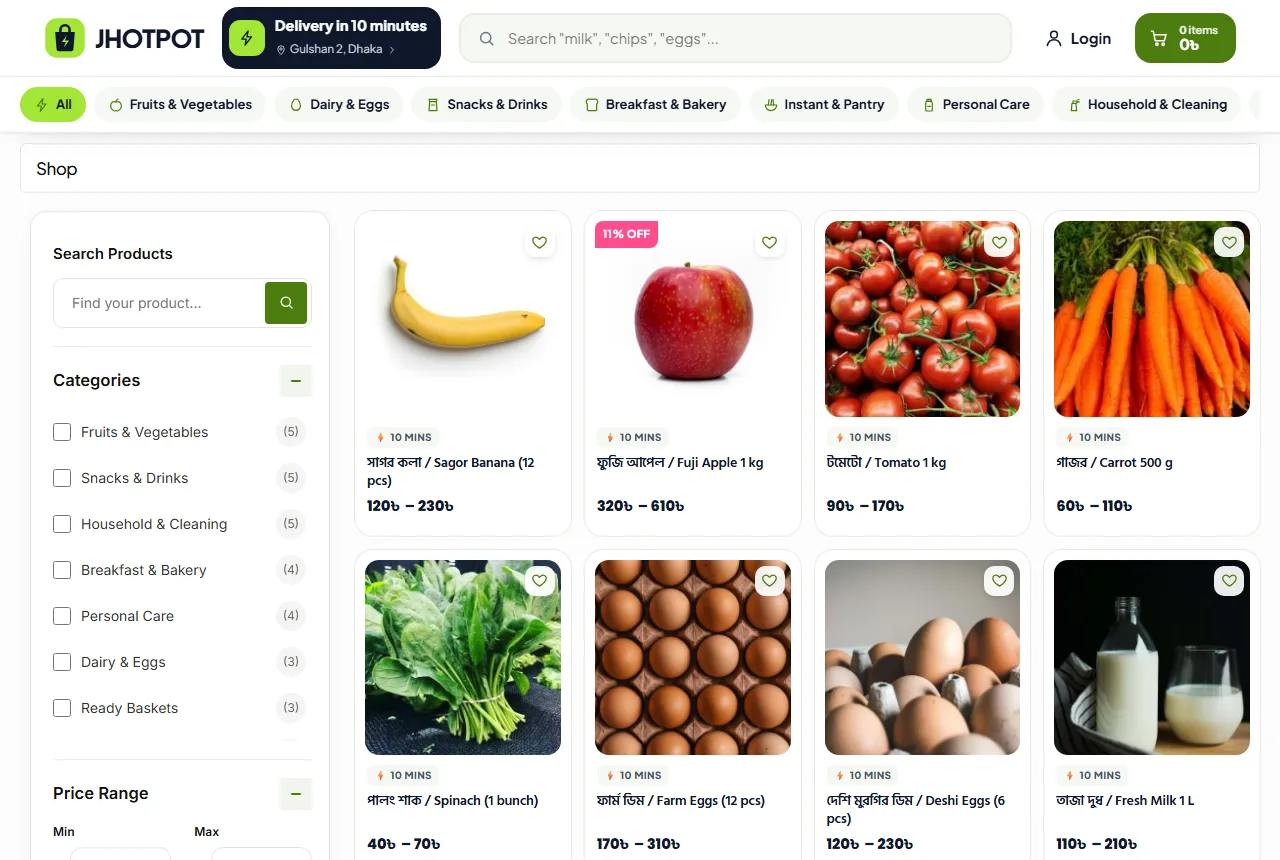
- A delivery pill with the time and the area, such as "10 minutes | Gulshan 2".
- A search bar that stays on screen as the buyer scrolls.
- The cart with a live count.
The delivery pill answers the first question before it is asked: do you deliver here, and how fast? If the time changes at night or in rain, change the pill. A promise that is wrong once is remembered for months.
Search should show results while the buyer types, with photos, prices and an ADD button. Many quick orders never touch a category page at all.
Homepage layout: dense, not decorative
A quick commerce homepage looks more like an app than a magazine. Here is an order that works:
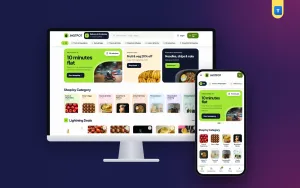
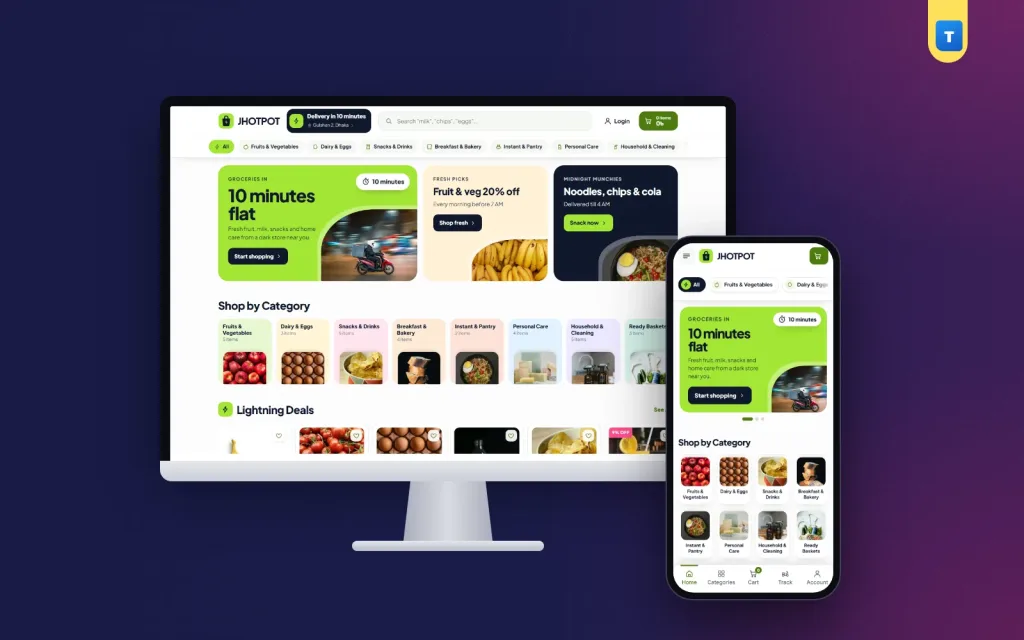
- Promo cards: one big and two small, all visible at once.
- Category tiles: a dense grid, eight or more per screen on a phone.
- Lightning deals: a rail of offers with ADD buttons.
- Fresh picks: fruit, vegetables, dairy and bread.
- How delivery works: a short timeline from order to door.
- Coupons: codes that copy with one tap.
- Snack rail: chips, drinks, noodles and chocolate.
- Late-night band: if you are open all night, say it loudly.
- Reviews and FAQ.
Replace sliders with fixed cards. Sliders hide offers and move while the buyer is trying to tap. Three cards that stay still are faster to read and to use.
Category tiles that work
Use small square photos on soft backgrounds with short names: Fruits & Veg, Dairy & Eggs, Snacks & Drinks, Breakfast, Instant Food, Personal Care, Cleaning. A "Ready Baskets" tile, with ready bundles such as a breakfast basket, helps buyers who want a whole meal in one tap.
Product cards with quick ADD
In quick commerce, the card is the product page for most buyers. Each card needs:
- A clear photo on a white background.
- The name and the pack size, such as "Milk, 1 litre".
- The price, with the old price crossed out if there is an offer.
- An ADD button that adds the item without leaving the page.
- An out-of-stock state that is impossible to miss.
Keep cards two per row on phones and five or six per row on laptops. Rails that scroll sideways keep the homepage short while showing many items.
Pack options, such as one piece or two, or 6 and 12 eggs, should be simple buttons with their own price. A good quick commerce website design template makes this possible without a long product page.
Stock you can trust
Nothing breaks a quick commerce promise like an item that is "in stock" on the site but missing in the store. Keep stock exact:
- Count every item in the dark store and enter it in the shop.
- Let the shop reduce stock with each order.
- Hide or grey out sold-out items at once.
- Show an "In Stock" pill on product pages.
When a picker cannot find an item, call the buyer before the rider leaves. Offering a swap is better than a missing item.
Show how fast delivery works
Buyers trust a promise more when they see how it is kept. A small "how it works" block with four steps does that:
- Order placed: 0 minutes.
- Picked from the shelves: 2 minutes.
- Packed and checked: 4 minutes.
- On the way by bike: 10 minutes.
A simple drawing of nearby stores, like a radar, makes the idea of "close to you" easy to grasp. Use your real times and your real store count. If your average is 18 minutes, say 20, not 10.
List your service areas in the footer and on the FAQ page. A buyer just outside your area should know before they fill the cart.
Coupons and offers
Quick commerce buyers love small, frequent offers. Show them as ticket-style coupon cards with the code, the rule and a "tap to copy" button. Copying the code saves typing on a phone, and it is one of the small touches that make a delivery app website design template feel modern.
Keep offers simple: "৳50 off over ৳499", "free delivery after 11 PM", "first order ৳100 off". Long rules with many conditions lose buyers at checkout.
Bundles
Ready baskets, such as a breakfast basket (bread, eggs, butter, milk) or a movie night basket (chips, drinks, popcorn), raise the order value and save the buyer time. Put them in their own category and on the homepage.
Behind the screen: picking and packing
The website is only half of quick commerce. The other half happens in the dark store, and the design can help it. Product titles with the exact pack size, such as "Eggs, 12 pcs", make picking faster. Clear categories that match your shelves mean pickers walk less.
Print or show each order with items grouped by shelf: fridge, dry goods, cleaning, snacks. Check every bag against the order before it leaves. A missing loaf of bread hurts more in a 10-minute order than in a two-day one, because the buyer is waiting for it right now.
Keep a short list of swaps for common items, such as one brand of milk for another, and ask the buyer before swapping. A note field at checkout, "call me before replacing", saves arguments at the door.
The rider handover
Riders should carry cold items in an insulated bag and hand them over first. A short message or call when the rider is two minutes away helps the buyer be ready. These habits do not show on the screen, but they decide whether the next order comes. The best quick commerce website design template in the world cannot rescue a late, wrong or warm delivery.
Late night and 24/7
If you are open all night, make it a feature. A dark band on the homepage with a line such as "Forgot something at 2 AM?" and a few items people need late, such as milk, eggs, noodles, medicine-cabinet basics and cold drinks, turns a promise into orders.
Show your hours in the footer. If your night service covers fewer areas, say so in the band. Night buyers are often your most loyal ones, so treat them well, and a good quick commerce website design template gives them their own space on the homepage.
Checkout in under a minute
The checkout must be as fast as the delivery promise:
- Only the fields the rider needs: name, mobile number, area, address and a note.
- Saved details for returning buyers.
- A clear delivery charge in the cart, before checkout.
- A free-delivery bar, such as "Add ৳150 more for free delivery".
- Cash on delivery, plus bKash, Nagad and cards as you grow.
Accounts matter in quick commerce, because buyers order often. A sign-in pop-up that accepts a Bangladeshi mobile number or an email with a password saves the address and shows past orders, so the weekly basket can be repeated in seconds.
Phones first, always
Nearly all quick commerce orders come from phones. A quick commerce website design template should be designed for the phone first and the laptop second:
- The delivery pill and the search bar at the top.
- One promo card, then the category grid.
- Cards two per row with ADD buttons for thumbs.
- A bottom tab bar with Home, Shop, Cart and Account.
- No pop-ups that cover the cart button.
Test on a cheap Android phone over mobile data, at night, with one hand. If any step feels slow or fiddly, buyers feel it too.
Keep it light
Speed is the product. Compress photos, avoid heavy page builders and keep scripts few. A theme with one small script and no jQuery dependency loads faster than one that bundles many libraries. Measure the shop on a phone every month.
Content and trust
Even a fast shop needs a few trust pages:
- Service areas and delivery times by area.
- Returns for damaged or wrong items, with a quick refund rule.
- FAQ about timing, payment and substitutions.
- Contact with a chat line that answers fast.
A small blog with useful posts, such as "10-minute dinners from your pantry", brings visitors from search. Google's guide to helpful content is a good guide: write for real buyers and answer their real questions.
Common mistakes
- A delivery time in the header that riders cannot meet.
- Sliders and big banners that push products down.
- No ADD button on cards, so every item needs a product page.
- Stock that is wrong, leading to missing items.
- Coupons with long, hidden rules.
- Service areas hidden until checkout.
Fix these before adding anything new. A quick commerce website design template only works when the operations behind it match the promise on the screen.
How to compare a quick commerce website design template
When you look at a quick commerce website design template, test these things on a phone:
- Can you change the delivery time and area text?
- Does search show results while you type?
- Is there an ADD button on every card?
- Can you set pack options with separate prices?
- Does stock show clearly, and stop orders when sold out?
- Do coupons copy with one tap?
- Is checkout short, with cash on delivery?
- Does it work with normal shop plugins for payment and delivery?
A delivery app website design template that only shows screenshots fails most of these tests. You need a working shop, not a picture of one.
Also check who you can call when something breaks. A design with clear documentation and updates saves you from paying a developer every time WordPress or WooCommerce changes.
Launching your quick commerce shop with Jhotpot
Many of these ideas are already built into the Jhotpot grocery delivery WordPress theme for WooCommerce. It has a header with a delivery-time and area pill and a sticky search, three promo cards, dense category tiles, lightning deals and fresh picks rails with quick ADD buttons, a "how 10 minutes works" tracker, coupons that copy, a snack rail, a late-night band, reviews, FAQ and a compact footer with service areas.
Every demo product has pack options. Delivery zones, cash on delivery, mobile or email sign-in, a wishlist and a phone tab bar are ready after the demo import, so you can focus on stock and riders.
Frequently asked questions
What is a quick commerce website design template?
A shop design built for very fast grocery delivery: a delivery-time pill, dense categories, quick ADD buttons and a short checkout.
How is it different from a normal grocery shop design?
It puts speed first: fewer banners, more products per screen, and ADD buttons on every card.
Can a quick commerce website design template promise 10 minutes?
The design shows your promise; your stores and riders keep it. Set the time you can really meet in each area.
Do I need an app?
Not at the start. A fast, app-like website on phones works well and costs far less than an app.
Which payments should I offer?
Start with cash on delivery, then add bKash, Nagad and cards.