 −34%
−34%
Jontro – Best Multi Vendor WordPress Theme
✦ Key features
- 37 homepage blocks, 14 on by default
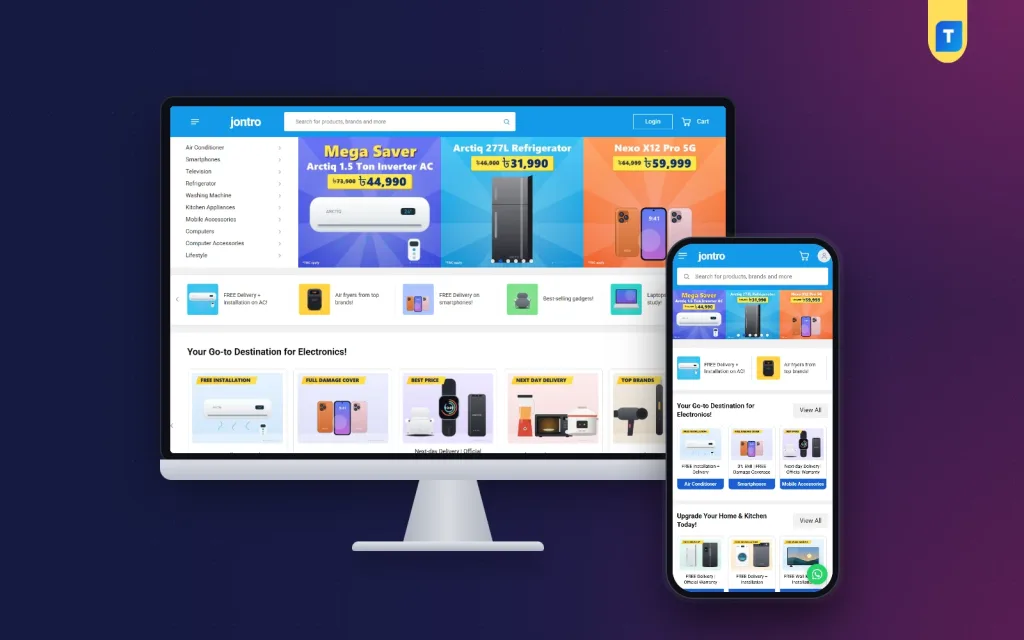
- Sky-blue header with wide live search
- Category list with sub-category panels
- Three-up banner carousel and offer shortcuts
- Seven product rows with their own sources
- Grouped two-column specification tables
- Delivery zones inside and outside Dhaka
- Marketplace-style My Account with orders table
- EMI, warranty and compare on product page
- Six palettes and four font choices
- bKash, Nagad, SSLCommerz and cash on delivery
- Steadfast and Pathao courier with tracking
- Demo with 50 products from 12 brands
Overview
Jontro is a marketplace-style electronics theme and an honest alternative if you search for the best multi vendor WordPress theme. It has no seller accounts. You get 37 homepage blocks, grouped specs, delivery zones and a bundled store plugin.
If you search for the best multi vendor WordPress theme for an electronics business, you probably want a store that looks and feels like the big local marketplaces. Jontro gives you that look. It is built for one shop owner who sells phones, ACs, TVs, fridges, washing machines, kitchen appliances, computers and gadgets under a single brand.
One point first, so there are no surprises. Jontro is a marketplace-style store, not a seller-hosting platform. It has no seller accounts, no seller dashboard and no commission system. You are the only seller. What you get is the layout Bangladeshi shoppers already know, a very large homepage toolkit and a complete store engine.
Is Jontro the best multi vendor WordPress theme for you?
It depends on what "multi vendor" means in your plan. Use this short guide.
- You sell your own stock, but want a big-marketplace look: Jontro fits well.
- You want other sellers to register, list products and earn payouts: Jontro is not the right tool. Choose a theme with a seller module instead.
- You are not sure yet: start with Jontro, build your catalogue, and move to a seller platform later if the business grows that way.
Many electronics owners find that the first option is all they need. People who ask for the best multi vendor ecommerce website often mean exactly this: a big, tidy catalogue with strong search. A large catalogue with clear categories, brand cards and filters is what makes a store feel like a marketplace to a buyer.
Who can use Jontro
The demo is an electronics store with 50 products from 12 invented brands. The layout suits many kinds of shops:
- Home appliance showrooms selling ACs, fridges, washing machines and TVs
- Mobile and gadget shops with many brands
- Computer and accessory stores
- Kitchen appliance and small electrics sellers
- Lifestyle and gift stores that want a marketplace-style layout
- Any large catalogue shop that needs deep categories and many product rows
A layout shoppers already know
The header is a single sky-blue bar with nothing stacked above it. It holds a menu button for all categories, your wordmark, a wide search with live results, a Login button and the cart. On phones it becomes menu, logo, cart and account, with the search field just under the bar.
Below it, a category list with sub-category panels sits beside a three-up banner carousel. Offer shortcut tiles slide underneath. A customer looking for a new TV finds the right shelf in a couple of clicks.
Speed and lightness
Large catalogues need light pages. Here is what the code does:
- The front end does not use jQuery. It runs on one plain JavaScript file of about 29 KB
- One stylesheet of about 149 KB covers the whole theme
- Product and banner images below the first screen load lazily
- No page builder plugin is needed to arrange the homepage
Front-end features
Homepage with 37 blocks
Fourteen blocks are on by default and the rest wait for your catalogue to grow. Every block can be switched off and dragged into a new place.
- Categories with a banner carousel, and offer shortcuts
- Two rows of category cards and a row of brand cards
- Seven product rows, each with its own title, category and source: best sellers, on sale, newest or top rated
- Just For You, a large grid with a Load more button
- About the store, with a title and a few ticked lines
- A promise strip for delivery, warranty, EMI and payments
- Departments, product spotlight, shop by budget, find your fit, shop by need and why Jontro
- Brand spotlight, tech tips, how it works and shop by platform
- Six folding FAQ items
Product cards
- An orange discount tab and an Express tag
- A blue price beside the old price
- Orange stars with the review count
- A round cart button
- Compact cards on phones
Product page
- Vertical thumbnails and a share option beside the name
- The Express delivery line, plus brand and seller
- Price with discount, variant choice and quantity
- Add to cart and Buy now buttons
- EMI per month, warranty, compare, available offers and a "why buy from us" card
- Specification, Description and Reviews switches
- A two-column grouped specification table, then related products
Writing specs is simple. Type "Label: value" lines on the product. A line without a colon starts a new group such as General, Display or Battery. A "Delivery" line fills the Express line, and an "Offers" line, split by bars, fills the offers list.
Category pages, account and checkout
- Folding filters on the left for category, price, highlights and attributes
- Item count in the title, sorting, a four-column grid and Load more
- A marketplace-style My Account: a card lists every page, with cards for account information, account security and an orders table with Review and Buy Again buttons
- On phones, My Account turns into four coloured tiles and a list with round icons
- Checkout with delivery zones inside Dhaka and outside Dhaka, and free delivery over an amount you set
- Login and register in a popup
- An "Order placed" popup and a Track Order page
- Wishlist, compare page, coupons and invoices
Back-end and dashboard options
Theme Options
All theme settings sit in Jontro, under Theme Options. They are laid out in one page with a sidebar, and the page works on a phone too.
- Homepage layout: switch blocks on or off and drag them into order
- Colours: six palettes, namely Sky and orange, Royal blue, Teal, Crimson, Purple and Green
- Typography and style: four font choices, Roboto, Inter, Poppins with Roboto, and Open Sans
- Header and menu, including the optional bottom bar with Home, Categories, Search, Cart and Account
- Product cards and product sections
- Banners and shortcuts: six banners and six shortcut tiles
- Cards, product rows and store text
- Promo blocks: spotlight, fit finder, why us, categories, deals and banners
- Platform, editions, steps and questions
- Product page, and footer with contact details
- Settings search, export, import, reset, and a sticky save bar
The store dashboard
The bundled Themeve Commerce plugin runs the shop, so you do not need WooCommerce. It installs with one click from Jontro, under Setup.
- A sales overview with today, the last seven days, the month so far and orders waiting, plus a sales chart
- Orders with status, a printable invoice and a payments box for advances, dues and refunds
- Incomplete orders, so you can call people who left at checkout
- A full-page product editor with variants, stock, SKU and photos
- Categories, brands and tags
- Payments: cash on delivery, bKash, Nagad, SSLCommerz card payment and manual payment
- Delivery charge by zone, and courier booking through Steadfast or Pathao
- Customer list, transactions and reports
- SMS, OTP and new-order alerts on Telegram
- Facebook Pixel with the Conversion API
Switched-on modules
Jontro turns on the modules an electronics store needs. Attributes handle the filter lists. Offers, back-in-stock alerts and returns are recommended and ready. Other modules stay off until you need them, which keeps the dashboard clean.
Best multi vendor WordPress theme or Jontro? Know the difference
A true multi vendor platform adds work for you: approving sellers, setting commissions, paying out and handling disputes. If you do not want that work, a marketplace-style store is easier to run. You keep control of prices, stock and customer service. Buyers still see a big, organised catalogue.
Choosing the best multi vendor WordPress theme starts with an honest look at your own plan. If you want to host sellers one day, ask yourself whether your brand is strong enough first. Many owners get better results by growing one trusted store before they invite others in.
How it helps you sell electronics
A buyer of a fridge or an AC spends a lot and wants proof before paying. Jontro puts that proof on the page. A shopper who wants the best multi vendor ecommerce website experience, with price, delivery and warranty visible at once, gets it from the first screen.
- Grouped specs let buyers compare Display, Battery or Capacity without opening ten tabs
- EMI and warranty lines answer the two questions every buyer asks before a big purchase
- Delivery zones show a fair charge before checkout
- Shop by budget and shop by need help buyers who do not know the model name
- Back-in-stock alerts bring buyers back when a sold-out model returns
- Order tracking cuts the number of "where is my parcel" calls
Set up in five steps
- Install and activate the Jontro theme.
- Open Jontro, then Setup, and install Themeve Commerce with one click.
- Activate your licence under Jontro, then License.
- Run the one-click demo import. It adds 50 products from 12 invented brands, with variants, grouped specs, the banner carousel, product rows, guides, menus and every page, including Compare, Payment and EMI, Delivery and Installation, Return and Replacement and Tech Tips.
- Set colours and fonts in Theme Options, replace the sample products and artwork, and go live.
Why choose Jontro over a plain template
A plain template gives you a header and a footer. Jontro gives you a finished electronics store, and the best multi vendor WordPress theme comparison is worth running only after you know whether you need sellers at all.
- The store engine, payments and couriers for Bangladesh are included
- Specs, EMI, delivery zones and compare are made for electronics
- No page builder is needed to arrange the homepage
- Updates reach your dashboard once your licence is active
What is included
- The Jontro theme
- The Themeve Commerce plugin, bundled
- One-click demo content
- Lifetime updates
- Support on WhatsApp
The theme needs WordPress 6.0 or higher and PHP 7.4 or higher, and it is fully responsive. The demo artwork and brand names are samples. If you sell mostly phones from many brands, look at Jogajog. For a simpler computer and gadget store, look at Tech Bazer.
You can see Jontro working on the live demo, and browse more ready-made designs in our WordPress themes collection.
Reviews
0.0
Write a review
★★★★★
0 reviews from buyersNo reviews yet — be the first to share your experience after buying.
Frequently Asked Questions
01Is Jontro the best multi vendor WordPress theme?
Jontro looks like a big marketplace, but it is for one shop owner. It has no seller accounts or commissions. If you only need the marketplace look for your own stock, it fits well.
02Can other sellers sign up on a site built with the best multi vendor WordPress theme layout of Jontro?
No. Jontro does not include seller registration, seller dashboards or payouts. You are the only seller on the site.
03Is Jontro suitable for a store with hundreds of products?
Yes. It has a category list with sub-category panels, seven product rows, a Load more grid and category pages with folding filters.
04How do I add grouped specifications?
Write Label: value lines on the product. A line without a colon starts a new group, such as Display or Battery.
05Can I charge different delivery inside and outside Dhaka?
Yes. Checkout uses delivery zones, and you can offer free delivery over a set amount.
06Is the store plugin included?
Yes. Themeve Commerce is bundled and installs in one click from Jontro, then Setup.
07Which payments and couriers work with it?
bKash, Nagad, SSLCommerz, cash on delivery and manual payment, plus Steadfast and Pathao courier and a Track Order page.
08Do I need code to change the homepage?
No. Banners, shortcut tiles, product rows, colours and fonts are set in Theme Options, and blocks are switched on or off and dragged into order.
Delivery & Support
1Place your orderAdd to cart, sign in and pay with bKash or Rocket.
2Payment verified automaticallyEnter your Transaction ID — the payment is matched automatically, usually within seconds.
3Get your productYour license key and download appear in My Account → Licenses.
- Secure automatic payment verification
- Delivery to your account & e-mail
- Friendly WhatsApp support
Refund Policy
This policy applies to every product in our store.
You get a refund when the product does not work as described and we cannot fix it, when your license will not activate your website, or when a manually delivered product is late and you cancel before delivery. A working license, or a single license already used on a live domain, is not refundable. Approved refunds go back to the number you paid from within one working day, minus the Send Money charge.
More items
View all →