 −50%
−50%
Loyalty Points – WooCommerce Loyalty Points Plugin
✦ Key features
- Points added when an order is completed
- Points on Themeve Commerce when payment completes
- 1 point per 1 taka on WooCommerce
- Points given once per order
- Balance on the WooCommerce My Account dashboard
- Logged-in customers only
- Simple on/off switch
- You choose the rewards
- Works with WooCommerce and Themeve Commerce
- No coding needed
Overview
Loyalty Points is a loyalty points plugin WordPress shops can switch on in a minute. Customers earn points on every completed order, and WooCommerce stores show the balance on the My Account dashboard for easy tracking.
Loyalty Points is a loyalty points plugin WordPress shop owners can switch on in a minute. Every completed order earns the customer points, and the balance shows up in their account. Nothing else needs to be set up for the points to start counting.
Winning a new buyer costs money in ads, discounts and time. Keeping an existing buyer costs far less. Points give regular customers a visible reason to choose your shop again. Every order adds to a number they can watch grow, and you can see exactly who your best customers are.
Who can use this loyalty points plugin WordPress shops install
It suits any shop that has returning customers. It runs on two kinds of store:
- A WordPress shop that runs on WooCommerce.
- A shop built on our Themeve Commerce plugin.
Shops that see the biggest effect:
- Grocery and household shops, where people order every week.
- Cosmetics and baby product shops, where buyers repeat the same items.
- Fashion pages with seasonal buyers who return before each Eid or Puja.
- Pharmacy-style and daily-use shops with steady repeat orders.
- Gift and accessory shops that want customers to come back for the next occasion.
What you get at a glance
- Points added automatically when an order is completed.
- Points on Themeve Commerce when the payment completes.
- Points given once per order only.
- A points balance on the WooCommerce My Account dashboard.
- A single on/off switch on one settings screen.
- Works on WooCommerce and Themeve Commerce.
- No coding and no complicated rules to learn.
Why points bring customers back
People like progress. A balance that climbs from 2,000 to 5,000 points feels like something worth keeping, even before you announce what it can be used for. Customers who see their number grow think twice before they order from another page.
A loyalty points plugin WordPress owners can run without a developer also gives you a clear picture of repeat buying. You stop guessing who your best customers are, because their balances rise faster than everyone else's. That list is useful for every message and offer you send.
Light on your site
The plugin adds no JavaScript and no stylesheet to your shop pages. It does its work when an order changes status, and it shows one line of text on the account page. The balance is stored as a small value on the customer's user record, so there is no extra database table to grow.
How the points are counted
On WooCommerce
- When you mark an order as Completed, the customer earns 1 point for every 1 taka of the order total.
- The total is rounded down to a whole number. An order of 1,250.75 earns 1,250 points.
- Points are added to the customer's existing balance.
On Themeve Commerce
- Points are added when payment completes, or when the order status becomes Completed.
- The rate is 1 point for every 100 taka of the order total, rounded down.
- An order of 1,250 taka earns 12 points.
Rules that apply on both
- Each order gives points once. If the status changes again later, for example from completed to processing and back, nothing is added a second time.
- Points go to logged-in customers only. A guest order has no account to hold the points, so it earns nothing.
- Cancelled, refused and unpaid orders earn nothing, because points are given only on completion or payment.
Customers do not need a manual to understand it. The rule is simple enough to explain on a banner or a Facebook post, which matters more than clever rules nobody remembers.
Front end: what customers see
- On a WooCommerce store, the customer's My Account dashboard shows a notice line that reads Loyalty points followed by their balance.
- It appears only when the customer is logged in.
- The notice uses WooCommerce's own info style, so it matches your theme.
- There is no extra page to find and no table to read. Just one number.
On a Themeve Commerce store, the plugin adds the points to the customer's account record. The visible balance line is part of the WooCommerce account dashboard, so on Themeve Commerce you will check balances yourself and tell customers where they stand. Test it on your own store before you announce the program.
Back end: every screen and option
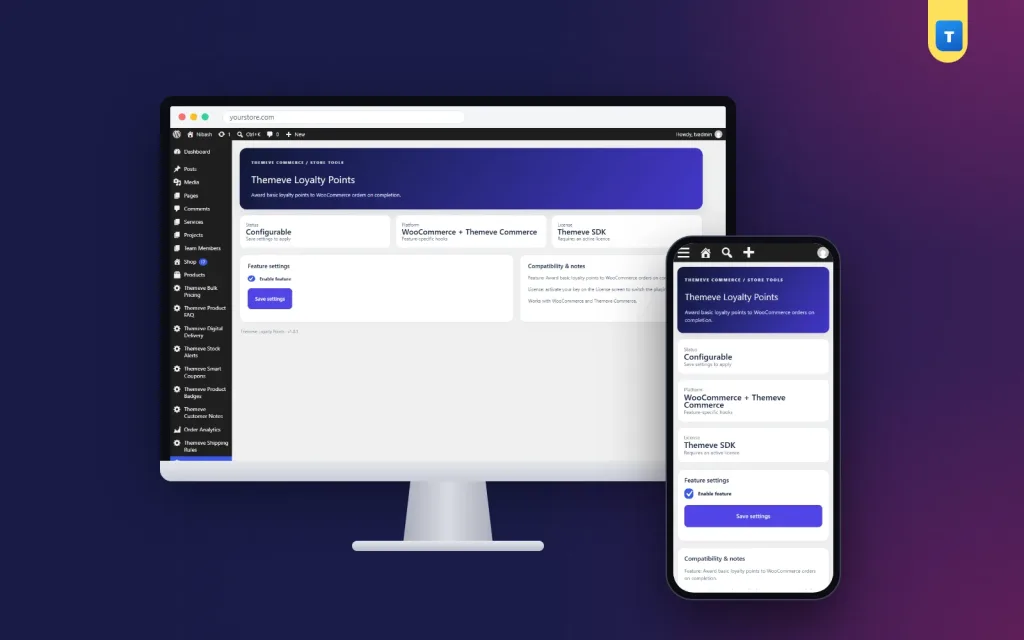
The Themeve Loyalty Points settings screen
After activation, Themeve Loyalty Points appears in the left admin menu. The screen has these parts:
- Header and status tiles. Three tiles show the plugin status, the supported platform (WooCommerce and Themeve Commerce) and the licence state.
- Feature settings card. It holds the Enable feature checkbox. Tick it to award points and show the balance. Untick it to stop awarding points. A Save settings button stores the choice.
- Compatibility and notes card. A side panel with a short description and a reminder that the licence must be active.
This is a loyalty points plugin WordPress administrators can manage in a few seconds, because there is only one setting to look after. Points already earned stay on the customer accounts when you switch the feature off.
What the plugin does not include
This plugin earns and shows points. It does not have a redeem-at-checkout step, a points history table, a settings field for the earning rate or a screen that lists every customer's balance. That keeps it light, and it leaves you free to decide how points are rewarded and to change your mind as you learn what your buyers like.
Who can open the settings
On WooCommerce, users with the manage WooCommerce capability can open the screen. On a Themeve Commerce store without WooCommerce, store administrators can open it.
The licence screen
The plugin needs an active Themeve licence. Until you activate it, no points are given and only the lock screen and License screen open. After you enter your licence, points start counting on new completed orders. Updates arrive in Dashboard, Updates while the licence is active.
How a loyalty points plugin WordPress stores can run by hand
Many small shops run simple reward rules by hand, and that works well. Choose a few levels and promise a reward at each one. For example:
- 5,000 points: a free delivery coupon.
- 10,000 points: a small gift with the next order.
- 20,000 points: early access to a sale.
When a customer messages you, check their balance and send the reward. Write your reward levels on a banner and in your Facebook page intro. Check balances once a week for your top buyers and send a message when someone reaches a level. Customers who get a surprise reward often tell their friends.
A quick example
A grocery shop switches on points before Ramadan. Regular buyers see their balance grow with each weekly order. The shop announces that 10,000 points earns free delivery for a month. Through the season, more buyers order weekly instead of switching shops, and the owner can see who the most loyal customers are.
Choose rewards you can afford
Work out what a reward costs before you promise it. If free delivery costs you 100 taka, and a customer needs 10,000 points to earn it, you can see the cost per order at a glance. Start with small rewards, watch how customers respond for a month, and only then add bigger ones.
A loyalty points wordpress plugin for WooCommerce stores only records the points; the generosity of the program is your decision.
Keep the program fair
- Use the same rules for every customer.
- Keep reward levels steady for at least a season.
- If you change the rules, announce it early and honour points already earned.
- Answer balance questions quickly and politely. A customer who asks about points cares about coming back.
Setup in six steps
- Make sure WooCommerce or Themeve Commerce is installed and active.
- Go to Plugins, Add New, Upload Plugin. Choose the zip file and install it.
- Activate the plugin.
- Open the License screen and enter your licence.
- Open Themeve Loyalty Points in the left menu, make sure Enable feature is ticked and click Save settings.
- Complete a test order, log in as that customer and check the balance.
Only orders completed after the plugin is switched on earn points. Older orders are not counted back.
Why choose it over a plain order history
An order list tells you what was sold. Points tell the customer that you noticed them. That small difference is often what makes a shopper pick you again when two shops sell the same item at a similar price.
- Customers get a number they can see, which gives them a reason to return.
- Points are added by the system, so nobody has to count orders by hand.
- The once-per-order rule keeps totals honest.
- You choose the rewards, so the cost to your shop stays in your hands.
- If you want a loyalty points WordPress plugin for WooCommerce that is easy to explain to customers, this one keeps the rule short.
Works well with other Themeve plugins
- Smart Coupons shows a coupon code on the cart and checkout, which is a neat way to hand out a reward code.
- Customer Notes lets your team record which rewards a customer has already received.
What is included
- The plugin zip, ready to upload in Plugins, Add New.
- Updates in Dashboard, Updates while the licence is active.
- Documentation after purchase.
- Six months of support.
- Requirements: WordPress 6.2 or newer, PHP 7.4 or newer. Tested up to WordPress 7.1.
With a loyalty points plugin WordPress shops of any size can start rewarding their best customers with every order they place.
Loyalty Points is built on the official WordPress documentation standards, and you can browse more of our WordPress plugins.
Reviews
0.0
Write a review
★★★★★
0 reviews from buyersNo reviews yet — be the first to share your experience after buying.
Frequently Asked Questions
01What does a loyalty points plugin WordPress stores can install actually do?
It gives customers points on every completed order and stores the balance on their account, so you can reward repeat buyers.
02How many points does a customer earn?
On WooCommerce, 1 point for every 1 taka of the order total, rounded down. On Themeve Commerce, 1 point for every 100 taka.
03When are points added?
On WooCommerce when the order is marked Completed. On Themeve Commerce when payment completes or the order is Completed. Each order gives points once.
04Where do customers see their points?
On a WooCommerce store, in a notice line on the My Account dashboard.
05Do guest customers earn points?
No. Points are stored on a customer account, so the customer must be logged in.
06Can customers redeem points at checkout?
No. The plugin earns and shows points. You decide the rewards and give them yourself, for example with a coupon.
07Does this loyalty points plugin WordPress owners install need WooCommerce?
It works with WooCommerce or with Themeve Commerce. Install one of them first.
08Does it need a licence?
Yes. Until the licence is active, no points are given and only the lock and License screens open.
Delivery & Support
1Place your orderAdd to cart, sign in and pay with bKash or Rocket.
2Payment verified automaticallyEnter your Transaction ID — the payment is matched automatically, usually within seconds.
3Get your productYour license key and download appear in My Account → Licenses.
- Secure automatic payment verification
- Delivery to your account & e-mail
- Friendly WhatsApp support
Refund Policy
This policy applies to every product in our store.
You get a refund when the product does not work as described and we cannot fix it, when your license will not activate your website, or when a manually delivered product is late and you cancel before delivery. A working license, or a single license already used on a live domain, is not refundable. Approved refunds go back to the number you paid from within one working day, minus the Send Money charge.
More items
View all →You may also like
−50%
 −38%
−38%
 −50%
−50%
 −50%
−50%
