A shoes website design template saves you months of work, but only if it fits how shoes are really bought. People do not buy shoes by colour alone. They ask about size, fit, comfort and whether the pair will last. A template that answers those questions on the page is worth far more than one that just looks good.
This guide shows how to choose and set up a template for a shoe shop in Bangladesh. You will find the layout blocks that matter, size help ideas, photo tips, payment and delivery advice, and a checklist you can follow before launch.
What a shoe shop website must solve
Think of this as the brief for any shoes website design template you look at, because it keeps the choice practical.
Online shoe buyers have one big fear: the wrong size. Every exchange costs you delivery twice and eats your profit. A good shop site is built around that fear.
- Size: help buyers know which size to order.
- Fit and comfort: describe width, sole and material in plain words.
- Trust: show that pairs are original and that exchange is possible.
- Speed: let a buyer go from the first page to payment in a few taps.
- Range: let men, women, kids and elders each find their own shelf.
Keep this list beside you while you look at templates. Each feature you consider should solve one of these points.
What to look for in a shoes website design template
Many templates are made for general shops and treat shoes like any other product. Use this checklist to find one that understands footwear.
- Size ranges visible on the product card, not hidden inside the page.
- Quick size buttons so a buyer can add a pair without opening it.
- Colour swatches that change the photo.
- Filters for type, size, colour, price and brand.
- A size guide area you can fill with your own chart.
- Square or portrait cards that show shoes at a good size.
- Homepage blocks you can switch off and move.
- Good phone layout, with two cards per row.
- Local payments: bKash, Nagad, cash on delivery.
- Courier support for parcels and tracking.
If a template misses more than two or three of these, you will end up building them yourself.
Plan your range before you choose a layout
Planning the range first is the cheapest step in choosing a shoes website design template, because it tells you which blocks you will actually use.

Shoes come in many types, and your range decides your menu. Write down the groups you sell.
- By person: men, women, boys, girls, little kids, seniors.
- By type: sneakers, running, sandals, formal, boots, slides, heels, school shoes.
- By use: office, school, rain, travel, wedding, home.
- By brand or maker, if you stock more than one.
Most shoppers think "I need school shoes for my son" or "I need something for rainy days". Give them a way to shop by that thought. A rail of shoe types and a row of "made for" cards often work better than a long category list.
Homepage blocks that work in a shoes website design template
A good shoe homepage is quick to scan. Here is an order that suits most shops.
- Hero slider: one or two seasonal offers with a clear button.
- Shop by type: a rail of shoe shapes that link to categories.
- Shop by who: tiles for men, women, kids and elders.
- New drops: two rows of the newest pairs.
- Size finder: a small tool that turns foot length into a shoe size.
- Best sellers: tabs by category.
- Made for: cards for running, office, school and rain.
- Flash sale: a band with a countdown and stock bars.
- Brands and price tiles: quick routes for people who shop by budget.
- Promise strip: delivery, exchange, cash on delivery, original products.
You do not need all of these on day one. Start with six or seven and add the rest as your catalogue grows.
Shoes website design ideas for size help
Size is where many shops lose money, so spend your best effort here. These shoes website design ideas reduce wrong-size orders.
A foot-length size finder
Ask the buyer to measure her foot in centimetres and slide to that number. The tool shows the matching EU, UK and US size. Add links to men, women or kids after the result.
A size range chip on every card
A small label such as "EU 39 to 45" tells a buyer at a glance whether the pair comes in her size. It saves clicks and stops people opening pages that cannot suit them.
A size guide and exchange page
Write a simple chart for each brand or maker, because sizes differ. Add a page that explains how exchange works, how many days the buyer has and who pays for the second delivery.
How to measure at home
- Stand on a sheet of paper in the evening, when feet are largest.
- Mark the longest toe and the heel.
- Measure the gap in centimetres.
- Add about 0.5 to 1 cm for comfort.
- Match the result to your chart.
Product photos that shoppers trust
Shoes look different from every angle. Show them honestly.
- Take at least four photos: side, front, back and sole.
- Add one photo of the pair being worn.
- Use a clean, plain background in soft daylight.
- Keep the same size and crop for every pair so the grid stays neat.
- Show the real colour. Edited photos cause returns.
- Photograph the box if it adds trust, especially for branded pairs.
Write the material, sole type, heel height and weight in the description. For kids, add the age range. For seniors, mention grip and soft insoles.
Colours, fonts and layout
Shoes website design ideas for colour are simple: let the shoes carry the colour and keep the page calm around them.
A sporty brand can use bold headings and one strong accent colour, such as orange on a grey base. A leather workshop may prefer cream and brown. Pick one main accent and use it for buttons and sale labels.
- Choose two fonts only.
- Keep product cards the same size.
- Use white space around each card.
- Make the price large and the sale price clear.
- Keep the add-to-bag button the same colour everywhere.
Good templates give you a few ready palettes. Try each one with your own photos before you decide, as colours look different with real shoes on them.
Payment, delivery and exchange in Bangladesh
Local habits shape how you set up checkout.
- Offer bKash and Nagad for quick payment.
- Offer a card gateway such as SSLCommerz.
- Keep cash on delivery, since many buyers want to try the pair first.
- Take a small advance on costly pairs to cut fake orders.
Show delivery time and charge for Dhaka and other districts at the product page, not at the last step. Connect Steadfast or Pathao so you can send parcels from the order screen. A tracking page keeps buyers from calling you again and again.
State your exchange rule in two lines. For example: "Exchange within 3 days if the pair is unworn and the box is intact." Clear rules prevent arguments.
Make it work well on phones
Phone buyers are impatient, and a shoes website design template that loads slowly will lose them before the first photo appears.
Most orders will start on a phone. Test everything on a small screen.
- Show two cards per row.
- Keep quick size buttons large enough for a thumb.
- Make photos swipeable on the product page.
- Use a short, one-page checkout.
- Compress images so the page opens fast on mobile data.
- Keep the bag button visible while scrolling.
A ready-made option for a family shoe shop
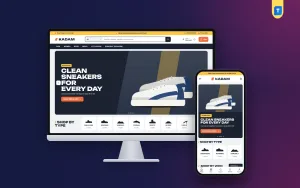
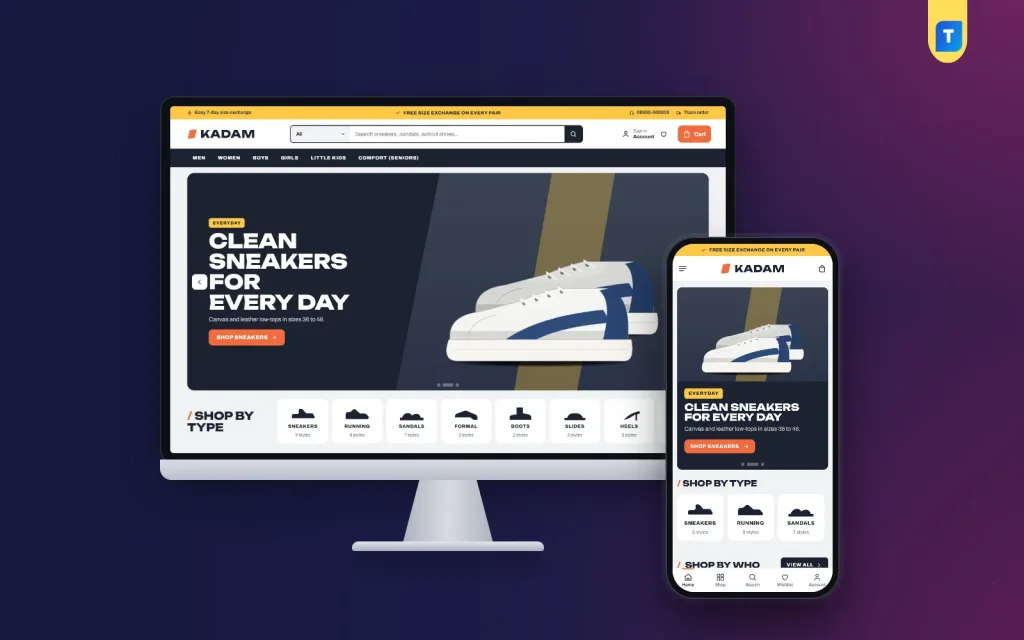
If you want a shoes website design template that already has these features, Kadam is one option. It is a WordPress theme for shops that sell to the whole family.
It includes a shop-by-type rail of shoe shapes, a size finder from foot length to EU, UK and US, square cards with an EU size range chip, and quick sizes and colour swatches. There are 24 homepage blocks, with 14 switched on in the demo, and five palettes. Checkout supports bKash, Nagad, SSLCommerz and cash on delivery, with Steadfast and Pathao courier support. The demo has 41 pairs from EU 20 to 45.
You can look at the Kadam page and open the live demo to see how the blocks fit together. Whatever you choose, test it with your own photos before you commit.
Setting up the shop step by step
- Install WordPress and the theme, then import the demo to see the layout.
- Replace the demo products with your first ten pairs.
- Set sizes and colours as product attributes.
- Write your size chart and exchange page.
- Choose your palette and upload your logo.
- Turn off the homepage blocks you do not need.
- Set payment methods and delivery charges.
- Connect your courier and place a test order.
- Add the rest of your range.
- Share the link with past buyers and on your Facebook page.
Content that helps shoppers and search engines
Words on the page help buyers decide, and they help your pages appear when people search. Keep them simple and true.
- Write a unique title for every pair: type, brand or maker, colour.
- Start each description with who the pair is for and when to wear it.
- List the material, sole, heel height, weight and care in short lines.
- Add a short paragraph on every category page, such as school shoes or running shoes.
- Write a few guides: how to measure your foot, how to clean leather, how to pick school shoes.
These guides bring visitors from Google who are not yet ready to buy. A shopper who reads your size guide once is more likely to return when she needs a pair.
Reviews and proof
Ask buyers for a review after delivery. Show the product they bought beside each review. Even a few honest reviews help more than a long page of claims. If a pair runs small, say so in the description. Buyers respect that and return less.
Testing, upkeep and mistakes after launch
A shoes website design template gives you a good start, but a shop needs care every week.
- Check which sizes sell out first and restock them.
- Hide pairs that are sold out in every size.
- Update the flash sale band when an offer ends.
- Replace seasonal photos in the hero.
- Keep WordPress, the theme and plugins updated, and take a backup first.
- Read your exchange requests monthly. Repeated reasons show you what to fix on the page.
If many exchanges are for size, look at your size chart and your photos first. If many are for colour, retake photos in better light.
Mistakes to avoid
- Listing shoes without size information.
- Using one small photo per pair.
- Mixing size systems without a conversion chart.
- Hiding the exchange rule.
- Filling the homepage with too many banners.
- Leaving demo text and photos in place after launch.
- Skipping a test order on a real phone.
Fix these before launch and you will answer fewer questions each day.
A short pre-launch test
Ask a friend who has never seen the shop to buy a pair on her phone while you watch. Do not help her. Note where she pauses, where she scrolls back and where she gets stuck.
Most problems show up in the first five minutes: a size she cannot find, a button she misses, a delivery charge she did not expect. Fix each one, then run the test again with someone else. Two rounds are usually enough to remove the worst friction before real customers arrive.
If you want to read more on the technical side, the official WordPress documentation is a good, reliable reference.
Frequently asked questions
What is the best shoes website design template for a small shop?
The best one shows size on the card, helps buyers find their size, works well on a phone and supports local payment. Pick for those features before looks.
How do I reduce wrong-size orders?
Add a size finder, show the size range on each card, write a clear size guide and explain your exchange rule. These four steps cut most returns.
How many photos does each pair need?
At least four: side, front, back and sole. A photo of the pair being worn helps too.
Do I need a shoes website design template or a custom site?
A template is enough for most small and medium shops. It costs less, goes live sooner and you can still change colours, blocks and text yourself.
Should I offer cash on delivery for shoes?
Yes. Many Bangladeshi buyers want to see the pair first. Ask for a small advance on costly pairs to avoid fake orders.
Can I sell for men, women and kids on one site?
Yes. Use shop-by-person tiles and a type rail so each group finds its own shelf quickly.