Strong video production website design turns a showreel into enquiries. Brand managers, wedding couples and agency producers all check your website before they call, and they decide in about a minute whether your team looks serious. If your site is slow, hard to read on a phone or hides your best work, the call simply does not happen.
This guide covers what a production house website needs: the showreel, the portfolio, services, team, trust signals, enquiries and mobile layout. It is written for small and mid-sized teams in Bangladesh and beyond who want more and better clients from their website.
What clients look for on a production website
Before we talk about layout, it helps to understand the visitor. A client opening your site usually wants answers to five questions:
- Is their work good enough for my brand or event?
- Have they done projects like mine before?
- Who will actually work on my project?
- Roughly how do they work and how long does it take?
- How do I contact them quickly?
Every part of good video production website design should answer one of these questions. Anything that does not help can usually be removed.
Lead with the showreel, but keep it short
Your showreel is the strongest proof of your skill, so it belongs at the top of the homepage. But a heavy video that plays automatically can slow the page and annoy visitors on mobile data.
- Use a poster image with a play button. Load the video only when someone presses play. The page stays fast and the visitor stays in control.
- Keep the reel between 60 and 90 seconds. Open with your single best shot. Viewers decide in the first ten seconds whether to keep watching.
- Update it twice a year. An old reel with dated looks makes the whole company feel dated.
- Add one clear line of text. Something like "TV commercials and brand films for growing companies" tells visitors what you do before they press play.
Video production website design for the portfolio
The portfolio is where serious clients spend most of their time. A good portfolio page is selective, organised and tells a story.
Choose fewer, better projects
Eight to twelve strong projects are better than forty average ones. Remove work that no longer reflects your level, even if the client was famous.
Group by type
Separate commercials, documentaries, corporate films, music videos and events. A wedding couple and a bank's marketing team are looking for very different things.
Give each project a short case story
For each project, write three short paragraphs: the client's goal, your approach and the result. Add the final film, a few stills and the credits. This shows clients how you think, not only how you shoot.
Show behind the scenes
A small gallery of set photos, lighting setups and crew at work helps clients imagine working with you. It also shows the scale of productions you can handle.
Services that are easy to understand
Many production websites list services with clever names that clients do not search for. Use plain words:
- TV commercial production
- Online video ads and social media content
- Corporate and training films
- Documentaries
- Music videos
- Wedding and event films
- Editing, colour grading and sound
For each service, add one or two lines on what is included and who it is for. A dedicated services page can go deeper, with typical timelines and what the client needs to prepare.
Introduce the team
Clients hire people, not logos. An About page with your director, cinematographer, editor and producer, each with a photo and a short line about their experience, builds trust quickly. If you work with freelancers, say so honestly and describe how you build the right team for each project.
Numbers help too: projects completed, years of experience, happy clients and awards. Keep them real; inflated numbers are easy to spot.
Trust signals that work
- Client logos. Only show brands you have actually worked with, and ideally link a project for each.
- Testimonials. Short quotes with a name and role from real clients carry more weight than long anonymous praise.
- Press and awards. Festival selections or industry awards belong on the homepage, briefly.
- Clear contact details. A phone number, email and office address show you are a real business.
Film production website design for enquiries
The whole site should lead to one action: getting in touch. Good film production website design makes this easy without being pushy.
- A contact button in the header. Visible on every page, on desktop and phone.
- A short form. Name, email or phone, the type of project and a message are enough. Long forms scare people away.
- A call-to-action band. After the portfolio and services, a simple "Have a project in mind? Let's talk" band catches visitors who are ready.
- Fast replies. Keep every enquiry in one inbox and reply the same day. A quick, personal answer often wins the job.
Protect the form from spam with simple checks, such as a consent box and a limit on how often one visitor can send a message.
Designing for phones first
Many clients first see your site from a link in a message or a social post, on a phone. On small screens:
- Keep the menu in a clean drawer with only the main pages.
- Make the play button large and centred.
- Stack project cards in one column with clear titles.
- Keep text large enough to read without zooming.
- Keep the contact button always within reach.
Test on a real mid-range Android phone, not only on a laptop. That is what most of your visitors use.
Speed and technical basics
A beautiful site that loads slowly loses clients. A few technical basics make a big difference:
- Host videos on a video platform. Upload films to a video service and embed them instead of uploading large files to your own server.
- Compress images. Stills and behind-the-scenes photos should be resized and compressed before upload.
- Avoid heavy page builders. They add a lot of code that slows every page.
- Use clean page titles. "TV Commercial Production in Dhaka | Your Studio" tells Google and clients what the page is about.
Google's guide to Core Web Vitals explains how loading speed and layout stability affect both visitors and search rankings.

Planning the site structure
Before you design a single page, list the pages you need and what each one must do. A typical production house site works well with this structure:
- Home: showreel, a short line about what you do, selected projects, services, client logos, testimonials and a call to action.
- Portfolio: all projects, grouped by type, each opening into its own case story.
- Services: each service with a short description, typical timeline and what the client needs to prepare.
- About: your story, your team and the equipment or facilities that set you apart.
- Contact: a short form, phone number, email, address and a map.
- Blog: optional, but useful for behind-the-scenes notes and tips for clients.
Keep the main menu to five or six items. Anything more makes the site feel cluttered, especially on a phone.
Writing case stories that win work
A case story turns a pretty film into proof that you solve problems. Keep each one short and follow the same pattern:
- The brief. What did the client need? "Launch a new tea brand to young urban buyers in four weeks."
- The idea. What did you propose and why? One or two sentences on the concept.
- The production. Locations, crew size, days of shooting, special equipment. This shows the scale you can handle.
- The result. Views, reach, sales lift or simply the client's feedback. Even a one-line quote helps.
Add the final film at the top and four to six stills below. Clients who read a case story to the end are usually very close to contacting you, so finish each one with a small "Start a similar project" button.
Showing how you work
Many first-time clients are nervous because they do not know what producing a video involves. A simple "how we work" section removes that fear. Describe four or five steps in plain words: briefing call, concept and script, pre-production, shooting, editing and delivery. Add a typical timeline for a short commercial and for a corporate film. When clients understand the process, they feel safer and ask better questions in the first call.
This is also a good place to explain what clients need to provide, such as brand guidelines, product samples or access to a location. Clear expectations make every project smoother, and they show that your team is organised.
Content that keeps the site alive
A blog is not required, but a few posts a year help a lot. Write about a recent shoot, explain how you plan a commercial, or share tips for brands preparing their first video. These posts show expertise, give you something to share on social media and help search engines find your site for more topics.
Colours, type and mood
Production companies often choose a dark, cinematic look, and it works well because it makes stills and video frames stand out. A dark background with one strong accent colour, such as red or gold, feels like a cinema and keeps attention on the work. If your clients are mostly corporate, a lighter design with plenty of white space may feel more familiar to them.
Whatever you choose, keep it consistent. Use one or two fonts, one accent colour and the same button style everywhere. Good video production website design lets the films carry the emotion while the layout stays quiet and clear. Check text contrast carefully on dark backgrounds; grey text on black is hard to read on a phone in sunlight.
Common mistakes in production websites
- Autoplaying sound. Visitors close the tab immediately.
- Portfolio without context. A grid of thumbnails with no client names or stories says little.
- Hidden contact details. If a client has to search for your phone number, they will call someone else.
- Outdated work at the top. Always put your newest strong work first.
- Too many fonts and effects. Let the films be the star; keep the design calm.
A launch checklist
- Showreel at the top with a poster image and play button.
- Eight to twelve projects, each with a short case story.
- Services listed in plain words.
- About page with real team photos.
- Client logos and testimonials you can back up.
- Contact button on every page and a short form.
- Fast loading on a phone over mobile data.
- Privacy and terms pages in place.
Frequently asked questions
How many projects should my portfolio show?
Eight to twelve strong projects is a good range. Quality matters far more than quantity.
Should my website show prices?
Most production houses do not list fixed prices because every project is different. You can show starting prices for simple packages, such as event films, to filter enquiries.
Do I need a blog?
It is not required, but a few useful posts each year help search engines and show clients how you work.
How often should I update the portfolio?
Add a new project every time you finish one you are proud of, and remove the weakest one so the page stays sharp. A quick check every three months is a good habit for any film production website design.
Is a one-page website enough?
A one-page site can work for a freelancer. A production house usually needs separate pages for portfolio, services and about, so each can go deeper.
Building it with Drishyo
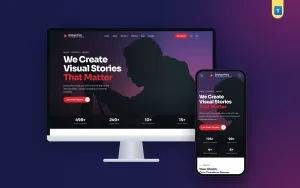
If you would rather start from a finished design, Drishyo is our video production company WordPress theme built around these ideas. It has a showreel hero with a play button, services, selected projects, a gallery, testimonials, an About page with your team, and a contact form that sends every message to an enquiry inbox in your dashboard. It runs without any plugin, and the one-click demo sets up all the pages for you.
Whatever tool you use, the rules of good video production website design stay simple: lead with your best work, explain it clearly, show the people behind it, and make getting in touch effortless.