Good bag shop website design makes a buyer feel the bag before they hold it. They want to see the colour, the size, the inside pockets and how it looks on a shoulder. This guide covers the homepage, photos, product pages, checkout and daily habits that help a bag and accessories shop in Bangladesh turn visitors into orders.
Every idea here is practical and cheap. Pick the ones that fit your shop, try them for a few weeks, and keep what works.
What makes bag shop website design different
Bags are bought with the eyes, but also with a list of practical questions. Will my laptop fit? Is it real leather? Will the strap break in a month? Your design has to answer both the heart and the head.
- Looks mean photos must be large, clear and consistent.
- Size means buyers need measurements and "what fits inside".
- Material means honest notes about leather, PU, canvas or jute.
- Gifting means many orders are for someone else, so returns and delivery dates matter.
Most bag shops also sell wallets, belts, sunglasses and scarves. A good design leaves room for these small items without crowding the bags.
Plan your categories first
Before you think about colours, list what you sell. Then group it in a way buyers understand. A simple set many shops use:
- Women: handbags, totes, crossbody bags, clutches.
- Men: office bags, backpacks, messenger bags.
- Wallets: bifold wallets, card holders, ladies' purses.
- Sunglasses: aviator, round, sports.
- Scarves: cotton, silk, hijab scarves.
- Accessories: belts, beanies, watches, key rings.
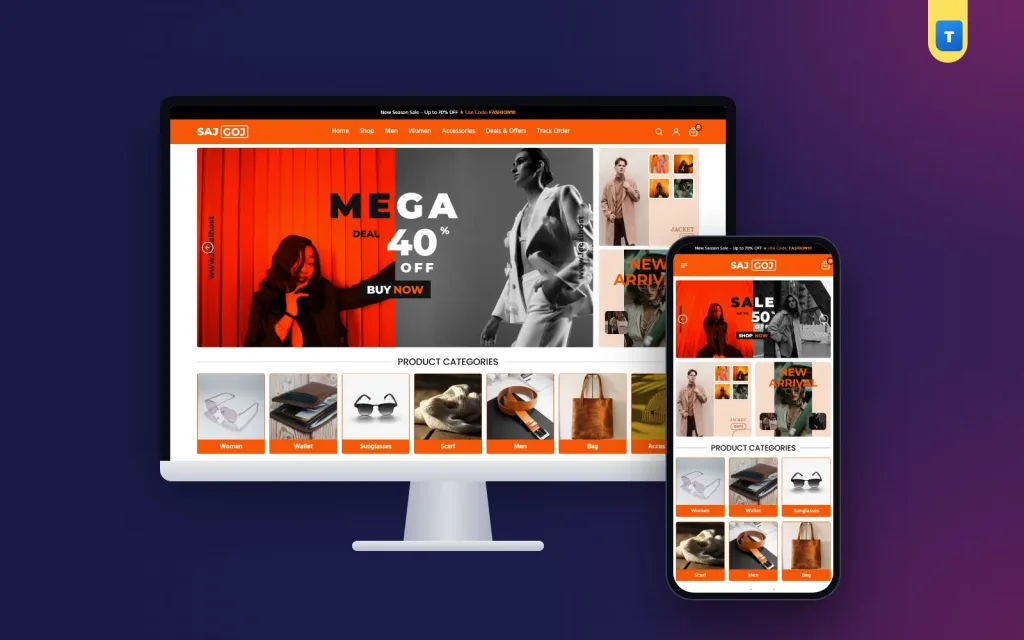
Show these as photo tiles near the top of the homepage, each with a coloured name bar. On phones, three tiles per row keeps them readable. Seven clear categories beat twenty vague ones.
Brands and collections
If you sell your own label and a few outside brands, fill in the brand for every product. Buyers who trust one maker can then filter to it in a tap. For your own label, a short "Our Story" page with a photo of the workshop adds a lot of trust.
Collections help too. "Office Collection", "Eid Gifts" or "Under ৳1,500" are easy to make with product tags. A smart bag shop website design lets buyers shop by need, not only by type.
A homepage order that sells accessories
A bag shop homepage should feel like walking past a bright shop window. Here is an order that works well:
- Hero slider with your current sale or new collection, using real product photos.
- Two side banners, such as "New Arrival" and a seasonal item.
- Category tiles so buyers can jump straight to bags, wallets or sunglasses.
- Featured products in a sliding row.
- Limited offers with a bold sale banner beside discounted items.
- Recent products in a grid.
- Promises such as cash on delivery and easy returns.
- Customer reviews with names and cities.
Each block should do one job. If a block has nothing fresh to show, switch it off instead of leaving old offers up.
Photos: the heart of bag shop website design
A bag that looks flat in a photo will not sell, however good it is. Plan a photo set for every bag:
- Front view on a plain light background.
- Side view to show depth.
- Inside view with the pockets open.
- A close-up of the stitching, zip or buckle.
- On a shoulder or in a hand to show real size.
Use the same background, light and angle for every product. Daylight near a window is enough; you do not need a studio. Square photos fit most shop grids and galleries best.
For sunglasses, add one photo on a face so buyers can judge the size. For scarves, show one folded and one worn. For wallets, show one open with cards inside.
Product cards that invite a click
The product card is what buyers see most. Keep it simple: one strong photo, the name, the price, a discount tag when there is an offer, and a clear "Shop Now" button across the full width.
Write names that help a buyer choose, such as "Urban Hide Office Bag, Brown, 15-inch". Avoid names like "New Bag 23". When buyers scroll on a phone, a clear name is often what makes them stop.
A small tag like "9% OFF" in a bright colour catches the eye without covering the bag. Keep tags short; long sale text on top of a photo hides the product.
Product pages that answer every doubt
On the product page, put the answers buyers need near the top, so they do not have to scroll or message you:
- A gallery with zoom and thumbnails.
- The price, the old price and "You save ৳X".
- Size in centimetres and what fits inside.
- Material and care notes.
- Stock status and brand.
- Buy Now and Add to Cart buttons.
- A short return and warranty note.
Add a WhatsApp button that opens a chat with the product name filled in. Many buyers in Bangladesh like to ask "Is the black one in stock?" before ordering. A one-tap chat keeps them on your shop instead of moving to another page.
Use variations for colours. When a buyer picks "tan", the photo, price and stock should change to the tan bag at once.
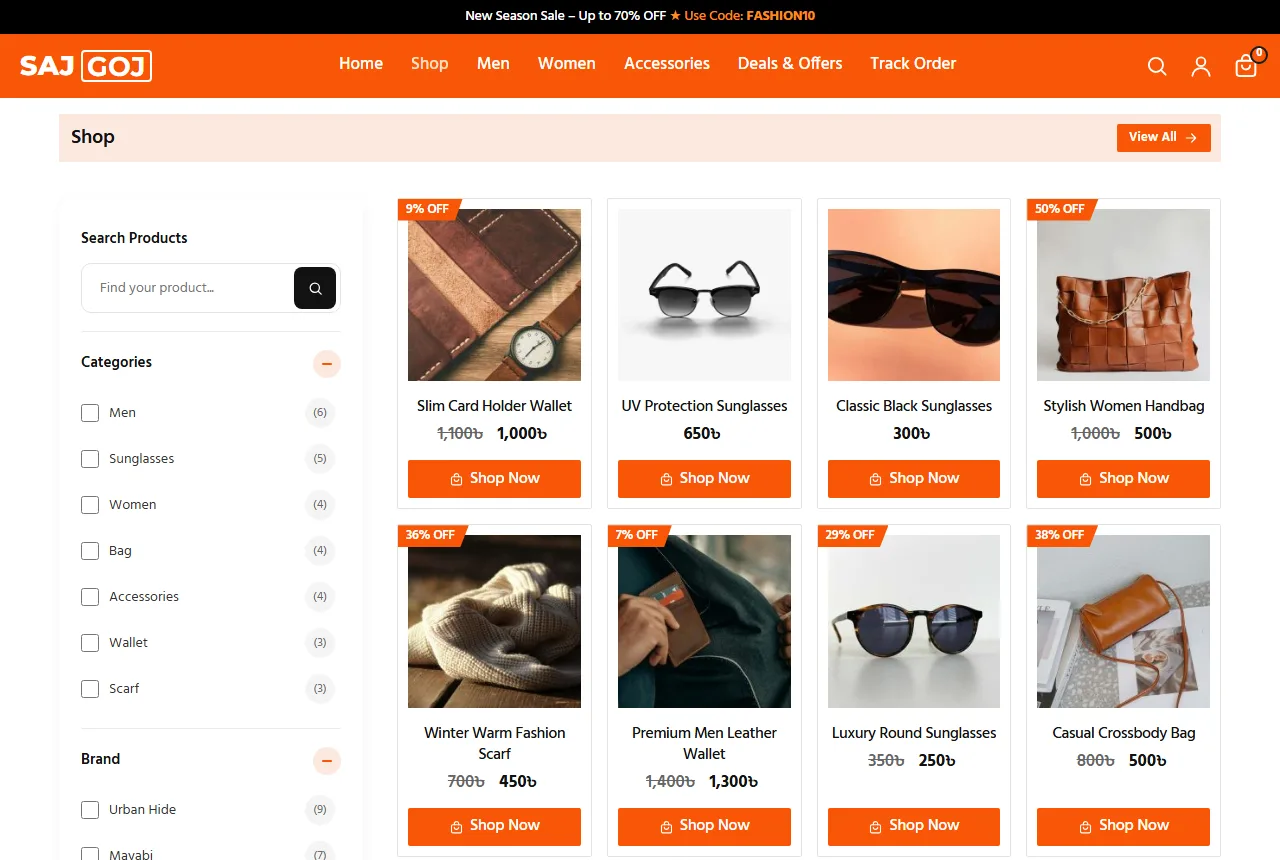
Filters and search for a growing catalogue
Once you pass fifty items, buyers stop scrolling and start filtering. A good filter card on shop and category pages has:
- the current category;
- a price range, because bag budgets vary a lot;
- average rating;
- in stock or out of stock;
- on sale items;
- brands.
On phones, open the filters in a panel so they do not push the products down. Put a search box in the header and show matching products as the buyer types. Test it with the words buyers really use, such as "ladies bag", "purse" or "chosma".
Bag shop website design on phones
Most accessory buyers come from Facebook or Instagram on a phone. The link opens, and you have a few seconds to show the bag they saw in the post.
- A menu button, a centred logo and the cart at the top.
- A full-width search row under the header.
- A side drawer menu with your categories.
- Two product cards per row.
- Buttons big enough for a thumb.
Leave the screen free for photos. A bag shop is visual, so every extra bar on the screen takes space from the product. Test on a cheap Android phone over mobile data. If the photos load slowly there, compress them more.
Keep pages light
Compress every photo before upload; 1000 to 1200 pixels wide is enough for most galleries. Use a shop theme with small files instead of a heavy page builder. Keep plugins few. A fast shop sells more, especially when buyers arrive from social media and leave quickly.
Checkout, delivery and payment
Ask only what the courier needs: name, mobile number, district, area and a short address. Show delivery charges early. Many shops charge about ৳80 for home delivery and offer free delivery over a set amount. Put this in the top bar and the cart, so nobody is surprised at the last step.
Dhaka delivery in one or two days and outside Dhaka in two to four days is a common promise. If you send gifts, add a note field so buyers can write a short message for the receiver.
Cash on delivery is still the main way people pay. Add bKash, Nagad and card payments with a payment plugin as you grow, and show their logos in the footer.
Packing bags and sunglasses
Stuff bags with paper so they keep their shape. Put sunglasses in a hard case. Wrap leather in a dust bag if you can. A neat parcel with your logo turns delivery into part of the brand, and buyers often share a photo of it.
Print a small card with your page name, WhatsApp number and a thank-you line. Some shops add a discount code for the next order. These cheap touches turn one order into a habit, and they cost less than a boosted post.
Plan the busy days too. Before Eid, Pohela Boishakh and big date sales, order extra boxes, set a clear last order date and show it on the homepage. Good bag shop website design includes these simple notes, because buyers need to know when a gift will arrive.
Trust: accounts, reviews and returns
Fake cash on delivery orders cost money: the rider, the courier fee and the return. Asking buyers to sign in with a mobile number or email before ordering cuts many of these. Keep sign-up short and save the address for next time.
Reviews matter even more for small brands. Ask happy buyers for a review with a photo of the bag in use. Show reviews with the name and city on the homepage, and reply to every review, including the unhappy ones.
Write a clear return page. For example, "7 days to return if the item is damaged or not as shown." Clear rules give buyers the courage to place the first order. That trust is a quiet part of bag shop website design.
Show real contact details: a phone number, a WhatsApp number and, if you have one, a shop address. A Contact page with a form gives shy buyers another way to ask. Answer messages within a few hours during the day. Fast replies sell bags as well as good photos.
When you get a complaint about colour or quality, ask for a photo, offer an exchange or refund, and say sorry. Note which items get complaints and check the supplier. Handled well, an unhappy buyer often comes back.
Common mistakes to avoid
- Only one photo per bag, taken on a messy table.
- No size in centimetres.
- Calling PU "leather".
- Colours in photos that do not match the real bag.
- Delivery charges shown only at checkout.
- Copying a fashion accessories website design template and never changing the demo text.
- Pop-ups on phones that hide the cart button.
Google's guide to helpful content is a good reminder. Write product text for buyers, in your own words, and answer the questions they really ask.
Content that brings buyers back
A small blog helps a bag shop more than many owners expect. Short guides answer questions and bring visitors from search. Good topics:
- How to choose sunglasses for your face shape.
- How to care for a leather bag in the rainy season.
- The right office bag size for a 14-inch or 15-inch laptop.
- Eid gift ideas under ৳2,000.
Change the homepage with the seasons too. Show scarves and beanies in winter, light totes in summer and gift sets before Eid. A seasonal bag shop website design tells regular buyers that the shop is alive and stocked.
A launch checklist
- Every product has four or more photos on the same background.
- Every bag has a size in centimetres and a material note.
- Colours are set up as variations with their own photos.
- Category tiles sit near the top of the homepage.
- Delivery charges are visible before checkout.
- Return, Shipping and Contact pages are written.
- You placed three test orders from a phone.
After launch, track visitors, orders, average order value and returning buyers each week. Change one thing at a time, and see whether the numbers move.
Turning these ideas into a shop with Sajgoj
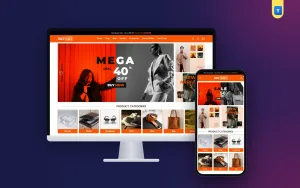
You do not have to build all of this from scratch. The Sajgoj bag and accessories store theme for WordPress and WooCommerce already follows most of these ideas. It is more than a fashion accessories website design template: it is a working shop.
It has a hero slider with side banners, category tiles with coloured name bars, a sliding featured row, a limited offers block, recent products, promises and customer reviews. The product page has zoom, "You save", stock and brand pills, Buy Now and a WhatsApp button.
Buyers sign in with a mobile number or email, keep a wishlist and track orders. Every homepage block can be switched on or off. Import the demo, add your bags, and you can take orders the same week.
Frequently asked questions
How many photos does bag shop website design need per product?
Four to six: front, side, inside, a detail and one in use.
What colours suit a bag shop website design?
One bright brand colour, such as orange, with plenty of white. It lets the bags stand out.
Should I sell wallets and sunglasses in the same shop?
Yes. They are small add-ons that raise the order value. Give each its own category.
Do I need online payment from day one?
No. Cash on delivery is enough at first. Add bKash, Nagad or cards later.
How do I show the size of a bag?
Give the size in centimetres, say what fits inside, and add one photo on a shoulder or in a hand.