The best electronics website design is not the one with the most animation. It is the one that helps a nervous buyer pick the right product and feel safe paying for it. When someone is about to spend 40,000 taka on an AC, a clear answer beats a clever effect every time.
This guide shows what such a design looks like, page by page. It covers size tools, running-cost tools, product pages, photos, payment and delivery in Bangladesh, and the mistakes that lose sales. A ready-made option is shown near the end, but the advice works with any tool.
What makes the best electronics website design
Look at how people really buy appliances and gadgets. They ask questions. Will this AC cool my room? Is this fridge big enough for five people? How much will it add to my electricity bill? Can I pay in instalments? Will it come with a warranty?
The best design answers these questions on the page, before the buyer picks up the phone. It does this with:
- Clear specs written in plain words, with units.
- Tools that suggest the right size.
- Honest prices, with EMI shown when it exists.
- Warranty and service details in plain view.
- Photos of the product in a real home.
- A short, safe checkout.
Looks matter, but they come after clarity. A clean layout, one accent colour and readable text are enough.
Start with the questions your buyers ask
Before you design anything, spend one week writing down every question customers ask by phone, in the shop and on Facebook messages. Put each one in a list. You will see patterns quickly.
Common questions in an appliance shop:
- Which size or capacity should I buy?
- What is the difference between these two models?
- Does it use a lot of electricity?
- Is the warranty from the brand or from you?
- Do you deliver and install it?
- Can I pay in instalments?
- What if it arrives broken?
Each question is a block or a line you should add to the website. If you answer seven questions well, you are already ahead of most shops.
Pick a simple site structure
A shop with a messy menu loses people quickly, and the best electronics website design always keeps the structure flat and obvious:
- Home
- Categories: Air Conditioners, Refrigerators, TVs, Washing Machines, Fans, Kitchen Appliances, Lighting
- Offers
- Compare
- Brands
- Warranty and Service
- Delivery and Installation
- Contact and Shop Address
Use no more than seven items in the top menu. If you have many sub-categories, show them in a dropdown or a side filter on the category page. Keep category names the way customers say them, not the way the factory names them.
Homepage: show people the way in
A homepage is not a poster. It is a signpost. Within the first screen on a phone, a visitor should see what you sell, one strong offer, and a way to search.
A simple order that works well:
- Header with logo, big search box, phone number and cart.
- Main banner or a single featured product.
- Category tiles with real product photos.
- A size picker or helper tool, if you sell appliances.
- Best sellers and new arrivals.
- Deals with an honest end date.
- Brand logos you officially stock.
- Reasons to buy from you: delivery, warranty, payment options.
- Reviews, shop address and map.
Cut anything that does not help a buyer decide. Fewer blocks that work are better than many that distract.
Check the first screen on a small phone, not only on your computer. If the search box, the offer and the category tiles are not visible within one or two swipes, move them up. Most visitors will never scroll to the bottom of a long page, so put the useful parts early.
Size tools for ACs, fridges, TVs and washers
Size is the biggest worry with large appliances. A buyer who is unsure will either leave or call you ten times. A small helper tool on the homepage solves both problems.
Ideas that work:
- AC: enter the room size and show the right ton, then list matching models.
- Refrigerator: enter family size and show litres.
- TV: enter the sofa distance and show the screen size in inches.
- Washing machine: enter family size and show the capacity in kg.
Also add a small capacity label on every product card, such as "1.5 ton" or "320 L." Buyers should not have to open the page to see the basic size.
Use your own knowledge to set these rules. Ask your best salesperson how they decide, and copy that logic. For example, many shops use about one ton of AC for every 120 to 150 square feet of room, and then adjust for sun, floor and the number of people. Write the rule down, test it on a few real customers and fix it if it gives odd results.
Show the real running cost
Electricity bills worry every family, especially in summer. A running-cost tool gives a clear number and helps the buyer see why an inverter model costs more.
How it works:
- The buyer picks the appliance.
- The buyer enters hours of use per day.
- The buyer enters the electricity price per unit.
- The tool shows units used and the monthly bill.
- It also shows the monthly and yearly saving of an inverter model against a regular one.
This one tool turns a price argument into a savings argument. A model that costs 6,000 taka more can look cheap when the buyer sees what it saves over three years. Always show your assumptions, so the numbers feel honest.
Product pages that close the sale
Treat each product page as a small sales conversation. Put the most helpful items near the top:
- Brand, model name and capacity
- Three key specs in short tiles
- Price, old price and a monthly EMI line
- Warranty length and type
- Stock status
- Delivery and installation note
- Add to cart and a call button
Below that, give the full spec table, what is in the box, and a short description. Then add a compare button and links to similar models. Do not copy long text from the brand. Write short lines a family member could read aloud.
Best electronics website design examples worth copying
You do not need to invent everything. These patterns appear on good shops, and you can copy them:
- A spec card on every product, with up to three key specs.
- A capacity or size chip on the image.
- A compare tray that stays at the bottom while shoppers browse.
- A "shop by room" or "shop by budget" row.
- A sticky Add to cart bar on phones.
- A warranty badge near the price.
- A short "why buy from us" block with three or four honest points.
- Reviews with the buyer's area and date.
Pick four or five that fit your shop and do them well. Trying to copy everything makes the site heavy and slow. When you look at other shops for ideas, ask what problem each feature solves for the buyer. If you cannot name the problem, skip the feature.
Photos and colour that build trust
Appliances look alike on a white background, so photos matter a great deal in the best electronics website design. Use a main picture on white, but add at least two photos of the product in a real room. Show the AC on a wall, the fridge in a kitchen, the TV on a stand. People understand size by seeing it near a door or a sofa.
Keep the colour plan simple:
- One main colour for buttons and links.
- One dark colour for text.
- Light backgrounds, so the products stand out.
- No more than two font styles.
Make sure the text is easy to read on a phone in bright sunlight. Dark text on a light background is the safest choice. Keep body text at 16 pixels or larger and give lines enough space, so an older family member can read the specs without squinting.
Payment, delivery and installation in Bangladesh
Local habits decide whether a visitor becomes a buyer. Offer the ways your customers already use, and keep the choice short:
- bKash and Nagad
- Cash on delivery, with a small advance for heavy items if needed
- Card or banking through a gateway like SSLCommerz
- Manual Send Money with a transaction number box
For big items, write down your delivery rules in plain words: charge inside and outside Dhaka, number of days, who unpacks and installs, and what happens if the item is damaged on arrival. Link to a courier such as Steadfast or Pathao for smaller parcels and give customers a tracking page.
Be clear about service too. Say where the service centre is, how long a repair usually takes and who to call. Buyers of costly items think about what happens after the sale, and a plain answer here builds more trust than any badge.
One honest line about installation, such as "Free AC installation inside Dhaka, pipe and stand extra," saves many phone calls and many arguments.
Choosing a home appliance website design template
If you do not want to design every page yourself, a ready-made layout can save weeks. A home appliance website design template should be checked against the points in this guide. Ask:
- Does it show specs and capacity on cards?
- Does it have a size helper or lets me add one?
- Does it support compare and variants?
- Can I show EMI and warranty clearly?
- Does it include a shop system with local payments?
- Does it work well on a phone?
- Can I change colours and blocks without code?
- Is there a demo I can import?
Open the demo on your phone and try to buy something. If you get stuck, your customers will too. A good home appliance website design template also gets regular updates, so it keeps working as WordPress changes.
A ready-made option: Ujjal
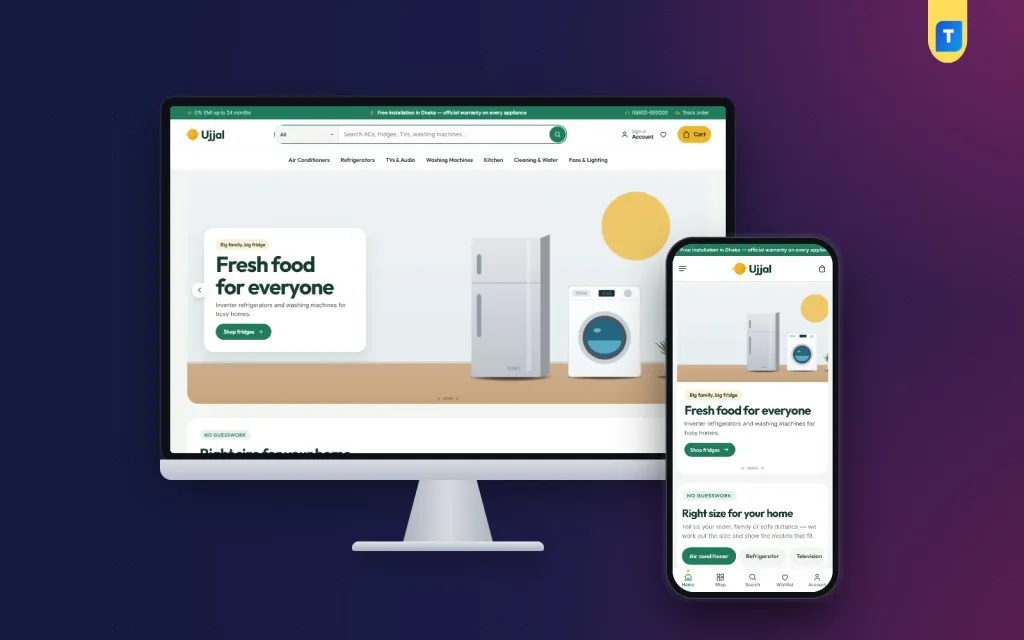
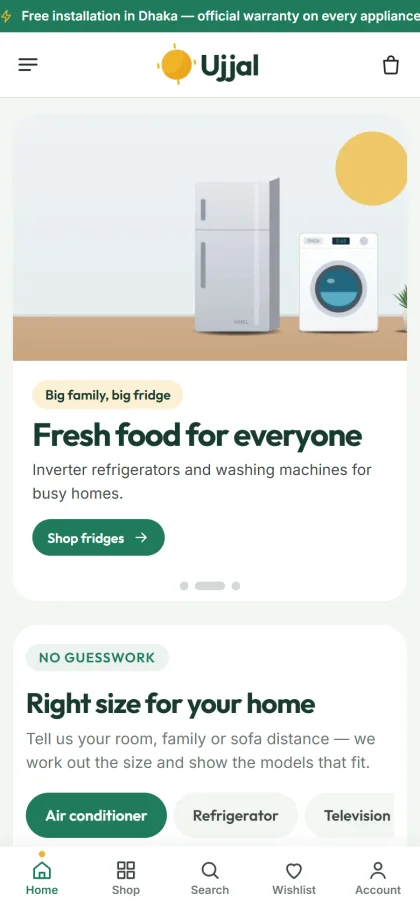
Ujjal is a WordPress theme for shops that sell air conditioners, refrigerators, TVs, washing machines, kitchen and cleaning appliances, fans and lighting. It follows the ideas above.
What it includes:
- A right-size picker for AC, fridge, TV and washer, with a slider on each tab.
- A running-cost calculator that also shows inverter savings.
- A capacity chip on every product card.
- At-home photos, key-spec tiles and a 0% EMI line.
- 24 homepage blocks, 17 on by default, that you can switch and re-order.
- Five palettes and four font pairs.
- The Themeve Commerce shop plugin with one-page checkout, bKash, Nagad, SSLCommerz, cash on delivery, Steadfast and Pathao.
The demo comes with 30 products from six brands, and the Theme Options dashboard works on a phone. Judge it as you would any other option, using the checklist in the section above.
Mistakes that stop the best electronics website design from working
Even a good plan can fail through small errors. Watch for these:
- Listing "call for price" instead of a price.
- Using the maker's text with no explanation of what the specs mean.
- Only one photo per product.
- No warranty page, or a vague one.
- Fake countdown timers and fake stock numbers.
- Hiding delivery charges until the last step.
- Huge images that make the page slow on mobile data.
- No test order before launch.
- A checkout with too many fields.
A last check before you go live
- Place a real order with bKash and one with cash on delivery.
- Open every page on two phones.
- Read each policy page as a customer would.
- Check that emails and order notes arrive.
- Take a full backup.
After launch, look at your orders and calls every week. If people keep asking the same thing, add the answer to the page. That is how a good site becomes a better one. If you started from Ujjal, the same habit applies: use Theme Options to change a block, test it on a phone, and keep what works.
If you want to read more on the technical side, the official WordPress documentation is a good, reliable reference.
Frequently asked questions
What is the best electronics website design for a small shop?
A simple one: clear categories, spec cards, honest prices, warranty details, local payments and a short checkout. Extra effects matter much less than clear information.
How do I plan the best electronics website design on a small budget?
Use a ready-made WordPress theme, take your own product photos, and spend your time on specs and policy pages. Start with 20 to 30 products and add more later.
Do I need a size picker for an appliance shop?
It is not required, but it helps. ACs, fridges, TVs and washers are bought by size, and a picker answers the most common question on the page.
How can I show EMI on my website?
Add a monthly price line next to the main price, such as "from 3,500 taka per month." State the terms clearly on the product page or a linked EMI page.
Is a home appliance website design template enough, or do I need a developer?
A good template is enough for most shops. You import the demo, add your products and set up payments. Hire a developer only for special features.
Which payment methods work best in Bangladesh?
bKash, Nagad and cash on delivery cover most buyers. Add a card gateway if you sell costly items to customers who prefer cards.
How many photos does a product need?
At least four, including one in a real room. For large appliances, in-room photos help buyers judge the size.