Boutique website design templates save a small shop months of work, but only if you pick one that fits your stock, your buyers and your way of selling. A pretty demo is not enough.
This guide explains how to choose and set up a template for a boutique in Bangladesh. You will see what to check before you buy, how to plan the homepage, how to handle photos, payment and delivery, and which mistakes to avoid. It also covers kidswear and family shops, which have special needs.
What boutique website design templates are
A template, or theme, is a ready-made design for your website. It controls the layout, colours, fonts and the way products are shown. You add your own logo, photos and prices, and the site is ready to use.
Good boutique website design templates share a few traits:
- They are made for clothing, shoes, bags or accessories, not for general business sites.
- They include shop pages, a cart and a checkout, or work with a shop plugin.
- They let you change colours, fonts and homepage sections without code.
- They look good on a small phone screen.
- They load fast.
Boutique website design templates are not a finished business. They are a frame. The photos, the product details and your service still decide the result.
Why a template beats a custom build for most boutiques
Many owners ask if they should hire a designer to build everything from zero. For a new boutique, a template is usually the smarter first step.
- Cost: a template costs a fraction of a custom design.
- Time: you can go live in days, not weeks.
- Testing: the layout has already been used on many screens.
- Control: you can edit it yourself later.
- Change: if your range grows, you can move to a custom build with real sales data to guide it.
A custom build makes sense when you have unusual needs, such as a made-to-measure tool, or when your sales are large enough to justify the cost.
Define your boutique before you shop for a look
Write down four things before you open any demo of boutique website design templates.
- What you sell: kurtis, sarees, kidswear, bags, shoes, mixed.
- How many products: ten, fifty or five hundred.
- Who buys: age, city, budget and device.
- How they pay and receive: bKash, Nagad, cash on delivery, courier.
This short sheet becomes your filter. If a template is built for huge catalogues and you have twelve products, it will look empty. If it is built for a few hero products and you sell five hundred small items, it will feel cramped.
How to judge boutique website design templates before you buy
Do not judge by the first screen alone. Open the demo and test it like a customer.
Check these points:
- Open the demo on your own phone. Does it feel fast and clear?
- Click through a product page. Are size and colour easy to pick?
- Add an item to the cart and go to checkout. How many steps are there?
- Look for a size guide, a wishlist and reviews.
- Look for local payment methods and courier support.
- Read what the seller says about speed, such as whether it uses heavy scripts.
- Find out how updates arrive and who answers questions.
Also check whether it needs extra paid plugins. Some templates look cheap until you add the shop plugin, the slider, the page builder and the payment add-on.
Plan the homepage of your boutique
The homepage is your shop window. Plan the blocks on paper before you touch the template.
A tested order is:
- Hero banner with one message and one button.
- A strip with delivery, cash on delivery and exchange.
- Category tiles with clear photos.
- New arrivals.
- Best sellers in tabs by category.
- One deal or offer with a clear end date.
- Customer reviews or photos.
- Footer with contact details and payment icons.
A good template lets you switch each block on or off and move it up or down. That matters when your range is small. Hide what you cannot fill, and add it back as the shop grows.
Boutique website design templates for kidswear shops
Children's clothing is a special case, because the buyer is a parent, not the wearer. Parents shop by age, by budget and by occasion, often with one hand free.
When you look for a kids fashion website design template, check for these features:
- Shop by age, with clear groups such as 0 to 2, 3 to 5 and 6 to 8 years.
- Price groups, such as under 500 taka or under 1,000 taka.
- Occasion groups, such as Eid, school, birthday and winter.
- Matching sets for parent and child.
- A size guide with height and chest in inches or centimetres.
- Bright but soft colours and rounded fonts that feel friendly.
- Easy exchange rules, since children grow and sizes can be wrong.
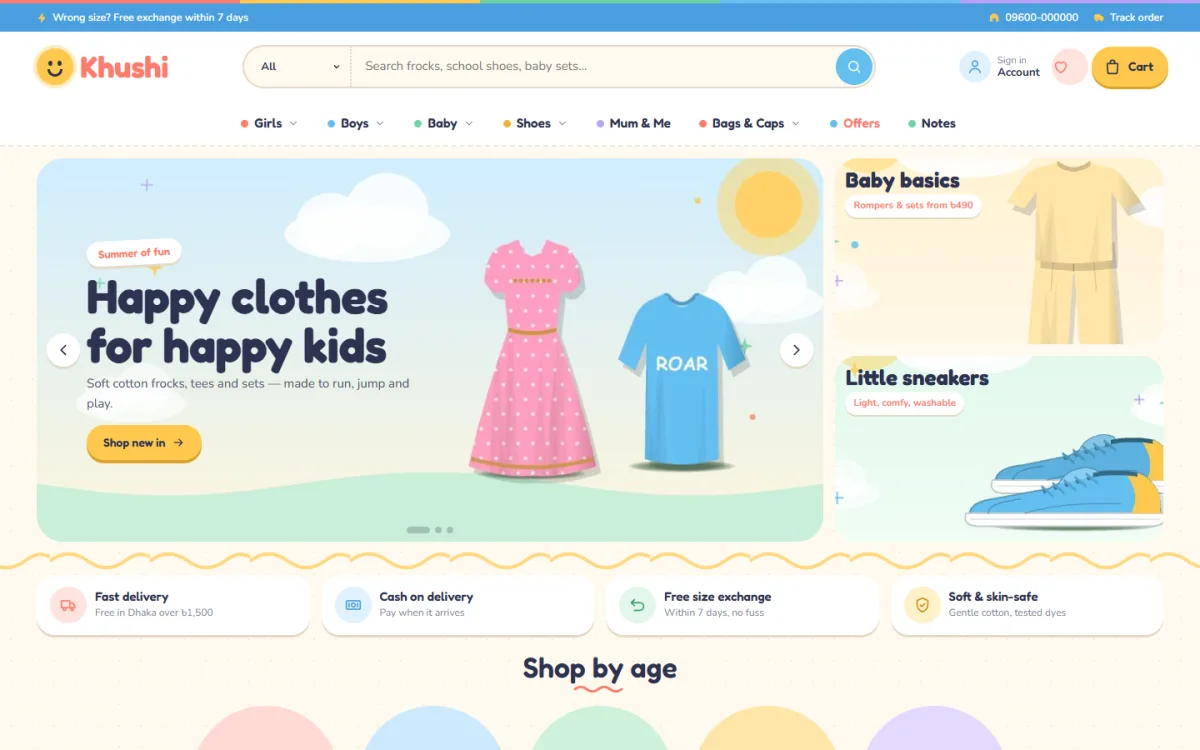
A friendly look also helps. Cream pages, rounded type and playful touches calm a parent and make the shop feel safe.
Photos and product details
A template shows your photos in its own way, so prepare them to suit.
- Use one ratio for all product photos, for example 4:5.
- Shoot on a plain background in daylight.
- Show front, back and a close view of the fabric.
- For kidswear, add a flat lay and one worn photo with the child's age and height.
- Name files clearly, such as "girls-cotton-frock-pink.jpg".
- Compress images before upload.
For details, write fabric, fit, length and care in short lines. Add the size you tested on the model. Buyers decide faster when they see facts.
Payment, delivery and returns
The best layout fails if checkout is confusing. Check that the template supports what your buyers use.
- bKash and Nagad: either a gateway or clear manual steps.
- SSLCommerz: for card and bank payments.
- Cash on delivery: keep it available, with a small advance for costly orders if fake orders are a problem.
- Courier: Steadfast or Pathao, with tracking numbers sent to the buyer.
Show delivery charges before the final step. List delivery time inside and outside Dhaka. Write your exchange rule in two or three short lines, and link it from the product page and the footer.
A ready-made option: Khushi
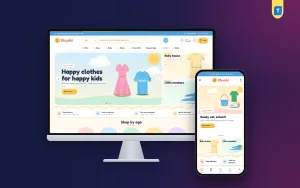
Khushi is a WordPress theme made for kidswear and family stores in Bangladesh. It follows the way parents shop, and it can serve as a kids fashion website design template or as a general clothing template, since the age bubbles, sets and price groups are settings that you can rename.
The theme includes:
- Shop by age with five colourful bubbles.
- A twinning sets block for mum and me outfits.
- Pocket-money picks with price bubbles.
- 20 homepage blocks that you can show, hide or re-order.
- Deal of the day with a countdown and stock bars.
- Five palettes and four rounded font pairs.
- A login popup and folded product reviews.
- bKash, Nagad, SSLCommerz and cash on delivery, with Steadfast and Pathao.
- The Themeve Commerce shop plugin, so you do not need WooCommerce.
- A one-click demo with 41 products.
It needs WordPress 6.0 or newer and PHP 7.4 or newer. If you run a kids or family boutique, it is worth opening the demo and checking how the age bubbles work on a phone.
Set up your template step by step
Once you have chosen from the boutique website design templates you tested, follow this order. It avoids rework.
- Buy a domain and hosting. Choose a short, clear name.
- Install WordPress and the template.
- Import the demo to see how each block works.
- Replace the logo, colours and fonts.
- Delete the demo products and add your own.
- Set up the menu with five or six items.
- Write the size guide, delivery and returns pages.
- Connect payment methods and the courier.
- Place test orders.
- Check every page on a phone.
Do not skip the test orders. They catch wrong prices, missing delivery charges and broken emails before a real buyer finds them.
What to prepare before you start
Setup goes faster when your material is ready. Gather these items in one folder:
- Your logo in PNG form, with a clear background.
- Product photos, already cropped and compressed.
- A spreadsheet with names, prices, sizes, colours and stock.
- Text for the about, delivery, returns and size guide pages.
- Your bKash and Nagad merchant details, and your courier account.
With a theme such as Khushi, the one-click demo import shows you where each of these items goes, so you can replace the sample content one block at a time.
Plan for Eid and other busy seasons
Boutiques in Bangladesh earn a large part of their income around Eid, Pohela Boishakh, winter and the wedding season. Prepare the site at least three weeks before. Add the seasonal stock, set a countdown on the deal block, and raise your courier capacity. Check stock numbers daily during the rush, because overselling is the fastest way to lose trust.
Speed and technical care
Speed is part of the buying experience, especially on mobile data. Many boutique website design templates carry heavy scripts that slow the page, so test before you commit. A parent on a phone with a child nearby will not wait for a slow page, and a slow shop quietly loses orders you never see.
- Choose a template that avoids jQuery and heavy sliders where possible.
- Use lazy loading for images below the first screen.
- Keep plugins to the few you really need.
- Use a cache plugin or hosting cache.
- Keep WordPress, the theme and plugins updated.
- Back up the site every week.
Test with a free speed tool and, more importantly, with your own phone on a normal connection.
Trust, words and basic search setup
New shops need to prove they are real.
- Show your phone number, WhatsApp link and address.
- Link your Facebook and Instagram pages.
- Add real customer photos and reviews.
- Write an about page with your name and story.
- Use https on every page.
For search, give each product a clear title, a unique description and descriptive alt text on photos. Submit your sitemap to Google Search Console. Do not expect quick rankings; they take time, and nobody can promise them. Social posts and word of mouth bring the first buyers.
Mistakes to avoid
- Choosing a template for its demo photos instead of its structure.
- Buying one that needs many extra paid plugins.
- Leaving demo content on the live site.
- Using photos of different sizes and backgrounds.
- Hiding delivery charges until the last step.
- Asking customers to create an account before they can order.
- Never testing on a real phone.
- Filling the homepage with every block when you only have a few products.
Most of these are easy to fix once you know them. Review your site every month, and fix one thing at a time. Keep a short notebook of customer questions. Each repeated question points to something missing on a page: a size note, a delivery time or a photo of the back of the garment.
If you want to read more on the technical side, the official WordPress documentation is a good, reliable reference.
Frequently asked questions
Are boutique website design templates good enough for a real business?
Yes, if you choose one that is fast, works on phones and supports local payment. Many successful shops start with a template and keep it for years, changing only the photos and products.
How much do boutique website design templates cost?
Prices vary. A template is far cheaper than a custom design. Remember to add a domain, hosting and, if the template needs them, extra plugins. Choose one that includes the shop plugin.
Can I use a kids fashion website design template for general clothing?
Often yes. If the age groups, sets and price groups are settings, you can rename them for women's, men's or family ranges. Check the demo to see how flexible each block is.
Do I need coding skills?
No. A good template lets you change colours, fonts and homepage blocks in a settings panel. You will not need code for normal work.
How many products should I have at launch?
Ten to fifteen is enough if the photos are good. Add more as you learn what sells.
Which payment methods should a boutique offer?
bKash, Nagad and cash on delivery cover most buyers. Add SSLCommerz if you want to accept cards too.
Will the site work well on phones?
It should. Open the demo of any template on your phone before buying. Check the header, product cards and checkout.