Clothing website design ideas are easy to find and hard to choose from. Every shop you open uses a different banner, a different menu and a different way of showing a dress. This guide cuts through that. It gives you ideas that work for real clothing shops, explains why they work, and shows how to use them without a big budget.
The advice fits small and growing shops in Bangladesh, especially those that sell on Facebook today and want their own website tomorrow. You will find ideas for the homepage, product pages, mobile screens, colours and checkout, plus a short checklist at the end.
Start with the feeling you want buyers to have
Before you collect any clothing website design ideas, decide how your shop should feel. The feeling guides every other choice.
- Fresh and young: light colours, rounded cards, short words, weekly drops.
- Calm and minimal: off-white, black, square edges, few words.
- Rich and traditional: deep colours, fabric close-ups, craft stories.
- Classic and smart: navy, tan, serif headings, tailoring details.
Pick one. A shop that tries to feel all four ends up feeling like none. Write the feeling in three words and stick the note near your screen: for example, "fresh, quick, friendly".
Homepage ideas that keep visitors scrolling
The homepage has one job: send the visitor to a product. These ideas help.
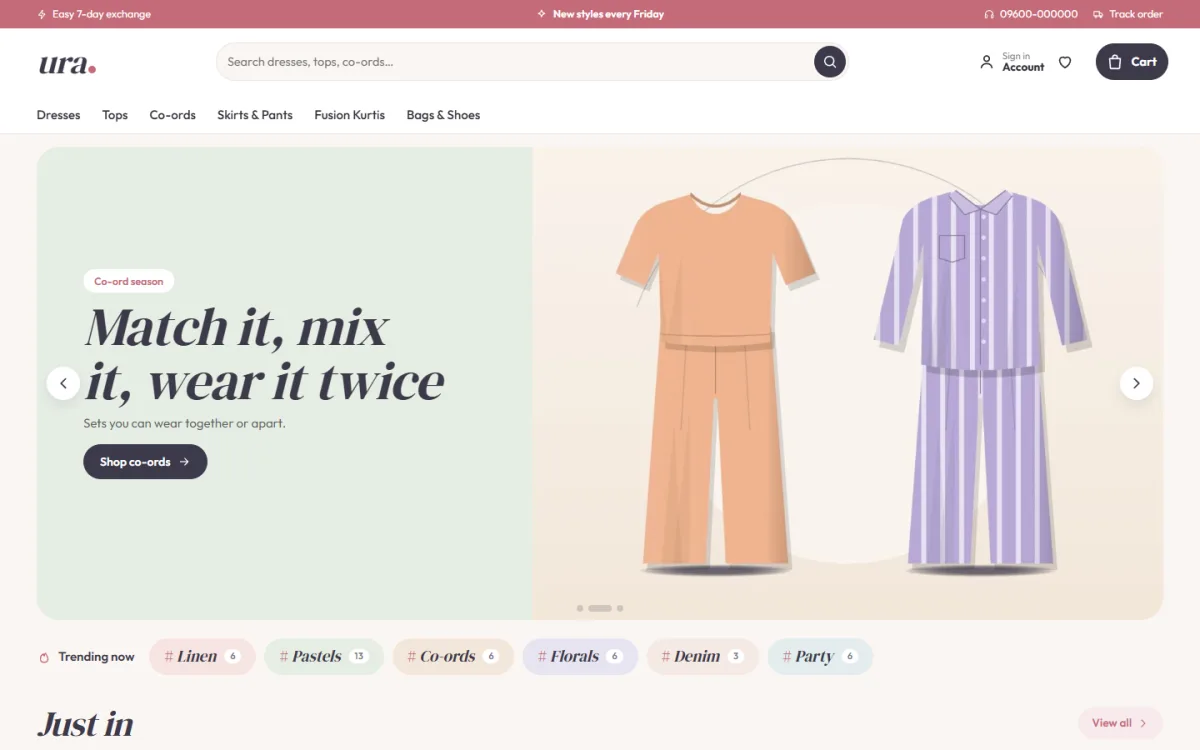
- Split hero. A soft colour panel holds your headline and button, with the photo beside it. It reads well on phones and laptops.
- Trend chips. A row of small labels such as linen, pastels, co-ords, florals, denim and party. Each opens matching products.
- Promise strip. Four short lines: new every Friday, cash on delivery, easy exchange, fast delivery.
- Shop by category. Round or square picture tiles with clear names.
- Just in. Two rows of the newest pieces.
- Best sellers in tabs. One tab per category, so shirts and dresses do not fight for space.
- Drop countdown. One timed release with stock bars, if you really launch things on a schedule.
- Lookbook. One tall picture and two small ones, each with a link to the pieces shown.
You do not need all eight. Start with four and add the rest when you have the content.
Clothing website design ideas for product cards
Product cards appear everywhere: on the homepage, in categories and in search. Small changes to them add up.
- Use rounded corners and a soft shadow for a friendly look, or borderless cards for a minimal look.
- Show a second photo on hover for desktop visitors.
- Add a floating add-to-cart button so the action is always in reach.
- Show quick sizes and colour swatches on the card, to save a click.
- Display the price in a larger size than the discount label.
- Add a small badge for "New" or "Few left", but only when it is true.
- On phones, use two cards per row and keep the text short.
Keep every card the same height. A grid with uneven cards looks careless.
Lookbooks and shop-the-look blocks
A lookbook turns single items into outfits. It is the cleanest way to sell a second piece.
- Use one tall photo and two smaller photos in a magazine style layout.
- Add a short "Shop the look" link on each photo.
- Mention the pieces by name: top, skirt, bag.
- Refresh the lookbook with every new drop.
Buyers who see a dress with a belt and a bag often add all three. Show the combined price if you can, because it makes the decision easier.
Product page ideas that lower returns
Most returns in clothing come from size and colour surprises. Fix them on the product page.
- Show four to six photos, including a back view and a fabric close-up.
- List the model's height and the size she wears.
- Add a size guide for dresses, tops and sets, in inches and centimetres.
- Describe the fit in plain words: relaxed, fitted, cropped.
- State fabric, length and care in a short bullet list.
- Put the exchange rule beside the buy button.
- Invite the first review with a friendly popup when none exist yet.
The better the page answers questions, the fewer messages you get and the fewer parcels come back.
Colour, type and spacing ideas
Colour sets the mood faster than words. These clothing website design ideas keep colour simple.
- Use one soft base colour, one accent and plenty of white.
- For young women's wear, try blush, sage, lavender, peach or mint as the accent.
- Use a serif font for headings and a clean sans-serif for body text.
- Keep body text at 16 pixels or more for phones.
- Leave generous space around photos.
- Make buttons the same colour everywhere so people learn where to click.
Test your palette against your photos. If the photos have warm tones, avoid a cold blue accent. If your clothes are bright, use softer page colours so the products stand out.
Ideas for offers, drops and urgency
Offers can lift sales when they are real and clear. They can also make a shop look desperate when they are not. Here are some honest ways to design them.
- A weekly drop. Release new pieces on the same day, such as Friday, and say so on the homepage. Regular buyers learn the rhythm.
- Stock bars. Show how many pieces are left only when the number is real.
- Price tiles. Tiles such as "Under 1,200" or "Under 2,500" help buyers who shop by budget.
- Bundle prices. Show the price of a full outfit next to the single pieces.
- Festival pages. Create a simple landing page for Eid or Pohela Boishakh with a short list of picks.
Keep the offer area small. One offer block on the homepage is enough. If every section shouts, none of them gets heard.
Clothing website design ideas on a small budget
You do not need a large budget to make a shop look professional. Spend on the few things buyers notice most.
- Photos first. Good daylight pictures cost almost nothing and change everything.
- One clean theme, not a custom design from scratch.
- A simple logo in two colours, saved as a clear image file.
- Short, honest product text that you write yourself.
- Free tools for analytics, and one paid tool at a time only if it earns its place.
- Your own customers' photos, shared with permission.
Leave out the features you do not need yet. A wishlist and reviews help from day one. A loyalty programme can wait until you have repeat buyers.
Connecting the website with Facebook and Instagram
For most Bangladeshi clothing shops, social media is the front door and the website is the shop counter. Make the two work together.
- Link every post to the exact product page, not the homepage.
- Use the same colours, fonts and photo style on your page and your site.
- Add a visible link to your page in the footer and on the contact page.
- Install the Facebook Pixel so you can see which posts bring buyers.
- Share customer photos from the site in your stories, with permission.
- Reply to comments with the product link.
When someone clicks from a post and lands on the same dress they saw, the path to a sale is short. That small detail is one of the most useful clothing website design ideas for shops that live on social media.
Design ideas for phones
Most of your visitors will arrive from a social media post, which means a phone. Design for the thumb.
- Keep the header to menu, logo and cart.
- Use a sticky add-to-cart bar on the product page.
- Make buttons large and well spaced.
- Collapse long text, such as reviews, into folds that open on tap.
- Load images lazily so the top of the page appears first.
- Skip auto-playing video and pop-ups on load.
- Offer sign-in and register in a popup, so shoppers never lose their place.
Open the site on a mid-range phone with a slow connection. If you can use it comfortably, most buyers can too.
Checkout ideas for Bangladeshi shops
Great design is wasted if checkout is hard. Plan these items:
- One-page checkout with name, phone, address and area
- Cash on delivery as the default option
- bKash and Nagad with clear steps and a transaction ID field
- A card gateway such as SSLCommerz
- Delivery charges shown before the last step
- Courier booking with Steadfast or Pathao from the order screen
- An "Order placed" popup and a confirmation message
- A Track Order page
Test these with a friend who has never used your site. Watch where they pause. Every pause is a place to improve.
Choosing a women's fashion website design template
A ready template saves you from drawing every page yourself. A good women's fashion website design template gives you the homepage blocks above, a clean product card and a working shop. When you compare options, check:
- Can you switch homepage blocks on and off and change their order?
- Does the demo look good on your phone?
- Are bKash, Nagad, cash on delivery and courier booking supported?
- Is a size guide included?
- Can you change colours and fonts without code?
- Does it come with updates and help?
A women's fashion website design template is only a start. Your photos, words and prices make the shop yours.
A ready-made option: Ura
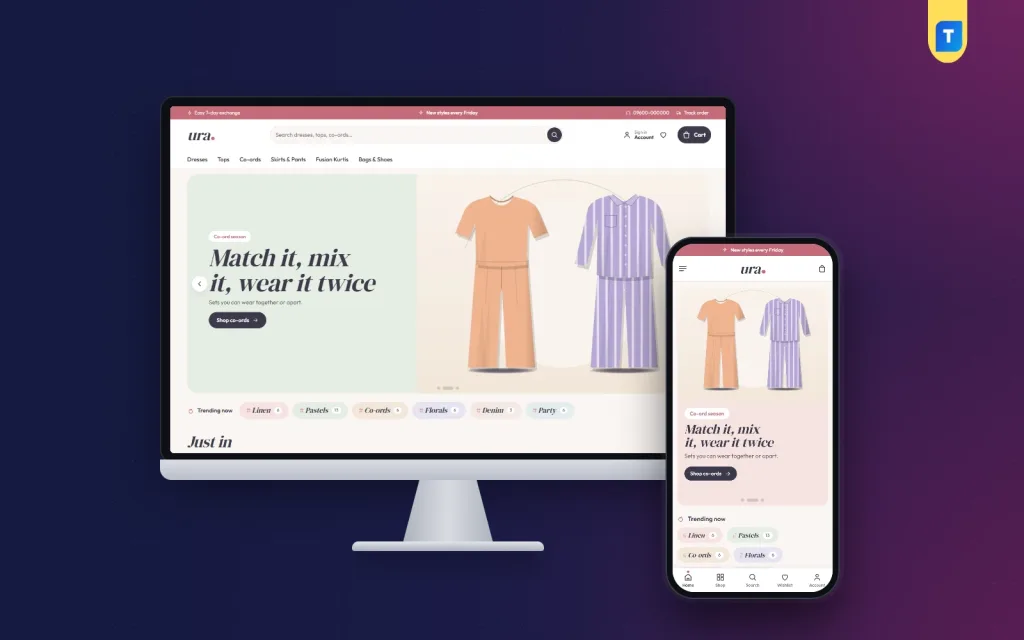
Ura is a Themeve theme for young fashion labels that sell dresses, tops, co-ord sets, skirts, pants, fusion kurtis, bags and shoes. It puts several of the ideas above in one package.
From its product page:
- A split hero with a soft colour panel
- Trending now chips that open matching products
- A magazine lookbook with Shop the look links
- The Friday drop, a countdown with stock bars
- 24 homepage blocks you can re-order
- Rounded cards with a floating add button
- A size guide for dresses, tops and sets
- Five palettes: Rose and sage, Lavender, Peach, Mint and Denim
- bKash, Nagad, SSLCommerz and cash on delivery
- Steadfast and Pathao courier delivery
- A 36-piece demo from six sample studios
The shop plugin comes with the theme, so you can start taking orders after setup. Look at the Ura page and open the demo on your phone to see whether it suits your range.
Mistakes to avoid with clothing website design ideas
Not every idea suits every shop. Watch for these traps.
- Copying everything. Pick a few ideas and do them well.
- Using too many effects. Animations slow pages and distract buyers.
- Mixed photo styles. Keep light, background and crop the same.
- Ignoring text. Short, clear lines sell better than clever slogans.
- Fake urgency. A countdown that never ends damages trust.
- Empty blocks. If you have no content for a section, leave it out.
- Forgetting policy pages. Delivery, exchange and privacy pages build trust.
A simple plan to put these ideas to work
- Write your three-word feeling.
- Choose four homepage blocks.
- Prepare 20 to 30 products with good photos.
- Write the size guide and the exchange rule.
- Set up cash on delivery, bKash, Nagad and your courier.
- Place test orders on a phone.
- Launch, share on Facebook and look at the numbers after a week.
- Change one thing at a time and check the effect.
Small, steady improvements work better than a full redesign. Pick one idea this week, try it and keep what helps.
If you want to read more on the technical side, the official WordPress documentation is a good, reliable reference.
Frequently asked questions
Where can I get clothing website design ideas for a small shop?
Browse stores in your own category, check demo sites of ready themes and read your own customer messages. Note what helps buyers and copy the habit, not the look.
Which clothing website design ideas work best on mobile?
A short header, two cards per row, a sticky add-to-cart bar, large buttons and lazy-loaded images. Keep pages light and text short.
How many products should I show on the homepage?
Twelve to twenty is enough, grouped in a few blocks. Let the shop and category pages hold the rest.
What colours suit a women's fashion shop?
Soft base colours such as blush, sage, lavender or peach work well. Choose one accent and keep the rest white so photos stand out.
Do I need a developer for a women's fashion website design template?
No. Install the theme, import the demo and change blocks, colours and text in the options panel. A developer is only needed for custom features.
How do I reduce returns?
Use true colours, a size guide, a clear fit description and a plain exchange rule. Most returns come from surprise.