Choosing between clothing website design templates is easier when you know what your shop needs to do, not only how it should look. A template that suits a ten-product boutique will frustrate a store with a thousand items, and the reverse is also true.
This guide helps you pick the right template for a clothing business in Bangladesh. It covers the types of layouts, the features that matter, a scoring checklist, a setup order and the mistakes to avoid. Read it before you spend money on any theme.
What clothing website design templates actually give you
A template is a ready-made layout. It decides where the header, banners, product grids, filters and footer go. You add your logo, colours, photos and products, and the shop is ready for visitors.
The right template saves weeks of design work. The wrong one forces you to fight it every day. A good template gives you:
- A homepage structure that matches how people shop for clothes.
- Product and category pages with sizes, colours and filters.
- A cart and checkout that work on phones.
- Settings for colours, fonts and menus, so you do not edit code.
- Demo content you can import and then replace.
Match the template to the size of your catalogue
This is the most important choice. Decide how many products you will sell in the first year, then pick a layout built for that number.
Small catalogue: up to 50 products
Choose a quiet layout with large photos, a short menu and few homepage blocks. Visitors can see most of your range on one page. Lots of search and filter tools would only add clutter.
Medium catalogue: 50 to 300 products
You need clear categories, new arrivals, bestsellers and a good product filter. A mega menu helps here.
Large catalogue: 300 products and more
Search becomes the main tool. Look for a search box with a category picker, an all-categories menu, deal blocks and tabs that let shoppers move between departments without leaving the homepage.
Features to look for in clothing website design templates
Use this list when you compare options. Not every item is needed for every shop, but you should know which ones you are giving up.
- Size and colour choices with a size guide.
- Header search that can narrow by category.
- Flexible homepage blocks that you can hide, show and re-order.
- Deal blocks with a countdown for sales days.
- Wishlist and quick view so shoppers can save pieces.
- Reviews on product pages.
- Local payments: cash on delivery, bKash and Nagad.
- Courier support for Steadfast and Pathao.
- Light pages that load fast on mobile data.
- Language switch if you serve both English and Bangla readers.
The homepage blocks most clothing shops need
A homepage is a set of blocks stacked in order. The best clothing website design templates let you control that order. Here are the blocks worth having, from top to bottom.
- Hero banner or slider with your main offer.
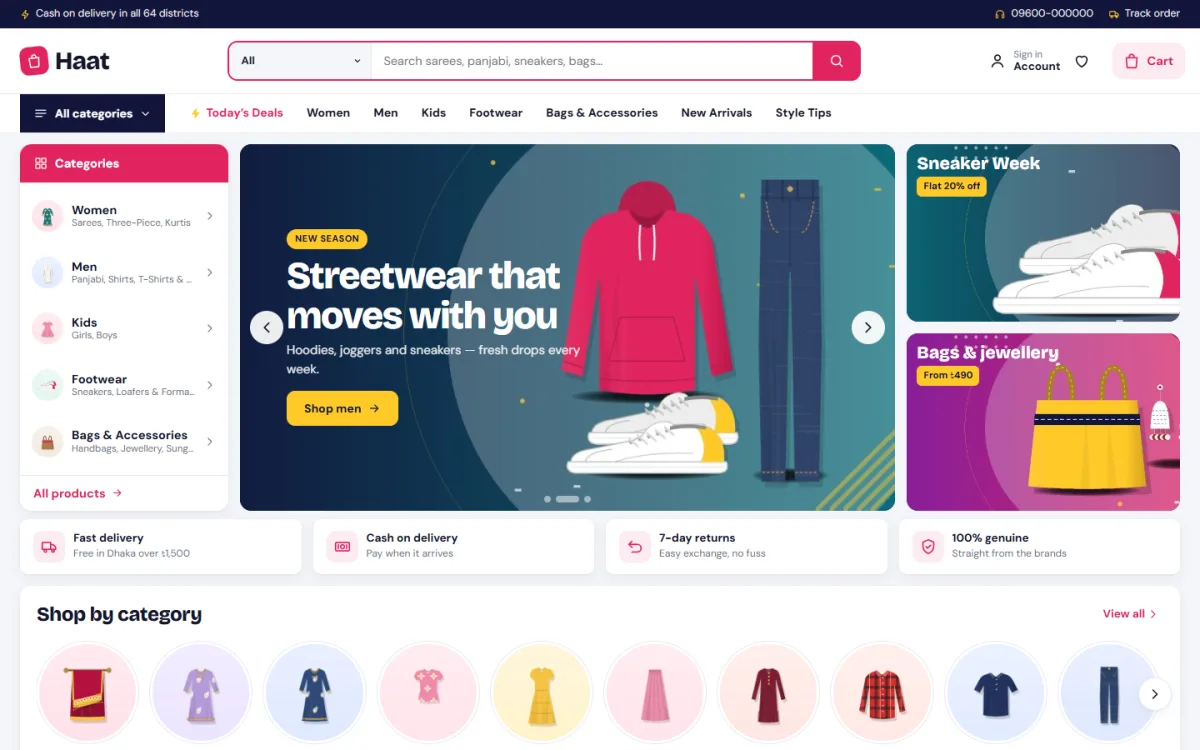
- Service strip with delivery, cash on delivery, returns and genuine products.
- Category icons with round pictures.
- Deal of the day with a timer and a stock bar.
- Top brands if you sell more than one label.
- Bestsellers by category in tabs, so one block serves several departments.
- Promo banners for seasonal campaigns.
- Budget block with price tiles.
- Department blocks for Women, Men and Kids.
- Reviews and brand story near the footer.
Small shops can switch off half of these. Large shops use them all. What matters is that you decide, not the template.
Fashion megastore website design template: when you need one
Some stores are not boutiques. They sell sarees, three-piece sets, panjabi, western wear, kidswear, shoes, bags and jewellery under one roof. For these, a fashion megastore website design template is the right tool.
A megastore layout is busy on purpose. Customers arrive with a rough idea, such as a panjabi for Eid or school shoes for a son, and they want to reach the right shelf in two taps. The layout therefore puts search, deals and categories in plain sight.
- A wide search box with a category picker.
- A menu that opens the full list of departments.
- Deal blocks and a budget section.
- Several promo banners, each with a clear job.
- Product cards that are compact on phones, so more items fit on each screen.
If you run a quieter boutique, avoid this style. A busy page will bury your pieces.
Speed matters more than decoration
On Eid week and sale days, traffic jumps and most of it comes from phones. A heavy template loses those visitors before the page opens. When you compare clothing website design templates, check these points.
- How many scripts and stylesheets load on the first page?
- Does the template depend on a page builder plugin?
- Are images lazy loaded?
- Are fonts bundled, or fetched from outside servers?
- Does the demo feel quick on your phone, on mobile data?
Open the demo on a cheap Android phone and scroll. Your customers will do the same thing, and they will not wait.
How to test a template before you commit
A demo site can look perfect in screenshots. Test it properly with this routine.
- Open the demo on your phone and on a computer.
- Search for a product, then filter it by size and colour.
- Open a product page and look for a size guide.
- Add an item to the bag and start checkout.
- Check the payment options and delivery fields.
- Look at the footer, the menu and the account pages.
- Rotate the phone, then resize the browser window.
Write what you like and what annoys you. If the annoyances come up in the first five minutes, they will come up for your customers too.
Clothing website design templates for Bangladeshi payments and delivery
A template made for another country may look fine and still fail at the till. Local shops need local tools, and you should check them before you buy.
- Cash on delivery as a normal option, not a hidden extra.
- bKash and Nagad either through a gateway or with a manual transaction ID field.
- District and thana fields in the address form.
- Courier booking from the order screen for Steadfast or Pathao.
- Order alerts to your phone through email, Telegram or WhatsApp.
- Bangla text that displays well, with a font made for Bangla.
These details decide how much manual work you do every day. A template that handles them saves hours.
A ready-made option for large clothing shops
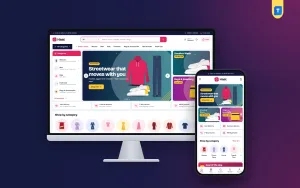
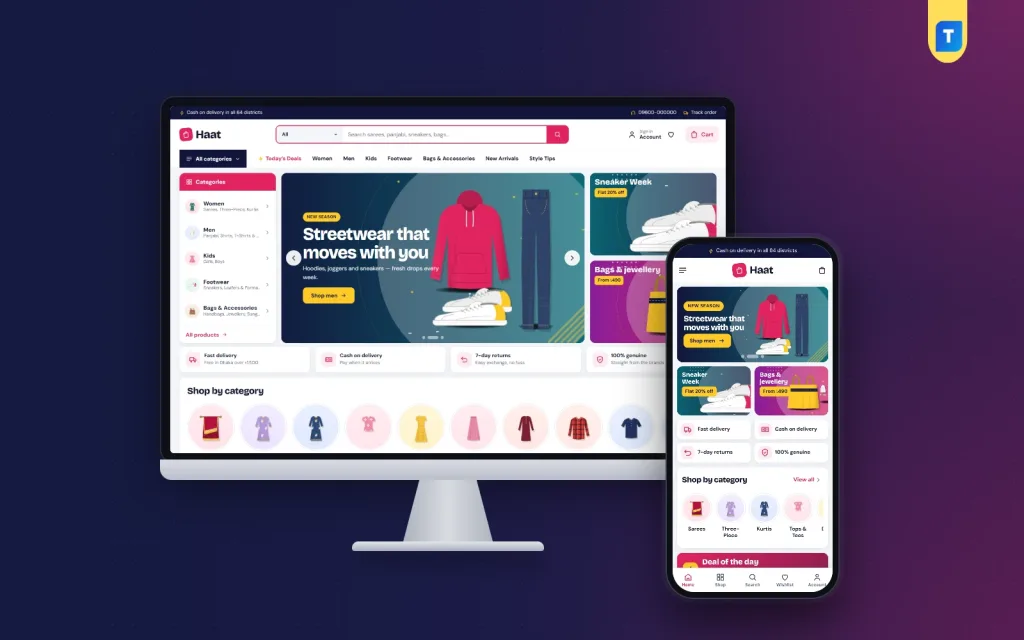
Haat is a fashion megastore theme for big clothing shops and multi-brand stores. It is built for stores where search, deals and categories need to stay in plain sight.
These are the main points from its feature list.
- A big header search with a category picker.
- An All categories menu for large catalogues.
- 17 homepage blocks you can show, hide and re-order.
- Deal of the day with a countdown and stock bars.
- Bestsellers by category, with 12 products per tab.
- A budget store with price tiles, three department blocks and a brand spotlight.
- Five colour palettes and four font pairs.
- A login popup and a reviews fold on product pages.
- bKash, Nagad, SSLCommerz and cash on delivery, with Steadfast and Pathao delivery.
- An English and Bangla switch.
The demo comes with 62 products from 8 brands and installs in one click, so you can see a full megastore before you add your own range. The store plugin is bundled and installs from the theme setup page. A small boutique can use it too, by turning off the blocks it does not need. Details and demo links are on the Haat page.
Colours, fonts and photos: make a template look like your brand
Two shops can use the same layout and still look different. The difference comes from a few choices you make in the first week.
Colours
- Choose one main colour and one accent. More than that looks messy.
- Check the contrast of text on buttons, especially on phone screens in daylight.
- Use the accent colour only for actions, such as Add to bag and Checkout.
Fonts
- Use one font for headings and one for body text.
- Pick a pair that supports Bangla properly if your pages carry Bangla text.
- Avoid decorative fonts for prices and sizes. Clear numbers sell better.
Photos
- Use the same background and light for every product.
- Crop to the same ratio, so the grid lines up.
- Compress each file before upload. Clothing website design templates cannot fix a 4 MB photo.
Which template type fits which shop
If you are still unsure, match your business to one of these common cases.
- Local brand with its own label: a clean single-brand layout with big photos.
- Saree and three-piece seller with seasonal demand: a layout with occasion tabs, deal blocks and strong banners.
- Multi-brand department store: a megastore layout with search, brands and departments.
- Facebook page seller going online: a simple layout with a fast checkout and cash on delivery.
- Wholesale and retail house: a layout with bulk order options and clear price tiers.
Setting up your store once you pick a template
The order below keeps the work calm and avoids rework.
- Install and activate the theme, then run the setup page.
- Import the demo if you want a layout to start from.
- Replace the logo, colours and fonts. Pick one palette and keep it.
- Build the menus. Use short names and no more than seven top items.
- Add real products with clear photos, sizes, colours and stock.
- Set up the homepage blocks. Hide what you do not need.
- Connect payments and couriers and test each one with a real small order.
- Write the policy pages: delivery, return and exchange, privacy.
- Remove the demo content so no sample product reaches a customer.
Give yourself a week for this. Rushing leads to missing sizes, wrong prices and broken links, and you lose trust with your first customers. After launch, check your orders every day for the first two weeks, and note every question customers ask. Those questions show you what to add to the product pages, the size guide or the delivery policy.
Mistakes people make when choosing a template
- Choosing by screenshot, without testing the demo on a phone.
- Picking a megastore layout for a tiny catalogue, or the reverse.
- Ignoring local payments until the last week.
- Installing five plugins to add features the template should include.
- Using photos in many different styles.
- Leaving demo text and sample products on the live site.
- Changing the template every few months, which confuses returning customers.
A scoring sheet for comparing options
Give each template a score from 1 to 5 for every line below. Add them up and compare. Do this for your top three choices, ideally on the same day, so the demos are fresh in your mind. Ask a friend or a staff member to do the same on their own phone and compare notes.
- Fits the size of my catalogue.
- Product page handles sizes and colours.
- Search and filters are easy.
- Homepage can be re-ordered without code.
- Works with bKash, Nagad and cash on delivery.
- Courier booking is built in.
- Fast on a mid-range phone.
- Clear updates and support.
A template that scores well on all eight is a safe pick. If it is weak on two or three lines, ask yourself whether you can live with that for a year.
If you want to read more on the technical side, the official WordPress documentation is a good, reliable reference.
Frequently asked questions
Are clothing website design templates good enough for a real business?
Yes, if you choose one that fits your catalogue and local needs. Many successful shops start with a template and change only the logo, colours, photos and products.
How do I choose between clothing website design templates?
Start with your catalogue size, then check sizes and colours, search, payments, courier support and speed. Test the demo on your own phone before you decide.
Can I change the homepage layout later?
With a block-based theme, yes. You can show, hide and drag blocks into a new order without writing code.
Do I need WooCommerce for a clothing store?
Not always. Some themes include their own shop plugin that handles cart, checkout, payments and couriers. Check what comes in the package.
Is a megastore template right for a small boutique?
It can work if the template lets you switch off the extra blocks. If it cannot, pick a simpler layout.
How many products should I add before launch?
Twenty to forty good products are enough to start. Add more as you learn what sells.
Will a template work well on phones?
A good one will. Always open the demo on a phone and check the menu, search, product page and checkout yourself.