 −10%
Haat – Clothing Store WordPress Theme
✦ Key features
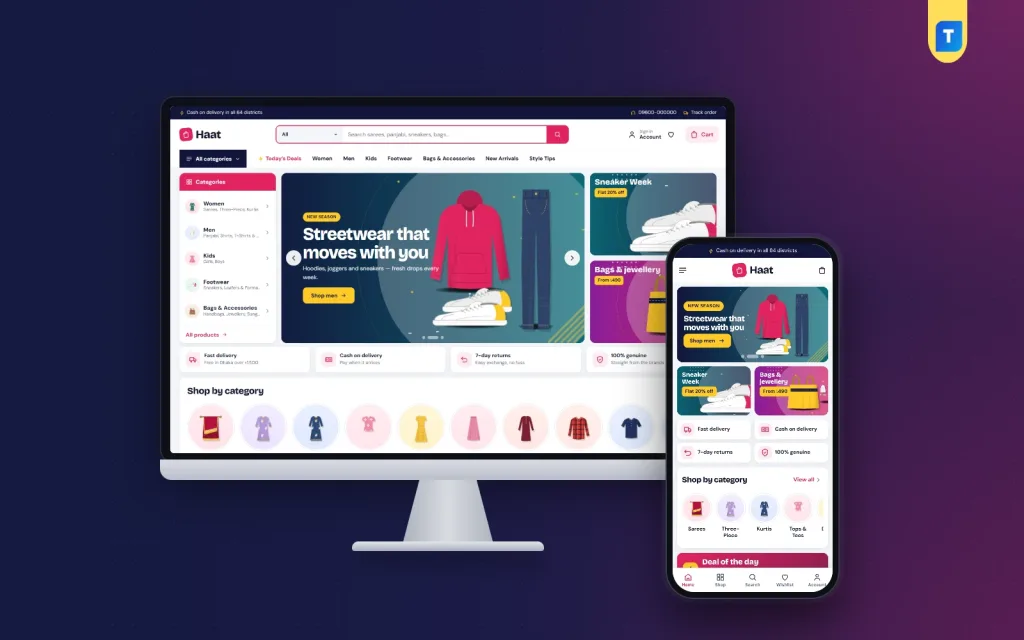
- Big header search with category picker
- All categories menu for large catalogues
- 17 homepage blocks you can re-order
- Deal of the day with countdown and stock bars
- Bestsellers by category, 12 products per tab
- Budget store with price tiles
- Three department blocks and brand spotlight
- Login popup and reviews fold
- bKash, Nagad, SSLCommerz, cash on delivery
- Steadfast and Pathao courier booking
- 5 colour palettes and 4 font pairs
- English and Bangla switch
- One-click demo with 62 products
Overview
Haat is a clothing store WordPress theme for large and multi-brand fashion shops. It has category search, deal of the day, a budget store, 17 re-orderable homepage blocks, one-page checkout, local payments and courier booking.
Haat is a clothing store WordPress theme for big shops and multi-brand stores that sell many kinds of fashion under one roof. It puts search, deals and categories in plain sight, because a store with hundreds of items cannot hide them.
The demo shows a megastore with women's, men's and kids' wear, footwear and accessories. That is a sample. The same design suits a single large clothing shop, a family department store, a regional fashion marketplace or a brand with many collections. Replace the demo with your own range and it becomes your store.
Who can use this clothing store WordPress theme
Haat is made for catalogues that are wide rather than small. For instance:
- Multi-brand clothing stores that stock several labels.
- Saree, three-piece and panjabi sellers with seasonal demand.
- Western wear, kidswear and school-wear shops.
- Footwear, bag and jewellery sellers who want one site for every department.
- Wholesale and retail fashion houses.
- Facebook page sellers who are ready to run their own website.
- Agencies that need a base for a clothing ecommerce website for a client.
A tiny boutique with ten products can use it too, by switching off the blocks it does not need.
Light pages for busy sale days
Eid and sale days bring heavy traffic, mostly from phones. A slow site loses that traffic. Haat keeps the front end small.
- One theme script of plain JavaScript. The shop pages do not load jQuery.
- One main stylesheet of about 90 KB.
- Logos and menu pictures use lazy loading.
- Product cards are tighter on phones, so more items fit on each screen.
Front-end features of the clothing store WordPress theme
Header and navigation
- A big search box with a category picker, placed next to the account, wishlist and cart icons.
- An All categories menu that opens the full list of departments.
- A Main menu you build yourself.
- On phones, a three-part header with menu, logo and cart.
17 homepage blocks
In Homepage layout you show or hide any block and drag it into place. On a phone, arrows move it up or down. Each block has its own settings panel.
- Hero slider with side promos and a category list.
- A service strip for delivery, COD, returns and genuine products.
- Category icons with round pictures.
- Deal of the day with a countdown and stock bars.
- Top brands logo row.
- Bestsellers by category, in tabs with 12 products each.
- A row of three promo banners.
- Budget store with price tiles and matching products.
- New arrivals in two rows.
- Three department blocks, each with one banner and eight products.
- Trending now and Top rated.
- Brand spotlight.
- Just for you, a big grid with a Load more button.
- Style tips, showing your latest three posts.
Deals, budget and brands
Deal of the day shows the time left and how fast stock is going. Together they create a small push on big sale days.
Many buyers shop by price first and style second. The budget store gives them price tiles to tap, with matching products below.
If you stock several labels, the Top brands row and Brand spotlight give each one a place. Feature one label for a week, then swap in the next.
Product page and shopping tools
- Reviews in a fold, with a popup that invites the first review.
- Size guide page and size options.
- Wishlist and coupons for repeat shoppers.
- Back-in-stock alerts, offers and returns.
- Login and register popup.
Mobile shopping
Fashion shoppers scroll on their phones, often late at night. On a small screen the header folds into menu, logo and cart, and the cards pack more items into each screen. The same blocks you see on desktop stack in a clean single column, and the page stays fully responsive. The load-more button keeps the long Just for you grid from slowing the first view.
Cart, checkout and tracking
- One-page checkout.
- An Order placed popup.
- A Track Order page so buyers can check the delivery status alone.
- An English and Bangla switch.
Back-end options in the dashboard
Haat runs on the Themeve Commerce plugin. It is bundled, installed with one click during setup, and handles every step after a customer taps Add to cart. All store tools sit under one menu named Shop.
Haat Theme Options
- Groups for the homepage, colours, type, the header, product cards, the hero, deals and promos, product rows, the product page and the footer.
- Five colour palettes: Magenta, Ocean, Tangerine, Forest and Violet. Every colour can be edited by hand.
- Four font pairs: Bold (Bricolage Grotesque and DM Sans), Clean (Inter Tight and Inter), Friendly (Poppins and Nunito Sans) and Sharp (Sora and Manrope).
- Google Fonts can be switched off.
- Footer columns come from two menus, Footer Shop and Footer Help.
- A find-a-setting search, a save bar that stays in view, a reset button and settings export and import.
- The Customizer holds the same options if you prefer a live preview.
Orders and sales
- A store dashboard with today's sales, the last seven days, the month so far and a sales chart.
- Order statuses, printable invoices and a payments box for advances, dues and refunds.
- Incomplete Orders, listing people who left at checkout.
- A customer list that groups buyers as new, repeat, VIP, inactive or risky.
- Transactions with every payment and refund.
Products and sizes
- A full-page product editor with options such as size and colour, each with its own price, stock, SKU and photo.
- Menus for categories, brands and tags.
Payments and delivery
- bKash, Nagad, SSLCommerz, cash on delivery and manual payment.
- An optional advance on cash on delivery orders.
- Delivery charges per district and extra local zones.
- Steadfast and Pathao booking from the order screen.
- A COD money screen for what the courier still owes you.
Alerts and protection
- New-order alerts on Telegram, email or WhatsApp.
- SMS updates and OTP phone checks.
- Fake order protection.
- Automatic review requests after delivery.
Marketing and SEO
- Facebook Pixel with Conversion API, Google Analytics 4 and Google Tag Manager.
- Product feeds for Facebook and Google shopping.
- SEO settings for descriptions, sharing previews and rich results.
- Coupons and promo codes.
Optional modules
- Pre-orders and Delivery Date and Time.
- Bulk Order and Corporate Quotes, and Reseller and Wholesale Prices.
- Combo and Bundle Offers, Flash Sale, Upsell and Cross-sell.
- Loyalty Points, an Affiliate Program and Recently Viewed.
- Exchange and Returns, Store Locations and popups.
- A Marketplace module and a REST API with signed webhooks.
How a clothing store WordPress theme helps a busy fashion business
A big catalogue means many orders. Haat sends each new one to Telegram, so the team knows at once. Invoices are ready for every order, and the courier can be booked from the same screen. That cuts the number of phone calls and spreadsheets.
For shoppers, the path is short. A buyer looking for a panjabi for Eid types it in the search box, picks the category and sees matching items. A buyer with a budget taps a price tile. A buyer who wants a brand opens the logo row.
Clothing also brings returns and size questions. A size guide page, back-in-stock alerts and exchange and return requests are part of the package, so these questions have a place to go. A clothing ecommerce website that answers them early gets fewer messages later.
A few practical ideas for a new store. Use the three department blocks for your biggest categories, such as women, men and kids. Set Deal of the day on the item with the best margin and enough stock to make the bar look real. Rotate the Brand spotlight each week. Update the Style tips posts before each festival, with outfit ideas that link to your products.
Each of these takes minutes in the dashboard, and together they keep a large store fresh. Any clothing store WordPress theme works best when the homepage changes with the season.
Set up in a few steps
- Install and activate the Haat theme.
- Open Haat, Setup and install the bundled Themeve Commerce plugin.
- Activate your licence in Haat, License so updates arrive.
- Run the one-click demo import.
- Choose a palette and font pair in Theme Options.
- Edit the homepage layout, banners and the service strip.
- Delete sample products, add your own, and turn on payments and couriers.
Why choose it over a plain template
A basic fashion template looks fine with twelve products. It struggles with twelve hundred. Haat starts from the opposite point: a large, busy catalogue with deals, departments and brands.
- Search with a category picker and an All categories menu for deep catalogues.
- Department blocks, bestsellers by category and a budget store.
- The store engine included, with local payments and couriers ready.
- Fake order and incomplete order tools.
- No coding for colours, fonts or layout.
For a developer, it is also a fast base for a clothing ecommerce website. The options are grouped clearly, so a client can change banners and colours without calling you every week.
Another thing to remember is that you do not have to buy a shop plugin, a payment plugin and a courier plugin separately. They come as one package, made to work with the theme.
What is included
- The Haat theme.
- The bundled Themeve Commerce plugin.
- The Haat Fashion Megastore demo: 62 sample products from eight brands, deal of the day, department blocks, style tips posts, menus and every page, such as About, Help Center, Delivery Info, Returns and Refunds, Size Guide, Our Stores and Track Order. All pictures and brand names are made up.
- Documentation.
Haat needs WordPress 6.0 or newer and PHP 7.4 or newer. If you run a family store rather than a marketplace, other Themeve fashion themes may fit better. For a large range with many shoppers, Haat is a clothing store WordPress theme made for the crowd.
You can see Haat working on the live demo, and browse more ready-made designs in our WordPress themes collection.
Reviews
0.0
Write a review
★★★★★
0 reviews from buyersNo reviews yet — be the first to share your experience after buying.
Frequently Asked Questions
01Is Haat a good clothing store WordPress theme for a multi-brand shop?
Yes. It has a Top brands logo row, a Brand spotlight block and a demo with 62 products from 8 brands.
02Can I use this clothing store WordPress theme for a small boutique?
Yes. Switch off the blocks you do not need and the homepage stays short and clean.
03Can customers search inside one category?
Yes. The header search has a category picker, and the All categories menu lists every department.
04Do I need to write code to change the homepage?
No. Show, hide and drag blocks in Haat, Theme Options, Homepage layout. On a phone you use arrows.
05Does it come with the store plugin?
Yes. Themeve Commerce is bundled and installs with one click from Haat, Setup.
06Can buyers pay with bKash or cash on delivery?
Yes, along with Nagad, SSLCommerz and manual payment. Delivery runs through Steadfast or Pathao.
07Will my team get notified of new orders?
Yes. New-order alerts can go to Telegram, email or WhatsApp, and invoices are made for orders.
08Where do theme updates come from?
Activate your licence under Haat, License and updates arrive in the dashboard.
Delivery & Support
1Place your orderAdd to cart, sign in and pay with bKash or Rocket.
2Payment verified automaticallyEnter your Transaction ID — the payment is matched automatically, usually within seconds.
3Get your productYour license key and download appear in My Account → Licenses.
- Secure automatic payment verification
- Delivery to your account & e-mail
- Friendly WhatsApp support
Refund Policy
This policy applies to every product in our store.
You get a refund when the product does not work as described and we cannot fix it, when your license will not activate your website, or when a manually delivered product is late and you cancel before delivery. A working license, or a single license already used on a live domain, is not refundable. Approved refunds go back to the number you paid from within one working day, minus the Send Money charge.
More items
View all →You may also like
−10%
 −10%
 −34%
WordPress Themes
Dipto – Digital Products WordPress Theme for Subscription Shops
৳2,150
৳3,250Save −34%
 −34%
