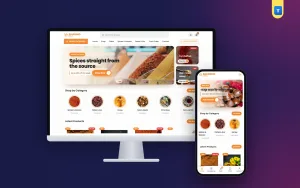
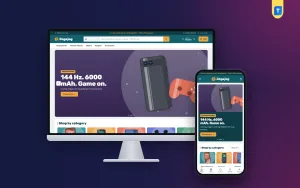
An electronics website design template gives you a ready-made layout for an online shop, so you do not have to draw every page from nothing. You add your products, your logo and your prices, and the structure is already there. The skill is in picking one that fits the way people buy phones, laptops and other gadgets.
This guide explains what to look for, which pages and blocks matter, how to set a template up in a week, and which mistakes to avoid. It is written for small shop owners in Bangladesh, but the steps work anywhere. A ready-made option is shown near the end.
What an electronics website design template really is
A template is a set of finished pages and blocks: a homepage, category pages, a product page, a cart, a checkout. On WordPress it usually comes as a theme. You install it, load the demo, and replace the sample products with your own.
A good electronics website design template is different from a general shop template in a few ways:
- It treats specs as the main content, not an extra.
- It has a compare tool, because buyers compare models.
- It shows warranty and EMI near the price.
- It handles variants like storage size and colour with their own prices.
- It works well with long product names and model numbers.
A fashion template with big photos and no spec table will frustrate your visitors, even if it looks pretty. Think of the difference between a showroom and a catalogue: electronics buyers want the catalogue first and the showroom feeling second.
Template, theme or custom build: which one?
You have three ways to get a site. Each suits a different shop.
- Template or theme. Fast and cheap. You get a tested layout and change colours, fonts and blocks. Best for most small and medium shops.
- Page builder from scratch. More freedom, but slower. You must design and test every page yourself.
- Custom development. Costs the most and takes weeks. Worth it only for large shops with special needs.
If your shop has fewer than 500 products and you want to go live within a month, start with a template. You can always add custom work later.
The same rule applies when you search for an electronics website design template online: choose for your real products first, and for looks second. A plain layout that shows specs well will sell more than a fancy one that hides them.
Features to look for in an electronics website design template
Do not choose by the demo picture alone. Open the demo on your phone and check this list. Take your time here, because this step decides how much extra work you will do later:

- A clear spec area on product cards and product pages.
- Product compare, with at least three products side by side.
- Storage and colour variants with different prices.
- EMI or instalment line next to the price.
- Warranty badge or text.
- Search with category picker and live suggestions.
- Filters by brand, price and key specs.
- One-page checkout with few fields.
- Local payments such as bKash, Nagad and cash on delivery.
- Courier support and order tracking.
- Good speed on a mobile network.
- Updates and support from the seller.
If four or more of these are missing, you will need extra plugins, and each plugin adds cost and risk. Every plugin is another thing to update, another thing that can clash with your theme, and another thing that can slow the page. A template that already has the main parts built in is usually the safer choice.
Homepage blocks that a gadget store needs
The homepage should help a visitor reach a product in two or three taps. A solid layout for a gadget store has these blocks:
- Header with logo, search and cart
- Main banner with one clear offer
- Category tiles for phones, laptops, audio, watches, cameras, gaming and accessories
- A finder that matches category, use and budget
- Best sellers and new arrivals
- Deals with a real end date
- Brand logos
- Delivery, warranty and payment notes
- Reviews and shop address
Choose a template that lets you switch blocks on and off and change their order. You may start with 10 blocks and add more later. A homepage with too many sections feels like a noisy market.
Product pages that help people decide
Most buyers decide on the product page, so test it first when you try a demo. It should answer the basic questions without a long scroll.
Look for:
- Key-spec tiles at the top, such as screen size, battery, memory and camera
- Price, old price and a monthly EMI line
- Variant buttons for storage and colour that change the price
- Warranty length
- A delivery date or time estimate
- Photos from several sides
- A full spec table below
- Related products and accessories
Showing a delivery date is a small detail with a large effect. People are more ready to buy when they know the day the parcel will arrive.
Finder and compare: tools that save sales
Gadget buyers often know the job, not the model. "A laptop for video editing" or "a phone with a good camera under 30,000 taka." A plain grid of products does not help them.
A gadget finder
A finder asks three things: category, use and budget. It then shows a few matching products. This copies what a good salesperson does at your counter. Check that the template builds its use options from your own product tags, so you can control them.
Side-by-side compare
A compare page puts the specs of several products in one table. The best ones have an "only show differences" switch, which hides the rows that match. It saves the buyer from reading twenty identical lines.
Variants with stepped prices
A phone with 128 GB and 256 GB should show two prices on one page, not two separate listings. Stepped prices keep your catalogue tidy and help the buyer see what extra storage costs.
How to choose an electronics website design template
Use this short process when you compare options:
- Write down your top 10 products and what a buyer needs to see for each.
- Open three demos on your phone, not only on a computer.
- Try to find a product, compare two, and reach checkout in each demo.
- Read what is included: shop plugin, payments, courier tools, demo import.
- Check the update history and the support method.
- Check the minimum WordPress and PHP versions against your hosting.
- Look at the price against what you would pay for the missing parts.
The right choice is the one that lets you open the shop soonest with the fewest extra purchases. Do not pay for 40 homepage layouts if you will use one.
Payments and delivery for Bangladesh
A shop in Bangladesh must support local ways of paying. Check that your template, or its shop plugin, offers:
- bKash and Nagad, with a clear step for the buyer
- Cash on delivery, with the option of a small advance for costly items
- A card or banking gateway such as SSLCommerz
- Manual payment with a transaction number field
- Booking with Steadfast or Pathao from the order screen
- A tracking page for customers
If a template only supports foreign payment gateways, you will spend extra on custom work. Ask before you buy. A gadget shop website design template that was made for Bangladesh will already have these steps ready.
Also set your delivery rules early: free delivery above a certain amount, charges inside and outside Dhaka, and a clear time estimate. Put this on a Delivery page and repeat the short version in the cart.
Change the look without code
A good template lets you change the main parts of the design in an options panel, with no coding. At minimum you should be able to:
- Pick a colour palette and change the accent colour.
- Choose a font pair.
- Change the header and footer style.
- Switch homepage blocks on or off and re-order them.
- Edit text, buttons and banners.
It is a bonus if the options panel works on a phone. Then you can fix a wrong price or swap a banner from anywhere. Keep your brand simple: one logo, one main colour, one font pair.
Phone use and speed
Most of your visitors will come from Facebook and Google on mobile data. Test your template on a real phone, and check:
- The page opens in about three seconds on a normal connection.
- Buttons are large enough for a thumb.
- The cart is always easy to reach.
- Product cards stay readable at small widths.
- The checkout is not cluttered.
To keep things quick, resize images before upload, use caching, remove plugins you do not use and choose a theme that loads little extra code.
Set up your store in seven days
Here is a realistic plan for a first launch. Adjust it to your pace.
- Day 1: Buy a domain and hosting. Install WordPress.
- Day 2: Install the template and import the demo. Remove sample products you do not need.
- Day 3: Set logo, colours, fonts and menus.
- Day 4: Add your first 20 products with photos, specs and prices.
- Day 5: Set up payments, delivery rules and the courier.
- Day 6: Write the About, Delivery, Warranty and Return pages. Place a test order.
- Day 7: Check on two phones, fix small problems and take a backup. Then share your link.
Add the rest of the catalogue after launch. A small, clean shop beats a big, messy one. Once the shop is live, share the link on your Facebook page, ask early buyers for reviews and check your order list every day for the first two weeks.
Content you should prepare first
Many shops lose time because the content is not ready. Before you start with your electronics website design template, collect:
- Clear photos of each product, at least three each
- Spec lines in a simple list, with units
- Correct prices, and EMI terms if you offer them
- Warranty terms for each brand
- Your shop address, phone number and opening hours
- A short About text in plain words
- Logo in a clean file
Write each spec once, in the same order for every product in a category. When all phones list the screen, memory, battery and camera in the same order, shoppers learn the pattern and read faster. It also makes your compare page look clean.
Keep the text honest. If a product has a seller warranty and not a brand warranty, say so. Buyers forgive many things, but not surprises after payment.
A ready-made option: Jhalak
If you are looking for a gadget shop website design template for WordPress, Jhalak was built around the points above. It is aimed at shops selling phones, laptops, monitors, tablets, audio, smartwatches, cameras and gaming gear.
Some of what it includes:
- A "Find your gadget" block that matches category, use and budget.
- Side-by-side compare with an only-differences switch.
- Storage variants with stepped prices.
- Key-spec tiles, a warranty line and a 0% EMI line.
- Delivery date shown on product pages.
- 24 homepage blocks, with 17 on by default.
- Five colour palettes, four font pairs and a Theme Options dashboard that works on phones.
- The Themeve Commerce shop plugin with one-page checkout, bKash, Nagad, SSLCommerz, cash on delivery, Steadfast and Pathao.
The demo has 37 products from seven brands, so you can judge it with a real catalogue. Compare it with other options on your shortlist using the checklist above. A good gadget shop website design template should save you hours, not add to your list of jobs.
Common mistakes to avoid with a template
These problems come up often when shops start with a template:
- Keeping the demo products and text, so the site looks like every other shop.
- Using manufacturer photos at huge file sizes.
- Turning on every homepage block.
- Hiding the warranty and return policy.
- Skipping the test order.
- Installing many plugins for small jobs.
- Forgetting to update the theme and WordPress.
- Not backing up before a change.
Fix these early and your shop will look professional and run well. If you chose Jhalak or any other theme, remember to import the demo only on a fresh install, then edit it into your own brand.
If you want to read more on the technical side, the official WordPress documentation is a good, reliable reference.
Frequently asked questions
What should an electronics website design template include?
It should include spec cards, compare, variants with prices, an EMI line, warranty text, search and filters, a fast checkout and local payment support.
Is a gadget shop website design template different from a general shop template?
Yes. A gadget layout puts specs, compare and variants first. A general shop template focuses on photos and sizes, which is not what phone and laptop buyers need.
Can I use an electronics website design template without WooCommerce?
Yes, if the template comes with its own shop plugin. Some themes include cart, checkout, payments and order tracking, so you do not need WooCommerce.
How long does it take to launch an electronics shop with a template?
A simple shop can go live in about a week if your photos, specs and prices are ready. Adding a full catalogue takes longer.
Will I need a developer?
Not for the basics. You can import the demo, change colours and fonts, add products and set payments yourself. Hire help only for special features.
Can I sell phones and laptops with the same template?
Yes. Choose a template with a finder, compare and variant support. These work for phones, laptops, audio and accessories alike.
How do I keep my shop fast?
Resize images, use caching, keep plugins few and update everything regularly. Test the shop on a real phone after each change.