 −15%
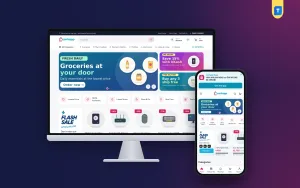
Jhalak – Electronics Ecommerce Website Template

✦ Key features
- Find your gadget by category, use and budget
- Compare side by side with an only-differences switch
- Storage variants with stepped prices
- Key-spec tiles, warranty and 0% EMI line
- Delivery date on product pages
- 24 homepage blocks, 17 on by default
- Theme Options dashboard works on phones
- Five palettes and four font pairs
- Sign in and register in a popup
- One-page checkout and order tracking
- bKash, Nagad, SSLCommerz and cash on delivery
- Steadfast and Pathao courier booking
- Themeve Commerce shop plugin included
Overview
Jhalak is an electronics ecommerce website template for phones, laptops, audio and gaming shops. It has a gadget finder, side-by-side spec compare, storage variants with stepped prices, 24 homepage blocks and a built-in local shop.
Jhalak is an electronics ecommerce website template for WordPress, made for stores that sell phones, laptops, monitors, tablets, audio gear, smart watches, cameras, gaming products and accessories. It is built for two kinds of buyer: the one who reads every spec line, and the one who just wants help choosing.
The shop runs on Themeve Commerce, our own plugin, which comes bundled and installs in one click. WooCommerce is not used. Cart, checkout, local payments, courier booking and order tracking are already part of the package.
Who can use this electronics ecommerce website template
The demo is a premium gadget store, and that is only an example. The same pages work for many shops:
- Phone and tablet retailers.
- Laptop, monitor and computer shops.
- Audio stores with headphones, earbuds and speakers.
- Camera, drone and projector sellers.
- Gaming shops with consoles and controllers.
- Authorised brand dealers who show official warranty and EMI.
- Page-based sellers who now want a real website.
If you carry a narrower range, hide the blocks you do not use. Nothing else breaks.
Why a gadget store needs more than a product grid
Many buyers search for an electronics ecommerce website template and find a design with empty boxes. A gadget store needs working tools, not just boxes.
Gadget customers rarely know the exact model. They know the job: editing video, gaming after work, a laptop for university. Then they know the budget. A plain grid makes them do all the sorting. Jhalak moves that work to the page. Two homepage tools sort for them, and the cards carry enough detail to decide without opening ten tabs.
Front-end features of the electronics ecommerce website template
Find your gadget
The block asks three things: which category, what it will be used for, and the budget. The shopper picks a category tab, taps a use chip and moves the budget slider. Up to six matches appear at once.
- You choose the categories in Theme Options.
- The use chips come from your own product tags. A laptop tagged for gaming shows up when someone taps the gaming chip.
- The budget slider narrows the list by price.
Compare side by side
This block lines up real spec sheets, row by row. You set up the comparisons in Theme Options, for example two flagship phones or three ultrabooks. Every spec line on those products gets its own row.
An "Only show differences" switch hides every row that matches. The buyer sees just what separates the two models.
Cards and storage variants
Cards are crisp and white, with a spec line under the name. Phones and laptops can carry storage and colour variants with stepped prices, so a 256 GB model shows its own price as soon as the buyer picks it. Card settings include:
- Photo shape: square, portrait or tall.
- Brand or category above the name.
- Star rating and sold count.
- Colour dots.
- A second photo on hover.
Product page
- Key-spec tiles near the top.
- One box with the warranty and a 0% EMI line.
- A delivery date that tells buyers when the parcel should arrive.
- Delivery charges and times from your store settings.
- "Frequently bought together" suggestions.
- Return and exchange text and care notes.
- A sticky add-to-cart bar on phones.
- Reviews in a fold, plus a popup that asks for the first review.
Header and menu
The top of the page decides whether a visitor stays or leaves, so it is kept simple and quick to use.
- A top bar with up to three offers, a hotline and an English / Bangla switch.
- A sticky header.
- Search with a category picker.
- Account and wishlist icons on desktop.
- Sign in and register in a popup, so nobody loses a cart halfway.
Cart, checkout and tracking
- One-page checkout, closed by an "Order placed" popup.
- A Track Order page.
- Wishlist, coupons and invoices.
Phones and footer
Many gadget buyers browse on a phone during a break and buy later on a laptop, so both screens matter.
The layout is fully responsive. The phone header keeps menu, logo and cart, cards turn compact, and an optional bottom bar offers Home, Shop, Search, Wishlist and Account. The footer has about text, phone, email, address and hours, with links to Facebook, Instagram, TikTok, YouTube and WhatsApp.
24 homepage blocks, on or off
Seventeen blocks are on by default. Seven more wait, switched off. Drag any block to a new spot, or use the arrow buttons when you work from a phone.
- Hero slider with studio-lit launches behind a glass text panel.
- Find your gadget.
- Shop by category on podium tiles.
- Just launched, two rows of the newest products.
- Compare side by side.
- Best sellers in tabs by category.
- Three department blocks, each with a banner and eight products.
- Flash deals with a countdown and stock bars.
- Made for you, four lifestyle cards.
- Shop by budget, price tiles with products.
- Trending now, a sliding row.
- Top rated.
- Official brands logos.
- Tech guides, your latest three posts.
- A promise strip for official warranty, EMI, delivery and returns.
The extras are Our promise, Quick links, Four cards, Banner + row, Promo cards, Brand spotlight and More to explore.
Back-end: Theme Options
Go to Jhalak → Theme Options. Every part of this electronics ecommerce website template is set here. The page works on a phone too, which helps when you are standing at the counter. A search box finds any setting. A sticky save bar stays in reach, and you can reset or export your work.
- Homepage layout: switch and sort blocks.
- Colors: five palettes (Indigo & mint, Electric blue, Graphite & lime, Violet and Ocean), or set colours by hand.
- Typography & style: four font pairs (Space Grotesk with Inter, Sora with Inter, Manrope, DM Sans), button shape, content width and motion.
- Header & menu: offers, hotline, language switch, sticky header, search and the phone bottom bar.
- Product cards: the card options above.
- Hero slider: three slides and two side promos.
- Gadget finder, compare, categories, deals and more: finder categories, comparison sets, deal end time and promo banners.
- Product sections: tabs, price tiles, departments and titles.
- Product page: delivery, bought-together, return text, sticky bar and care text.
- Footer & contact: details and social links.
Back-end: the shop dashboard
Sales and orders
The dashboard opens on the numbers a shop owner checks every morning.
- Today's sales, the last seven days, the month so far, orders waiting for you and a two-week chart.
- Order statuses and printable invoices.
- A payments box for advances, dues and refunds.
- Incomplete Orders, so you can call buyers who left checkout.
Products and variants
- A full-page product editor.
- Options such as storage and colour. Each option keeps its own price, stock, SKU and photo.
- Menus for categories, brands and tags.
Payments
- Cash on delivery, with an optional advance as a fixed amount, the delivery charge or a percentage.
- bKash and Nagad, and cards through SSLCommerz.
- Manual Send Money for bKash, Nagad, Rocket and Upay, with a transaction ID.
Delivery
- A charge for each district, plus extra zones.
- Booking with Steadfast or Pathao from the order screen, with an automation setting.
- A COD money screen that shows what the courier owes you.
Customers and alerts
- Sign in by password, a phone code, Google or Facebook.
- Accounts with orders, tracking, wishlist and exchange or return requests.
- Alerts by email, Telegram or WhatsApp.
- SMS updates and an automatic review request after delivery.
- OTP phone checks and fake order protection for COD.
- SMS campaigns for past buyers.
Marketing and reports
- Facebook Pixel with the Conversion API, Google Analytics 4 and Google Tag Manager.
- Facebook and Google shopping feeds.
- SEO settings for descriptions, sharing previews and rich results.
- Transactions with monthly totals.
- A customer list grouped as new, repeat, VIP, inactive or risky.
Optional modules
You switch these on from one screen, so the plugin stays light:
- Pre-orders, handy for a launch before stock lands.
- Delivery Date & Time.
- Bulk Order & Corporate Quotes, for companies that buy ten laptops.
- Reseller & Wholesale Prices.
- Combo & Bundle Offers, such as a phone with a case and charger.
- Flash Sale, Loyalty Points, Upsell & Cross-sell, Recently Viewed.
- Back in Stock Alerts, Exchange & Returns, Store Locations.
- Sales and Signup popups, an Affiliate Program and a Marketplace module.
Support tickets, testimonials and offers have their own menus. Developers get a REST API with signed webhooks.
How this electronics ecommerce website template helps you sell
A gadget costs real money, so buyers take their time. Your site has to answer their questions while they decide. Jhalak does this with tools that sit on the homepage and on each product, not hidden in a menu.
- The finder turns a vague wish into a short list of products.
- The compare block helps a careful buyer settle between two close models.
- Stepped prices avoid surprises when a buyer picks more storage.
- A visible warranty, EMI line and delivery date remove common doubts.
- COD advances cut fake orders on costly items.
Set it up
- Install and activate Jhalak.
- Install Themeve Commerce from Jhalak → Setup.
- Activate your copy under Jhalak → License.
- Run the one-click demo import, or start empty.
- Pick a palette and font pair, and add your logo.
- Replace the sample products, define your finder and comparisons, and set payments and couriers.
The demo holds 37 products from seven invented brands, with spec sheets, the finder, ready comparisons, tech guides, menus and pages such as Our Stores. Swap all of it for your own stock.
Why choose it over a plain template
- The shop is included. A basic electronics ecommerce website template or gadget shop website template leaves cart, payment and courier work to you.
- Finder and compare are built into the homepage, not added by a separate plugin.
- Local payments and couriers are ready from day one.
- Colours, fonts and block order change without code.
- Public pages use no jQuery, and the theme script is plain JavaScript of about 27 KB.
What is included
- The Jhalak theme.
- The Themeve Commerce plugin.
- One-click demo content.
- Documentation after purchase.
- Updates and six months of support.
It needs WordPress 6.0 and PHP 7.4 or newer, and is tested up to WordPress 7.1. If you want an electronics ecommerce website template that is ready to sell, with a finder, a compare tool and a real checkout, Jhalak fits. It also works as a sharp gadget shop website template for a smaller range.
You can see Jhalak working on the live demo, and browse more ready-made designs in our WordPress themes collection.
Reviews
0.0
Write a review
★★★★★
0 reviews from buyersNo reviews yet — be the first to share your experience after buying.
Frequently Asked Questions
01Can I use Jhalak as an electronics ecommerce website template for any gadget range?
Yes. The demo is a premium gadget store, but the finder, compare block and product pages suit phones, laptops, audio, cameras, gaming and accessories. Hide any block you do not need.
02What makes Jhalak more than a basic electronics ecommerce website template?
It includes the shop plugin, local payments, courier booking, a gadget finder and a spec compare block. A basic template usually gives only a layout.
03How does the gadget finder choose products?
Shoppers pick a category, a use and a budget, and up to six matching products appear instantly. You set the categories in Theme Options, and the uses come from your product tags.
04Can I set up my own comparisons?
Yes. You list the products for each comparison in Theme Options and Jhalak lines up their spec lines row by row. Shoppers can switch on Only show differences to hide matching rows.
05Do phones and laptops support storage options?
Yes. Storage and colour variants carry stepped prices, so the price changes as the buyer picks a bigger model.
06Is the store plugin included?
Yes. Themeve Commerce is bundled and installs in one click from Jhalak, Setup. It handles cart, checkout, payments, couriers and orders.
07Which payment and delivery options can I offer?
bKash, Nagad, SSLCommerz, cash on delivery and manual payment, with Steadfast and Pathao courier and an order tracking page.
08Can I edit the theme from my phone?
Yes. The Theme Options dashboard works on phones, and you can re-order homepage blocks there with arrow buttons.
Delivery & Support
1Place your orderAdd to cart, sign in and pay with bKash or Rocket.
2Payment verified automaticallyEnter your Transaction ID — the payment is matched automatically, usually within seconds.
3Get your productYour license key and download appear in My Account → Licenses.
- Secure automatic payment verification
- Delivery to your account & e-mail
- Friendly WhatsApp support
Refund Policy
This policy applies to every product in our store.
You get a refund when the product does not work as described and we cannot fix it, when your license will not activate your website, or when a manually delivered product is late and you cancel before delivery. A working license, or a single license already used on a live domain, is not refundable. Approved refunds go back to the number you paid from within one working day, minus the Send Money charge.
More items
View all →You may also like
−15%
 −14%
 −6%
 −10%
