Fashion ecommerce website design decides whether a visitor becomes a buyer or closes the tab after ten seconds. The clothes may be lovely, but if the shop is slow, confusing or untrustworthy, nobody will see them.
This guide is for Bangladeshi fashion sellers who want to move from a Facebook page to a real online shop. It explains how to plan the structure, design the pages, handle photos, set up payment and delivery, and test before launch. It also includes notes for modest wear stores, which have their own shopping habits.
What fashion ecommerce website design covers
Design is not decoration. It is the way the whole shopping trip is arranged. Fashion ecommerce website design includes:
- The pages you build and the order of the menu.
- The layout of the homepage, category pages and product pages.
- Colours, fonts and the style of your photos.
- Shopping tools such as filters, size guides and wishlists.
- The cart, checkout and order tracking.
- Speed on a phone.
- Signs that tell a buyer your shop is real.
When these parts work together, the shop feels simple to use. When one is weak, buyers feel doubt, even if they cannot say why.
Understand how fashion buyers shop online
Fashion is different from electronics or books. A buyer cannot test the fit or touch the cloth. So they look for clues.
Most people follow a pattern:
- They see a post or an ad and tap through on a phone.
- They scan the photos and the price.
- They look for the size, the fabric and the colour options.
- They check delivery cost and time.
- They look for proof that others bought and were happy.
- They choose a payment method, often cash on delivery.
Design every page around these steps. If a step is hard, you lose people at that point.
Local habits to respect
Buyers in Bangladesh have clear habits that your shop should respect.
- Many first-time buyers will not pay in advance. Cash on delivery builds the first order.
- Many people ask for the price in a comment or message. Show prices on the page so they need not ask.
- Shoppers compare two or three pages before choosing. Clear photos and facts help you win the comparison.
- Families buy before Eid, Ramadan and the wedding season. Prepare stock and the site well in advance.
- Many people open the shop from a Facebook link. The first screen must load fast and match the post they just saw.
Good fashion ecommerce website design starts from these habits and then adds style on top.
Plan the structure before the look
Many owners start by picking colours. In fashion ecommerce website design, start with the site map instead.

A simple, strong structure is:
- Home: best pieces, categories and one offer.
- Categories: for example abaya, hijab, kaftan, office wear and accessories.
- Product page: photos, price, options and a clear add to cart button.
- Cart and checkout: short and without forced sign-up.
- Size guide: a chart with lengths and widths.
- Delivery and returns: cost, time and exchange steps.
- About and contact: your story, phone and WhatsApp.
Keep the main menu to five or six items. If a buyer cannot reach a product in two taps, the menu is too deep.
Design the homepage for fashion ecommerce
The homepage should show what you sell, who it is for and where to click next, all without scrolling.
A reliable block order is:
- A hero with one short message and one button.
- A promise strip: delivery, cash on delivery, exchange, fabric.
- Category tiles with clear pictures.
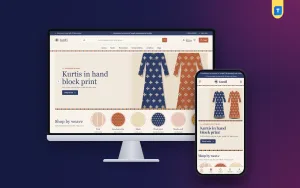
- Shop by colour or by price, if it suits your range.
- New this week.
- Most loved items in tabs.
- A single offer with an end date.
- Reviews and customer photos.
Use only the blocks you can fill well. An empty section looks worse than no section.
Colour and type for the homepage
Pick one main colour, one soft neutral and one accent. Use the accent only on buttons and sale labels, so people learn where to click. Use one font for headings and one for body text. A serif heading with a plain body font feels calm and premium.
Leave generous space around photos. Space tells the buyer that each piece was chosen with care, and it makes the shop feel less like a market stall and more like a quiet boutique.
Check contrast. Light grey text on a cream background is hard to read on a phone in daylight. Dark text on a light page is safest.
Photography that earns trust
Photos do the work of a shop assistant. They must be clear, honest and consistent.
- Shoot in soft daylight with a plain background.
- Show the front, back, side and a close view of the fabric.
- Use the same ratio and crop for every product.
- Show the garment worn, with the model's height and size noted.
- For modest wear, show the length from shoulder to hem and how the sleeve ends.
- Do not over-edit. Colours should match what arrives.
- Compress every image so the page stays light.
If you sell abayas or hijabs, add a short video or a second photo that shows the drape. It reduces doubt and returns.
Modest wear website design template: what to look for
Modest fashion has its own habits. Buyers are careful, they compare fabric and length, and they often shop for the whole family before Ramadan and Eid. If you choose a modest wear website design template, look for these features:
- A calm look with soft colours and no loud badges.
- Shop by colour, since shade matching between abaya and hijab matters.
- Sets or outfit blocks, so a buyer can pick a full look.
- A size guide that includes length and sleeve measurements.
- Price tiles for people with a fixed budget.
- Good reading on a phone late at night.
Respect is part of the design. Use respectful photos, clear language and a quiet layout. Avoid flashing banners or pressure messages.
Make fashion ecommerce website design fast on mobile
Most of your orders will come from phones, often on mobile data. Speed is a design choice.
- Pick a light theme without heavy page builders.
- Prefer plain JavaScript over large libraries where you can.
- Lazy-load images below the first screen.
- Keep the phone header simple: menu, logo and cart.
- Make buttons big enough for a thumb.
- Show two products per row on small screens.
- Test on a mid-range phone, not only your own.
A page that opens in two seconds feels trustworthy. A page that takes eight seconds feels risky.
A quick way to test is to open your shop on mobile data, not Wi-Fi, in a place with an average signal. Count the seconds until the first product photo appears. If it is more than four, look at your largest images first. Most slow shops are slowed by a few photos that are several megabytes in size.
Product pages that remove doubt
This is the page where the order is decided. Answer every question before the buyer has to ask.
- Put the title and price at the top.
- Offer size and colour as buttons.
- Add a short note on fabric, fit, length and care.
- Link to the size guide next to the size buttons.
- Show stock and delivery time.
- Add a few reviews with real names.
- Suggest matching pieces to complete the look.
Matching pieces raise the order value in a natural way. A buyer who picks an abaya may add a scarf if you show it right there.
Payment and delivery for Bangladesh
Payment is part of fashion ecommerce website design, because it shapes the last and most sensitive step.
- bKash and Nagad: show them clearly, with steps, or link a gateway that matches payments automatically.
- SSLCommerz: for card and bank payments.
- Cash on delivery: keep it, because many first-time buyers need it. Ask for a small advance on costly items if fake orders hurt you.
For delivery, choose a courier with tracking, such as Steadfast or Pathao. Show the delivery charge before checkout. State delivery time for Dhaka and for other districts. Write your exchange rule plainly: how many days, what condition and who pays the return fee.
A ready-made option: Noor
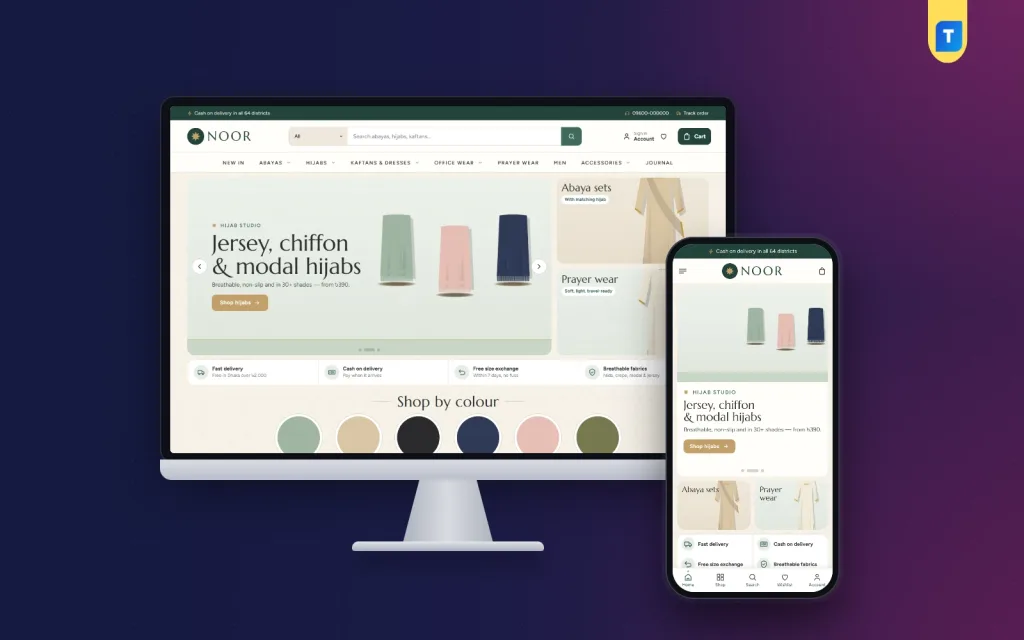
Noor is a WordPress theme for modest wear shops in Bangladesh. It uses warm sand, deep sage and soft gold, with serif headings and small eight-point star details. It works as a modest wear website design template, and it suits other clothing shops too, since the swatches, sets and price tiles are settings that you can rename.
What it includes:
- Shop by colour with six swatches.
- A complete the look block with ready sets.
- 20 homepage blocks that you can show, hide or re-order.
- Today's offer with a countdown and stock bars.
- Gentle on the pocket price tiles.
- Five calm palettes and four serif-led font pairs.
- A login popup and reviews fold with a first-review popup.
- bKash, Nagad, SSLCommerz and cash on delivery, with Steadfast and Pathao.
- The Themeve Commerce shop plugin, so WooCommerce is not needed.
- A one-click demo with 37 products.
It is a calm, quiet layout. If that matches the mood of your brand, open the demo on your phone and judge the speed and feel yourself.
Build trust from day one
A new shop has no history. Fashion ecommerce website design should give buyers reasons to believe in you.
- Show a phone number, WhatsApp link and email.
- Add links to your Facebook and Instagram pages.
- Publish real customer photos, with permission.
- Write an about page with your name, city and story.
- Use https on every page.
- Keep your returns policy short and visible.
Small signs matter. A buyer who sees a real voice behind the shop is far more willing to send the first order.
Words, search and social setup
Write clear product text
Name products by what they are, such as "Black crepe abaya with sleeve cuffs, 54 inch". Add fabric, length and care in short lines. Use the same size words everywhere.
Set up basic search
- Give each page a clear title and a short description.
- Add alt text to photos.
- Submit your sitemap to Google Search Console.
- Write two lines at the top of each category page.
Results take time and no one can promise a rank. Keep posting on Facebook and Instagram with a link to the product page. Install the Facebook Pixel so you can see which posts bring buyers.
Mistakes to avoid and a launch checklist
Common mistakes
- Too many colours, fonts and flashing banners.
- Photos with different sizes and backgrounds.
- No size guide, or one without lengths.
- Delivery charges that appear only at the end.
- Forced account creation before checkout.
- Heavy pages that load slowly.
- No test on a real phone.
- Poor fashion ecommerce website design choices that copy another brand.
Launch checklist
- Place a test order with each payment method.
- Check order emails and SMS alerts.
- Test courier booking and tracking.
- Read each page on a phone for spelling.
- Confirm every product has a price, size and stock.
- Check the size guide, delivery and returns pages.
- Make a backup and store login details safely.
After launch, review orders every week. See which pages people leave and fix one thing at a time. For a quiet, modest store, Noor lets you make those changes in the settings without code.
If you want to read more on the technical side, the official WordPress documentation is a good, reliable reference.
Frequently asked questions
How much does fashion ecommerce website design cost?
The cost depends on the route. A custom build is the most expensive and takes the longest. A ready-made WordPress theme is much cheaper, and you add a domain and hosting. Choose a theme that already includes a shop plugin to avoid extra fees.
What is the most important part of fashion ecommerce website design?
Photos, size information and a simple checkout matter most. If a buyer can see the product clearly, find the size and pay easily, the rest is detail.
Do I need WooCommerce?
No. Some themes bring their own shop plugin with local payment and courier support. Check this before you buy.
What should a modest wear website design template include?
Look for a calm layout, shop by colour, outfit sets, length and sleeve size guides and good mobile reading. These match how modest wear buyers shop.
How many products do I need to start?
Ten to fifteen well-photographed products are enough. A small, clean shop is better than a large, messy one.
Should I keep cash on delivery?
Yes, for most shops in Bangladesh. Confirm orders by phone and ask for a small advance on high-value items if needed.
Can I manage the shop without a developer?
Yes. With a good theme you can change colours, fonts and homepage blocks in settings, and add products yourself.