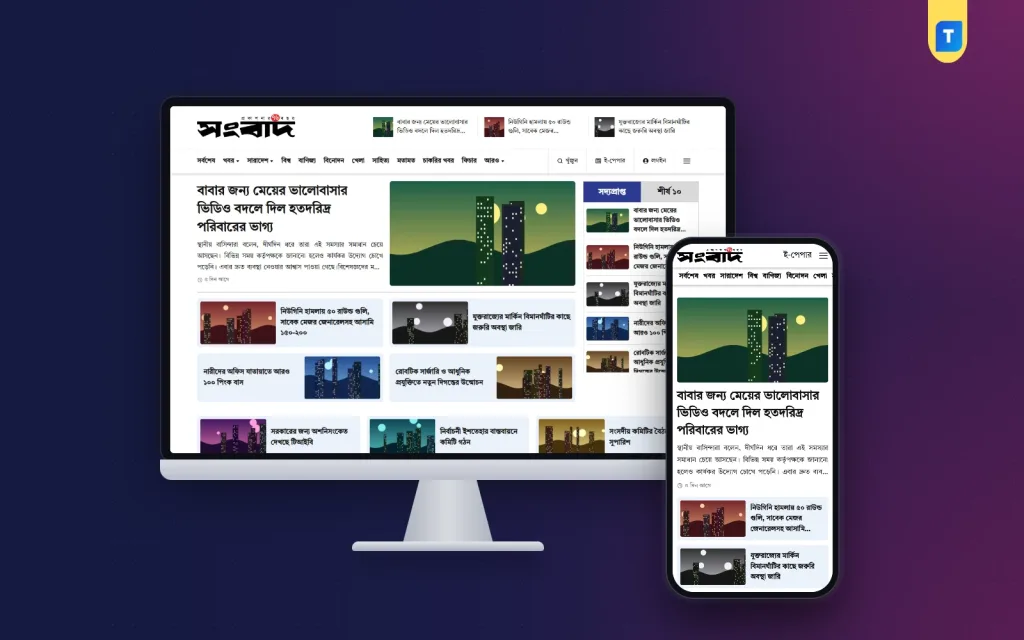
Planning an online news portal Bangladesh readers will trust starts long before you choose colours or a logo. You need a legal footing, a clear idea of what you will cover, and a design that works on the cheap Android phones most of your readers carry. This guide walks through those three parts in order: registration, sections and design. It is written for journalists going independent, local publishers and the freelancers who build news sites for them.
Each part affects the next. The beats you choose decide your categories, your categories decide your menus and homepage, and your registration details belong on the About and Contact pages before you apply anywhere. Getting the order right saves weeks of rework, and it also makes the site look like a serious newsroom from the first day instead of a blog that happens to post news.
For the design and setup part we use the Sangbad Bangla News Portal WordPress Theme as the example, because it was made for exactly this job: Bangla menus and dates, local news for every district, and a dashboard in Bangla. You can open the live demo in another tab and compare it with each step below.
Online News Portal Bangladesh: Registration Basics
Bangladesh has a national policy for online mass media, and news portals apply for registration through the Ministry of Information and Broadcasting. The process has changed over the years, so read the latest circular on the ministry's website before you start rather than trusting old forum posts. Expect to provide details of the publisher and the editor, an office address, your domain name and business papers such as a trade licence and tax registration. Verification of the people involved can take months.
You do not have to wait with an empty site. Most new portals build the website, publish carefully for some time and apply with a working product to show. What you should do from day one is behave like a registered newsroom. Print the editor's and publisher's names, the office address, a phone number and an email on the site. Write a short editorial policy and a corrections policy. These pages also help with readers, advertisers and Google AdSense later.
Keep your paperwork tidy in one folder: the trade licence, tax documents, the domain invoice, hosting details and the national ID copies of the editor and publisher. Renew the domain for several years at a time. A lapsed domain is a common and painful way for a young portal to vanish overnight, and the name is sometimes taken by someone else within days.
Choosing Your Beat and Section Plan
The online news portal Bangladesh market is crowded with national names that have large teams and decades of reputation. A new site rarely wins by copying them. Decide what you will cover better than anyone else: a division, a district, an industry, expatriate news or campus life. Your section list then follows from that decision. A regional portal might lead with its district, then countrywide news, sports and opinion, while a national site needs politics, economy and international coverage near the top.
Local news is a real advantage
Readers search for news from their own upazila, and big national portals cannot cover every one of them every day. A network of part-time local correspondents, each tagged to a place, lets a small team publish stories nobody else has. Plan this structure early. If location is only mentioned inside the text, readers cannot browse by district later, and you lose the one area where a new Bangla news portal can beat established competitors.
Design Choices That Matter to Bangla Readers
Design for the phone first. Most readers arrive from Facebook links on a small screen, often on slow mobile data, so the headline, photo and next story should load fast and sit within one thumb's reach. Use Unicode Bangla everywhere and a font that stays sharp at small sizes. Show the date the way readers expect it, since many Bangla sites print the Bangla calendar date beside the English one. Keep the menu short enough to scan in a second.
Plan ad space as part of the layout rather than squeezing it in later. A header banner, one or two slots between homepage sections and one inside articles are usually enough. Too many ads slow the page and make a new portal look desperate. Finally, give readers a reason to return: a Latest list, a Top 10 list of the most-read stories and clear category pages turn one visit into several.
What Sangbad Sets Up the Moment You Activate It
Sangbad does a large part of the section planning for you. On activation it creates 39 categories, from national news, politics and the eight divisions to opinion, jobs, campus, climate and expat news, along with 13 default pages and 3 menus. The pages cover daily newsroom needs: Latest, Archive, Converter, District News, Photo Gallery, Video Gallery, Account, Contact, About Us, Terms, Privacy Policy, Advertise and Career. Anything you already have is kept, and no extra plugins are needed.
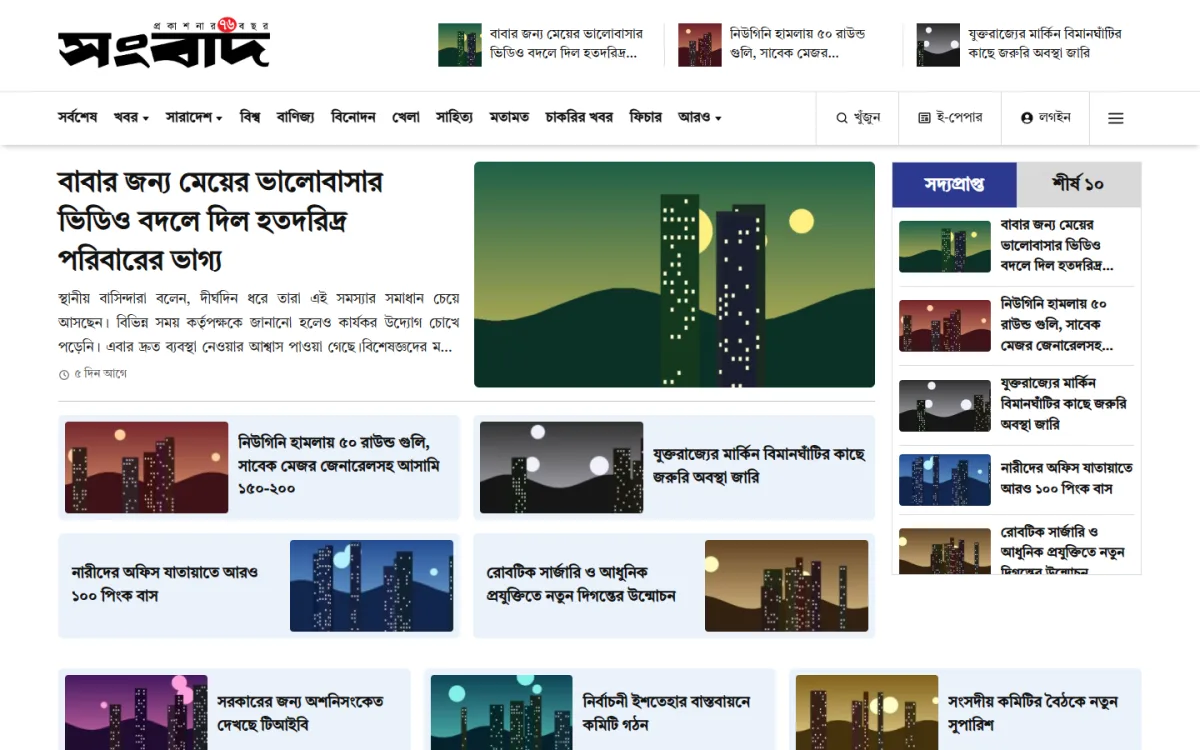
The screenshot shows the result. The সংবাদ masthead sits on the left, with three small headline thumbnails beside it. The menu runs from the latest news through countrywide, world, business, entertainment, sports, literature, opinion, jobs and features, with search, e-paper and login buttons at the right. Below, a lead story carries a large bold headline, a short excerpt and the time it was posted, beside a wide photo. Four story cards follow, and the sidebar switches between Latest and Top 10 tabs.
The header date can show the Bangla date together with the Bangabda calendar date and the Hijri date, and an e-paper link can sit in the header too. Desktop and mobile get separate headers. A side drawer menu works on every device, with the logo, today's date, a grid of pages with icons, the category list and a login and sign-up line at the bottom.
Homepage Sections, District Map and the News Dashboard
The homepage is built from 13 section layouts: Latest, International, Opinion, Video, Countrywide with a district map, Business, Literature, Jobs, Entertainment, Sports and a Photo Gallery, below the lead area. In the News Dashboard you drag sections into a new order, switch them on or off, rename them and pick the category and layout for each. Three custom sections take extra categories of your own. Top 10 and Popular lists come from a built-in view counter, so no analytics plugin is needed.
For local coverage, the theme includes 8 divisions, 64 districts and 494 upazilas with Bangla names. Reporters tag each story from a location box beside the post editor, and readers find local news through dropdowns or by clicking a division on an inline map of Bangladesh. Each story can carry a shoulder line, a subtitle, a reporter name and a YouTube link. A Converter page turns Bijoy text into Unicode and back, which helps desks with older typing habits.
Everything else lives in the News Dashboard: an overview with stats, a 7-day graph and a setup checklist, then tabs for branding, five colours with live preview, fonts, header, sections, footer, social links and login. Eight ad slots take an image with a link or ad code such as AdSense, with a device choice for each. Five Bangla fonts are bundled, including Hind Siliguri and Noto Serif Bengali, and only the ones you pick are loaded.
Launch Steps From Upload to First Story
Check your hosting first: Sangbad needs WordPress 6.0 or higher and PHP 7.4 or higher, and it is tested up to WordPress 6.8. Go to Appearance, Themes, Add New, Upload, choose the zip and activate it. Then open News Dashboard, License and enter the key from your Themeve account under My Account, Licenses, so updates arrive in your dashboard. If you want to see a full site first, sign in to the demo dashboard and look around.
Next, use Tools, Import Demo Content. It adds 117 news stories, 9 photo galleries, 7 videos, 16 images and sample ad banners, and one click removes them again without touching your own posts. Set Settings, Permalinks to Post name for clean district and search links. Turn on Anyone can register in Settings, General if readers should create accounts through the Bangla login popup. The WordPress documentation covers these core screens if your team is new.
Before launch, replace the logo, colours and footer lines with your own, add your editorial team to the footer, fill the About, Contact and Advertise pages, and set up the ad slots. Publish at least a week of real stories across your main sections so no homepage block sits empty. Then test every page type on two or three different phones over mobile data, not just on office Wi-Fi.
Growing Readers With Facebook, Search and Local Reporters
A Facebook page will probably bring most of your early traffic. Post every story with a short Bangla summary and a clear photo, reply to comments, and avoid misleading headlines that win one click and lose a reader. For search, submit a sitemap to Google Search Console and publish at regular times. Local stories covered early, tagged by district and upazila, often reach readers that bigger portals miss.
Build a small network of correspondents and give each one a Contributor account, so their copy reaches an editor before it goes live. Pay attention to the Top 10 list. It shows which subjects your readers care about, which helps you plan coverage and tells advertisers what kind of audience you have. When you approach local advertisers, show them real numbers from the dashboard rather than promises.
Mistakes New Portals Make
The biggest mistake is launching with no About page, no named editor and no contact details. Readers, advertisers and the authorities all look for them, and a portal without them looks anonymous. Other common errors are copying stories from big portals, which invites complaints and gets AdSense applications rejected, and opening dozens of empty categories. Leave unused homepage sections switched off until you have stories to fill them.
Technical mistakes hurt too. Skipping backups, sharing one admin password among the whole team and uploading huge photos straight from a camera are all common. So is buying cheap hosting that falls over during the first big story. Treat your online news portal Bangladesh project as a business from the start: proper hosting, separate accounts for every staff member, regular backups and a written publishing routine.
Frequently Asked Questions
Can I publish before my registration is approved?
Many portals build and run their site while the application is processed, but rules change, so read the current circular from the Ministry of Information and Broadcasting and follow it. In any case, show the editor, publisher and office address clearly on the site from your first day.
Do I need extra plugins for district news, galleries or ads?
Not with Sangbad. The News Dashboard, location system, converter, galleries, login popup and ad slots are all part of the theme. You will still want general tools such as a backup plugin and an SEO plugin for sitemaps, which every site needs.
Is this design only for national news sites?
No. Sangbad is meant for online newspapers, regional portals and magazines. A regional site can lead with its own division through the section settings, while a national site can keep politics and international news at the top of the homepage.
What should I compare it with?
If you prefer a classic layout with a slider and ticker, look at the Bangla Newspaper Theme 2025. For a premium design with a breaking news ticker and galleries, see the Pro News Bangla Theme. Compare each against your own section plan.
Ready to Go Live
A successful online news portal Bangladesh readers return to rests on three things: proper registration and transparent pages, a section plan built around coverage you can actually deliver, and a fast design that feels natural in Bangla on a phone. Sort the paperwork, plan your beats, then let the theme handle the structure. To start with categories, district news and a Bangla dashboard already in place, get the Sangbad Bangla News Portal WordPress Theme.