 −12%
−12%
Minar – Kurta Ecommerce Website Template for Everyday Panjabi
✦ Key features
- The arch banner
- Shop by occasion
- Featured, categories and this week's offers
- Just in, most loved, blog and FAQ
- Shop pages and filters
- Orders and stock
- One page of Theme Options
- Enquiries, licence and updates
- From install to first order
- What is included
Overview
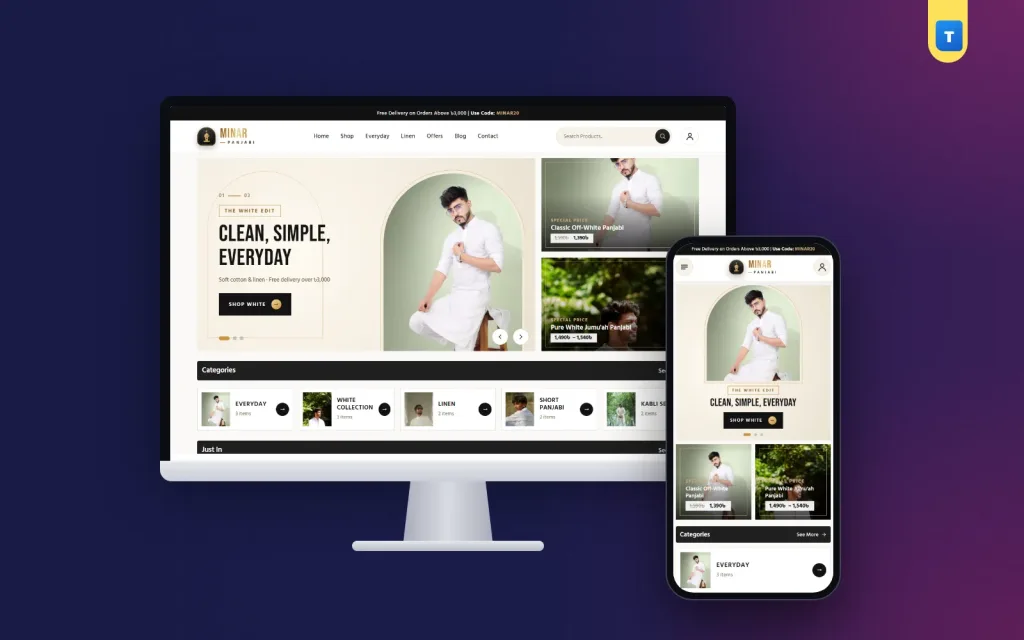
Minar is a kurta ecommerce website template for everyday panjabi, white and linen collections on WooCommerce: a calm black and beige design, an arch banner, Everyday and Jumu'ah occasion cards, square product photos, size buttons with a chart and guest checkout.
Minar is a kurta ecommerce website template for WordPress and WooCommerce, designed for brands that sell quiet, well-made panjabi and kurta for every day. The look is calm: near-black and warm beige, the clean Jost font, square edges and lots of white space. The banner shows your photo inside a gold arch, a nod to the minaret the theme is named after.
Shoppers pick a size, see the delivery charge before they pay and can order as guests. The demo fills the shop with 12 products in 5 categories in one click.
Who Minar is for
Minar suits sellers whose customers buy again and again rather than once a year. Think of:
- Everyday kurta and panjabi brands with simple cuts in cotton and soft blends.
- White collection specialists who sell pure white for Jumu'ah and prayers.
- Linen labels selling breathable pieces for the long summer.
- Short kurta and kabli set makers who dress office and casual buyers.
- Minimal menswear shops that want their store to look as clean as their clothes.
These buyers know their size and their favourite colour. A good kurta ecommerce website template lets them find it fast, trust the fabric and reorder without fuss. Minar keeps everything else out of the way.
A minimal homepage with an arch banner
The demo homepage runs in this order. Every block can be turned off or moved in Minar → Theme Options → Homepage layout.
The arch banner
Each slide places its text on warm beige with a thin gold arch outline, and the photo sits inside an arch-shaped window. The three demo slides are "The White Edit", "Linen Collection" and "Essentials". Side banners carry a gold frame line, a price pill and an arrow. On phones the banners turn square.
Shop by occasion
Straight after the banner come four occasion cards: Everyday, Jumu'ah, Summer and Casual. They match how regular kurta buyers think: "something for Friday" or "something cool for July". Few themes start with occasions, but in a kurta ecommerce website template they guide the buyer better than a long menu.
Featured, categories and this week's offers
Featured products, then your categories with photos and the "This Week's Offers" block. Offers show as one framed deal panel beside two cards of the same height. On phones the deal panel becomes a short side-by-side card with the photo and details only.
Just in, most loved, blog and FAQ
New arrivals, the best sellers, three blog posts and a FAQ list. The demo posts are practical: "Building a Simple Panjabi Wardrobe", "Why Linen Gets Better With Every Wash" and "Keeping White Panjabi White". A size guide and a review block are included and switched off by default.
Header and footer with a quiet character
The logo is a gold minaret badge with the shop name in a soft gradient. On desktop the header is taller than usual, with the menu centred and a gold underline under the active item, a pill-shaped search box and a round account button.
On phones the header is just three round buttons: menu, logo and account. There is no search bar in the phone header at all, so the banner starts higher and the first screen shows more product. Search is still one tap away in the menu.
The footer has a wave edge with soft gold wave lines and the brand centred, closing the page as calmly as it opened. Every colour and text can be changed in Theme Options, so the kurta ecommerce website template can follow your own brand colours if black and beige are not yours.
Product pages for a kurta ecommerce website template
Minar shows each piece the way a minimal brand should: big, square and clear.
- A square main photo with the extra photos as a neat row of thumbnails below. Hover zoom shows the weave and stitching.
- Title, rating, price and sale price, a stock badge and a short fabric note such as "Pure cotton · Regular fit".
- Size buttons for M, L, XL and XXL with a Size Chart pop-up in inches. Each size is a real WooCommerce variation with its own stock; XXL can carry a small extra charge.
- Quantity, Add to Cart and Buy Now, which goes straight to the checkout.
- A WhatsApp button, then SKU, category and tags.
- Description, Additional information and Reviews tabs, and related products below.
For a buyer reordering the same white kurta in a new size, Buy Now turns the visit into a thirty-second job. That kind of speed is what a kurta ecommerce website template should offer regular customers.
Shop pages and filters
Category pages carry a filter card with the current category, a price range, rating, stock and an "On sale" switch. On phones the title and a Filters button sit on one line, and the filters slide in from the side. The product card stays the same on every page, so the shop feels consistent wherever a buyer lands.
Because the catalogue of a minimal brand is usually small, these filters stay simple on purpose. A buyer looking for a linen piece in XL under ৳2,500 finds it in a few taps, and a second visit takes even less because the layout never changes.
Guest checkout and phone sign-in
Minar does not make anyone register to buy. Guests can order, and a "Create an account" box at the checkout lets regular buyers save their address. Shops that prefer accounts can switch on "Orders need an account" in Theme Options → Checkout & accounts.
Accounts work with a mobile number or an email and a password. Visitors sign in through a pop-up, and the My Account page shows the same forms. After signing in, the buyer goes back to where they were.
Delivery charges are ready for Bangladesh: Inside Dhaka ৳80 and Outside Dhaka ৳120. Cash on delivery is on from the start, and you can add bKash, Nagad or card payments with their own WooCommerce plugins.
Speed that matches the minimal look
A minimal design should also be light. We measured what the theme adds to each page:
- One JavaScript file of 56 KB, about 14 KB compressed. No jQuery is loaded by the theme on the front end.
- One stylesheet of about 93 KB compressed, plus the Jost and Hind Siliguri fonts.
- No page builder, no slider plugin and no extra shop plugin.
WordPress, WooCommerce and your own plugins keep their files, so caching and image optimisation work as normal. A kurta ecommerce website template with this little weight leaves room for large, sharp product photos.
Running your kurta ecommerce website template
Orders and stock
Orders come in through WooCommerce → Orders with the buyer's phone, address, delivery area and size. Stock is per size, so a sold-out XL greys out without affecting the other sizes.
One page of Theme Options
Every setting is on one page: a sidebar of sections, a search box, a reset button per section and backup and restore. The Customizer shows the same settings with live preview. Change colours, fonts, the logo, the arch banner slides, occasion cards, section titles and the footer without code.
Enquiries, licence and updates
The Contact form sends by AJAX and saves every message under Minar → Enquiries. The licence client is part of the theme: enter your key in Minar → License for one-click updates. Minar → Setup imports the demo, and a second import replaces only what the first one created.
Minar compared with a generic kurta website template WordPress offers
Many shops start with a general fashion theme and then fight it for weeks. Before you buy a kurta website template WordPress can run, check that sizes are real variations with a chart, that the checkout knows Inside and Outside Dhaka, and that the design stays calm when you only have twelve products. Minar was built for exactly that case.
If your shop is about weddings rather than everyday wear, look at our Shahi theme instead.
From install to first order
- Install WordPress and WooCommerce.
- Upload and activate Minar, then enter your licence key.
- Run Minar → Setup → Import demo.
- Swap in your photos, names and prices.
- Check delivery and payment, then place a test order on your new kurta ecommerce website template.
Minar runs on WooCommerce and WordPress 6.0 or newer with PHP 7.4 or newer.
What is included
The Minar theme with built-in licence and updates, the demo and our support. The demo has 12 products in 5 categories (Everyday, White Collection, Linen, Short Panjabi and Kabli Set), 3 blog posts and the About, Contact, Blog, FAQs, Shipping, Return, Track Order, Wishlist, Privacy and Terms pages.
Reviews
0.0
Write a review
★★★★★
0 reviews from buyersNo reviews yet — be the first to share your experience after buying.
Frequently Asked Questions
01Which shops is this kurta ecommerce website template for?
Everyday kurta and panjabi brands, white collection and linen labels, and minimal menswear shops.
02Does the Minar kurta ecommerce website template need other plugins?
Only the free WooCommerce plugin. Licence, updates, demo import and the contact form are built in.
03Can buyers order without signing up?
Yes. Guests can order and may create an account at the checkout. You can make accounts required.
04Can I hide the search bar on phones?
It is already hidden in the phone header to give the banner more room; search stays in the menu.
05How do sizes and the size chart work?
Each size is a WooCommerce variation with its own stock, and the chart opens in a pop-up beside the buttons.
06What delivery charges does it use?
Inside Dhaka ৳80 and Outside Dhaka ৳120 in the demo. Both can be changed.
07Can I change the colours?
Yes. Black and beige are defaults; every colour can be changed in Theme Options.
Delivery & Support
1Place your orderAdd to cart, sign in and pay with bKash, Nagad or Rocket.
2Payment verified automaticallyEnter your Transaction ID — the payment is matched automatically, usually within seconds.
3Get your productYour license key and download appear in My Account → Licenses.
- Secure automatic payment verification
- Delivery to your account & e-mail
- Friendly WhatsApp support
Refund Policy
This policy applies to every product in our store.
You get a refund when the product does not work as described and we cannot fix it, when your license will not activate your website, or when a manually delivered product is late and you cancel before delivery. A working license, or a single license already used on a live domain, is not refundable. Approved refunds go back to the number you paid from within one working day, minus the Send Money charge.
More items
View all →You may also like
−12%
 −14%
−14%
 −15%
−15%
 −27%
−27%
