 −50%
−50%
Courier Intelligence – Courier Delivery History Plugin WordPress
✦ Key features
- Delivery records per customer phone number
- Courier, tracking ID, status, date and note
- Six statuses from delivered to unknown
- Phone lookup with delivered and returned counts
- Delivered rate among resolved records
- Add records by hand or by CSV
- Sample CSV file included
- Export all records as CSV
- History box on every order screen
- History column in the Themeve Commerce order list
- Numbers stored as hash plus last 4 digits
- Duplicate tracking IDs refused
- Administrators only
Overview
Courier Intelligence is a courier delivery history plugin WordPress shops use to record delivered and returned parcels per phone number. See the history on every order, import records by CSV and keep full phone numbers private.
Courier Intelligence is a courier delivery history plugin WordPress shops can use to keep a simple record of what happened to every parcel, sorted by the buyer's phone number. Before you hand a new order to the courier, you look up the number and see how many earlier parcels were delivered and how many came back.
It is made for shops that sell with cash on delivery and ship by courier. It works with WooCommerce and with Themeve Commerce, and only store administrators can open it. You enter or import the records yourself, so it works with any courier you use.
Who can use this plugin
Any shop that sends parcels and cares about returns can use it. The plugin does not depend on what you sell. Typical users are:
- Fashion, saree and panjabi shops with many COD orders.
- Gadget, phone and electronics sellers where one returned parcel hurts.
- Cosmetics, grocery and gift shops that ship to many districts.
- Social media page sellers who moved to a website and want one record of their buyers.
- Order-confirmation teams who need a quick answer before packing.
- Agencies that manage the shops of several clients.
Why delivery history matters more than order history
Your shop knows when an order was placed. Your courier knows whether the buyer actually took the parcel. For a cash on delivery business, the second fact decides profit. A buyer with five orders and five returns is very different from a buyer with five orders and five deliveries.
Many owners keep this in a notebook or a spreadsheet. That works until two staff members use two different files. This courier delivery history plugin WordPress owners can install puts the record inside your store admin, next to the orders.
Back-end options of the courier delivery history plugin WordPress admins get
The plugin has one working screen. On a Themeve Commerce shop it sits inside the Themeve Commerce menu. On a WooCommerce site it has its own menu called Courier Intelligence, with a sub-page named Courier Records. The screen is divided into clear cards.
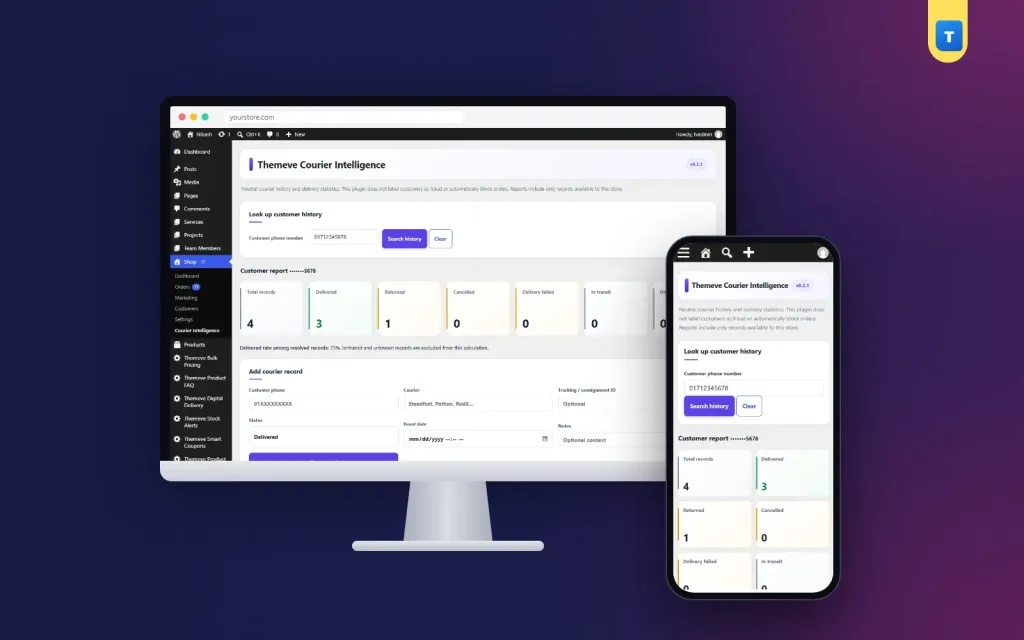
Look up customer history
- Type a customer phone number and press Search history.
- The plugin cleans the number first, so a number written with a country code or without one is matched the same way.
- A Clear button returns you to the full list.
Customer report
After a search, the report shows the number with only its last four digits visible, and a set of count boxes:
- Total records
- Delivered
- Returned
- Cancelled
- Delivery failed
- In transit
- Unknown
Below the boxes you also see the delivered rate among resolved records. In-transit and unknown records are left out of that rate, so it is not distorted by parcels still on the road. If there is not enough data, the report says so instead of showing a misleading figure.
Add courier record
- Customer phone. The buyer's number.
- Courier. The name of the courier company.
- Tracking or consignment ID. Optional, but useful.
- Status. Delivered, returned to sender, cancelled, in transit, delivery failed, or unknown.
- Event date. The day and time of the event.
- Notes. A short comment, such as buyer not reachable or wrong address.
Manual records are marked as manual. A tracking ID that already exists is refused, so the same parcel cannot be counted twice by mistake.
Import and export
- Import CSV. The file needs the columns phone, courier and status. Optional columns are tracking number, event date, notes and a source reference.
- Files up to 5 MB are accepted. Rows with a missing field, a wrong status or a repeated tracking ID are skipped.
- When the import ends, a message tells you how many rows were added and how many were skipped.
- Sample CSV. A ready file comes with the plugin so you can see the columns before you prepare your own.
- Export records CSV. Download every record whenever you need a report. The export never contains full phone numbers.
Latest courier records
- A table shows the newest 100 records, or the records that match your search.
- Columns: date, phone (last four digits only), courier, tracking ID, status, source, notes and action.
- A Delete link on each row removes a record after you confirm.
- A source column tells you if a row was added by hand or by CSV.
Where the history shows up on orders
You do not need to open the plugin screen for every order. The history comes to the order.
- A Courier Intelligence box appears on every WooCommerce and Themeve Commerce order screen, on the right side.
- It shows total, delivered, returned, cancelled, failed and in-transit counts for that buyer's phone number.
- A View full history button opens the lookup for the same number.
- On Themeve Commerce, the order list gets an extra Courier History column with a View history link on each row.
- If an order has no phone number, the box says so.
Your packing and confirmation team therefore sees the buyer's past parcels at the moment they confirm the order.
How it helps you run the shop
The plugin pays for itself in small, steady ways.
- Fewer returned parcels, because doubtful orders get a call or an advance first.
- Lower courier charges, because you stop paying return fees on repeat offenders.
- Faster confirmation, because good buyers with a clean record ship the same day.
- Less guesswork, because every decision rests on your own parcel records.
- Better training, because a new staff member can read the notes and learn the common reasons for returns.
Even a shop with ten orders a day gains from it. The record starts small and becomes valuable as it grows.
Is there anything for buyers to see?
No. This is an internal tool. Visitors and customers see nothing new on your website, and no extra script or style loads on the public pages. The plugin works only in the admin area.
A typical week with Courier Intelligence
Here is a simple example. On Saturday morning the manager downloads last week's courier report and imports the rows. On Sunday a new order arrives from a number with two returns in the past month. The history box on the order screen shows it at once, so the team calls the buyer and asks for a small bKash advance before packing.
Another order comes from a buyer with eight deliveries and no returns. That parcel ships the same day without a call. This is how a courier delivery history woocommerce plugin works in daily use. Over a few weeks the shop spends less on return charges and less time on doubtful orders.
Privacy built in
Phone numbers are personal data, and a list of them is worth protecting. The plugin stores each number as a secure hash that is unique to your website, plus its last four digits. The full number is not kept in its records, and the CSV export never contains full numbers.
- Only store administrators can open the plugin.
- Every action is protected by a security check.
- The screen reminds you to import only data you are allowed to process.
A neutral record, not a verdict
The plugin says plainly that it does not label anyone as a fraud and does not block orders by itself. It reports what your own records show. You decide what to do: ship as normal, call the buyer first, or ask for an advance payment.
That keeps the tool fair. A single failed parcel can be caused by a courier, a wrong address or a missed call. The notes field helps you remember the reason.
How it works beside other tools
Records come from you, by hand or by CSV. The plugin does not connect to courier company systems. That keeps you in control of what goes in, and it means the plugin suits every courier. As a courier delivery history woocommerce plugin, it also works on Themeve Commerce stores without any change.
It pairs well with Fraud Shield, which counts completed and refused orders on your own site, and Order Analytics, which shows sales, order health and top products for any date range.
Setup in a few minutes
- Upload the plugin zip from Plugins, Add New, then activate it.
- Open Courier Intelligence in the admin menu.
- Download the sample CSV and look at the columns.
- Export your latest courier report, arrange the columns the same way, and import a small batch first.
- Look up one of the imported numbers to check the report.
- Open any order and read the history box on the right side.
- Add new records after each courier report, weekly or daily.
From that day on, every new order shows the buyer's delivery history. Your courier delivery history plugin WordPress record grows more useful with every parcel you add. Our team can help with the first import over WhatsApp.
Why choose a courier delivery history plugin WordPress owners can trust over a spreadsheet
- The history sits inside each order, so nobody needs to search another file.
- Phone numbers are matched in one clean format, so small typing differences do not hide a buyer.
- Duplicate tracking IDs are refused.
- Full phone numbers are never stored in the records.
- Every staff member sees the same data, with administrator access only.
What is included
- The Courier Intelligence plugin zip, ready to upload.
- Phone lookup with a seven-box customer report and delivered rate.
- Manual record form with six statuses, date and notes.
- CSV import, sample CSV file and CSV export.
- History box on every order screen, and a history column in the Themeve Commerce order list.
- Updates from your dashboard while your account stays active, and support for six months.
It needs WordPress 6.2 or newer and PHP 7.4 or newer. CSV import is a new feature in this version, so begin with the sample file and a small batch of your own rows.
Courier Intelligence is built on the official WordPress documentation standards, and you can browse more of our WordPress plugins.
Reviews
0.0
Write a review
★★★★★
0 reviews from buyersNo reviews yet — be the first to share your experience after buying.
Frequently Asked Questions
01What is a courier delivery history plugin WordPress shops can use?
It is a record of delivered and returned parcels, sorted by the buyer's phone number, kept inside your store admin. You check it before you dispatch a new order.
02Does the plugin connect to courier companies?
No. Records come from you, by hand or by CSV from your courier report. That is why it works with any courier.
03Is this a courier delivery history woocommerce plugin only?
No. It works with WooCommerce and with Themeve Commerce. A history box appears on the order screen in both.
04Which statuses can I record?
Delivered, returned to sender, cancelled, in transit, delivery failed and unknown, plus a date and a short note.
05Are full phone numbers stored?
No. Each number is stored as a secure hash plus the last four digits, and the CSV export never contains full numbers.
06Can I import a whole month of parcels?
Yes, by CSV up to 5 MB. Start with the sample file and a small batch of your own rows, then import the rest.
07Who can open the plugin?
Only store administrators.
Delivery & Support
1Place your orderAdd to cart, sign in and pay with bKash or Rocket.
2Payment verified automaticallyEnter your Transaction ID — the payment is matched automatically, usually within seconds.
3Get your productYour license key and download appear in My Account → Licenses.
- Secure automatic payment verification
- Delivery to your account & e-mail
- Friendly WhatsApp support
Refund Policy
This policy applies to every product in our store.
You get a refund when the product does not work as described and we cannot fix it, when your license will not activate your website, or when a manually delivered product is late and you cancel before delivery. A working license, or a single license already used on a live domain, is not refundable. Approved refunds go back to the number you paid from within one working day, minus the Send Money charge.
More items
View all →You may also like
−50%
 −50%
−50%
 −50%
−50%
 −50%
−50%
