 −50%
−50%
Abandoned Cart Recovery – WooCommerce Abandoned Cart Recovery Plugin
✦ Key features
- Saves emails typed on the checkout
- Leads kept even when the shopper leaves
- Each email saved once, duplicates merged
- Lead dashboard with capture date
- Newest leads shown first
- Summary boxes for leads, automation and mail
- Logged-in carts recorded on Themeve Commerce
- Works on the WooCommerce classic checkout
- Table readable on phones
- Data stays on your own website
- You choose how and when to follow up
- Pairs with coupon suggestions for returns
Overview
Abandoned Cart Recovery is a WooCommerce abandoned cart recovery plugin that saves the email a shopper types at checkout, even if they leave. Open the lead list, then follow up by email, coupon or phone.
Abandoned Cart Recovery is a WooCommerce abandoned cart recovery plugin that keeps the one thing you need to win back a lost sale: the shopper's email. When someone types an email on your checkout page and then leaves without ordering, the address is saved as a cart lead in your admin.
You then decide how to follow up. It can be a friendly email, a coupon or a phone call. The plugin does not send messages by itself, so the words, the timing and the offer stay in your hands.
Who can use this plugin
Any online shop that uses the WooCommerce classic checkout can use it. The plugin does not care what you sell. Typical users are:
- Clothing, saree and panjabi shops where buyers hesitate over size or colour.
- Gadget and electronics stores where buyers compare prices before they pay.
- Cosmetics, grocery and gift shops with many first-time visitors.
- Furniture and appliance sellers with high-value carts and slow decisions.
- Small shops that follow up by hand and want a clean list of people to contact.
- Agencies that add a lead list to the shops they build for clients.
Why carts are left behind
Most shoppers who reach the checkout do not finish. Some are comparing prices. Some are surprised by the delivery charge. Some get a phone call, close the tab and forget. Others are unsure about the size or the colour and want to ask a question first.
Many of these people still want the product. They only need a reminder or an answer. Without their contact details, you have no way to reach them. That is the gap this WooCommerce abandoned cart recovery plugin fills.
How cart leads are captured
On the WooCommerce classic checkout, the email field is the first thing most shoppers fill in. As soon as a shopper types a valid email and moves on, the plugin saves it. If they finish the order, nothing more happens. If they leave, the email waits for you in the lead list.
- Only a valid email address is saved. Typing mistakes that are not real addresses are ignored.
- Each email is stored once. If the same person comes back three times without buying, the duplicates are merged.
- The capture happens in the background while the shopper fills in the form.
- The shopper sees no pop-up, no extra form and no change in the checkout page.
- The data stays on your own website, in your own database.
Back-end options of the WooCommerce abandoned cart recovery plugin
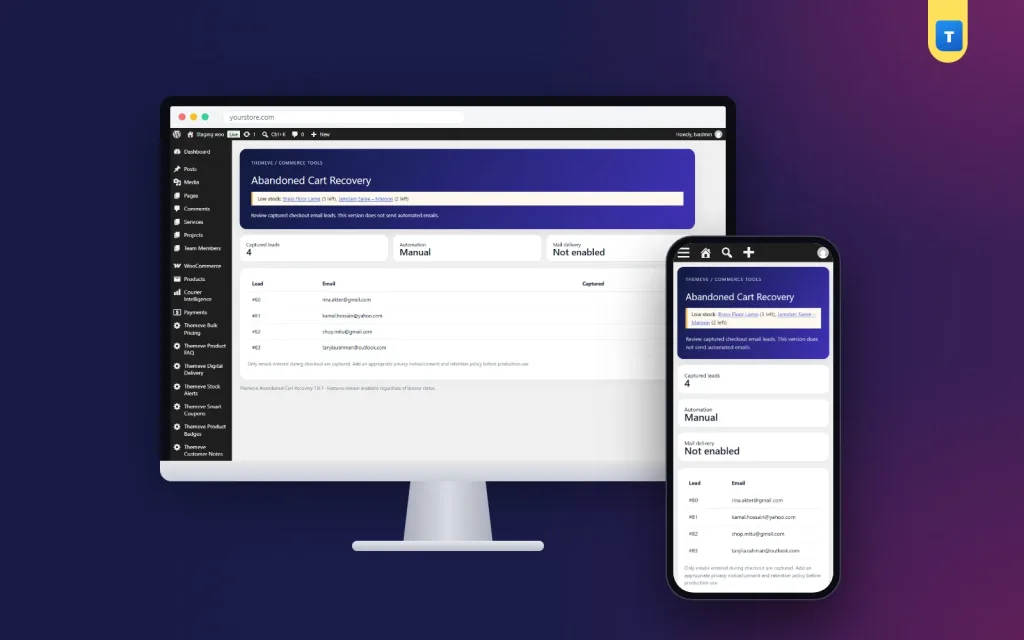
The plugin adds one menu item, Abandoned Cart Recovery, to the left admin menu. Open it and you see a clean lead dashboard. It has no complicated tabs, so a new staff member can learn it in a minute.
Header and summary boxes
- Captured leads. The number of emails saved so far.
- Automation. Shows Manual, which tells you that follow-up is done by you.
- Mail delivery. Shows Not enabled, which tells you the plugin does not send emails.
Lead table
- A table lists the newest 100 leads, newest first.
- Columns: lead number, email address and the date and time it was captured.
- The table scrolls sideways on small screens, so you can read it on a phone.
- When no lead exists yet, the table says so clearly.
Privacy reminder and access
- A short note on the screen reminds you that only emails entered at checkout are saved.
- It also reminds you to add a privacy notice and a retention policy before you use the list.
- Only users who can manage the shop open the screen.
Themeve Commerce stores
On Themeve Commerce stores, the carts of logged-in customers are recorded too. Because they are signed in, you already know who they are, and the lead list shows you that they left something behind.
Fresh leads matter most
A shopper who left an hour ago still remembers your shop. A shopper who left last month probably does not. Open the lead list each morning, contact the newest emails first, and keep the habit. The list then stays small and useful.
Keep a simple habit. Write the result next to each lead in your own sheet: replied, bought, not interested or no answer. After a month you will know which messages work, which products cause doubt and how many sales the list brings back. That small record is worth more than any guess, and it costs nothing to keep.
Following up with a WooCommerce abandoned cart recovery plugin
This plugin collects the leads and leaves the message to you. That keeps you in charge of the tone and the timing. Write a short, polite email. Mention the product, answer the most common question (size, delivery time or delivery charge) and give a clear link back to your shop.
For extra pull, offer a small coupon. Smart Coupons can show that coupon code on the cart and checkout when the shopper returns, so they do not have to search for it.
If many shoppers leave at the checkout, look at your form. Checkout Builder adds delivery instructions and a reference note to the checkout, which helps buyers who want to explain where to deliver.
A simple follow-up plan
- Contact new leads within a day.
- Keep the first message helpful, not pushy.
- If there is no reply, send one more message a few days later with a small offer.
- Then stop. Shoppers remember shops that respect their inbox.
- Give people an easy way to say no.
Example messages
- Clothing shop: you left a cotton panjabi in your cart, here is our size chart, and delivery inside Dhaka takes two days.
- Gadget shop: you were looking at a power bank, it comes with a six-month warranty, and we can deliver by courier anywhere in the country.
- Beauty shop: your serum is still waiting, and here is a short guide on how to choose by skin type.
Short, specific and useful messages work better than long sales text.
How abandoned cart recovery for WooCommerce helps your shop
- You build a list of real people who were one step from buying.
- You can answer doubts that stopped the sale, one buyer at a time.
- You learn which products and delivery charges cause the most hesitation.
- You spend nothing per email, because you use your own mail account or phone.
- You keep full control of what is said to your customers.
Ideas to reduce abandoned carts in the first place
The lead list also shows you where to improve the shop. If the same questions keep coming up when you contact shoppers, fix the cause on the site. These small changes often help:
- Show the delivery charge and delivery time on the product page, before the checkout.
- Add a size chart or a short buying guide to products that need one.
- Offer more than one payment method, including cash on delivery.
- Remove checkout fields you do not truly need.
- Keep a phone or WhatsApp number visible so doubtful buyers can ask.
- Make the cart and checkout load fast on a mobile phone.
Read your notes after a week of follow-ups. Patterns appear quickly, and each fix lifts every future order.
A day with the lead list
Imagine a shop that gets sixty visitors to the checkout each day. Around forty leave without paying, and perhaps fifteen of them typed an email first. Each morning the owner opens the screen and sees fifteen new rows, with the date beside each. She writes to the first five, answers one question about delivery to Chattogram, and sends a coupon to two others. Even a small share of these shoppers coming back adds up over a month. Nothing in the process costs money, and no shopper is contacted without a reason.
What to know before you buy
- Capture works on the WooCommerce classic checkout. It does not capture emails on the WooCommerce block checkout, so check which checkout your theme uses. Switching back to the classic checkout is a simple setting in WooCommerce.
- The plugin does not send reminder emails by itself.
- The emails are stored on your own website. Follow your local privacy rules when you contact shoppers.
- The lead list shows the newest 100 leads in the screen.
Setup in a few minutes
- Upload the plugin zip from Plugins, Add New, then activate it.
- Check that your shop uses the classic checkout.
- Open your shop in a private browser window and add a product to the cart.
- Type an email on the checkout page and close the window.
- Open Abandoned Cart Recovery in your admin and see the email waiting.
- Start your daily follow-up with the newest leads.
That is your plugin at work: a list of real people who were one step away from buying. If you need help, our team can assist over WhatsApp.
Why choose abandoned cart recovery for WooCommerce over a plain checkout
A plain checkout forgets every shopper who leaves. A WooCommerce abandoned cart recovery plugin like this one remembers them. This plugin remembers the email and gives you a second chance.
- Light and simple: one screen, no settings to learn.
- No outside service, so no monthly fee for a mail platform.
- Duplicate emails are merged, so nobody is contacted twice by mistake.
- Works with the coupon tool and checkout tool from the same family.
- Honest about its limits, with no hidden automation.
What is included
- The Abandoned Cart Recovery plugin zip, ready to upload.
- Email capture on the WooCommerce classic checkout.
- Duplicate merging, so each email appears once.
- Lead dashboard with capture date, newest first.
- Recording of logged-in carts on Themeve Commerce.
- Updates from your dashboard while your account stays active, and support for six months.
It needs WordPress 6.2 or newer and PHP 7.4 or newer, and it has been tested up to WordPress 7.1.
Abandoned Cart Recovery is built on the official WordPress documentation standards, and you can browse more of our WordPress plugins.
Reviews
0.0
Write a review
★★★★★
0 reviews from buyersNo reviews yet — be the first to share your experience after buying.
Frequently Asked Questions
01What does a WooCommerce abandoned cart recovery plugin like this do?
It saves the email a shopper types at checkout. If they leave without ordering, the email waits in your lead list so you can follow up.
02Does this woocommerce abandoned cart recovery plugin send reminder emails automatically?
No. It captures the emails as leads and you follow up in your own words, by email, coupon or phone.
03Is it suitable for abandoned cart recovery for WooCommerce block checkout?
No. Capture works on the WooCommerce classic checkout. Switching to the classic checkout is a simple WooCommerce setting.
04What happens if the same shopper leaves twice?
Duplicates are merged, so each email appears once in the lead list.
05Does it work with Themeve Commerce?
Yes. On Themeve Commerce stores, the carts of logged-in customers are recorded too.
06Where are the emails stored?
On your own website, in the plugin's lead list.
07How fast should I follow up?
Within a day works best, while the shopper still remembers your shop.
Delivery & Support
1Place your orderAdd to cart, sign in and pay with bKash or Rocket.
2Payment verified automaticallyEnter your Transaction ID — the payment is matched automatically, usually within seconds.
3Get your productYour license key and download appear in My Account → Licenses.
- Secure automatic payment verification
- Delivery to your account & e-mail
- Friendly WhatsApp support
Refund Policy
This policy applies to every product in our store.
You get a refund when the product does not work as described and we cannot fix it, when your license will not activate your website, or when a manually delivered product is late and you cancel before delivery. A working license, or a single license already used on a live domain, is not refundable. Approved refunds go back to the number you paid from within one working day, minus the Send Money charge.
More items
View all →You may also like
−50%
 −38%
−38%
 −50%
−50%
 −50%
−50%
