−7%
−7%
Digital Delivery – Digital Delivery Plugin WordPress

✦ Key features
- Add a download link to any order
- Download your file shown in My Account
- Only the logged-in buyer sees the link
- Different file per order for custom work
- Buyers can download again any time
- Product delivery link field on Themeve Commerce
- Link emailed to the buyer on Themeve Commerce
- Enable or disable with one tick box
- Use any file host you trust
- Works on WooCommerce and Themeve Commerce
- Nothing added to public pages
- Set up in minutes
Overview
Digital Delivery is a digital delivery plugin WordPress shops use to attach a download link to an order. Only the logged-in buyer sees it in My Account, and it works with WooCommerce and Themeve Commerce.
Digital Delivery is a digital delivery plugin WordPress shop owners can use to hand over files after an order. You paste a download link on the order, and the buyer finds it on their own order page in My Account, under Download your file. No one else can see it.
It suits shops that deliver e-books, design templates, course notes, invoices, certificates or custom work. It runs on WooCommerce and on Themeve Commerce, and the link is shown only to the logged-in buyer of that order.
The problem with sending files by message
Many shops still deliver files through Messenger, WhatsApp or email attachments. It works, but it is messy. Links get buried in long chats. Buyers change phones and lose them. Staff forget which buyer received which file. Weeks later the buyer asks again, and someone has to search old conversations.
A link on the order page solves this. The file stays where the purchase is, and the buyer can come back to it any time from their account.
Who can use a digital delivery plugin WordPress shops can trust
Any shop that sells something downloadable, or that sends documents after an order, can use it the same way.
- Template and design sellers who deliver source files.
- Teachers and coaching centres who deliver notes and recorded lessons.
- Freelancers who deliver finished work and invoices.
- Printing shops that share digital proofs for approval.
- Event organisers who share e-tickets and certificates after payment.
- Writers and translators who deliver finished documents to each client.
- Sellers of photos, fonts, music or software files.
Light and simple
The plugin adds no scripts or styles to your public pages. The only front-end change is one short line on the buyer's order page. In the dashboard it loads a small stylesheet on its own settings screen and nowhere else.
Files are not stored by the plugin. You keep them on your own hosting or cloud storage, so the plugin does not use your disk space or bandwidth.
What the buyer sees
When the buyer opens the order in My Account, they see a line that reads Digital delivery, with a link named Download your file. There is nothing to search for and nothing to forward. If they lose the file, they come back to the same place and download again.
- The link shows only to the logged-in customer who placed that order.
- Other customers cannot see it, and visitors who are not logged in cannot see it.
- The link stays on the order page, so the buyer can download again at any time.
- On Themeve Commerce, the buyer also gets an email with the links when the order is created.
Back-end options, screen by screen
A digital delivery WooCommerce plugin should not bury you in settings, so this one keeps the dashboard short. There is one plugin screen, one field on each order and, on Themeve Commerce, one field on each product.
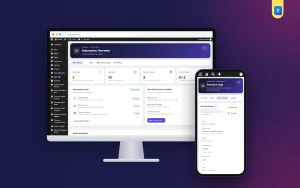
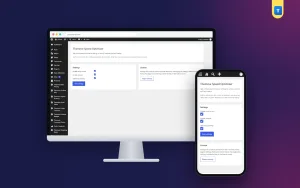
The Digital Delivery settings screen
A top-level menu called Themeve Digital Delivery opens the plugin screen. It is open to shop managers on WooCommerce and to administrators on other setups. The screen has three parts.
- Status row. Three small boxes showing the status, the supported platforms and the licence state.
- Feature settings. One tick box, Enable feature, and a Save settings button. Untick it to switch the delivery link off without removing the plugin.
- Compatibility and notes. A short card that says what the plugin does and reminds you that the licence must be active.
The order screen on WooCommerce
Open any order in your admin. In the order details you will find a field called Themeve digital delivery URL. Paste the download link there and save the order. That is all. The link is stored with that order and nowhere else.
- The field accepts web addresses only. A text that is not a valid address is ignored.
- Leave the field empty and save to remove a link.
- Only users who may edit orders can change it.
The product editor on Themeve Commerce
On Themeve Commerce stores, the product editor gains a section called Themeve Digital Delivery with a field named Secure download URL. Paste the file link for that product once. Whenever the product is ordered, the link goes with the order, is saved on it, and is emailed to the buyer.
- One link per product, so every buyer of that product receives the same file.
- Orders with several digital products show every link, each with the product name.
- The email is sent once per order, so repeat saves do not send duplicates.
Different files for different buyers
Because links are added per order on WooCommerce, you can send a different file to each buyer. That suits custom work such as logo designs, edited photos, CV writing or translation, where every customer gets something unique. For design or writing jobs, send a watermarked preview by chat first. When the buyer approves and pays, add the final file to the order.
Where to host your files
You host the file yourself and paste its link. Use your own hosting, cloud storage such as Google Drive or Dropbox, or any place you trust. Set sharing so that people with the link can download, and test the link in a private browser window before you paste it.
Keep in mind that the plugin hides the link on your own site. The link itself works for anyone who has it, so use storage that fits how valuable the file is.
A typical order, start to finish
- A buyer orders a set of wedding invitation templates and pays by mobile banking.
- You confirm the payment and open the order.
- You paste the link to the zip file in the Themeve digital delivery URL field and save.
- You send a short message: your files are ready in My Account.
- The buyer logs in, opens the order and downloads.
- Two weeks later they need the files on a new laptop. They log in and download again, without messaging you.
Digital delivery plugin WordPress setup in five steps
- In your dashboard, go to Plugins, then Add New, then Upload Plugin. Choose the zip file and install it.
- Activate the plugin.
- Enter your licence key on the License screen. The link field then appears on your order screens.
- Open Themeve Digital Delivery and check that Enable feature is ticked.
- Test it: place an order as a customer, add a link to that order in the admin, then log in as the customer and open the order in My Account.
Why this digital delivery plugin WordPress shops can use beats manual chat
Large download managers add file uploads, limits, expiry timers and licence systems. Most small shops use none of that. They need one thing: the right file, on the right order, visible to the right person. This plugin does that and stops there.
- Files stay with the order they belong to.
- No more hunting through old chats.
- Staff can see at once which link went to which buyer.
- Works with the file host you already trust.
- Set up in minutes, with a single option to manage.
Tips for smooth delivery
A few small habits make the system work better for you and your buyers.
- Name your files clearly, so the buyer knows what they are downloading.
- Open every link in a private window before you save it on the order.
- Use a separate folder in your cloud storage for each product or client.
- Tell new buyers once, in your order confirmation message, that files appear in My Account.
- When you replace a file with a new version, update the link on the order or the product.
If you run a digital delivery WooCommerce plugin setup on a growing shop, review your links every few months. Remove links to files that you no longer sell.
Honest limits
This digital delivery plugin WordPress owners install is deliberately small. Digital Delivery does not host files, count downloads or make links expire. It does not email the link on WooCommerce. There you add the link to the order and tell the buyer to check My Account. Buyers need an account, because the link shows on the account order page.
How it fits with other tools
If you sell many digital products, automation saves time. An order automation tool can email the customer or change the order status when payment completes, so they know to check their account. A customer notes tool can keep private notes on each buyer, such as which version of a file they received.
Licence, updates and requirements
Digital Delivery needs an active licence key. Without it, the link field is not added and only the lock screen and the License screen open. Enter the key from your account and the field appears. Updates arrive in Dashboard, then Updates, while the licence is active.
- WordPress 6.2 or newer, tested up to WordPress 7.1.
- PHP 7.4 or newer.
- Works with WooCommerce and Themeve Commerce.
- Works with any WordPress theme.
- Six months of support.
What is included
- The plugin zip file, ready to upload in Plugins, then Add New.
- Your licence key and lifetime updates while the licence is active.
- Documentation after purchase.
- Unlimited re-downloads from your account.
Simple, private and tidy: that is what a digital delivery WooCommerce plugin should be for a small shop that sends files every day.
Digital Delivery is built on the official WordPress documentation standards, and you can browse more of our WordPress plugins.
Reviews
0.0
Write a review
★★★★★
0 reviews from buyersNo reviews yet — be the first to share your experience after buying.
Frequently Asked Questions
01Which digital delivery plugin WordPress shops can use without a complex setup?
Digital Delivery. You paste a download link on the order and the buyer sees it in My Account. There is one setting to manage.
02Is this a digital delivery WooCommerce plugin only?
No. It works on WooCommerce and on Themeve Commerce.
03Where are the files stored?
You host the file yourself, on your hosting or cloud storage, and paste its link.
04Who can see the download link?
Only the logged-in buyer of that order, on their order page in My Account.
05Can I send a different file to each buyer?
Yes. Links are added per order, which suits custom work.
06Can every buyer of a product get the same file automatically?
On Themeve Commerce, a delivery link field on the product is sent with the order. On WooCommerce you add the link on each order.
07Do buyers need an account?
Yes. The link shows on the order page in My Account, so the buyer must be logged in.
08Does it need a licence?
Yes. Without an active licence key the link field is not added and only the lock and License screens open.
Delivery & Support
1Place your orderAdd to cart, sign in and pay with bKash or Rocket.
2Payment verified automaticallyEnter your Transaction ID — the payment is matched automatically, usually within seconds.
3Get your productYour license key and download appear in My Account → Licenses.
- Secure automatic payment verification
- Delivery to your account & e-mail
- Friendly WhatsApp support
Refund Policy
This policy applies to every product in our store.
You get a refund when the product does not work as described and we cannot fix it, when your license will not activate your website, or when a manually delivered product is late and you cancel before delivery. A working license, or a single license already used on a live domain, is not refundable. Approved refunds go back to the number you paid from within one working day, minus the Send Money charge.
More items
View all →