How does digital delivery work? In short, you sell or make something that is a file, and instead of handing it over in person, you give the buyer a safe way to download it online. The buyer pays or confirms the order, and then receives the file through a link, an email or an account page.
That sounds simple, and it can be. But many small shops in Bangladesh still do it the hard way, with files sent through Messenger, WhatsApp or email attachments. This guide explains the whole process step by step. You will learn the common methods, how to choose one, how to avoid the usual mistakes, and how to set up a clean system that works while you sleep.
What is digital delivery?
Before the steps, let us define the term. What is digital delivery? It is the act of giving a customer a product or document in electronic form, with no courier, no box and no waiting for a truck. The customer gets a file or access, and the delivery is finished the moment they have it.
Digital delivery covers many kinds of goods and services:
- E-books, PDF guides and printable worksheets.
- Design templates, fonts, photos and music.
- Course notes, recorded lessons and exam papers.
- Software, plugins and themes.
- Invoices, certificates, tickets and contracts.
- Finished custom work, such as a logo, a translation or a video edit.
The common point is that the product is a file. Once you understand that, the rest is a question of where the file is kept and how the right person gets it.
How does digital delivery work from start to finish?
Every method follows the same basic path, even if the tools are different. Here are the steps in order.
- The customer places an order. They pick the item and enter their name and contact details.
- The payment is confirmed. This may be a card, bKash, Nagad, a bank transfer, or a manual check by you.
- You or your system prepares the file. It is stored somewhere safe, such as your hosting, a cloud drive or a file host.
- A download link is created. The link points to that stored file.
- The link reaches the buyer. It is shown on a page, sent by email, or sent in a message.
- The buyer downloads the file. They save it to their phone or computer.
- You keep a record. You note that the order is delivered and what was sent.
Many owners ask how does digital delivery work in practice for their own shop. Look at the choices below first. The only real choices are in steps three, four and five. Where do you keep the file, how do you make the link, and how does it reach the buyer? The rest of this article looks at those choices.
The main ways to deliver a digital file
There are five common methods. Each has a place, and each has a weak point.
1. Messenger, WhatsApp or other chat
You send the file or a link in a chat. This is quick and every buyer already has the app. The weakness is order. Links get buried in long conversations, buyers change phones, and staff forget who received what.
2. Email attachment
You attach the file to an email. It is formal and easy to understand. The weakness is size. Many mail systems block large attachments, and messages can land in spam.
3. A shared link from a cloud drive
You upload the file to a drive, copy the share link and send it. This handles big files well. The weakness is control. If the link is public, anyone who gets it can pass it on.
4. Automatic downloads from a shop
A shop system creates the download right after payment. This is the best method for products you sell many times, such as e-books. The weakness is that it suits standard products better than one-off work.
5. A link on the order page
You add a download link to each order, and the buyer finds it in their account. This suits custom work and mixed catalogues, because every order can have its own file. It also keeps the file next to the purchase record.
How to choose the right method for your business
Do not copy what a bigger shop does. Choose by looking at what you sell and how often you sell it.
- Same file for every buyer, many sales: choose automatic downloads from a shop.
- A different file for each buyer: choose a link on the order page, or a private link per order.
- A few orders a week, simple files: chat or email can be enough at first, but plan to move.
- Large files, such as video or design source files: use a cloud drive or file host and share the link, not the file.
- Private documents, such as invoices and certificates: use a logged-in account page so only the buyer can see them.
A good test is this: if the buyer lost the file next month, how easily could they get it again? If the answer is "I would have to search my old chats", the method is too weak.
What a good digital delivery setup needs
Whatever tool you use, check it against this list.
- Privacy. Only the person who paid should be able to open the file.
- A fixed place. The buyer should be able to return to the same spot and download again.
- A clear label. The link should say what it is, for example "Download your file".
- Speed. Delivery should take minutes, not a day of waiting for you to reply.
- A record. You should be able to see which order received which file.
- Low cost. The system should not eat your hosting space or bandwidth.
Many shop owners focus on the file and forget the record. Without a record, you cannot answer a buyer who says "I never got it".
How does digital delivery work with large files?
A download link is only as safe as the place the file sits. You have three main options.
- Your own hosting. You upload the file to your site. You control it fully, but large files use your disk space and bandwidth.
- A cloud drive. Good for big files and quick sharing. Make sure the share setting is "anyone with the link" only if you are happy with that, or restrict it where you can.
- A dedicated file host. A service built for downloads, often with expiry dates on links.
Whichever you pick, use clear file names, keep one master copy, and test the link yourself from a different device before you send it to anyone.
Step-by-step: set up your first digital delivery
Here is a plain process a small shop can follow today.
- List every file you deliver and group them: same for all, or different for each buyer.
- Pick one storage place and move the files there.
- Give each file a clear name, such as "ielts-notes-vol-1.pdf".
- Create a share or download link and test it in a private browser window.
- Decide how the buyer will receive it: account page, email or chat.
- Write a short delivery note: what they got, how to open it, and who to contact.
- Run a test order from start to finish, as if you were the buyer.
- Write the steps down so a helper can repeat them.
The test order in step seven catches most problems. Broken links, wrong permissions and unclear wording all show up the first time you try it as a customer.
Digital delivery for small businesses in Bangladesh
Local conditions change a few details. Keep these points in mind.
- Phones come first. Most buyers open the file on a phone. Check that your PDF or file opens well on a small screen, and keep file sizes reasonable for mobile data.
- Payment is often manual. Many shops confirm a bKash or Nagad payment by hand. Deliver the file only after you have matched the transaction ID to the order.
- Facebook sellers need a record. If orders arrive in Messenger, move the delivery to a website order page so the file does not get lost in the chat.
- Internet can be slow. Offer a link that can be resumed, and tell buyers they can come back and download again.
- Language matters. Write the delivery note in the language your buyer uses, English or Bangla.
Local habits are easy to fit in once the basics are clear. Freelancers who work for clients abroad also benefit. A neat order page with a download link looks more professional than a loose link in an email.
Common mistakes to avoid
These problems come up again and again.
- Public links with no control. One shared link ends up in a group, and your product is free for everyone.
- No second download. The buyer loses the file and has to ask you, again and again.
- Wrong file sent. With custom work, a mix-up between two clients is easy when everything is in chat.
- No delivery proof. A buyer says they got nothing, and you cannot show otherwise.
- Delivering before payment is confirmed. This costs real money, especially with manual payments.
- Never testing. A link that has expired or has the wrong permission looks careless.
- Overbuilt systems. Do not buy a heavy platform for five orders a week.
A ready-made option for WordPress shops
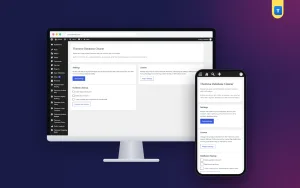
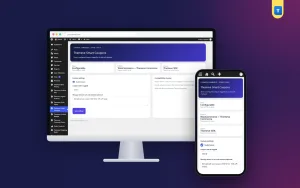
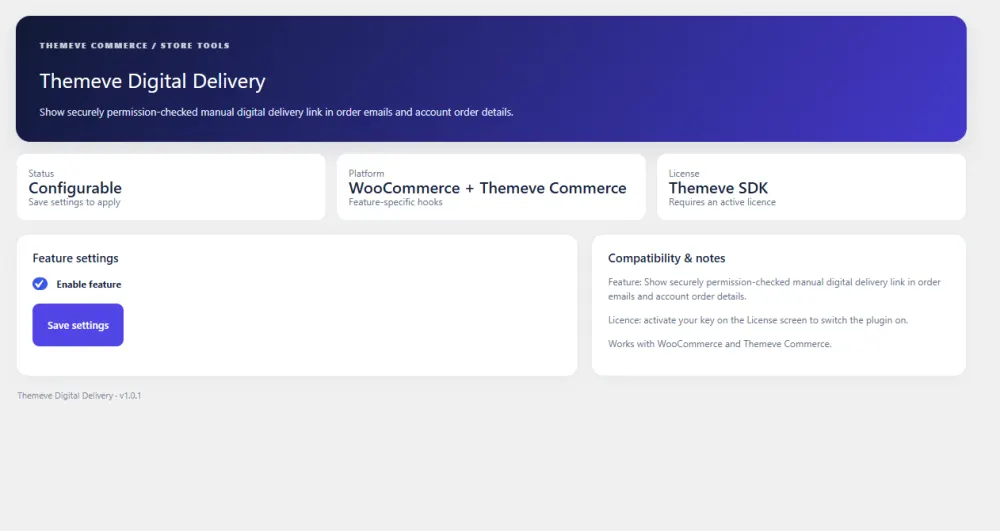
If your shop runs on WordPress, a small plugin can handle the "link on the order page" method for you. Digital Delivery lets you paste a download link on any order. The buyer then finds it in My Account, on their own order page, under "Download your file".
Some facts that matter when you compare options:
- Only the logged-in buyer of that order can see the link. Other customers and visitors cannot.
- You can use a different file for each order, which suits custom work.
- The buyer can download again at any time from the same place.
- It works on WooCommerce and on Themeve Commerce.
- The plugin does not store your files. You keep them on your own hosting or cloud storage, so it does not use your disk space or bandwidth.
- It adds no scripts or styles to your public pages.
It is a good match for e-book sellers, teachers, template designers, printing shops and freelancers. You can read the full details on the Digital Delivery plugin page.
Keeping your digital delivery safe and tidy
After the system is running, a few habits keep it healthy.
- Review your storage once a month and remove files you no longer sell.
- Replace a link as soon as you update a file, so buyers never get the old version.
- Do not reuse one public link for many buyers.
- Keep a backup copy of every master file in a second place.
- Write a short refund and support policy, and show it near the download.
- Check your order list weekly for orders that were paid but not delivered.
These small habits take little time and prevent the worst complaints.
A quick checklist before you go live
- Every file has a clear name and one master copy.
- Links are tested from a phone and a computer.
- Only paying customers can reach the file.
- The buyer knows where to find the file again.
- You have a record of each delivery.
- A test order has gone through the whole process.
- Your contact details are visible if something goes wrong.
If you want to read more on the technical side, the official WordPress documentation is a good, reliable reference.
Frequently asked questions
How does digital delivery work for a small online shop?
The buyer orders and pays, you store the file in a safe place, and a download link reaches the buyer by email, chat or their account page. Small shops usually do best with a link on the order page, because it stays next to the purchase.
What is digital delivery in simple words?
It means giving a customer a file instead of a physical item. There is nothing to ship, so the delivery is complete as soon as the customer can download it.
How does digital delivery work if every customer needs a different file?
Use a method that attaches a link to each order. That way every buyer sees only their own file, and you do not need to search through chats to find which file went to whom.
Is it safe to send download links through Messenger or WhatsApp?
It works for a few orders, but it is hard to track and control. A link on a logged-in order page is safer, because only the buyer can see it and they can find it again later.
Can the buyer download the file again?
That depends on your method. With a link kept on the order page, the buyer can return to the same place and download again at any time, which saves you repeat messages.
Where should I keep large files?
Keep them on a cloud drive or a file host and share the link. This avoids using your own hosting space and bandwidth, and big files do not get blocked as email attachments.
Do I need a plugin to deliver digital files?
No, you can start with email or chat. A plugin becomes useful when you have regular orders and want a clean, private and repeatable process.