 −20%
−20%
Juta – Shoe Store Website Template for WordPress
✦ Key features
- Who Juta is for
- A shoe store website template with a bold red look
- Homepage blocks you can switch on or off
- Sizes, size chart and product pages
- Light code for phones on mobile data
- Accounts, orders and the dashboard
- Getting started with your shoe store website template
- What is included
Overview
Juta is a shoe store website template for WordPress and WooCommerce: EU size buttons for men, women and kids, a size chart pop-up, men and women rows with category tabs, shop filters, WhatsApp orders and mobile sign-in.
Juta is a WordPress theme for shops that sell shoes, sneakers and sandals online. It is a shoe store website template that already works as a full shop, with size buttons, a size chart and rows for men, women and kids.
The design is bold and red, made to look good on a phone. Juta runs on the free WooCommerce plugin, so carts, stock, coupons and orders work the way shop owners expect.
The demo brings 28 pairs in 10 categories, from sneakers and sandals to school shoes and heels, plus three guide posts and all the help pages.
Who Juta is for
Shoes are hard to sell online because size matters so much. A buyer wants to know the pair will fit before paying. Juta is built around that worry and fits:
- Shoe shops moving from a counter to an online store.
- Sneaker stores with new drops every month.
- Footwear brands and leather shoe makers selling their own lines.
- Sandal and slipper sellers with fast, cheap orders.
- Kids' shoe shops and school shoe sellers before the new term.
- Factory outlets clearing stock at fixed prices.
- Facebook shoe pages that want a cart instead of endless inbox chats.
If you were looking for a shoe store website template so buyers can choose their size and order without a long chat, Juta gives you that in one theme.
A shoe store website template with a bold red look
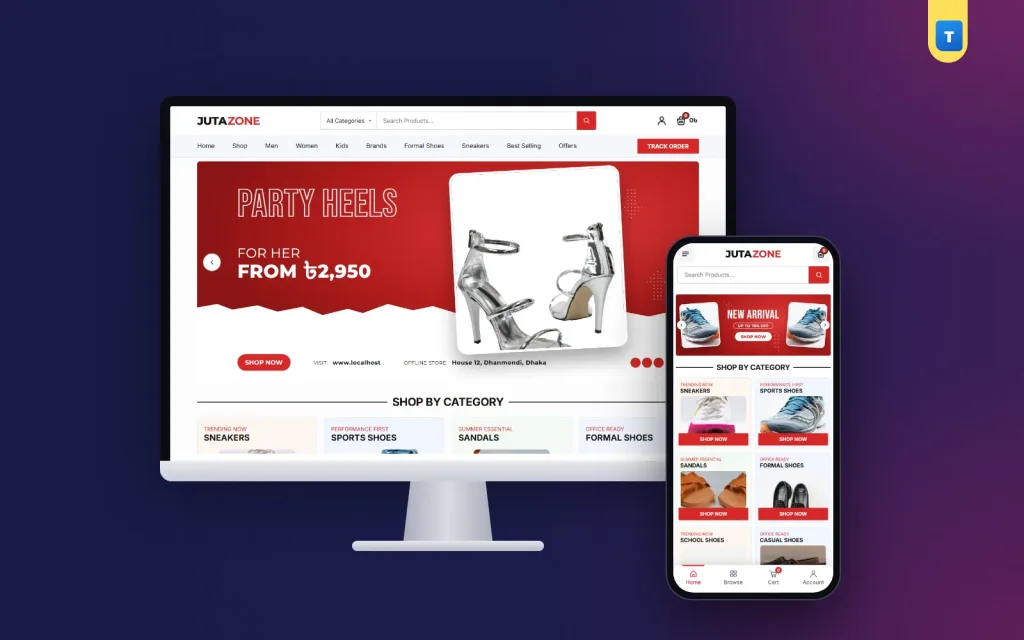
Juta has its own design. The header holds the logo, a category picker with a search box, the account link and a cart that shows the cart total. Under it sits a light bar with the menu and a "TRACK ORDER" button.
On phones you get a menu button, a centred logo and the cart, with a full-width search row below. A bottom tab bar holds Home, Shop, Cart and Account, so the shop feels like an app. The menu opens in a side drawer.
Juta also works well as a sneaker wordpress theme. The red brand colour, outlined headlines and torn white edges suit street style, and you can change the colour in Theme Options for a calmer leather shop.
Homepage blocks you can switch on or off
Every homepage block has an on/off switch and its own fields in Theme Options:
- Hero slider on the brand colour, with an outlined headline, an offer line, a shoe photo, a torn white edge and a strip with "SHOP NOW", your store address and an offline store line.
- Shop by category: eight tiles with "SHOP NOW", the last tile linking to all categories. Phones show two per row.
- Men row: category tabs and five product cards.
- Women row: the same layout for women's shoes.
- Latest products: two rows of five on a grey band.
- Two promo banners: one with a price burst, one with "NEW ARRIVAL / SALE 30% OFF".
- Customer reviews: three cards.
- FAQ in two columns with a WhatsApp help strip.
- Blog: your latest posts.
Products tagged Men, Women or Kids feed the homepage rows. Tag a new pair once and it appears in the right row. The strip with your store address tells buyers there is a real shop behind the website, which helps a lot with trust.
Sizes, size chart and product pages
Every product is a variable product with EU sizes shown as buttons. The demo uses 39 to 44 for men, 36 to 40 for women and 28 to 34 for kids. Each size has its own stock, so a buyer sees at once that size 42 is gone.
A Size Chart pop-up shows EU size against foot length. It tells the buyer to measure from the heel to the longest toe, and to pick the bigger size when the foot falls between two. That one line saves many exchanges. Buyers who are still unsure can tap the WhatsApp button and ask before they order, which is far cheaper than sending a second parcel.
The product page has one white panel with the gallery (discount tag, zoom and thumbnails) and the summary.
The summary shows title, stars, price with "You save", a short text, stock and brand pills, quantity, Buy Now and Add to Cart. A WhatsApp order button opens a chat with the product name filled in. A grey return and warranty box shows "7 days easy return" with the categories and tags.
A second panel holds the Description and Reviews tabs, and related products follow. The page is built with WooCommerce's own template functions, so plugins that hook into the product summary keep working.
Shop pages and filters
Shop and category pages have a filter card with Current Category (locked on a category page), Price Range, Average Rating, Stock Status, Product Status for items on sale, and Brands. Buyers press Apply Filters or Reset All. On phones the filters open in their own panel.
Live search shows matching pairs as the buyer types. Someone typing "loafer" or "school" sees results straight away. For a shoe store website template this matters, because shoe buyers often know exactly the type they want.
Light code for phones on mobile data
Most shoe orders come from phones. Juta keeps its own files small. The theme uses one plain JavaScript file of 55.6 KB (about 14 KB compressed) and one stylesheet of about 88 KB compressed.
The theme itself needs no jQuery and no page builder. WooCommerce still loads its own scripts on shop pages, as it does with any theme. Fewer theme files mean the first screen shows sooner on a cheap phone over mobile data.
Accounts, orders and the dashboard
Juta has its own sign-in and sign-up popup and page. Customers sign up with a Bangladeshi mobile number (01XXXXXXXXX) or an email and password. By default an account is needed to place an order, which keeps fake orders down. Password reset works by email.
Buyers can save pairs to a wishlist and check orders on the Track Order page. The Contact page has a form, and messages are kept in the dashboard under Juta → Enquiries, even if email is not set up yet. A newsletter sign-up collects subscribers, listed in the dashboard.
Running the shop
You run Juta from the normal WordPress and WooCommerce dashboard. Orders arrive in WooCommerce → Orders, and pairs, sizes, prices and stock are edited in WooCommerce → Products.
Theme Options is one settings page with a section sidebar. It holds colours, typography, header and menu, homepage blocks, the contact form, company details and footer, and delivery charges. The demo sets a Bangladesh zone with home delivery at ৳80 and free delivery over ৳5,000. Change both in WooCommerce.
Cash on delivery works from the start. Add bKash, Nagad or card payments with any WooCommerce payment plugin, and add a courier plugin later if you need one. The footer has a "Pay With" logo strip.
Activate your licence once and updates arrive in the dashboard, with your content and settings kept in place. A shoe store website template should let you update sizes and prices in minutes, and Juta does that with tools WordPress users already know.
Getting started with your shoe store website template
- Install WordPress and WooCommerce on your hosting.
- Upload Juta in Appearance → Themes → Add New and activate it.
- Activate your licence with the key from your Themeve account.
- Import the demo from Juta → Setup → Import demo. It takes one click.
- Add your pairs: photos, sizes, prices and stock, tagged Men, Women or Kids.
- Set delivery and payment: your delivery charges and the methods you accept.
- Place a test order from your phone, then share the shop link.
Shoot each pair from the side, the front, the back and the sole, on the same plain floor in daylight. Add one close-up of the stitching or the material. Square photos fit the cards and gallery best.
Before school term and Eid, check the stock of the most popular sizes. Mark sold-out sizes at once so nobody orders a pair you cannot send. Anyone comparing sneaker wordpress theme options will find this size-level stock one of the most useful parts of Juta.
Juta runs on WooCommerce, the free shop plugin used by millions of stores. See all our WordPress themes for more shop designs.
What is included
- The Juta theme zip file
- One-click demo import: 28 pairs, 10 categories, 3 guide posts, help pages and menus
- Help pages: About, Contact, Blog, FAQs, Shipping, Return, Track Order, Privacy and Terms
- Step-by-step documentation
- Theme updates with your licence
Demo photos are free-licence and every brand name in the demo is invented. All you need is WordPress and the free WooCommerce plugin to turn this shoe store website template into your own shop.
Reviews
0.0
Write a review
★★★★★
0 reviews from buyersNo reviews yet — be the first to share your experience after buying.
Frequently Asked Questions
01What kind of shop is Juta for?
Shoe shops, sneaker stores, footwear brands, sandal sellers, kids' and school shoe shops, and factory outlets.
02Is Juta a shoe store website template or a full theme?
It is a full WordPress theme with a working WooCommerce shop, demo pairs, size buttons and order pages.
03Can buyers choose EU sizes?
Yes. Each pair has size buttons with their own stock, and a Size Chart pop-up shows foot length for each size.
04Do customers need an account to order?
By default, yes. They sign up with a mobile number or an email, which keeps fake orders down.
05Can I take bKash or Nagad payments?
Cash on delivery works out of the box. Add bKash, Nagad or cards with any WooCommerce payment plugin.
06Does this shoe store website template need other plugins?
No. It needs only WordPress and the free WooCommerce plugin, and it works with other WooCommerce plugins too.
07Do I need coding skills?
No. Import the demo, then change photos, prices and texts from the dashboard.
Delivery & Support
1Place your orderAdd to cart, sign in and pay with bKash, Nagad or Rocket.
2Payment verified automaticallyEnter your Transaction ID — the payment is matched automatically, usually within seconds.
3Get your productYour license key and download appear in My Account → Licenses.
- Secure automatic payment verification
- Delivery to your account & e-mail
- Friendly WhatsApp support
Refund Policy
This policy applies to every product in our store.
You get a refund when the product does not work as described and we cannot fix it, when your license will not activate your website, or when a manually delivered product is late and you cancel before delivery. A working license, or a single license already used on a live domain, is not refundable. Approved refunds go back to the number you paid from within one working day, minus the Send Money charge.
More items
View all →