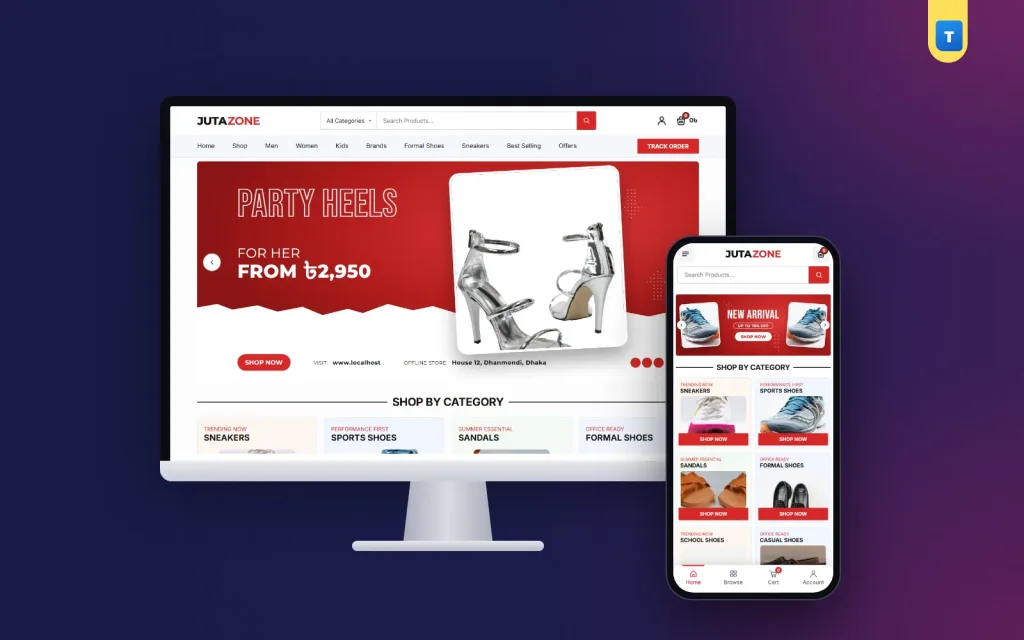
Good shoe store website design answers one question before any other: will this pair fit me?
Shoes are one of the hardest things to sell online. Buyers cannot try them on, sizes differ between brands, and every wrong size means a return trip for your rider. This guide shares practical ideas, checklists and mistakes to avoid for shoe shops in Bangladesh, from the homepage to the checkout.
Pick the ideas that fit your shop, test them for a month, and keep what brings orders.
What makes shoe store website design different
A shoe shop has three problems that many other shops meet less often.
- Fit: one wrong size and the buyer is unhappy, even if the pair is perfect.
- Many sizes per pair: one model may have six sizes, each with its own stock.
- Different buyers: men, women and children shop in different ways and for different reasons.
Every choice on your site should help with at least one of these. Keep them in mind as you read the ideas below.
Know your buyers first
Think about who orders from you. A college student wants the newest sneakers at a fair price. An office worker wants black formal shoes that last. A mother wants school shoes for two children before the new term, in the right sizes, delivered before Sunday.
Each of them needs a different path through the shop. The student starts from a sneaker banner. The office worker searches for "formal". The mother goes straight to Kids. Your homepage should give all three a clear first step.
Homepage layout that sells shoes
A homepage order that works well for a shoe shop:
- A hero slider with one strong shoe photo, one offer line and one button.
- Shop by category: eight tiles such as Sneakers, Sports, Sandals, Formal, School, Casual, Boots and Heels.
- A Men row with category tabs and five products.
- A Women row with the same layout.
- Latest products in two rows.
- Two promo banners for a new arrival and a sale.
- Reviews, a short FAQ and a WhatsApp help strip.
This order is a safe start for most shoe store website design projects. Separate rows for men and women save time. A woman looking for heels does not want to scroll past ten pairs of formal men's shoes first.
Show that a real shop stands behind the site
Many buyers in Bangladesh still worry about ordering shoes online. A simple line in the hero, such as your store address and "Visit our offline store", tells them you are a real business. If you have a showroom in Dhaka or a district town, show a photo of it on the About page.
This small detail in your shoe store website design often matters more than a clever banner. People trust a shop they could walk into.
Sizes and the size chart
Size help is the heart of any shoe shop online. Put it right next to the size buttons, not at the bottom of the page.
- Show sizes as buttons, not a dropdown. A thumb can tap 41 faster than it can open a list.
- Use one system, such as EU sizes, across the whole shop.
- Give each size its own stock, so sold-out sizes look sold out.
- Add a size chart pop-up with EU size and foot length in centimetres.
- Add one line of advice: measure from the heel to the longest toe, and if you fall between two sizes, pick the bigger one.
For kids' shoes, add a note about room to grow. Parents often ask whether to buy one size up. A size chart is the cheapest part of shoe store website design, yet it prevents more returns than anything else.
Photos that sell a pair
Shoe buyers look closely. Shoot each pair the same way, so the whole shop looks neat:
- side view, which is the main photo;
- front and back;
- the sole, so buyers see the grip;
- a close-up of stitching, leather or mesh;
- one photo on a foot, so buyers see the shape.
Use daylight and the same plain floor or background. Square photos fit cards and galleries without cropping. Keep colours true, because a brown pair that arrives looking black means a return.
Name each photo file after the pair, such as stride-runner-black-side.jpg, before you upload it. Compress every photo so it loads fast on mobile data. A clear photo of about 1,000 pixels wide is enough for zoom on most phones.
Shoot new stock on the day it arrives, so the shop never shows a pair you cannot send. If you sell the same model in three colours, shoot all three in the same light so buyers can compare them side by side.
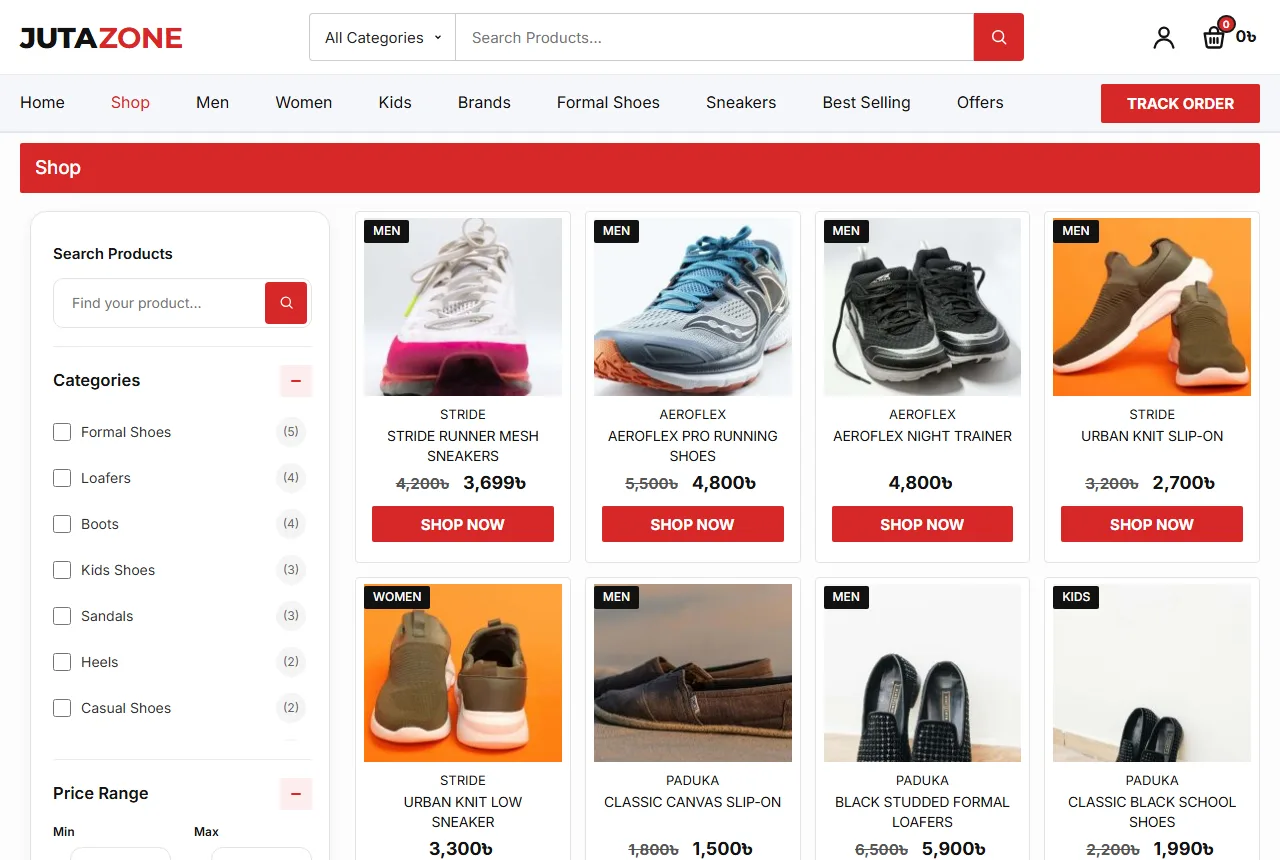
Product page checklist for shoe store website design
The product page is where the buyer decides. Check that yours has each of these:
- A gallery with zoom and thumbnails.
- Title, stars and price, with the saving shown in taka when on sale.
- Size buttons, the size chart and a stock badge.
- Buy Now for quick buyers and Add to Cart for those still browsing.
- A WhatsApp button that opens a chat with the product name filled in.
- A return box that says plainly what you accept, such as "7 days easy return".
- Tabs for description and reviews.
- Related pairs in the same style or category.
Write the description yourself. Mention the material, the sole, the fit (narrow, normal or wide) and where the pair works best: office, sport, school or a wedding. Two short paragraphs are enough.
Ideas for sneakers and sports shoes
Sneaker buyers are younger and move fast. They follow new drops, compare prices across pages and share photos with friends. Good sneaker website design gives them bold photos, short names and clear prices.
Many shops try a sneaker website design with dark pages and tiny text, which is hard to read on a phone. Use a red or black accent, outlined headlines and big product shots in the slider. Add a "NEW ARRIVAL" banner each time new stock lands. Show the stock of each size, because a sneaker fan will buy at once if they see only two pairs of size 42 left.
For sports shoes, add a line about use: running, football, gym or walking. Buyers want to know the pair suits their sport.
Checkout and delivery for Bangladesh
A long checkout loses shoe orders. Ask only for name, mobile number, district and address. Cash on delivery should be on from day one. Add bKash, Nagad or card later through a payment plugin when buyers ask for it.
Show delivery charges early. A common setup is ৳80 across Bangladesh with free delivery over a set amount, such as ৳5,000. Dhaka buyers often expect delivery in one or two days, so state what you can do and keep to it.
Asking buyers to sign in with a mobile number or email before ordering cuts fake orders. It also saves their address, which makes the second order quicker.
Exchanges without stress
Some size exchanges will happen. Make them simple. Ask the buyer to keep the box and tags, send the rider with the new size, and collect the old pair at the same visit. Track which models get the most exchanges. Often the size chart for that brand needs a fix.
Phones first
Most shoe orders are placed on a phone. Test every page on a cheap phone over mobile data. Keep the theme light, with few scripts and no heavy page builder. A bottom tab bar with Home, Shop, Cart and Account makes the shop feel like an app.
Show two products per row, with category tiles two per row as well. Size buttons should be large enough for a thumb. Clean shoe store website design on a phone is mostly about removing clutter, not adding effects.
Common mistakes to avoid
- Only one photo per pair, with no sole or close-up.
- Sizes listed in the description instead of as buttons.
- No size chart, so every buyer asks on WhatsApp.
- Showing sizes that are already sold out.
- Prices that say "inbox" instead of a real number.
- Hidden delivery charges that appear only at the last step.
- Copying product text from another shop.
Google's guide to helpful content is a useful reminder: write your pages for buyers first, not for search engines.
Content that helps buyers choose
A small blog can answer the questions you hear every day. Write short guides such as how to find your shoe size, formal shoes every man should own, and how to care for leather shoes. Link each guide to the matching pairs.
Add a two-column FAQ on the homepage about delivery, returns, sizes and payment. Each answer there saves you a phone call.
Seasons and school terms
Shoe sales follow the calendar. Plan your homepage around these moments:
- School term: put School Shoes and Kids first, with a clear size guide for children.
- Eid: push formal shoes, loafers, sandals and heels for family outings.
- Wedding season: show formal pairs and women's heels together.
- Monsoon: highlight sandals and shoes that handle wet roads.
- Winter: move boots and closed shoes to the top.
Change the slider and the promo banners with each season. A homepage that still shows a monsoon offer in December looks forgotten. Seasonal updates are one of the easiest shoe store website design habits to keep.
Trust, reviews and repeat buyers
A buyer who has never met you is waiting at home for a parcel on trust. Small signals help a lot. Show reviews with a name and a city, not only stars. Ask happy buyers for a photo of the pair on their feet, and reply to every review, even the unhappy ones, with a calm answer.
Put your return rule on every product page, near the price. Keep a Track Order page in the header, so buyers can check where their parcel is without calling. Answer WhatsApp quickly during the evening, when most people shop.
Repeat buyers are your profit. When a customer opens an account, their address and order history are saved. A wishlist lets them keep the pairs they like for payday. Send a short message when a saved style comes back in their size. Strong shoe store website design makes the second order easier than the first.
Brands and price bands
Group your pairs by brand and by price. A brand filter helps loyal buyers, while a price range filter helps students and parents on a budget. Keep a few good pairs under ৳1,500 in every main category, so nobody leaves without finding something they can afford.
A launch checklist
- Every pair has five photos, sizes, a price and stock for each size.
- The size chart opens from every product page.
- Category tiles and Men and Women rows sit near the top.
- Your store address or showroom photo is visible.
- Delivery charges and return rules are clear.
- Cash on delivery works and the checkout is short.
- You placed three test orders from a phone.
Run through this list again before each school term and each Eid. It takes half an hour and catches most problems before buyers do.
Putting these ideas into a shop with Juta
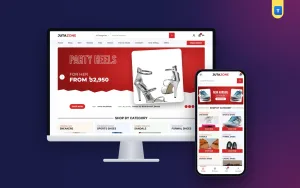
The Juta shoe shop theme for WordPress already follows most of this guide. Its red hero slider has an outlined headline, a shoe photo and a strip with your store address and offline store line. Below come eight category tiles, Men and Women rows with tabs, latest products, two promo banners, reviews and a two-column FAQ with WhatsApp help.
Every pair has EU size buttons, a Size Chart pop-up with foot length, a stock badge, Buy Now and a WhatsApp button. A return box shows "7 days easy return". Phones get a bottom tab bar and a full-width search row. Juta also suits anyone after a sneaker website design with a bold, street look.
It runs on the free WooCommerce plugin, and every homepage block has an on/off switch. Import the demo, add your pairs and you can take orders the same week.
Frequently asked questions
What should good shoe store website design include?
Size buttons with a size chart, clear photos from every side, separate men's and women's rows, a short checkout and WhatsApp help.
Which size system should I use?
Pick one, such as EU sizes, and use it across the whole shop with foot length in the chart.
Do I need online payment at the start?
No. Cash on delivery is enough at first. Add bKash, Nagad or card later.
How much does shoe store website design cost to set up?
WordPress and WooCommerce are free. Your main costs are hosting, a shop theme and good photos.
How do I cut size returns?
Put the size chart beside the size buttons, add measuring advice and answer questions on WhatsApp before the order.