Kurta ecommerce website design is easy to get wrong in one direction: too much. Too many banners, too many badges, too many pop-ups. Kurta and everyday panjabi are simple clothes, bought by people who know what they like and come back for more. This guide shows how to design an online kurta store that is calm, fast and built for repeat buyers, from the homepage to the checkout.
The advice suits small brands with a dozen products as well as larger shops with a few hundred. It assumes WordPress and WooCommerce, but the ideas apply to any platform.
Who buys kurta online
Everyday kurta buyers are not the same as wedding shoppers. They are office workers who want something comfortable for Friday, students who need a few plain pieces, and older men who wear white for prayers every day. Many of them buy the same cut in several colours, and they reorder when a favourite wears out.
That shapes everything. They value clear sizes, honest fabric information and quick reordering much more than flashy effects. Good kurta ecommerce website design respects their time.
Kurta ecommerce website design starts with less
A minimal store is not an empty store. It is a store where every element has a job. Before adding anything, ask what question it answers for the buyer. If the answer is "none", leave it out.
Use one or two colours plus a neutral, such as near-black and warm beige on white. Choose one clean font family for headings and text. Keep corners square or very slightly rounded, and use generous white space between sections. The product photos then become the strongest colour on the page, which is exactly what you want.
A homepage that gets to the product fast
On the homepage, a short path to products matters more than a long brand story. A simple order works well:
- A banner with one clear collection, such as "The White Edit" or "Linen Collection".
- Occasion cards: Everyday, Jumu'ah, Summer and Casual.
- Featured products.
- Categories and one weekly offer.
- New arrivals and best sellers.
- A short blog and a FAQ list.
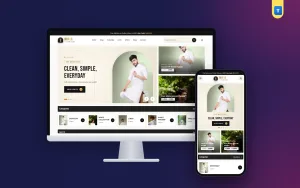
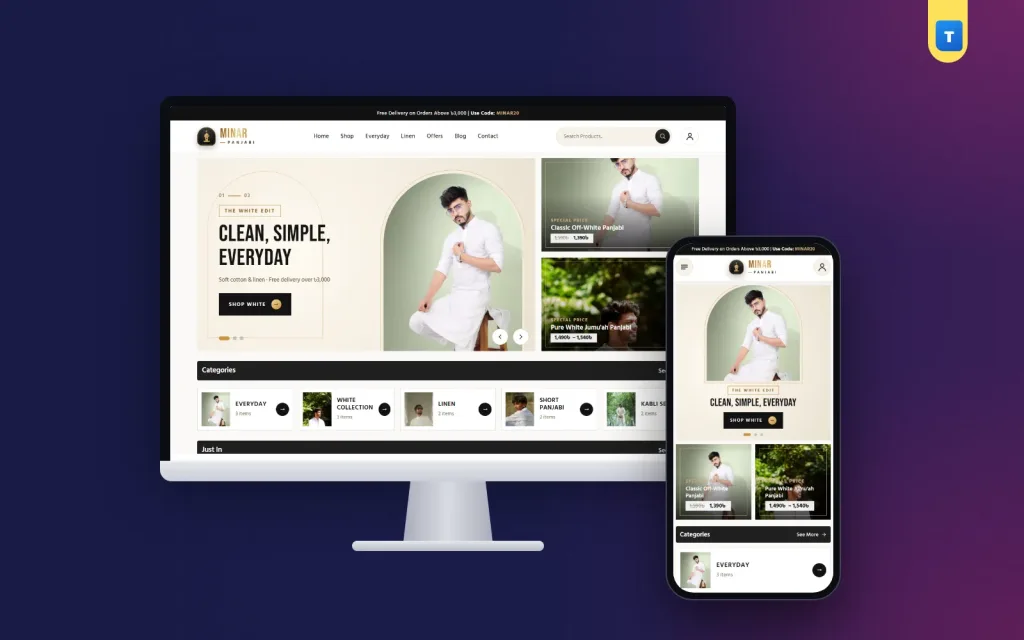
The banner can still have character. A photo set inside an arch-shaped window, with a thin gold outline on a beige background, gives the page a distinct look without adding clutter. On phones, make the banner square and remove the search bar from the header so the first screen shows more of the product.
Occasions for everyday clothes
Occasion cards are usually associated with weddings, but they work just as well for daily wear. "Jumu'ah" leads to white kurta, "Summer" to linen, "Casual" to short kurta and "Everyday" to soft cotton. A buyer who thinks "I need something for Friday" lands on the right products in one tap.
Keep it to four cards. More than that and the cards become a second menu. Give each card one honest photo of a man wearing the piece in daylight, and a short line under the title such as "Pure white for prayers" or "Natural linen for hot days".
Photographing white and natural fabrics
White kurta is the hardest product to photograph well. In poor light it turns grey or blue, and the texture disappears. Shoot in soft daylight near a window, use a light but not pure white wall, and set the camera's white balance manually.
For linen and khadi, add one close-up that shows the slub and weave. Buyers of natural fabrics care about texture, and a close-up answers "is it thick or thin?" better than any description.
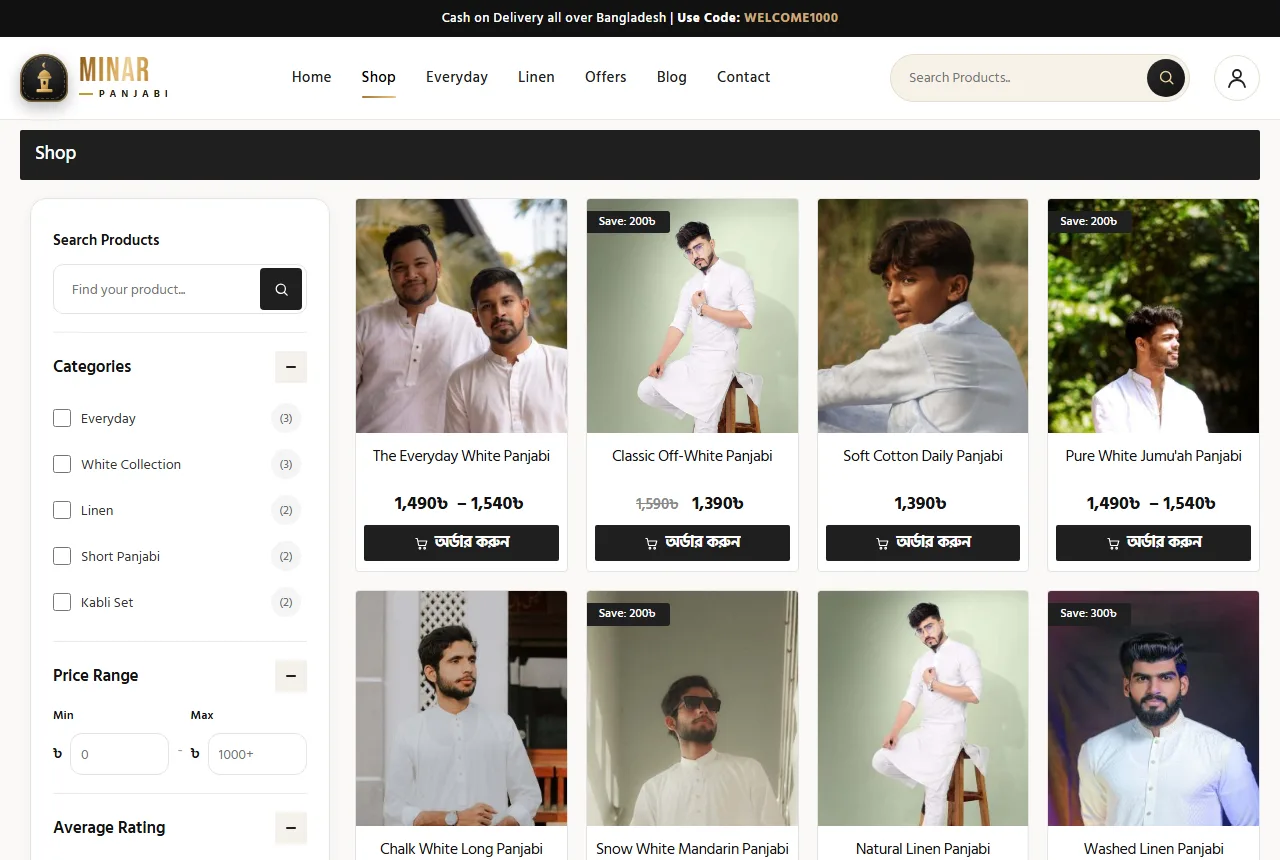
Use a square main photo and show the extra photos as a neat row below. Square photos line up perfectly in the shop grid and look tidy on phones.
Fabric information people trust
Minimal does not mean vague. Each product needs clear facts: fabric (pure cotton, linen blend, khadi), fit (regular or comfort), length in inches for each size, and care instructions. A short spec line under the price, such as "Pure cotton · Regular fit", gives the basics at a glance.
If a fabric shrinks a little after the first wash, say so. Honesty here prevents returns and builds the kind of trust that turns a buyer into a regular. That is a quiet but important part of kurta ecommerce website design.
Sizes that stay consistent
Repeat buyers expect their size to be the same every time. Keep your size chart stable across collections, and if a new cut runs larger, say so on that product.
In WooCommerce, set each size as a variation with its own stock. Show sizes as buttons, grey out sold-out ones, and open the size chart in a pop-up next to the buttons with chest, length and sleeve in inches. A small extra price for XXL is fine if it uses more fabric; just show it clearly when the size is selected.
Kurta ecommerce website design for repeat buyers
The most valuable kurta customer is the one who comes back. Design for them:
- Accounts that are optional. Let guests order, but offer a "Create an account" box at the checkout so the address is saved next time.
- Phone sign-in. Many buyers remember their mobile number, not an email.
- Buy Now. A buyer reordering one white kurta should go straight from the product to the checkout.
- A wishlist. People save colours they want to try later.
- Stable product pages. Keep the same link for a best seller year after year, so bookmarks and search results keep working.
Offers without noise
Minimal brands still run offers, but they should look like the rest of the shop. One framed deal panel with two smaller cards beside it, all the same height, is enough. On phones the panel can become a short card with the photo on one side and the price on the other.
Avoid countdown timers and flashing badges. They clash with a calm design and, for everyday clothes, rarely add many orders. A simple "This Week's Offers" title and a fair discount do the job.
Navigation and search
On desktop, a centred menu with a thin underline on the active item looks clean and is easy to scan. Put search in a pill-shaped box and the account behind a round icon.
On phones, three round buttons are enough: menu, logo and account. Keep search inside the menu. Category pages need a filter card with price, rating, stock and an "On sale" switch, opened from a Filters button that shares a line with the page title.
A short, local checkout
A checkout for Bangladesh should ask for a name, a phone number, an address and the delivery area. Show two delivery choices, such as Inside Dhaka ৳80 and Outside Dhaka ৳120, and offer cash on delivery from the start. Add bKash, Nagad or cards once you are ready.
Do not ask for a postcode or a company name. Every extra field loses a few orders, and in kurta ecommerce website design the goal is to make the second and third order just as easy as the first.
Speed is part of the design
A calm design that loads slowly is not calm. Use a theme that adds little code: one small script without jQuery on the front end and one stylesheet, with no page builder. Compress photos to WebP at the size they are shown.
Test on a mid-range phone with mobile data. If the banner appears within two or three seconds and the menu responds at once, you are in good shape.
Content for a minimal brand
A short blog helps buyers and brings search visitors. Good topics for a kurta brand are practical:
- How to build a simple kurta wardrobe with four colours and two lengths.
- Why linen gets softer with every wash.
- How to keep white kurta white without harsh bleach.
- What to wear for Jumu'ah in summer.
Write as you would explain it to a customer in the shop. Google's guidance on helpful, people-first content rewards exactly that.
Seasons for an everyday brand
Even everyday kurta has seasons. In the hot months, move linen and light cotton to the banner and the Summer occasion card. During Ramadan, white kurta for prayers sells strongly, so bring the White Edit forward. In winter, darker colours and slightly heavier fabrics take over.
These changes are small, often just one banner slide and the order of two blocks, but they keep the shop feeling current. Plan them on a calendar at the start of the year, so the work takes ten minutes each time instead of a rushed evening.
Seasonal updates also help search. When your homepage and blog talk about summer linen in April, buyers searching for it find a shop that is clearly ready to sell it. Seasonal planning is easy to forget in kurta ecommerce website design, because the product looks the same all year, yet buyers' needs change with the weather.
Keep last season's best sellers available even after the banner changes. Regular buyers often come back months later for the same piece in another colour.
Starting from a kurta shop website design template
You can build all of this yourself, but a kurta shop website design template saves weeks. It gives you the layout, size variations, the checkout and the minimal styling, so your work is the photos and the product facts.
When comparing a kurta shop website design template, check the phone header, the size chart, guest checkout, local delivery charges and the page weight. Many templates look minimal in screenshots but load heavy scripts underneath.
Footer and the small finishing details
The footer is where buyers look for the return rule, delivery times and your phone number. Keep it short and centred, with the brand mark, a few link columns and the contact details. A soft wave edge or a thin gold line can close the page with the same calm feel as the banner.
Small details finish the job: a favicon that matches the logo, the same button style on every page, and consistent wording such as "Add to Cart" everywhere. None of these sells a kurta alone, but together they tell the buyer the brand is careful, and careful brands get trusted with repeat orders.
Measuring a minimal store
Track a few numbers each month: how many orders come from returning customers, how many visitors add to cart, and how many returns you get per size. If returns are high for one size, check the chart for that cut.
Read customer messages as design feedback. If people keep asking whether a fabric is see-through, add a line about it to the product page. Small changes like these are the most useful kurta ecommerce website design work you can do after launch.
Mistakes to avoid
- Filling a minimal shop with pop-ups and countdowns.
- Photographing white kurta under yellow light.
- Changing the size chart from one collection to the next without saying so.
- Forcing sign-up before the first order.
- Using a heavy page builder for a twelve-product shop.
Bringing it together with Minar
Our Minar kurta ecommerce website template follows this approach.
It has an arch banner on warm beige, Everyday, Jumu'ah, Summer and Casual occasion cards, a framed weekly deal panel, square product photos with a thumbnail row, size buttons with a chart, Buy Now, guest checkout with phone sign-in and Inside and Outside Dhaka delivery on WooCommerce. It is the calm side of kurta ecommerce website design, ready to fill with your own pieces.
Frequently asked questions
What makes good kurta ecommerce website design?
A calm layout, large clear photos, honest fabric facts, consistent sizes and a short checkout with local delivery.
How many products do I need to launch?
Ten to fifteen well-photographed pieces are enough for a minimal brand. Add more as you learn what sells.
Is a minimal style right for kurta ecommerce website design?
For everyday and white kurta, yes. It lets the fabric and the cut speak and loads faster.
Should buyers need an account?
No. Allow guest orders and offer an optional account for repeat buyers.
How should I photograph white kurta?
In soft daylight against a light wall, with manual white balance and one close-up of the fabric.