 −50%
−50%
Redirect Manager – Redirect Plugin WordPress
✦ Key features
- 301 permanent redirects
- One redirect per line
- Old path to new full URL
- Works as soon as you save
- Exact path matches, nothing by accident
- 404 log with time and path
- Last 200 requests stored, 25 shown
- No script or style on public pages
- Works with any WordPress theme
- Updates in the dashboard with an active licence
Overview
Redirect Manager is a simple redirect plugin WordPress sites can run alone. Add 301 redirects one per line, from the old path to the new address, and check a 404 log of the broken links your visitors really open.
Redirect Manager is a simple redirect plugin WordPress site owners can read at a glance. You write one line for each moved page, with the old path on the left and the new web address on the right. Visitors who follow the old link land on the right page through a permanent 301 redirect.
The plugin also keeps a log of 404 Not Found requests. That list shows which broken links people are really trying to open, so you can fix the ones that matter. It is built for shop owners, bloggers and small businesses who change page addresses now and then and do not want to lose visitors when they do.
Why old links break
Websites change. A product gets a better name and a new address. A blog post moves to another category. A redesign changes the whole link structure. Each change leaves old links behind, in Facebook posts, WhatsApp messages, search results, printed material and other sites that linked to you.
A redirect plugin WordPress owners can use without training solves this in minutes. When someone clicks one of those links and sees a not found page, most leave. A redirect sends them to the right place instead. It costs you one line of text.
Who can use this redirect plugin WordPress offers
The plugin works on any WordPress site, with any theme, and it needs no shop system. It suits:
- Shops that rename products or reorganise categories.
- Blogs and news sites that change their link structure.
- Businesses that move from an old website to a new one.
- Agencies that rebuild client sites and must keep old links alive.
- Anyone who has shared links on Facebook, in emails or on printed cards and wants them to keep working.
It needs WordPress 6.2 or newer and PHP 7.4 or newer. It has been tested up to WordPress 7.1. Whether you manage a single blog or a redirect wordpress website project with many pages, the same simple screen applies.
Moving your redirect wordpress website setup into one plain list also makes handover easy. Setting it up takes minutes, and you do not need to touch code or server files. If you can copy and paste a web address, you can use it.
Front end: what visitors experience
There is no new element on your pages. Nothing is added to the design, and no script or stylesheet loads for visitors. The change happens before the page is shown.
When a visitor opens an old link
- The plugin checks the requested path against your list.
- If it finds a match, it sends the visitor to the new address with a 301 status. The browser then shows the new page.
- If there is no match, WordPress carries on as normal. A missing page shows your usual not found page.
What a 301 means
A 301 redirect tells browsers and search engines that a page has moved for good. People arrive at the new page, and search engines learn the new address over time. Old shared links keep working, and you do not need to edit every post that mentions them.
When a visitor hits a missing page
If the page does not exist and no redirect matches, the visit is written to the 404 log. The visitor sees the normal not found page of your theme, and you see the entry in your dashboard later.
Back end: the redirect map
This is the heart of the redirect plugin WordPress administrators will use every week. It is one box, with no tabs to switch between.
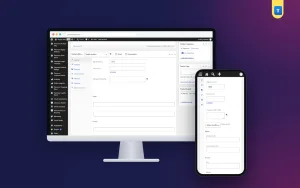
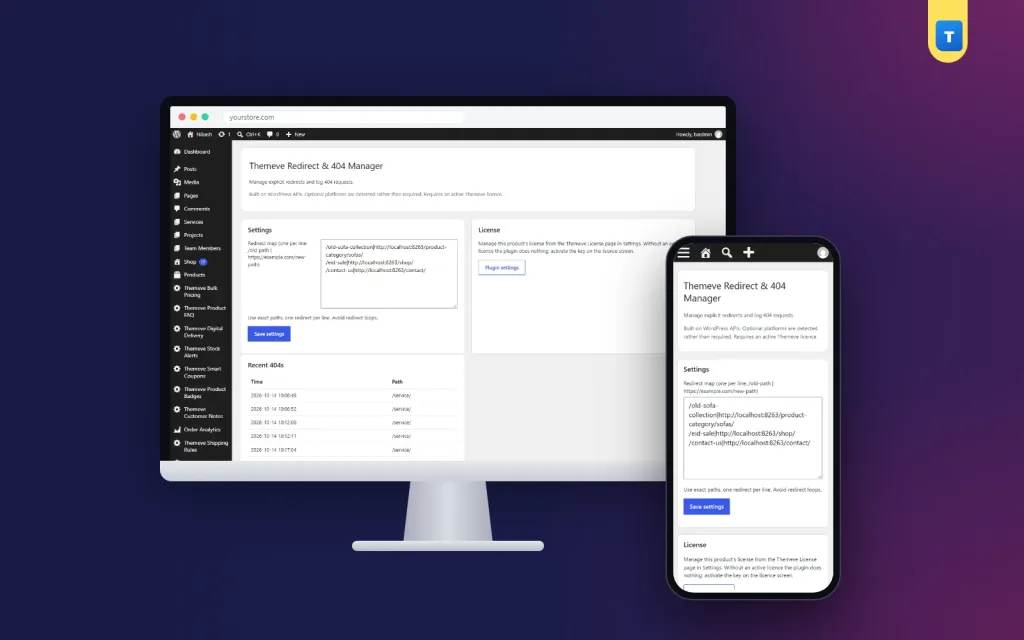
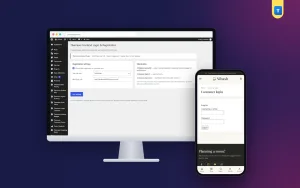
Open Settings, then Themeve Redirect and 404 Manager. The main card holds one large text box called the redirect map. Each line is one redirect.
How to write a line
- Type the old path first, starting with a slash, for example
/old-product/. - Add a vertical bar.
- Add the full new address, starting with https.
- Press Save settings. The redirect works straight away.
How matching works
- Matches are exact on the path. A trailing slash counts, so write the path the way visitors open it.
- There are no wildcard or pattern rules. Each old address needs its own line.
- The target must be a valid full web address. A line with a broken target is skipped.
- Lines without a bar are ignored, so you can leave yourself a blank line between groups.
- The redirect is permanent, with a 301 status.
For most small sites this is clearer and safer than pattern rules. Every redirect is visible, and no page is caught by accident. Avoid sending an address to itself or building a loop in which two lines point at each other.
Why one plain line is useful
- You can see all redirects together on one screen.
- You can copy the list into a note or a spreadsheet for safekeeping.
- You can fix a typo in a few seconds.
- You can hand the list to a colleague without explaining a complex screen.
Back end: the 404 log
Below the settings, a card named Recent 404s shows the latest missing pages as a small table with two columns: Time and Path. If nothing has been logged, it says so.
- The plugin stores the last 200 not found requests.
- The screen shows the most recent 25.
- Each entry has the time and the path that was requested.
- Requests inside the admin area are not logged.
How to use the log
The list shows old product links, typos and pages you deleted long ago. Check it now and then. Pick the paths that appear often, find the right new page, and add a line to the redirect map. That turns lost visitors into found ones.
Back end: licence and updates
The settings card has a link to the licence screen. The plugin needs an active licence. Without it, redirects do not run, and only the lock screen and the licence screen open. After you activate it, the redirect map and the 404 log become available. Updates appear in your dashboard under Updates while the licence is active.
What this redirect plugin does not do
A tool that does one job well should say where it stops.
- It has no wildcard, pattern or regular expression rules.
- It has no import or export button. Copy and paste the map instead.
- It does not redirect by query string. It matches the path only.
- It does not count hits or draw charts.
- It does not fix broken links inside your content. It catches them when visitors click.
If you are moving a very large site with thousands of addresses, plan the list in a spreadsheet first and paste it in once.
A quick example
A shop renames a product page from /panjabi-blue/ to a clearer address. Many people saved or shared the old link during Eid. The owner adds one line to the map, and every old link now opens the new page. A week later, the 404 log shows another old link that people still use. The owner adds that one too.
Good habits for redirects
- Before you change any page address, write down the old one.
- After the change, add the redirect straight away.
- Test it by opening the old link in a private window.
- Check the 404 log after a few days, and again each month.
- Keep a copy of your list somewhere safe, so you can restore it after a move.
- Keep redirects for as long as the old links are still shared. Removing them early brings the broken links back.
- Point each old address at the closest matching new page, not always at the homepage.
Before a redesign or move
Plan this step a few days before launch. List your most important addresses: the homepage, top products, popular posts and category pages. Next to each, write the new address. After the change, paste those lines into the plugin and test each one. A redirect plugin WordPress owners can trust is most useful at exactly this moment, when many addresses change at once.
Planning your redirects
A little planning makes the list cleaner and easier to keep.
- Group lines by section, such as products, posts and pages, with a blank line between groups.
- Use the exact path that visitors saw in the old address bar, including the slash at the end if there was one.
- Send each old page to the page that now holds the same content.
- Do not chain redirects, where one old address points to a second old address. Point straight to the final page.
- After a big change, open ten or fifteen of the old links yourself to be sure they work.
Setup steps
- Download the plugin zip from your account after purchase.
- In your WordPress dashboard, open Plugins, then Add New, then Upload Plugin, and choose the zip.
- Press Install Now, then Activate.
- Activate your licence on the licence screen.
- Open Settings, then Themeve Redirect and 404 Manager.
- Type your first redirect in the map, in the form old path, bar, new address.
- Press Save settings, then open the old link in a private window to test it.
- Come back after a few days and read the 404 log.
Why choose a redirect plugin WordPress sites can run alone
Many site owners cannot call a developer every time a page moves. A redirect plugin WordPress shop owners can handle by themselves saves both time and money. Redirects for a redesigned website also need care, and a plain list keeps that care easy.
Compared with editing files by hand
A redirect plugin WordPress shops rely on should also be safe to edit. Some owners add redirects by editing server files. One wrong character in such a file can take the whole site offline. This plugin keeps your redirects inside the WordPress dashboard, where a typo breaks only one line.
It is also lighter than a large link-management suite. There are no extra tables to learn, no charts and no pattern language. You get a plain list that anyone on your team can read, plus a log that tells you what to fix next.
What is included
- The plugin zip, ready to upload from the Plugins screen.
- A licence for your site, with updates in the dashboard while the licence is active.
- The redirect map with 301 redirects, one per line.
- The 404 log with time and path for the latest requests.
- The licence screen.
- Documentation after purchase and support for six months.
Pair it with an SEO tool that sets titles and descriptions for new pages, so both old and new links stay in good shape.
Redirect Manager is built on the official WordPress documentation standards, and you can browse more of our WordPress plugins.
Reviews
0.0
Write a review
★★★★★
0 reviews from buyersNo reviews yet — be the first to share your experience after buying.
Frequently Asked Questions
01How do I add a redirect with this redirect plugin WordPress offers?
Write one line: the old path, a vertical bar, then the full new address. Press Save settings and it works at once.
02What kind of redirect does it use?
A 301 permanent redirect, which tells browsers and search engines that the page has moved.
03Can I use wildcards?
No. Redirects use exact path matches, so each old address needs its own line.
04What is the 404 log for?
It lists missing pages that visitors tried to open, so you can add redirects for the ones that matter.
05Is this a good redirect plugin WordPress shops can use?
Yes. Shops that rename products or categories can keep every old shared link working with one line each.
06How many 404 entries are kept?
The last 200 are stored and the latest 25 are shown on the settings screen.
07Does it work with any theme?
Yes. It works on any site with WordPress 6.2 or newer and PHP 7.4 or newer.
08Does it need a licence?
Yes. Without an active licence redirects do not run and only the lock and licence screens open.
Delivery & Support
1Place your orderAdd to cart, sign in and pay with bKash or Rocket.
2Payment verified automaticallyEnter your Transaction ID — the payment is matched automatically, usually within seconds.
3Get your productYour license key and download appear in My Account → Licenses.
- Secure automatic payment verification
- Delivery to your account & e-mail
- Friendly WhatsApp support
Refund Policy
This policy applies to every product in our store.
You get a refund when the product does not work as described and we cannot fix it, when your license will not activate your website, or when a manually delivered product is late and you cancel before delivery. A working license, or a single license already used on a live domain, is not refundable. Approved refunds go back to the number you paid from within one working day, minus the Send Money charge.
More items
View all →You may also like
−50%
 −50%
−50%
 −50%
−50%
 −50%
−50%
