Good electronics ecommerce website design starts with one idea: people spend a lot of money on a fridge, a TV or an air conditioner, so they want clear facts before they pay. A site that hides the specs, the warranty or the delivery cost loses the sale, however nice it looks.
This guide shows how to plan and build an online electronics shop step by step. It covers the pages you need, what each page must show, how to handle payment and delivery in Bangladesh, and the mistakes that cost shops the most orders. You can follow it with any tool. A ready-made option is shown near the end.
What good electronics ecommerce website design must do
An electronics shop is not a fashion shop. Buyers do not browse for fun. They compare, check sizes, read the warranty and think about monthly payments. Your site has to answer their questions faster than a phone call to your counter would.
Every page should help with one of these jobs:
- Show the product clearly, from more than one angle, in the right size.
- Show the key specs without a long scroll.
- Show the price, any discount, and the EMI or instalment option.
- Show the warranty length and who gives it, the brand or your shop.
- Show how and when the product will arrive.
- Make it easy to pay and easy to ask a question.
If a visitor can do all six in two minutes on a phone, your design is working. If not, fix that before you spend money on ads.
Know your buyer and your range first
Before you open any design tool, write down who buys from you and what you sell. A shop that sells ACs, fridges and washing machines to families has different needs from a shop that sells earbuds and chargers to students.
Answer these questions on paper:
- Who decides to buy: the husband, the wife, the whole family?
- What is the usual price range of your best sellers?
- Do buyers need installation, or do they carry the item home?
- Which brands do you hold, and which are officially imported?
- How many products will you list in the first month: 20, 50, 200?
The answers decide your menu, your filters and the size of your homepage. A shop with 30 products does not need a mega menu. A shop with 300 does.
Plan the site structure before the look
Structure means the pages and how they connect. Keep it simple. Most electronics shops need only these pages:

- Home
- Category pages, such as Air Conditioners, Refrigerators, TVs, Fans
- Product pages
- Cart and checkout
- Compare page
- Offers or deals page
- Order tracking
- Warranty and return policy
- Contact and shop address
- About us
Think about how people shop for big items when you plan electronics ecommerce website design. Some start with a room: "I need something for the kitchen." Others start with a budget: "I have 40,000 taka." A good plan lets them enter by category, by room or by price. Adding these extra doors costs little and it helps a lot.
Design a homepage that sells, not just decorates
The homepage is a shop window. It should show your best offer, your main categories and a few reasons to trust you, all before the first scroll ends on a phone.
A strong order of blocks looks like this:
- Header with logo, a big search box and the cart.
- One main banner or one featured product.
- Category tiles with real product pictures.
- Weekly offers with a countdown, only if the offer is real.
- Best sellers and new arrivals.
- Shop by room and shop by budget.
- Brand logos you officially sell.
- Delivery, warranty and payment notes.
- Customer reviews and the shop address.
- Footer with policy links.
Do not stack twenty banners. One clear message beats five loud ones. Many appliance shops shout with red and yellow everywhere. A calm layout with plenty of white space feels more trustworthy when the buyer is about to spend a month of salary.
Product pages: where the sale is won or lost
Strong electronics ecommerce website design puts most of its effort into the product page. This is where a buyer decides. Treat each product page like a small spec sheet.
Put these items near the top:
- Brand and full model name
- Up to three key specs, such as capacity, size or power rating
- Price and the old price if it is on offer
- Monthly EMI price, if you offer it
- Warranty length, shown as a small badge
- Stock status, in stock or arriving soon
- Add to cart and a phone number button
Below that, add the full specification table, a short description in plain words, the box contents, and a few photos of the product in a real room. Customers want to picture a fridge in a kitchen, not on a white background only.
Write specs that people can read
Do not copy the maker's long text. Use short lines. Instead of "Energy-efficient inverter compressor technology," write "Inverter compressor: lower electricity bill." Give units every time: litres, kg, inches, watts, tons.
Photos that help
Use at least four photos: front, side, back and one in use. Keep the file size small so the page loads fast. A sharp 800 pixel picture that opens quickly is better than a heavy one that blocks the page on a mobile network.
Add a compare tool
People who buy electronics compare. If your site does not help them, they will open three other tabs, and they may not come back. A compare page that shows up to four products side by side keeps them with you.
A useful compare table:
- Lines up the same spec in the same row.
- Shows price and warranty at the top.
- Lets the buyer add to cart straight from the table.
- Works on a phone, with a side scroll that is easy to use.
Add a "Compare" button on every product card and on every product page. It takes one tap and the buyer stays in your shop.
Build trust with warranty and honest details
Electronics buyers worry about fake products, missing warranty and shops that disappear. Your design can calm these worries with small, honest signs:
- A warranty badge on every card and product page.
- A clear page that explains how warranty claims work and where to bring the product.
- Your real shop address, a map and a working phone number in the header or footer.
- The brands you officially sell, and the words "official warranty" only when it is true.
- Real customer reviews, not copied ones.
- A simple return and exchange policy in plain language.
Do not use fake countdown timers or fake stock numbers. Buyers notice, and one bad experience can cost you many sales through word of mouth.
Payment and delivery for Bangladesh
Local habits matter more than any design trend. Most customers in Bangladesh want to pay with bKash or Nagad, or pay cash when the product arrives. Some will want a card through a payment gateway. Offer these:
- bKash and Nagad, with clear steps for sending money or paying online
- Cash on delivery for items under a set price
- Card or mobile banking through a gateway such as SSLCommerz
- Partial advance for heavy items, with the rest on delivery
For big items such as ACs and fridges, think about delivery costs early. Tell the buyer whether delivery is free, whether installation is included, and how many days it takes in Dhaka and outside Dhaka. Show this on the product page and again in the cart.
Connect your orders to a courier such as Steadfast or Pathao so you can book parcels from your dashboard and give customers a tracking page. A tracking link cuts the number of "where is my order?" calls by a lot.
Electronics ecommerce website design for phones first
Most of your visitors will arrive from Facebook, and most Facebook users in Bangladesh browse on a phone. So you should check every page on a small screen before a large one.
Check these points on a real phone:
- The header keeps the menu, logo and cart, and nothing else.
- Buttons are big enough for a thumb.
- Product cards are compact, with the price easy to see.
- The Add to cart button stays visible when the buyer scrolls.
- Checkout fits on one page, with few fields.
- Text is at least 16 pixels, so no one needs to zoom.
Ask a friend who has never seen your site to buy a product on their phone. Watch where they stop. That test teaches you more than any article.
Speed and simple technical care
Slow pages lose buyers. A few small habits keep a shop fast:
- Resize every picture before you upload it.
- Use a light theme with few plugins.
- Use good hosting with a server close to your visitors.
- Turn on caching.
- Keep WordPress, your theme and plugins updated.
- Take a backup before every big change.
Also check the basics once a month: does the checkout still work, do the payment buttons open, do order emails arrive? Place a test order and see.
Home electronics website design Bangladesh: local details
Home electronics website design Bangladesh shops need has a few details that foreign templates often miss. Power cuts and high bills are a daily worry, so buyers care about inverter models and energy use. Voltage problems make stabiliser advice useful. Rooms are often small, so size guides help with ACs and TVs.
Add these small helpers to your pages:
- An AC size guide by room area
- A note on which fridge size suits which family size
- The running cost per month for ACs and fridges
- Prices in taka, with the bKash or Nagad option next to them
- Bangla labels for the main menu, if many of your buyers prefer Bangla
Eid, Ramadan and the summer months are your busy seasons. Plan your offers pages ahead of time and keep stock numbers honest.
A ready-made option: Taranga
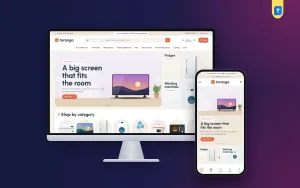
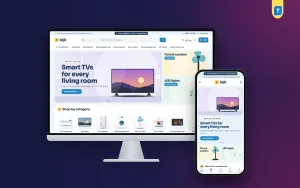
You can build every page above from scratch, but good electronics ecommerce website design takes time. If you want a head start, Taranga is a WordPress theme made for home electronics website design Bangladesh shops and phone shops. It was designed around the points in this guide.
What it includes:
- A product spotlight block with a big picture, key specs, price, EMI and warranty.
- Spec cards on every product, with a warranty pill and an "EMI from" price.
- Compare for up to four products side by side.
- Weekly offers with countdown and stock bars, shop by room and shop by budget.
- 23 homepage blocks you can switch on, off and re-order.
- Five colour palettes and four font pairs.
- The Themeve Commerce shop plugin, with one-page checkout, bKash, Nagad, SSLCommerz, cash on delivery, Steadfast and Pathao.
The demo has 47 appliances from six brands, so you can see how a full catalogue looks before you add your own. It is one option among many. Pick the tool that fits your budget and your skills.
A simple launch checklist
Before you tell customers your shop is open, go through this list for your electronics ecommerce website design:
- Every product has a clear name, price, key specs and warranty.
- At least four photos for your top 10 products.
- Payment methods tested with a real small order.
- Courier connected and a test parcel booked.
- Delivery charges and times written on the delivery page.
- Return and warranty pages published.
- Phone number, address and map visible.
- Site checked on two different phones.
- Order email and SMS arrive as expected.
- Backup taken.
After launch, share your shop link on your Facebook page and ask your first ten buyers for honest reviews. Then look at your numbers once a week and make one change at a time. If ten people ask the same question, that answer belongs on the product page. With a theme such as Taranga, you can change colours, fonts and block order from the theme options without touching code.
Common mistakes in electronics ecommerce website design
These errors show up again and again on new electronics shops:
- Listing products without a price, only "call for price."
- Copying maker text with no units and no plain explanation.
- Using one small photo per product.
- No warranty information at all.
- A checkout that asks for too many fields.
- Too many pop-ups on a phone.
- Ignoring delivery costs until the last step.
- Never updating stock, so buyers order items you no longer have.
Fix one item a week and your shop will get better steadily. You do not need to fix everything on day one.
If you want to read more on the technical side, the official WordPress documentation is a good, reliable reference.
Frequently asked questions
What is the most important part of electronics ecommerce website design?
The product page. It must show the key specs, price, warranty, EMI and delivery details clearly, because buyers of costly items want facts before they pay.
How much does an online electronics shop cost to start?
Costs vary. You need a domain, hosting, a theme and a shop plugin, plus time to add products. A ready-made theme saves design cost compared with custom work.
Do I need WooCommerce for electronics ecommerce website design?
No. WooCommerce is popular, but it is not the only way. Some themes, including Taranga, come with their own shop plugin that handles cart, checkout and orders.
Which payment methods should a Bangladeshi electronics shop offer?
bKash, Nagad and cash on delivery cover most buyers. Add a card gateway such as SSLCommerz if you sell higher-priced items and want card payments.
How many photos should each product have?
At least four: front, side, back and one in use. For big appliances, add a photo that shows the item inside a real room.
Can I run home electronics website design from my phone?
You can manage orders and small edits from a phone, but build the main design on a computer. Always test the finished site on a phone, since most buyers will use one.
How do I make customers trust a new shop?
Show a real address and phone number, clear warranty terms, honest reviews and a simple return policy. Do not use fake timers or fake stock counts.