Good electronics store ecommerce website design starts with one question: what does a nervous buyer need to see before they trust you with their money? Phones, chargers and gadgets cost real money in Bangladesh, and shoppers have been burned by fake products and late deliveries. Your website has to calm those worries within seconds.
This guide walks you through the whole job, from choosing what to sell to launching the shop. It is written for small shop owners who want a clear plan, not a pile of theory. Use the checklists as you go, and you will avoid the mistakes that cost most new online shops their first month of sales.
What electronics store ecommerce website design really means
Many people think design means colours and a nice logo. For an online electronics shop, it is wider than that. It covers how products are grouped, how specs are shown, how a buyer pays and how they track the parcel.
A well planned shop does five jobs:
- It helps people find the right product quickly.
- It shows the facts that decide a sale: model, warranty, what is in the box.
- It builds trust with real contact details and clear policies.
- It makes paying and ordering simple on a phone.
- It works fast on a weak mobile connection.
If any one of these fails, visitors leave. So plan all five before you pick a single colour.
Decide what you sell and who buys it
Electronics is a huge field. A shop that sells everything looks unfocused and is hard to organise. Start narrow, then grow.
Ask yourself these questions:
- Do you sell phones, accessories, computer parts, smart home items, or a mix?
- Is your buyer a student, a gamer, a office worker or a gift shopper?
- What is the average order value? A phone case order is small. A laptop order is large.
- Do you stock the items, or do you order after the customer pays?
Small orders need a quick, light checkout. Large orders need more proof: warranty details, photos, a phone number and sometimes a showroom address. Your answers shape every later choice.
Plan categories and menus for electronics store ecommerce website design
People shop by need, not by your warehouse shelf. A customer who wants a case thinks "case for my phone", not "mobile accessories, group 4". Name your categories the way customers speak.

A simple menu for a phone accessory shop might look like this:
- Cases and covers
- Screen protectors
- Chargers and cables
- Power banks
- Earbuds and headphones
- Stands, grips and holders
A clean menu is the base of good electronics store ecommerce website design, so keep the top menu to six or seven items. Put the rest under sub-menus or on the shop page. Add a search box at the top of every page, because many buyers type the exact model name they own.
For phone accessories, a "find by phone model" step is very useful. Case and screen protector buyers only care about one thing first: does it fit? If your site answers that on the home page, you save them time and save yourself many chat messages.
Design the home page for fast decisions
The home page is not a poster. It is a signpost. Most visitors should reach a product page within two taps.
Put these blocks on the home page, in this order:
- A short banner with one offer and one button.
- Category tiles with small pictures.
- A row of best sellers.
- A flash sale or new arrivals row.
- Trust points: genuine products, delivery time, return policy.
- Customer reviews with real names.
- Contact details and a map or address.
Do not stack ten sliders. One clear banner is enough. Heavy animation slows the page and hides the products.
Think about the phone first. Most of your visitors in Bangladesh will arrive from Facebook on a mobile screen. Open your draft site on your own phone every day while you build it.
Write product pages that answer questions
The product page is where the sale happens. Electronics buyers read details, so give them details.
Every product page should include:
- A clear title with brand and model.
- Three to six sharp photos, including the box and the ports.
- A short list of key specs in plain words.
- Warranty length and who gives it: you, the importer or the brand.
- What is inside the box.
- Delivery time and cost for Dhaka and outside Dhaka.
- Stock status, shown honestly.
Write specs as short lines, not paragraphs. "65W, 3 ports, USB-C" is better than a long sentence. If you sell look-alike items, add a small chip such as "fits iPhone 15" so buyers can check at a glance.
Photos, speed and mobile layout
Product photos make or break an electronics shop. Use a plain background and good light. Show the item from the front, the side and in use. Cropped, blurry images look like a scam.
Keep images light. Resize them before upload, ideally under 150 KB each for listing pages. Many buyers use mobile data, and a slow page loses them.
A quick mobile check:
- Buttons are large enough to tap with a thumb.
- Text is readable without zooming.
- The cart and the call button are always easy to reach.
- Filters open without covering the whole screen.
- The page loads in about three seconds on a normal connection.
Set up payment the way Bangladeshi buyers pay
Payment choice decides whether a visitor becomes a buyer. Offer the methods your customers already use.
- bKash and Nagad for mobile wallet payers.
- Card or bank payment through a local gateway such as SSLCommerz.
- Cash on delivery (COD) for buyers who do not yet trust online payment.
COD is popular but costly if many parcels return. A common fix is to ask for a small advance on high-value items, through bKash or Nagad, and keep COD for the rest. Explain this on the checkout page in one clear line, so nobody feels tricked.
Keep checkout short. Ask for name, phone number, address and district. Do not force account creation before payment. A one-page checkout converts better than a five-step one.
Delivery, couriers and order tracking
Delivery is the second place trust is won or lost. Decide your rules before launch.
- Choose one or two couriers. Steadfast and Pathao are common choices for small shops.
- Set a flat delivery charge for Dhaka and another for outside Dhaka.
- State the expected days on every product page.
- Send the customer a tracking message after dispatch.
- Add an order tracking page so buyers can check without calling you.
When a parcel is late, say so early. A short message saves you many angry calls.
Build trust, warranty and return pages
Online electronics buyers fear fakes and damaged goods. Show proof of who you are.
Add these pages and link them in the footer:
- About us, with your real shop address and photo.
- Contact, with a working phone number and WhatsApp or Messenger link.
- Warranty policy, written in simple lines.
- Return and refund policy, with the number of days.
- Delivery information.
- Privacy and terms.
Customer reviews help too. Ask happy buyers for a short review and a photo of the item, then publish it with their permission.
A ready-made option: Chhoya for phone case and accessory shops
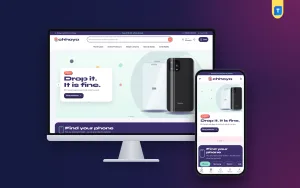
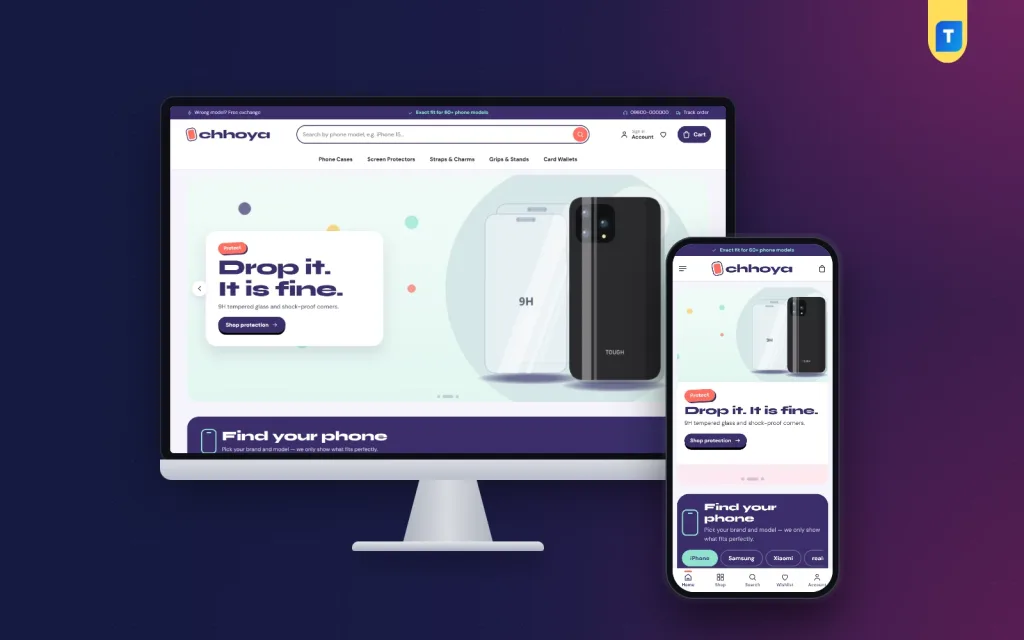
If your shop sells cases, screen protectors, straps, grips and card wallets, you can save weeks by starting from a finished theme. Chhoya is a WordPress theme made for this kind of shop. It is playful and colourful, so it suits young buyers who shop for style.
Here is what it gives you, based on its feature list:
- A "Find your phone" block: shoppers pick a brand, then a model, and see how many items fit.
- "Pick your vibe" finish swatches on product cards.
- A "fits" chip on each card, so buyers check compatibility at a glance.
- 24 homepage blocks, 14 switched on by default, which you can re-order.
- Five colour palettes and four font pairs.
- A demo with 36 products from 6 brands.
- A login popup and one-page checkout.
- bKash, Nagad, SSLCommerz and cash on delivery.
- Steadfast and Pathao courier support with order tracking.
It is a good fit if you want a phone case shop website design template that already handles the "will it fit my phone" question. It is a theme, not a full service, so you still add your own products, photos and policies.
Choosing a theme or a custom build
You have two broad routes. Each suits a different budget and stage.
Ready-made theme:
- Lower cost and fast launch, often in days.
- You can change colours, blocks and text yourself.
- Updates and fixes come from the theme maker.
Custom build:
- Higher cost and a longer wait.
- Useful for unusual features, such as a large product configurator.
- You depend on the developer for later changes.
For most small shops, a ready-made theme is the sensible start. You can learn what customers want, then pay for custom work later if you truly need it. If you want to compare options, see our Chhoya theme page and judge the demo on your own phone.
Set up the basics: hosting, domain and security
Even the best electronics store ecommerce website design fails on weak hosting. Plan these basics.
- Pick a short domain that is easy to say over the phone.
- Use hosting with good speed in or near your market.
- Install an SSL certificate so the site opens with https.
- Back up the site every week, and before any update.
- Keep WordPress, the theme and plugins updated.
- Use a strong admin password and a different admin username.
Payment pages must be secure. Never store card details yourself. Let the payment gateway handle them.
Connect Facebook and your sales channels
Many Bangladeshi electronics sellers start on a Facebook page and sell through Messenger. That works at first, but orders get lost in chat. A website gives you a record of every order.
A smooth move from Facebook to website:
- Put your website link in the page bio and pinned post.
- Share product links, not only photos, so buyers land on the order page.
- Reply to chat questions with a link to the product or the policy page.
- Offer a small first-order discount for website orders.
- Keep one shared stock count, so you do not sell the same item twice.
Over time, buyers learn that the website is the faster way to order.
Launch checklist for your electronics store ecommerce website design
Before you tell customers the shop is open, go through this list.
- Place a test order with each payment method.
- Check the order email and the dashboard notice both arrive.
- Open every page on a cheap Android phone.
- Read all product titles and prices for typing errors.
- Test the search box with five common product names.
- Check delivery charges for two districts.
- Confirm the contact number answers.
- Make sure the warranty and return pages are live.
After launch, look at your orders weekly. See which products get views but no sales, and improve those pages first.
Common mistakes to avoid
- Too many categories, so nobody finds anything.
- Product pages with only a title and a price.
- Stock photos copied from other websites.
- No clear warranty statement.
- A checkout that forces sign-up.
- Huge images that slow the mobile page.
- Hiding the phone number.
- Never updating prices after supplier changes.
Fix these and you are already ahead of many shops with bigger budgets.
If you want to read more on the technical side, the official WordPress documentation is a good, reliable reference.
Frequently asked questions
How long does electronics store ecommerce website design take?
With a ready-made theme, a small shop can be live in one to two weeks, mostly spent on photos and product text. A custom build usually takes one to three months.
What should an electronics store ecommerce website design include first?
Start with clear categories, strong product photos, spec lists, warranty details and a simple checkout. Add extras such as reviews and flash sales later.
Do I need cash on delivery?
For most Bangladeshi shops, yes. Many buyers still prefer to pay when the parcel arrives. Use a small bKash or Nagad advance on expensive items to reduce returns.
Can I run the shop from my phone?
You can manage orders and edit products from a phone. Large changes, such as layout work, are easier on a computer.
Is a phone case shop website design template enough for a bigger electronics shop?
It is best for case and accessory shops. If you plan to sell laptops or large appliances, pick a layout with stronger spec tables and filters.
How do I stop fake orders?
Confirm high-value orders by phone, ask for a small advance and keep a list of repeat problem numbers.
How many products do I need to launch?
Twenty to thirty well described products are enough to start. It is better to have fewer complete pages than many empty ones.