 −8%
Rosaal – Grocery Store Website Template (Fruit Shop WordPress Theme)
✦ Key features
- 12-month fruit calendar with best months
- In-season ribbon fed by your calendar
- Six mango cards with sweetness and fibre
- Harvest pre-orders with ship date and booked bar
- Floating plus button that becomes a stepper
- Gift crates and ready fruit lists
- 25 homepage blocks, switch on or off and re-order
- Five palettes and four font pairs
- No jQuery, one CSS and one JS file
- Sign in and register in a popup
- bKash, Nagad, SSLCommerz, COD, Steadfast and Pathao
- One-click demo with 38 products
Overview
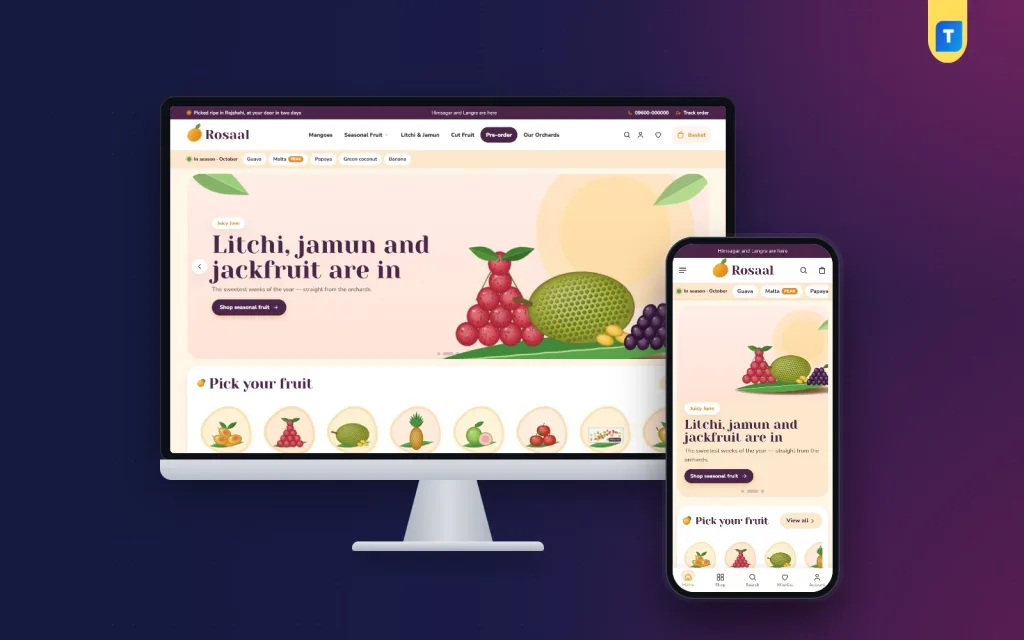
Rosaal is a grocery store website template for fruit and seasonal food sellers. It has a 12-month calendar, an in-season ribbon, mango cards, harvest pre-orders, 25 homepage blocks and a bundled shop with local payments.
Rosaal is a grocery store website template for sellers whose stock changes with the calendar. Mangoes in summer, litchi and jamun in their short weeks, jackfruit, tropical and imported fruit, cut fruit and gift crates: each one has a season, and buyers ask what is ripe right now. Rosaal answers that on every page.
It is a WordPress theme with a full shop system inside. The look is sunny cream with jamun purple and mango orange, round fruit tiles and soft blob shapes. Rosaal means juicy, and the design tries to match the name.
Who can use this grocery store website template
The demo is a fruit shop with invented orchards. Treat it as a sample and replace it with your own items, photos and names. The structure suits many sellers of fresh and seasonal food.
- Mango sellers who ship crates all season
- Litchi, jamun and jackfruit growers with a short selling window
- City fruit shops that sell cut fruit and gift baskets
- Orchard owners who sell directly to families
- Importers of apples, grapes, dates and other imported fruit
- Juice, dry fruit and nut sellers
- General grocers who want a seasonal section
- Vegetable, herb and flower sellers with a changing stock
- Gift sellers who build fruit baskets for Eid and weddings
Why seasonal sellers need more than a basic template
Most grocery themes show a mango like a bar of soap. Name, price, button. That wastes the one thing a fruit buyer cares about, which is whether the fruit is at its best. Rosaal gives fruit a calendar, a sweetness meter and a booking bar.
As a result, a seasonal seller does not have to keep editing banners every few weeks. Fill the calendar once. The site moves with the months.
Season tools in a grocery store website template
The "In season" ribbon
Just under the header, a ribbon lists this month's fruit. Each fruit gets a "peak" mark in its best month. The ribbon reads from your fruit calendar.
The 12-month fruit calendar
- A bar runs across each fruit's season
- A dot marks its best month
- The current month's column is lit
- You fill it once in Theme Options and the display follows the date
Meet the mangoes
Six mango cards. Each shows the skin colour, district and weeks of the season, a sweetness meter, the fibre level and the price of the linked product.
Pre-order the harvest
- Up to three crates in the block
- Each crate shows the day it ships and the days to go
- A bar shows crates booked against the batch size
- "Book now" drops the crate straight into the bag
- The demo includes a Pre-orders page and three sample crates
Light on the server
Fruit shoppers browse on their phones, often in the evening and often on mobile data. A grocery store website template should not make them wait, so the code stays small on purpose.
- No jQuery. The theme uses plain JavaScript
- One stylesheet and one script file
- The script is about 24 KB before compression
- Images load lazily
- Google Fonts can be switched off from Theme Options
More front-end features
Header and mobile layout
- Jamun-purple top bar with a mango logo
- Menu panels full of round fruit tiles
- Phone header with only the menu, logo and cart
- Sign in or register in a popup, so no one loses their place
Product cards
- A floating round plus button on the photo
- One tap turns it into a minus, number and plus stepper
- Compact cards on phones, so more fruit fits on one screen
- Wishlist heart and quick view
Product page, cart and checkout
- Reviews in a fold, with a popup that asks for the first review
- Back-in-stock requests
- Coupon codes
- One-page checkout and an "Order placed" popup
- A Track Order page, so buyers can follow their crate
The 25 homepage blocks
Every block can be switched off and moved. On a computer you drag. On a phone you use arrows.
- Orchard hero slides
- Pick your fruit: round fruit tiles
- Fresh from the orchard: tabs by category
- Ripe today: a countdown with stock bars
- Fruit for every moment: four picture cards
- Gift crates: a banner of its own
- Orchard of the month
- Our orchards: a logo row
- Orchard diary: your latest three posts
- A promise strip, for example tree-ripened, cash on delivery and a sweetness promise
- Three department blocks
- Just ripened
- Fruit under: price tiles with products
- Everyone's eating
- Highly rated
- Ready fruit lists
- More from the orchard: a big grid with a Load more button
- The fruit calendar, the mango cards and the pre-order block described above
Colours, fonts and style
- Five palettes: Mango and jamun, Litchi, Guava, Jackfruit and Watermelon
- Single colours can be changed by hand
- Four font pairs, led by Yeseva One, DM Serif Display, Playfair Display and Abril Fatface
- Setting search, a sticky save bar, reset, export and import
Back-end: Theme Options
Everything is under Rosaal, then Theme Options. No code is needed.
- Homepage layout: block order and visibility
- Colors: palettes and single colours
- Typography and style: font pairs
- Header and menu: top bar and menu panels
- Product cards: what each card shows
- Hero slider: orchard slides
- Calendar, mangoes, pre-orders, categories, deals and promos: calendar rows, mango cards, crates and offers, all on one screen
- Product sections: homepage product rows
- Product page: single product layout
- Footer and contact: store details and links
Back-end: the shop dashboard
Rosaal runs on Themeve Commerce, our own shop plugin. It is bundled and installs in one click from Rosaal, then Setup. WooCommerce, a payment plugin and a courier plugin are not needed.
Orders and products
- Sales overview: today, seven days, the month and orders waiting, with a two-week chart
- Orders with statuses, printable invoices and a payments box for advances, dues and refunds
- Incomplete orders from shoppers who left checkout
- Product editor with options such as crate size, each with its own price, stock and SKU
- Categories, brands and tags
- Customer list: new, repeat, VIP, inactive or risky
- Transactions with every payment and refund
Payments and delivery
- bKash, Nagad, SSLCommerz, manual Send Money and cash on delivery
- Advance on cash on delivery, as a fixed amount, delivery charge or percentage
- Delivery charges by district
- Steadfast and Pathao from the order screen
- COD money screen to see what the courier owes you
Alerts and marketing
- New-order alerts by email, Telegram or WhatsApp
- SMS updates, OTP and SMS campaigns
- Fake order protection
- Facebook Pixel with Conversion API, Google Analytics 4, Google Tag Manager and product feeds
- SEO settings for descriptions and sharing previews
Optional modules
- Pre-orders in the shop, for fruit not yet picked
- Delivery date and time
- Flash sale and special offers with bundles, useful for gift crates
- Loyalty points and refer a friend
- Bulk order and corporate quotes for offices and events
- Back-in-stock alerts and recently viewed products
- Exchange and returns
- Store locations
- Sales and signup popups
- Reseller and wholesale prices, an affiliate programme and a marketplace module
How it helps you sell
Think of a mango grower in Rajshahi. In April she opens the calendar and enters the weeks for each variety. She adds three pre-order crates with ship dates. The ribbon already shows what is in season, and the bar on each crate shows how many are left. Buyers see the stock moving, and they book early.
A city shop can use the same pages in a different way. It can use Ripe today to sell fruit that must go, Gift crates for Eid, and Fruit for every moment to link to fruit for guests, fasting or a hospital visit. A fixed advance on cash on delivery protects high-value crates. Telegram alerts show new orders as they arrive.
Because the season block reads the month, you spend less time on banners and more time on sourcing. For the owner of a grocery store website template, that is a real saving across a year of changing stock. A seller of dry fruit, nuts or honey can use the same calendar for festival months, with the best weeks marked.
Set up in five steps
- Upload and activate Rosaal in WordPress.
- Activate your licence under Rosaal, then License.
- Install Themeve Commerce from Rosaal, then Setup.
- Run the one-click demo import.
- Fill the fruit calendar, replace the sample fruit with yours and open for orders.
Why choose it over a plain template
A plain grocery store website template ends at the homepage. You then add the calendar idea, a booking idea, a checkout and local payments yourself. Rosaal ships them together.
- Calendar, sweetness meter and booking bar are part of the design
- Bangladesh payments and couriers are built in
- No page builder and no jQuery
- Gift crates and pre-orders are ready to use
- One bundled shop plugin instead of several
When you compare organic products website templates, ask whether the checkout, couriers and local payments work without extra plugins. Here they do.
What is included
- The Rosaal theme
- The Themeve Commerce plugin
- One-click demo: 38 products from 6 invented orchards, three pre-order crates, a gift basket, the fruit calendar, the mango guide, orchard diary posts, menus and pages such as Our Stores, Pre-orders and Sweetness Promise
- Documentation
- Six months of support, with updates through your Themeve account
Sellers who list natural and organic produce can treat Rosaal as one of the organic products website templates that already include a checkout, with the calendar and booking bar as extras. Rosaal needs WordPress 6.0 or newer and PHP 7.4 or newer. It is tested up to WordPress 7.1. If you sell mostly vegetables, look at Sobuj. For a wider organic grocery mix, see Tazaa.
You can see Rosaal working on the live demo, and browse more ready-made designs in our WordPress themes collection.
Reviews
0.0
Write a review
★★★★★
0 reviews from buyersNo reviews yet — be the first to share your experience after buying.
Frequently Asked Questions
01Is this grocery store website template only for fruit?
No. The demo is a fruit shop, but any seller whose stock changes with the season, such as vegetables, dry fruit, honey or gift baskets, can use the calendar and blocks.
02Can I take orders for mangoes before the harvest?
Yes. The Pre-order the harvest block shows up to three crates with the ship date, days to go and a bar of crates booked. Book now adds the crate to the bag.
03How does the in-season ribbon know which fruit to show?
It reads your fruit calendar from Theme Options. Fruit of the current month appears under the header, with a peak mark on its best month.
04Can a grocery store website template like Rosaal run a full shop?
Yes. Themeve Commerce is bundled and handles cart, checkout, payments, couriers, invoices and customer accounts. WooCommerce is not needed.
05Is Rosaal one of the organic products website templates?
It suits organic and natural produce sellers well. You add your own products and descriptions, and the calendar and pre-order tools help with seasonal stock.
06Which payments and couriers work with Rosaal?
bKash, Nagad, SSLCommerz, cash on delivery and manual payment, plus Steadfast and Pathao courier.
07Will I need a developer to set it up?
No. Calendar rows, mango cards, crates, colours and block order are all set in Theme Options.
08How does the shop look on a phone?
The phone header shows the menu, logo and cart, and fruit cards stay compact so shoppers see more fruit with each scroll.
Delivery & Support
1Place your orderAdd to cart, sign in and pay with bKash or Rocket.
2Payment verified automaticallyEnter your Transaction ID — the payment is matched automatically, usually within seconds.
3Get your productYour license key and download appear in My Account → Licenses.
- Secure automatic payment verification
- Delivery to your account & e-mail
- Friendly WhatsApp support
Refund Policy
This policy applies to every product in our store.
You get a refund when the product does not work as described and we cannot fix it, when your license will not activate your website, or when a manually delivered product is late and you cancel before delivery. A working license, or a single license already used on a live domain, is not refundable. Approved refunds go back to the number you paid from within one working day, minus the Send Money charge.
More items
View all →You may also like
−8%
 −27%
 −34%
 −18%
