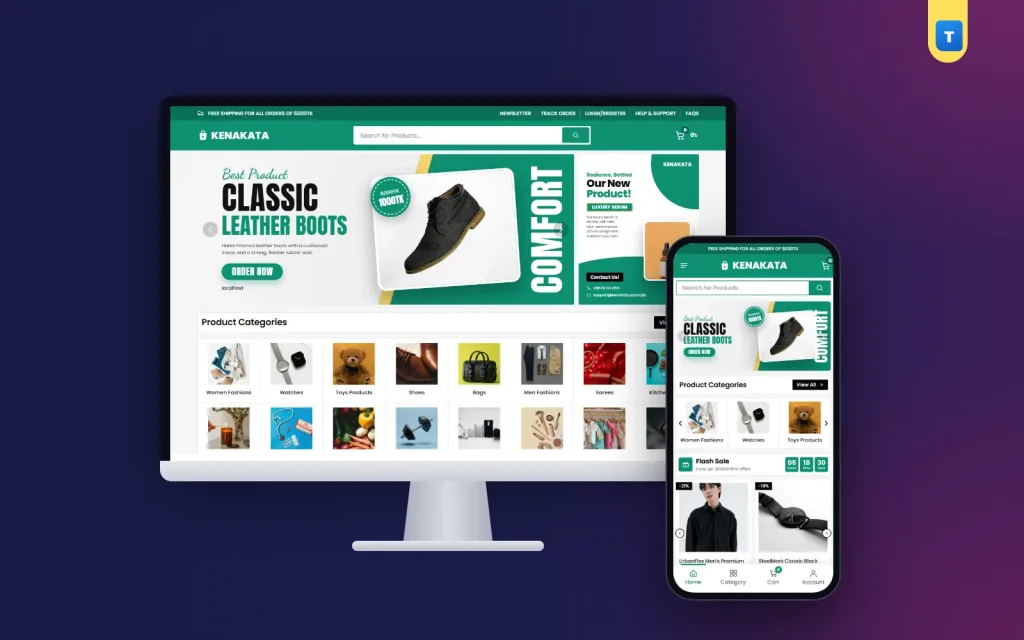
Good general store website design has one hard job: show hundreds of very different items without confusing the buyer. A saree, a rice cooker, a lipstick and a toy car all have to live on the same homepage. This guide covers the layout, categories, product pages, checkout and daily habits that help a multi-category shop in Bangladesh get steady orders.
Every idea here is simple and cheap. Pick the ones that fit your shop, try them for a few weeks, and keep what works.
Why general store website design is harder than a one-niche shop
A shoe shop knows its buyer. A general store does not. The same visitor may want a school bag today and a pressure cooker next week. Your design has to serve both visits.
- Many categories mean menus and grids must stay short and clear.
- Different price levels mean a ৳150 hair clip and a ৳9,000 blender share one page.
- Different buyers mean young students, mothers and office workers all use the same shop.
The answer is structure. When every row, card and filter follows the same pattern, buyers learn your shop in a minute.
Start with your categories, not your banner
Write down every category you sell. Then group them into 10 to 16 main ones, such as Women Fashions, Men Fashions, Sarees, Watches, Shoes, Bags, Beauty, Grocery, Kitchen Items, Home & Living, Electronics and Baby & Kids.
Show these as a bordered grid near the top of the homepage. Eight per row works well on a laptop. On a phone, one scrolling row of three with arrows keeps the page short. Give each category one clear photo, shot the same way, so the grid looks calm.
Avoid stacking three large banners above the categories. They look good in a mock-up but push the products far down on a phone.
Naming categories buyers understand
Use the words your buyers use. "Kitchen Items" is clearer than "Culinary Essentials". "Baby & Kids" is clearer than "Junior Collection". If many buyers search in Banglish, add those words to product titles or tags, such as "panjabi" or "borka".
Keep each category to one level where you can. A buyer who has to open three menus to find a hair dryer will often give up. Good general store website design keeps the path from homepage to product short: category, then product.
A homepage order that works
Buyers scroll a general store homepage like a market street. Each block should answer one question. Here is an order many shops use:
- Hero slider with one or two real offers.
- Category grid so people can jump to what they came for.
- Flash sale with a countdown and a row of discounted items.
- Big sale banner for the season, such as Eid or Pohela Boishakh.
- Featured products chosen by you.
- Recent products so regular buyers see what is new.
- Most selling products as social proof.
- Promises such as cash on delivery and easy returns.
- Blog posts with buying guides.
Each block should have a clear "View All" button that opens the full list. Rows that slide with round arrows save space and keep the page tidy.
Product cards that look the same everywhere
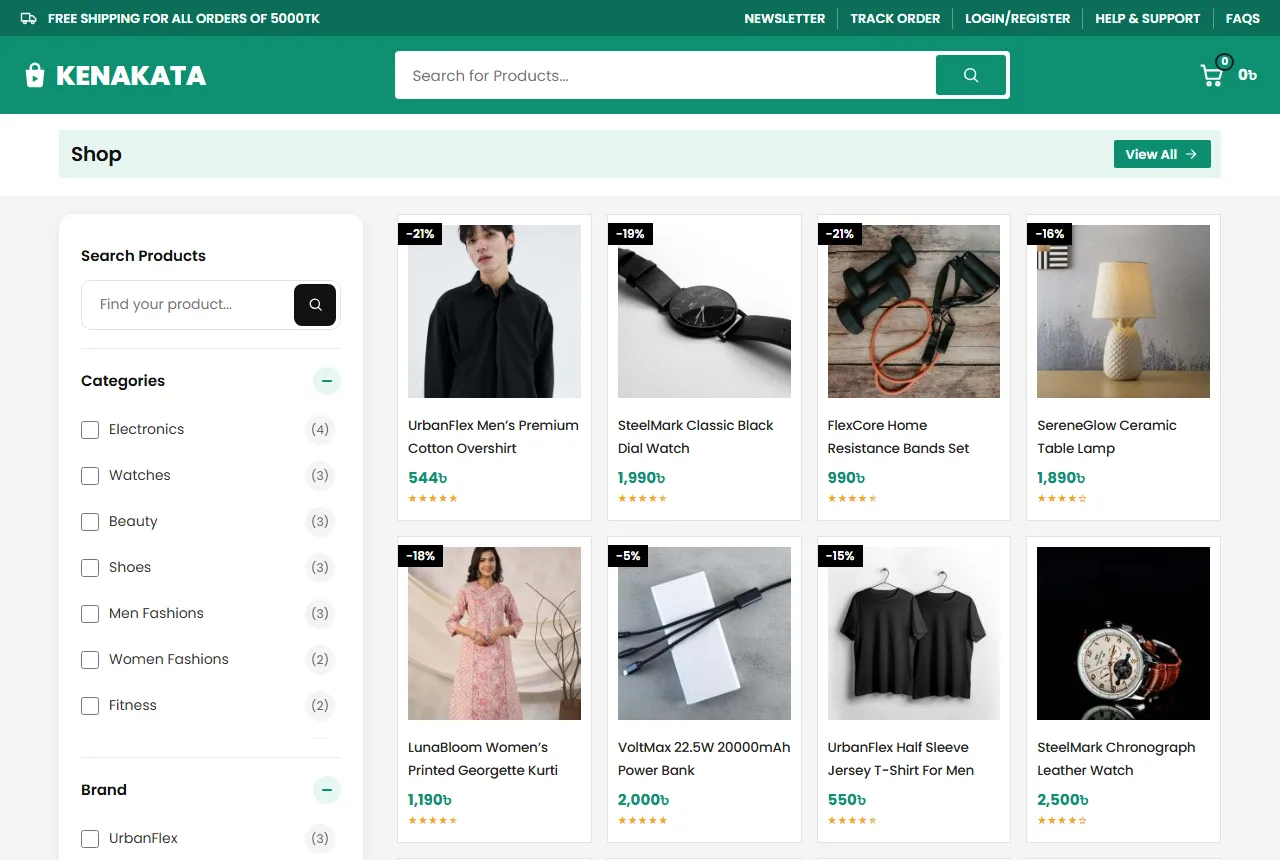
In a mixed shop, the card is your most important design piece. Keep it identical across the site: picture, a two-line title, the price, stars and a discount tag when there is an offer.
Use square photos on a plain white or light grey background. A bag shot on a bed next to a watch shot on a table makes the grid look messy. One background and one angle make even cheap items look cared for.
Keep titles in one pattern: brand, item, size or colour. For example "Walkwell Men's Running Shoe, Black, 42". Buyers comparing items will thank you.
Prices and discounts
Show prices in taka with the ৳ sign and no decimals, such as ৳1,250. When an item is on sale, show the old price crossed out and a small discount tag on the card. A black or dark tag stands out on a bright card without fighting the photo.
Do not put every item on sale. When everything has a discount, nothing feels special. Keep real offers for the flash sale and the season banner.
Search and filters for a big catalogue
When a shop has more than a hundred items, search becomes the main menu. Put a wide search box in the header with a category picker beside it. Show matching products as the buyer types, so they see results before pressing Enter.
On shop and category pages, add a filter card with:
- the current category;
- a price range;
- average rating;
- stock status (in stock or out of stock);
- on sale items;
- brands.
Add Apply and Reset buttons. On phones, open the filters in a panel so they do not cover the products.
Brands deserve their own filter. Many buyers in a general store trust one or two names for watches or beauty items and want to see only those. Fill in the brand for every product, even small ones, so the filter is useful from day one.
Check your search every week. Type the ten words buyers use most and see what comes up. If "lipstick" shows a frying pan, fix the titles or tags. Small fixes like this do more for general store website design than a new banner.
Product pages that answer questions
A buyer on a product page wants five answers: what is it, how much, is it in stock, how fast can I get it, and what if it is wrong. Put all five near the top.
- A gallery with zoom and three or four photos.
- The price with the old price and "You save ৳X".
- Stock and brand shown as small pills.
- Buy Now and Add to Cart buttons, both large.
- A short return and warranty note.
- A WhatsApp button that opens a chat with the product name filled in.
Many buyers in Bangladesh still like to ask a question before ordering. A WhatsApp button turns that habit into orders instead of lost visitors.
General store website design for phones
Most orders in Bangladesh come from a phone, often on mobile data. Design the phone view first, then the desktop.
- A menu button, a centred logo and the cart in the top bar.
- A full-width search row under it.
- A bottom tab bar with Home, Shop, Cart and Account.
- Product cards two per row.
- Buttons big enough for a thumb.
Test the shop on a cheap Android phone over 4G. If the homepage feels slow there, it is slow for most of your buyers. A clean general store website design loads fewer heavy pieces and keeps buyers scrolling.
Keep the shop light
Every extra second of loading costs orders. Compress photos before upload; most product photos are fine at 800 to 1200 pixels wide. Use a shop theme with small files instead of a heavy page builder. Keep plugins few, and remove the ones you do not use.
Pick hosting with servers close to your buyers. Check your shop speed once a month, especially after adding a new plugin.
Checkout, delivery and payment in Bangladesh
A long checkout loses orders. Ask only what the delivery needs: name, mobile number, district, area and a short address line.
Show delivery charges early. Many shops charge about ৳80 for home delivery and give free delivery over a set amount, such as ৳5,000. Say this in the top bar and in the cart, so nobody feels tricked at the last step. Dhaka delivery in one or two days and outside Dhaka in two to four days is a common promise.
Packing mixed orders
A general store order can hold a glass bottle, a shirt and a packet of biscuits. Pack heavy and breakable items first, wrap glass in paper or bubble wrap, and keep clothes in a separate bag. Write the order number on the parcel so the courier and your staff can find it fast.
Cash on delivery is still the main payment method. Add bKash, Nagad and card payments with a payment plugin as the shop grows. Show the logos of what you accept in the footer.
Accounts that cut fake orders
Fake cash on delivery orders cost real money: the rider's time, the courier fee and the return. Asking buyers to create an account with a mobile number or email before ordering cuts many of these.
Repeat buyers are where a general store earns its profit. Someone who bought a lunch box in March may come back for school shoes in June. A saved account makes that second visit easy, and that is one of the quiet wins of general store website design.
Make sign-up quick. A popup that accepts a Bangladeshi mobile number (01XXXXXXXXX) or an email with a password is enough. The address is saved, so the next order is faster. A wishlist and a Track Order page give buyers a reason to sign in again.
Common mistakes in general store website design
- Too many categories in the main menu.
- Photos with different backgrounds and sizes.
- Titles with no brand, size or colour.
- Delivery charges shown only at the last step.
- Countdown timers that never end.
- Pop-ups on phones that hide the cart button.
- Product text copied from a supplier, word for word.
Google's guide to helpful content is a good reminder here. Write product text for buyers, in your own words, and answer the questions they really ask.
Content and trust pages
A store selling many kinds of items needs clear help pages. Buyers check these before their first order:
- About: who runs the shop and where you are.
- Shipping: areas, charges and delivery days.
- Return: what you take back and how.
- FAQs: the questions you hear most.
- Contact: phone, WhatsApp, address and a form.
- Track Order: order number and phone or email.
- Privacy and Terms.
Seasonal changes
Bangladesh shopping follows the calendar: Eid, Pohela Boishakh, winter, the school year and wedding season. Change the hero slider, the sale banner and the first categories in the grid for each one. In winter, move blankets and jackets up. Before school starts, move bags, shoes and lunch boxes up. A seasonal general store website design tells regular buyers the shop is alive.
A small blog helps too. Short buying guides, such as how to pick a watch or how to care for a non-stick pan, bring visitors from search and answer questions before they reach you.
A launch checklist
- Every product has square photos, a clear title, a price and stock.
- The category grid sits near the top of the homepage.
- Search shows results as you type.
- Filters work on every category page.
- Delivery charges are visible before checkout.
- Help pages are written and linked in the footer.
- You placed three test orders from a phone.
Growing after launch
Add new categories slowly. Before you add one, ask whether you can keep stock, photos and prices up to date. Ten well-kept categories sell more than thirty half-empty ones.
Ask happy buyers for a review after delivery, ideally with a photo. Reply to every review, including the unhappy ones, with a calm answer. New buyers read those replies.
Track a few numbers every week after launch: visitors, orders, average order value and returning buyers. Change one thing at a time, and watch whether the numbers move.
Turning these ideas into a shop with Kenakata
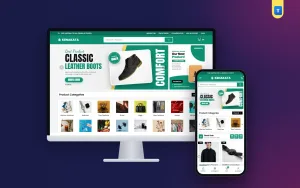
Good online store website design is easier when the theme already follows these rules. The Kenakata multi-category store theme for WordPress and WooCommerce has a hero slider, a bordered category grid, a flash sale with a countdown, a big sale banner, featured, recent and most selling rows, promises and a blog block.
It also has a shop filter card with price, rating, stock, on sale and brands, and live search with a category picker. The product page has a WhatsApp button, and buyers get mobile number or email sign-in, a wishlist and a Track Order page. Every homepage block can be switched on or off. Import the demo, add your products, and you can take orders the same week.
Frequently asked questions
How many categories should a general store website design show on the homepage?
Show 8 to 16 main categories in a grid. Put smaller ones inside them.
What is the best colour for a general store website design?
One bright brand colour with plenty of white works well. It lets product photos stand out.
Do I need online payment from day one?
No. Cash on delivery is enough at first. Add bKash, Nagad or cards later.
How many products should I start with?
Start with 30 to 100 items you always have in stock, then grow.
Is online store website design different on phones?
Yes. Phones need a bottom tab bar, a full-width search and cards two per row.