If you want to learn how to sell your digital products online, start with one idea: a digital product is anything the buyer receives without waiting for a parcel. That can be an ebook, a template, a course, a software plan, a gift card or a shared app account. The good news is that you need no warehouse and no courier. The harder part is making buyers trust you enough to pay.
This guide walks through the whole job in plain steps. You will choose a product, set a price, build a simple shop, take payment through bKash or Nagad, deliver the file or login, and handle support. Each section ends with a short list you can copy into your own plan.
What counts as a digital product
A digital product is something the customer gets by email, by download link or by a login. Nothing is posted. That single fact changes how you plan stock, delivery and cost.
Common types sold in Bangladesh today:
- Ebooks, guides and study notes in PDF form.
- Design templates, such as CVs, social media kits and wedding cards.
- Online courses and recorded classes.
- Monthly plans for design, video, photo and music apps.
- Gift cards, game top-ups and software activation plans.
- Printables like planners, worksheets and calendars.
Pick one type to begin. A shop that sells ten different things on day one is hard to explain and hard to support. You can add more later once the first product sells steadily.
Choose a product people already ask for
The safest way to begin is to look at what people already ask you. If friends keep asking where to buy a cheaper design app plan, that is a signal. If students ask for your notes, that is a signal too.
Use this short test before you commit:
- Do at least five people ask for it every month?
- Can you deliver it in less than ten minutes after payment?
- Can you explain it in one sentence?
- Is there a clear reason to buy from you rather than from a stranger?
If you answer yes to all four, you have a product worth testing. If you answer no to two or more, keep looking.
Set a fair price
Price is the part many beginners guess. Do not guess. Look at what buyers already pay and then decide where you sit.

- Check three similar offers on Facebook pages and marketplaces.
- Add your own cost: the plan you resell, your time, payment fees and any support.
- Decide a margin you can live with, not the highest number you can imagine.
- Offer two or three options, such as one month and three months.
For subscription-style products, give the buyer a choice between a personal account and a shared one. A shared seat costs less, and some buyers only need a tool for a week of client work. Showing both prices side by side saves many messages.
Plan how the buyer will pay
In Bangladesh, most online buyers pay with a mobile wallet. If you cannot accept bKash or Nagad, you will lose sales. Cash on delivery makes no sense for a file, so remove it from the plan.
Your payment options usually look like this:
- bKash and Nagad for most buyers.
- Card or mobile payment through a gateway such as SSLCommerz for buyers who prefer it.
- Manual Send Money with a transaction ID, which is simple and works from day one.
Whichever you use, ask for the transaction ID and the buyer's mobile number. Match them against your wallet statement before you send the product. This one habit stops most payment disputes.
How to sell your digital products online: where to sell
You have three realistic places to sell. Each has a cost and a limit.
A Facebook page only
This is the fastest start. You post, buyers message you, you take payment by hand. The limit is your time. Every order needs a person to reply, check the payment and send the file.
A marketplace
A marketplace brings traffic, but it takes a fee and sets the rules. You also do not own the customer list.
Your own website
A website is the best long-term base. You own the shop, the brand and the customer list. It can take payment and send delivery emails without you sitting at the phone. Most sellers keep their Facebook page for talking to people and use the website for the actual sale.
If you want to grow beyond a few orders a day, move to your own site early.
How to sell your digital products online: the shop you need
A digital shop is simpler than a normal online store. There is no shipping address, no delivery charge and no stock count for most items. Keep it that way.
The pages you need:
- A home page that says what you sell in one line.
- A product page for each item, with price, what the buyer gets and how it arrives.
- A cart and a one-page checkout.
- A page for payment steps and refund rules.
- A contact page with your WhatsApp number.
Checkout should ask for as little as possible: name, mobile number and email. Do not ask for an address when nothing is posted. Every extra field loses some buyers.
Write product pages that answer questions
A product page does the work of a shop assistant. If it answers the usual questions, you will get fewer messages and more orders.
Put these on every page:
- A clear title that says what the item is.
- The price and what is included.
- How and when it arrives, for example by email within minutes.
- For plans, the start date, the end date and what happens at renewal.
- For files, the format, the number of pages and the language.
- Your refund rule in plain words.
Spend a little time on this part, because it decides whether a visitor buys or leaves. Read each page once as if you were a first-time buyer who knows nothing about your shop. Anything that makes you stop and ask a question should be fixed or explained.
Add two or three real images or screenshots. Add a short list of questions buyers ask you most. Honest detail beats a long sales speech.
Design the landing page
If you run ads or post on Facebook, many people will land on one page first. A simple digital product landing page design has a clear order: a headline, a short proof, the offer, the price and one button.
- Headline: what the buyer gets, in plain words.
- Two or three lines of proof, such as how many people bought or a real review.
- A short list of what is inside.
- The price and one clear button.
- A few questions and answers near the bottom.
Good digital product landing page design is plain: one message, one offer, one next step. Keep the page fast on a phone. Most of your visitors in Bangladesh will open it on a mobile with an uneven connection, so avoid heavy sliders and large videos.
Deliver the product the right way
Delivery is where a digital seller wins or loses trust. People pay and then wait. The shorter the wait, the better the review.
Files
Send a download link by email straight after payment. Keep the link active for a set time and say so on the page. Name the file clearly so the buyer finds it later.
Plans and logins
For app plans, send the login or invite by email and by WhatsApp. Tell the buyer what to do on the first day and who to message if something fails. Keep a record of each start date and end date.
Gift cards and top-ups
Send the code in a message the buyer can copy. Confirm the amount and the region of the code in the same message.
Handle renewals without chasing people
If you sell monthly plans, renewals are your steady income. They are also the part that is easiest to forget. A buyer who does not know the end date will message you at the last minute, or leave without a word.
A simple renewal habit looks like this:
- Record the start date and end date for every order.
- Send a reminder three days before the end.
- Give a direct renewal link so the buyer pays in one step.
- Offer a small saving for a longer plan.
A renewal date tool on the site lets the buyer check the end date and save a reminder to their own calendar. That takes a repeated question off your phone.
A ready-made option for your shop
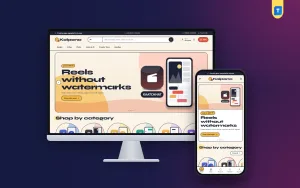
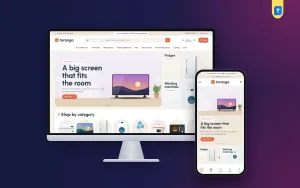
You can build all of this from scratch, but it takes time. If you use WordPress, a theme made for the job saves weeks. Kolpona is one such option, made for shops that sell design, video, photo and audio app plans, gift cards, courses and downloads.
What it includes, in short:
- A personal-or-shared card for each product, with its own price and button.
- A renewal date tool that saves a calendar reminder three days before the end.
- 17 homepage blocks you can switch off or re-order.
- A one-page checkout with no address, and delivery by email and WhatsApp.
- bKash, Nagad, SSLCommerz and manual payment.
- The Themeve Commerce shop plugin, so WooCommerce is not needed.
- 5 colour palettes, 4 font pairs and a one-click demo with 21 sample subscriptions.
The demo content is invented, so replace it with your own products. If you want to see how the pieces fit, open the Kolpona page and try the demo before you decide.
Bring in your first buyers
A shop with no visitors sells nothing. Start with people who already know you.
- Post your shop link on your Facebook page and in relevant groups, following each group's rules.
- Pin one post that explains the product, the price and how to pay.
- Ask each happy buyer for a short review and a screenshot, with permission.
- Answer every comment, even the simple ones.
- Write short helpful posts about your topic, so the page is useful and not only a price list.
Later you can add search traffic, email lists and small paid ads. Do not spend on ads before the product page converts. Test two versions of your digital product landing page design with a small group first, and keep the one that gets more orders. If ten visitors give no sale, fix the page first.
Mistakes to avoid and a launch checklist
Most failed shops fail for simple reasons. Check this list against your plan.
- Selling too many different things at once.
- No clear refund or support rule.
- Slow delivery after payment.
- Asking for an address on a digital order.
- Heavy pages that load slowly on a phone.
- Copying another seller's photos or text.
- Promising things the product cannot do.
- Forgetting renewal dates.
Also check that you have the right to sell what you offer. Resell only plans and files you are allowed to resell, and be honest on the page about what the buyer receives.
A launch checklist
Before you tell anyone about the shop, go through this list once.
- One product, one price, one clear page.
- Payment tested with a small real order.
- Delivery email tested and received on a phone.
- Refund rule and contact number visible.
- Shop opened on a phone and checked for speed.
- Your first ten buyers named, even if they are friends.
Selling well is mostly about repeating small, careful steps. Test, fix, and then repeat.
If you want to read more on the technical side, the official WordPress documentation is a good, reliable reference.
Frequently asked questions
How to sell your digital products online with no money?
Start with a Facebook page and manual bKash or Nagad payment. Deliver by email or WhatsApp. Once you have steady orders, move to a website so you do not answer every order by hand.
Do I need a website to sell digital products?
No, but it helps. A website takes payment and sends delivery without you being online. It also gives you a customer list that you own.
Which payment methods should I offer in Bangladesh?
Offer bKash and Nagad first. Add a gateway like SSLCommerz for card and mobile payment, and keep manual Send Money with a transaction ID as a backup.
Can I use WooCommerce for a digital shop?
You can, but you do not have to. Kolpona comes with the Themeve Commerce plugin, which handles cart, checkout, payments, invoices and orders.
How do I stop buyers from asking when their plan ends?
Show an end date on the order and add a renewal date tool to the site. Send a reminder three days before the end.
How long should delivery take?
Aim for minutes, not hours. Fast delivery is the first thing buyers mention in reviews.
What is the best way to learn how to sell your digital products online?
Sell one small product to real people. Each order shows you what to fix, from the price to the wording of the page.