An online newspaper website template is the fastest honest way to get a news site live in Bangladesh. Instead of paying for months of custom design, you start from a finished layout with a homepage, category blocks and article pages already in place, then fill it with your own reporting. This guide is for first-time publishers, local journalists and freelancers who want to launch quickly without cutting corners that hurt the site later.
We cover what a template saves you and what it does not, what to prepare before launch day, a simple one-week plan, and the Bangladesh-specific details that help a new paper find readers. As the example we use the Digital Newspaper Plus Theme – Ultra-Fast & SEO Optimized, a lightweight WordPress theme made for Bangla news portals, online magazines and digital media publishers.
Why an Online Newspaper Website Template Saves Months
A custom news site means wireframes, design rounds, development, testing and fixes, and for a small team that can easily take three to six months. During that time you are not publishing, not building a Facebook audience and not learning what your readers want. A template flips the order. You publish first, learn from real traffic, and adjust the design within the options you already have.
Templates also carry lessons from many earlier news sites. A ready layout already knows that a homepage needs a lead area, a latest news list, category blocks and space for ads. Building from scratch, a new team often forgets something basic, such as a popular posts list or a clear date line, and only notices after launch when readers struggle to find their way around.
What a template does not do is the journalism. It will not choose your sections, write your headlines or earn the trust of readers. Think of it as a printing press that is ready to run. The quality of the paper still depends on the people feeding it, and that is where most of your launch time should go.
What to Prepare Before You Install Anything
Start with the name and domain. A short, easy-to-spell name works best because people will type it on phones and share it in comments. Register the domain, choose hosting with enough disk space for thousands of photos and a server that performs well for readers in Bangladesh, and set up a professional email address for news tips and advertisers.
Next, prepare your brand basics: a wide logo for the header, a square version for the browser tab and social profiles, and two brand colours. Then write your section list. Six to ten sections are plenty at launch, for example national, politics, economy, international, countrywide, sports, entertainment and opinion. Every section you add needs stories, so be realistic about how much your team can publish each day.
Finally, have content ready before the site goes public. Aim for at least five stories in every homepage section, plus About, Contact, Advertise and privacy policy pages. A digital newspaper that opens with empty blocks looks abandoned, while one that opens with fifty real stories looks established from the first day, even if your whole team is only three people.
A One-Week Launch Plan for a Digital Newspaper
Days one and two: install and import
Install WordPress, set the time zone to Dhaka, then upload and activate the theme. Use the one-click demo import so the homepage, menus and blocks appear just like the demo. This gives you a working skeleton within minutes and shows you where each type of content will appear before you start replacing anything with your own material.
Days three and four: brand and structure
Replace the demo logo, set your fonts and colours and change the footer credits from the admin panel. Create your real categories, rename or delete the demo ones, and build the main menu in the order you planned. Set permalinks to the post name so shared links stay short. The WordPress documentation explains menus, categories and user roles step by step.
Days five to seven: content, checks and launch
Add your prepared stories with good featured images, delete every demo post, and check each homepage block on a phone and a computer. Install a backup plugin and a caching plugin, give reporters accounts with limited roles, and connect Google Search Console. On day seven, publish a launch post, share it on your Facebook page and ask friends and sources to share it too.
What This Theme Gives You on Day One
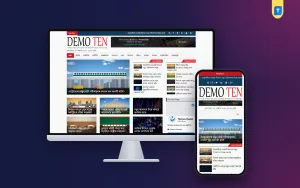
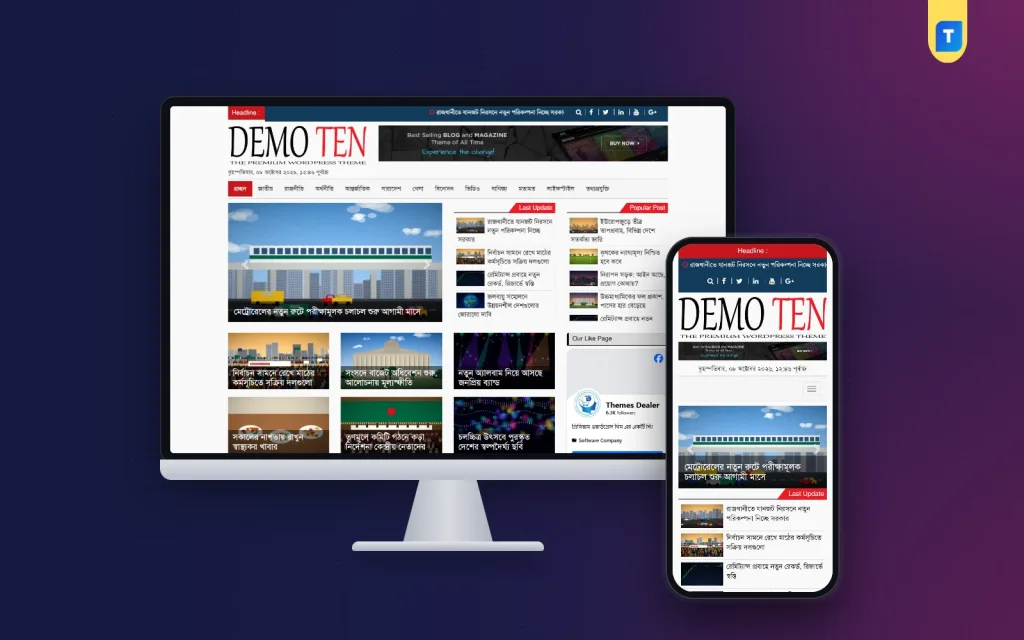
Once the demo is imported, the homepage looks like a complete Bangla daily. In the demo shown below, a dark top bar carries a scrolling Headline ticker with social icons and search, the logo sits beside a wide banner space, and a date line in Bangla runs under the logo. The menu bar highlights the home item in red and lists sections such as national, politics, economy, international, sports, entertainment, video and opinion.
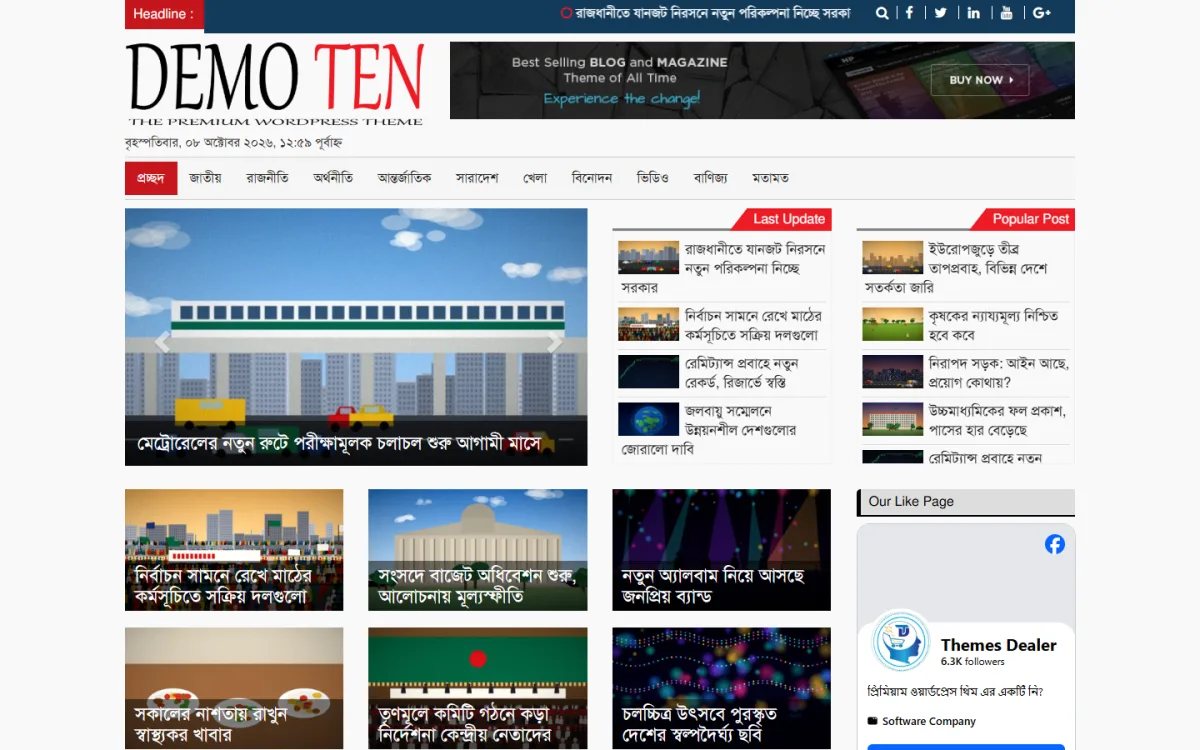
Below the menu, a featured post slider with arrows shows the top stories, while Last Update and Popular Post lists sit beside it, so readers see both the newest and the most-read stories without scrolling. Further down, category-based news highlights appear as photo tiles with the headline laid over the picture, and a box in the sidebar shows your Facebook page. The theme also includes a built-in photo and video gallery and trending sections.
On a phone the same layout stacks into one column. The ticker stays at the top, the menu folds behind a single button, and the slider and Last Update list follow in order. The theme is mobile responsive, lightweight and clean-coded, which matters because most Bangla news readers arrive on phones using mobile data, often from a link they tapped on Facebook.
Making the Template Look Like Your Own Paper
A common worry with any online newspaper website template is that your site will look like everyone else's. In practice, a few changes go a long way. Your logo, two consistent brand colours, a well-chosen Bangla font and your own photography change the feel of a site far more than moving blocks around. Readers remember a paper by its name, its headlines and its pictures.
In this theme you change the logo, fonts, colours and footer credits directly from the admin panel, with no developer needed. Decide on a photo style too: the same image ratio for every featured picture, no watermarks from other sites, and clear captions with credits. Consistent images make the tile grid on the homepage look planned rather than random.
Give the banner space a job as well. Until you have advertisers, use it to promote your own Facebook page, an upcoming special report or a call for local reporters. An empty or default banner looks unfinished, while a house ad shows that the paper is active and turns the space into something useful from the very first day.
Earning and Getting Found After Launch
The theme is AdSense optimized, with ad placements across mobile, tablet and desktop screens that fit without breaking the layout. Wait to apply for AdSense until you have a few weeks of original stories and the basic pages in place. Meanwhile, sell the header banner directly to local businesses, who often prefer to pay through bKash or Nagad and like to see their ad beside local news.
For search, the theme uses schema markup and clean HTML, which helps search engines read your pages. Do your part with clear Bangla headlines that match what people search for, proper categories and an XML sitemap submitted in Search Console. Google's Search Central documentation explains crawling and indexing in plain language and is worth reading once.
Facebook will likely bring most of your early traffic. Post each story with a short Bangla summary and a clear photo, reply to comments, and avoid misleading headlines. A small boost for your best local stories can help a new page find its first few thousand followers, but steady, honest reporting is what keeps them coming back.
Shortcuts That Cause Trouble Later
Speed is the point of a template, but some shortcuts cost more than they save. Leaving demo posts online is the most common one, and it confuses both readers and search engines. Another is keeping every demo category instead of following your section plan, which leaves empty archive pages. Using a nulled copy of any theme is worse still, because hidden code can damage your site and your name.
Other mistakes are uploading full-size camera photos, installing extra plugins for things the theme already covers, such as galleries, and launching without a privacy policy or contact page. Test the site on a real budget Android phone before you announce it. If it feels slow there, fix images and caching first, because that is where most new news sites lose readers.
Frequently Asked Questions
How long does it take to launch with an online newspaper website template?
The setup itself can be done in a day with a one-click demo import. A realistic launch, with your own categories, logo, pages and at least a few dozen real stories, takes about a week for a small team. Most of that time goes into preparing content and pages, not into the website itself.
Do I need coding skills for this theme?
No. You import the demo in one click and change the logo, fonts, colours and footer credits from the admin panel. Basic WordPress knowledge, such as creating posts, categories and menus, is enough to run the site day to day, and support is available on WhatsApp if you get stuck.
Can I use the theme on more than one site?
Yes. It comes with a lifetime licence that allows use on unlimited websites with no renewal fees. This suits agencies, freelancers and media groups who run several news titles or build news sites for local clients and want one layout they already know well.
Which other news themes should I compare?
If you want a classic daily front page with local news for every upazila, look at the Dainik Alo – Bangla Newspaper WordPress Theme. For a newer layout from the same family, see the Digital Newspaper Plus Theme 2025. Compare their demos on your own phone before you decide.
Ready to Launch Your Paper
A fast launch comes from good preparation: a short section list, ready content, a clean brand and a template that already handles the layout. Choose an online newspaper website template that is light on phones and easy to adjust, spend your first week on stories rather than design, and keep improving as readers arrive. To start with a ready Bangla news layout, see the Digital Newspaper Plus Theme – Ultra-Fast & SEO Optimized.