−50%
−50%
Smart Coupons – Coupon Suggestion Plugin WordPress
 −50%
−50%
✦ Key features
- Coupon notice on cart and checkout
- Your own message or a bare code
- WooCommerce block cart and checkout
- WooCommerce classic cart and checkout
- Themeve Commerce cart and checkout
- On and off switch keeps your text
- Plain text, safe and fast
- Change the message for each campaign
- Works with coupons you already create
- No coding needed
Overview
Smart Coupons is a coupon suggestion plugin WordPress shops can use to show a code or a short message on the cart and checkout, on WooCommerce block and classic pages and on Themeve Commerce.
Smart Coupons is a coupon suggestion plugin WordPress shop owners can use to show a coupon code, or a short message of their own, on the cart and checkout pages. You write the text once, save it, and every shopper who reaches those pages sees it. It works with WooCommerce and with our own Themeve Commerce shop system.
The plugin is built for a simple problem. You run a coupon campaign, but buyers forget the code by the time they pay. A reminder placed right next to the coupon box fixes that, and a coupon suggestion WooCommerce plugin like this one does it without code. It is small, quick to set up and easy to change when the campaign changes.
Who can use this coupon suggestion plugin WordPress offers
Any online shop that gives out discount codes can use it. The plugin does not depend on what you sell. It only needs a cart and a checkout page.
- Clothing, shoes and bag shops that run festival offers such as Eid or Puja sales.
- Cosmetics and grocery shops that give a welcome code to first-time buyers.
- Electronics and gadget stores that share codes through Facebook pages and influencers.
- Digital product sellers who hand out launch codes to a small audience.
- Agencies that build shops for clients and want a simple, reliable way to show a code.
- Owners who sell on WooCommerce today and plan to move to Themeve Commerce later.
Why shoppers forget coupon codes
Most shops promote a code in a Facebook post, a story or a banner. Days later the buyer reaches the checkout, sees an empty coupon box and cannot remember the code. Some leave to search for it. Some message you and wait for a reply. Many simply close the page.
Other buyers never saw your post at all. They would use a coupon if they knew one existed. A short line at the cart reaches them at the exact moment they are about to pay.
What buyers see from this coupon suggestion plugin WordPress adds
The plugin adds one notice. It is a plain information box, styled by your shop system, placed above the cart or checkout content. There are no pop-ups, no sliders and no extra pages to load.
On WooCommerce
- The block cart shows your notice above the cart content.
- The block checkout shows the same notice above the checkout form.
- The classic cart page shows the notice before the cart table.
- The classic checkout page shows the notice before the checkout form.
- The box uses the standard WooCommerce information style, so it matches your theme without extra work.
On Themeve Commerce
- The notice appears in the notice area of the Themeve Commerce cart and checkout.
- It uses the shop's own notice style, so it looks like part of the page.
- If you leave the message empty, buyers see a short line such as "Available coupon" followed by your code.
What the text looks like
- If you write a message, buyers see exactly your message.
- If you leave the message empty and only enter a code, buyers see "Use coupon code" followed by the code.
- The text is plain text. It is safe, quick to read and works the same on phones and desktops.
Back-end settings of the coupon suggestion plugin WordPress admins open
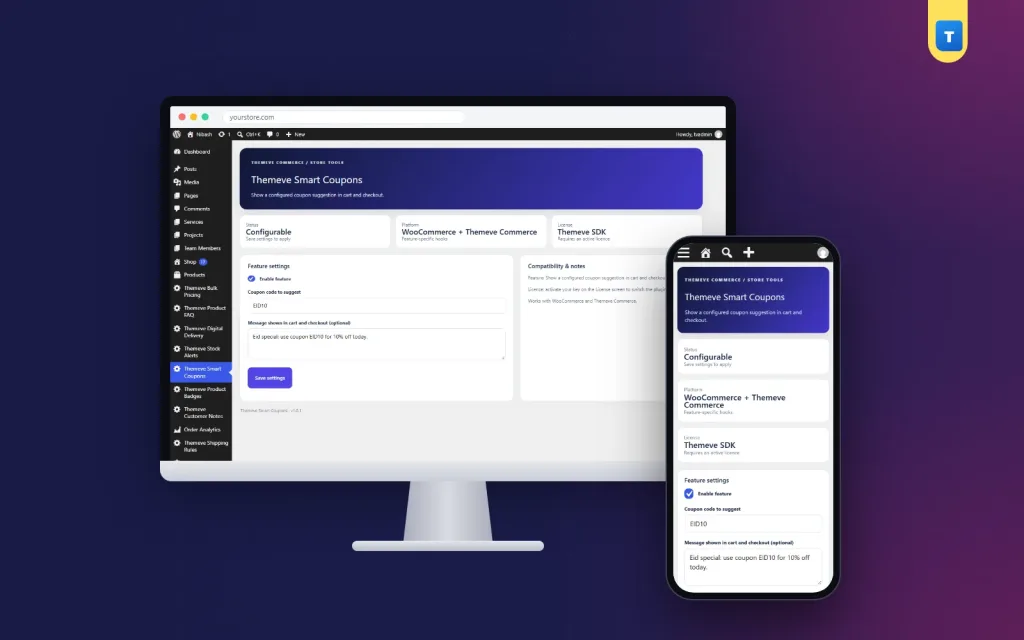
After you activate the plugin, a new item called Themeve Smart Coupons appears in the left admin menu. It opens one settings page. Shop managers on WooCommerce can open it, and so can administrators. Here is every option on that page.
Feature settings card
- Enable feature. A checkbox that switches the notice on or off. Untick it when a campaign ends and your text stays saved for next time.
- Coupon code to suggest. A text field for the code, for example EID10 or WELCOME50. The plugin shows a notice only when this field has a value, so replace the placeholder word that comes with a fresh install.
- Message shown in cart and checkout (optional). A small text area for your own sentence. Use it when a bare code is not enough, for example "New here? Use WELCOME50 on your first order."
- Save settings. A button that stores the values. The notice changes on the shop at once.
Compatibility and notes card
- A short side panel that repeats what the plugin does.
- It reminds you that the plugin works with WooCommerce and Themeve Commerce.
- It reminds you to activate your licence on the License screen.
Licence screens
- A lock screen shows when the licence is missing or expired. Until you activate, the notice does not run.
- A License screen lets you activate the plugin once.
- Updates arrive in Dashboard, Updates, while your licence is active.
Showing the code is separate from creating it
This coupon suggestion plugin WordPress tool shows a code. It does not create the coupon and it does not apply the discount. You create the coupon in WooCommerce or Themeve Commerce as usual, with the amount, limits and expiry date you want. Then you type the same code in Smart Coupons.
The buyer copies the code into the coupon box and the shop system applies the discount. Because the two jobs are separate, your coupon rules stay exactly as you set them. The plugin cannot give away more than your coupon allows.
Ideas for your coupon messages
Short messages with a clear code work best. Here are some patterns you can copy and adapt.
- Festival offer: "Eid offer. Use code EID10 for 10% off."
- First order: "New customer? Use WELCOME on your first order."
- Free delivery day: "Use FREEDEL at checkout for free delivery today."
- Loyalty: "Thank you for coming back. Use THANKYOU on this order."
- Clearance: "End of season. Use SALE15 on all clearance items."
Change the text for every campaign. It takes a few seconds, and it keeps the cart page useful all year.
How it helps you sell
- Buyers who arrive from Google learn about your offer at the cart, even if they never saw your social posts.
- Buyers who saw your post do not have to leave the checkout to find the code.
- Fewer people message you to ask for the code, so your inbox stays calmer.
- Your cart page always has something useful to say, so the coupon box never looks empty and confusing.
- You can test a new campaign message the same day, without a developer.
Here is an example. A clothing page runs an Eid campaign with the code EID10 for 10% off orders above a set amount. The owner creates the coupon, then types "Eid offer: use code EID10 at checkout" in Smart Coupons. When Eid is over, the owner swaps the text for a first-order welcome code. Nothing else changes.
Keep your coupons honest and profitable
- Check the expiry date and limits before you write the message. A code that fails at checkout frustrates buyers more than no code at all.
- Work out your profit on a typical order after the discount and the delivery charge.
- Add a minimum cart total or an expiry date in your shop system, so the code cannot be used forever.
- Change or switch off the message when the campaign ends.
Setup steps
- In your WordPress dashboard, go to Plugins, Add New, then Upload Plugin, and choose the zip file.
- Click Install Now, then Activate.
- Open the License screen and enter your licence to switch the plugin on.
- Create your coupon in WooCommerce or Themeve Commerce, with its amount, limits and expiry date.
- Open Themeve Smart Coupons in the left menu and tick Enable feature.
- Type the same coupon code. Add your own message if you want one.
- Click Save settings.
- Add a product to a test cart and check the cart and checkout pages.
Requirements
- WordPress 6.2 or newer, tested up to WordPress 7.1.
- PHP 7.4 or newer.
- WooCommerce, or the Themeve Commerce shop system, for the cart and checkout pages.
- An active licence, so the notice can run and updates can arrive.
Why choose a plugin instead of editing templates
You can paste a coupon line into a theme file, but it breaks on every theme update, and it is awkward for the next campaign. It also usually covers only one checkout type. WooCommerce now has two, the block pages and the classic pages, and a template edit rarely covers both.
This tool covers the block cart, the block checkout, the classic cart, the classic checkout and the Themeve Commerce pages. Your text lives in a settings screen, not in code. Anyone on your team can change it without touching a file. That is the main gain of a coupon suggestion plugin WordPress stores can run for years.
It also stays small. There is one settings page, three fields and no extra scripts for visitors to download. If you want a larger discount system, use it beside your shop's own coupon tools. If you only need buyers to remember the code, this is enough.
What is included
- The plugin zip file, ready to upload in Plugins, Add New.
- One settings page with an on and off switch, a code field and a message field.
- Support for WooCommerce block and classic pages, and for Themeve Commerce.
- Documentation after purchase.
- Updates in Dashboard, Updates, while your licence is active.
- Six months of support, with help on WhatsApp.
Works well with other tools
Coupons pair naturally with other offers. Bulk Pricing gives an automatic discount for bigger carts, so you can keep coupons for special moments. Abandoned Cart Recovery saves the details of shoppers who leave the checkout, so you can send them a code that the cart message then reminds them about. Both are optional.
If your store already uses a coupon plugin of its own, a coupon suggestion WooCommerce plugin such as this one can sit beside it. Smart Coupons only shows text, so it does not conflict with other discount logic.
Smart Coupons is built on the official WordPress documentation standards, and you can browse more of our WordPress plugins.
Reviews
0.0
Write a review
★★★★★
0 reviews from buyersNo reviews yet — be the first to share your experience after buying.
Frequently Asked Questions
01What does a coupon suggestion plugin WordPress shop owners install actually do?
It shows a coupon code or your own short message on the cart and checkout pages, so buyers do not forget the code.
02Is this coupon suggestion plugin WordPress ready for the block checkout?
Yes. It works on the WooCommerce block cart, the block checkout, the classic cart and checkout, and the Themeve Commerce pages.
03Does Smart Coupons create the coupon?
No. Create the coupon in WooCommerce or Themeve Commerce, then type the same code in Smart Coupons.
04Is the discount applied automatically?
No. The buyer enters the code in the coupon box and your shop system applies it.
05Can I write my own message?
Yes. Leave the message empty to show the code alone, or write a full sentence.
06Why does nothing show on my cart?
Check that the plugin is activated with your licence, the Enable feature box is ticked, and the code field is not empty.
07Does it work without WooCommerce?
Yes, on Themeve Commerce. Otherwise a shop system with a cart and checkout is needed.
Delivery & Support
1Place your orderAdd to cart, sign in and pay with bKash, Nagad or Rocket.
2Payment verified automaticallyEnter your Transaction ID — the payment is matched automatically, usually within seconds.
3Get your productYour license key and download appear in My Account → Licenses.
- Secure automatic payment verification
- Delivery to your account & e-mail
- Friendly WhatsApp support
Refund Policy
This policy applies to every product in our store.
You get a refund when the product does not work as described and we cannot fix it, when your license will not activate your website, or when a manually delivered product is late and you cancel before delivery. A working license, or a single license already used on a live domain, is not refundable. Approved refunds go back to the number you paid from within one working day, minus the Send Money charge.
More items
View all →