 −27%
Plugins
Elementor Pro Plugin 1 Year with Library Access – Elementor Pro Buy in Bangladesh
৳400
৳550Save −27%
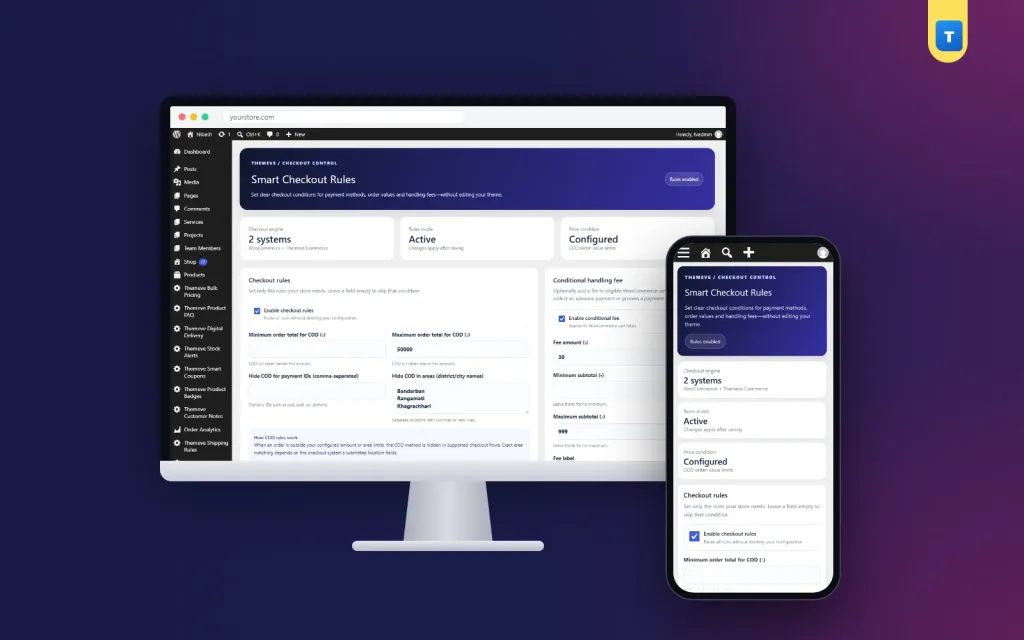
✦ Key features
Smart Checkout Rules is a cash on delivery rules plugin WordPress shops can use to decide exactly when COD appears at checkout. You set the limits once. The plugin applies them to every order, day and night, without a phone call from your staff.
It is built for Bangladeshi online shops that want to keep cash on delivery but stop it where it costs too much. You can hide COD for very small or very large carts, hide it for chosen districts or cities, add a small handling fee, and show a short notice so buyers know why. It works on WooCommerce and on Themeve Commerce. On a WooCommerce site it acts as a cash on delivery rules woocommerce plugin that needs no code.
Any shop that offers cash on delivery and ships by courier can use it. The rules are about money and places, not about a product type. Typical users are:
Cash on delivery brings in buyers who do not trust paying online yet. It also brings risk. A refused parcel worth a few hundred taka is annoying. A refused parcel worth a phone or a sofa set is a real loss. Sending COD parcels to areas where your courier returns many deliveries adds to the cost.
Many owners handle this by hand. Staff call the buyer and ask for an advance. That works until the shop gets busy. A rule at checkout does the same job for every order.
Smart Checkout Rules does not take payments and does not add new gateways. It only controls when COD is shown. Your other methods, such as bKash, Nagad or card payments set up in your shop system, stay as they are and become the choice for orders where COD is hidden.
Everything is set from one screen. After activation you will find a menu called Smart Checkout in the left admin menu, with one page named Rules and Settings. The page opens with a header that shows whether your rules are enabled or paused, and three small panels that show the checkout engine, the rules mode and whether an order-value limit is set.
Below that, the settings are grouped in three cards. Leave any field empty and that condition is skipped.
A notes card at the bottom of the screen reminds you how the plugin works with each shop system and that it does not collect advance payments.
Buyers do not see a settings page. They see a checkout that adapts to their cart and their address. These are the front-end effects of the rules:
Set a minimum order total, and cash on delivery hides for smaller carts. This helps when tiny orders cost more to deliver than they earn. Set a maximum order total, and COD hides for large carts, so big orders must be paid by another method before you ship.
You can use one limit, both, or neither. Here is a simple example. A clothing shop keeps COD for orders between a small minimum and a mid-range maximum. A buyer with one T-shirt in the cart pays the handling fee. A buyer with a family Eid order above the maximum is asked to pay by bKash or Nagad. Everyone in between pays at the door.
Some areas return more parcels than others. List those districts or cities, and cash on delivery hides for buyers who choose them. On WooCommerce the plugin checks the city, the postcode and the chosen district. On Themeve Commerce it checks the district, the thana and the address.
This lets you keep COD in your home city, where returns are rare, while asking for payment first in places where returns are common. Type plain place names, one per line or separated by commas.
Check your own courier reports before you build the list. Look at which areas send the most parcels back, and start with those. You can change the list at any time.
Some shops use a second payment method that works like cash on delivery, for example a custom gateway added by a developer. Add its payment ID to the rules and the plugin treats it the same way. One set of limits then covers both methods.
Instead of hiding COD, you can charge for it. Turn on the fee, set the minimum and maximum subtotal it applies to, enter the amount and give it a label. A shop can, for example, add a small charge to COD orders under a certain subtotal, so the buyer shares the delivery cost.
The handling fee applies to WooCommerce carts. The total and district rules work on both WooCommerce and Themeve Commerce.
The plugin saves time and money in a few direct ways.
Think of it as a cash on delivery rules woocommerce plugin that also runs on Themeve Commerce, so a move between the two systems later does not mean new tools. Two Themeve tools work well beside it. Fraud Shield shows a buyer's order history by phone number and can block repeat offenders. Shipping Rules hides chosen shipping methods once the cart reaches an amount you set.
Within minutes your cash on delivery rules plugin WordPress setup is guarding every checkout. If you get stuck, our team can help over WhatsApp.
A plain shop system shows the same payment methods to every buyer. Staff must then fix the risky orders one by one. This plugin moves that work to the checkout, where it costs nothing per order.
The plugin needs WordPress 6.2 or newer and PHP 7.4 or newer, and it has been tested up to WordPress 7.1.
Smart Checkout Rules is built on the official WordPress documentation standards, and you can browse more of our WordPress plugins.
No reviews yet — be the first to share your experience after buying.
It decides when cash on delivery appears at checkout. Smart Checkout Rules hides COD by order total or by district, and can add a handling fee.
Yes. Set a maximum order total and COD hides when the cart goes above it. Smaller orders still see COD.
No. It works on WooCommerce and on Themeve Commerce. The handling fee applies to WooCommerce carts; the total and district rules work on both.
Yes. List the districts or cities. On WooCommerce the plugin checks city, postcode and district; on Themeve Commerce it checks district, thana and address.
No. It only decides when COD is shown. Your existing methods, such as bKash or Nagad, take the payment.
Yes. One switch pauses every rule and keeps your settings.
COD is hidden, an optional notice can explain why, and anyone who still tries it gets a clear message to choose another method.
You get a refund when the product does not work as described and we cannot fix it, when your license will not activate your website, or when a manually delivered product is late and you cancel before delivery. A working license, or a single license already used on a live domain, is not refundable. Approved refunds go back to the number you paid from within one working day, minus the Send Money charge.
−27%
 −50%
 −50%
 −50%
