 −50%
−50%
Product Badges – WooCommerce Product Badges Plugin
✦ Key features
- Your own badge text
- Rounded badge on product cards in shop lists
- One setting changes the whole shop
- On/off switch keeps your text
- Works with WooCommerce
- Works with Themeve Commerce where the card supports it
- Small inline CSS, no script
- Empty text hides the badge
- No per-product editing
- No coding needed
Overview
Product Badges is a WooCommerce product badges plugin that shows your own campaign text, such as Eid Offer or Free Delivery, on product cards in your shop lists. Change one setting and the whole shop updates.
Product Badges is a WooCommerce product badges plugin that puts a short line of your own text, such as Eid Offer or Free Delivery, on every product card in your shop lists. You type the text once, switch it on, and shoppers see it as they scroll.
A product grid full of similar photos blurs together, especially on a phone. A small coloured label gives the eye something to stop on and tells people in two or three words that something is happening now. This plugin does that with one setting and no per-product editing.
Who can use this WooCommerce product badges plugin
It is made for shops that run store-wide campaigns. It works on two kinds of store:
- A WordPress shop that runs on WooCommerce.
- A shop built on our Themeve Commerce plugin, where the theme's product card supports it.
Shops that benefit most:
- Fashion and clothing pages that run Eid, Puja, winter or new season campaigns.
- Grocery and household shops that want to say Free Delivery or COD Available on every card.
- Gadget and electronics sellers with a sale week or an import batch to move.
- Cosmetics and gift shops that push a gift-ready message before special days.
- Handmade and small-batch sellers who want a New Arrival or Limited Stock label.
What you get at a glance
This is the full list of what the plugin adds to your store.
- Your own badge text, changed any time.
- A clean rounded badge on product cards in shop lists.
- One setting that changes the whole shop.
- An on/off switch that keeps your text when it is off.
- Works on WooCommerce, and on Themeve Commerce where the card supports it.
- No coding and no editing of single products.
Light on your pages
The badge is one small piece of HTML with a few lines of inline CSS. The plugin loads no JavaScript on your shop pages and no extra stylesheet file. Its admin stylesheet loads only on its own settings screen. There are no images to download, so the badge costs almost nothing in page weight.
Front end: what shoppers see
The badge
- A short rounded label with white bold text on an indigo background.
- Small type, 11 pixels, so it does not fight with your product title or price.
- Shown on the product cards in shop lists, such as the shop page and category pages.
- On WooCommerce, it sits above the product title, near the product image.
- On Themeve Commerce, it sits under the product title inside the card.
- The same text appears on every card, so the message is clear and repeated.
What it does not do
The plugin does not show a badge on the single product page, and it does not give different text to different products. It is a store-wide campaign badge. If you need a different label for a single item, this is not the tool for that, and it is better to know that before you buy.
Phone view
Most of your visitors probably arrive from a phone, so this is the screen that matters most.
The badge is a plain inline element, so it follows the card width on small screens. Test it on a small phone before you announce a campaign. If the text wraps onto two lines, shorten it.
Back end: every screen and option
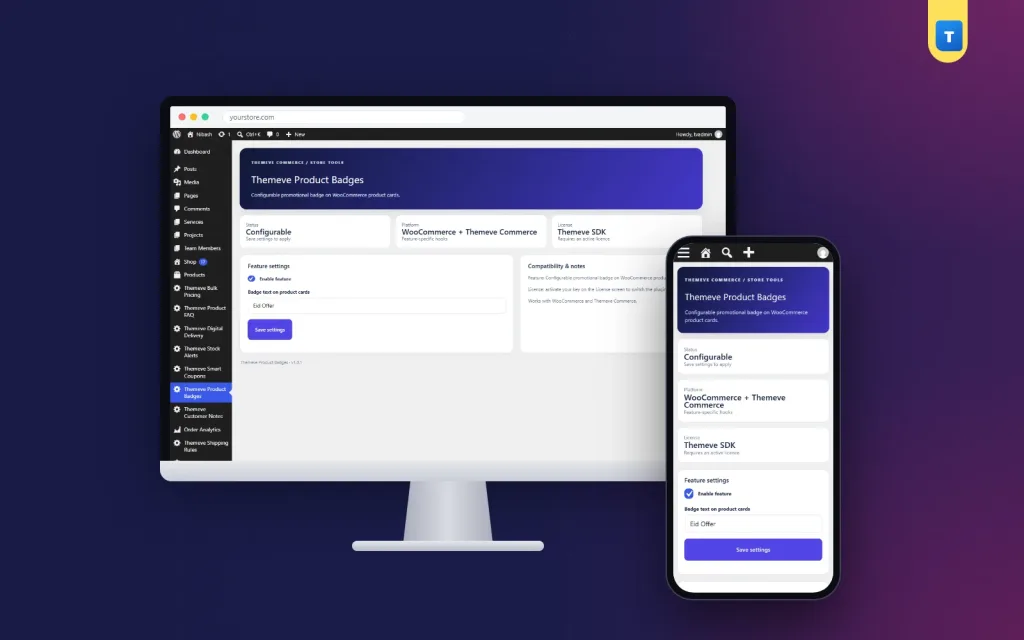
The Themeve Product Badges settings screen
After activation, Themeve Product Badges appears in the left admin menu. The screen has these parts:
- Header and status tiles. Three tiles show the plugin status, the supported platform (WooCommerce and Themeve Commerce) and the licence state.
- Enable feature checkbox. Tick it to show the badge. Untick it to hide the badge on the whole shop.
- Badge text on product cards. A text field for your badge text. The sample text is Recommended. Replace it with your own words. If you leave the field empty, no badge is printed.
- Save settings button. Stores your choices. The change shows on the shop at once.
- Compatibility and notes card. A side panel with a short description and a reminder that the licence must be active.
When you switch the badge off, your text stays saved. The next campaign starts with one click.
Who can open the settings
On WooCommerce, users with the manage WooCommerce capability can open the screen. On a Themeve Commerce store without WooCommerce, store administrators can open it.
The licence screen
The plugin needs an active Themeve licence. Until you activate it, no badge is shown and only the lock screen and License screen open. After you enter your licence, the settings screen and the badge work. Updates arrive in Dashboard, Updates while the licence is active.
Ideas for badge text
Keep it short. Two or three words work best on small screens. Here are some that suit common campaigns:
- Festivals: Eid Offer, Puja Special, Winter Sale.
- Delivery: Free Delivery, COD Available, Free Delivery Dhaka.
- Urgency: New Arrival, Limited Stock, Last Days.
- Gifting: Gift Ready, Wedding Picks.
Change the text with each campaign so the badge always feels fresh. A badge that never changes soon becomes invisible.
How a WooCommerce product badges plugin helps you sell
Shoppers scroll fast. A label that repeats the same offer on every card is hard to miss, and it answers a question before it is asked. A buyer who sees Free Delivery on the shop page does not need to open each product to check.
Match the badge with a real offer
A sale badge must be honest. If it says Eid Offer, there should be lower prices, a bundle or free delivery behind it. Shoppers forgive a plain shop. They do not forgive a misleading one.
A quick example
A clothing page plans an Eid campaign with free delivery inside Dhaka. Two weeks before Eid, the owner types Free Delivery Dhaka as the badge text and switches it on. Every product card now shows the message, and the Facebook posts link straight to the shop. After Eid, the owner changes the text to New Season and keeps it for a month. No coding, no editing of each product.
Tips for readable badges
A WooCommerce product badges plugin only helps when the badge is easy to read, so spend a minute on these checks.
- Use words your buyers use every day, in the language of your Facebook posts.
- Leave a little space at the top of your product photos so the badge does not cover a logo.
- Give the badge a rest between campaigns. When it returns with a new message, shoppers notice it again.
A simple campaign calendar
A badge works best when it follows a plan. Write down your next four campaigns and the words you will use for each. For example:
- Two weeks before Eid: Eid Offer, shown until the festival day.
- The week after: Free Delivery, to bring back people who missed the first sale.
- The next month: New Season, as new stock arrives.
- A slow month: Limited Stock or Last Days on the items you want to clear.
Keep the plan next to your Facebook content calendar. When a post goes live, the badge in the shop already matches the message, and shoppers who click through see the same words on the card. That match makes the shop feel organised, and organised shops earn trust.
If you run a sale for only part of the catalogue, remember that the badge appears on every card. In that case choose wording that is true for the whole shop, such as Free Delivery, and keep product-level offers in the title or price.
Setup in six steps
- Make sure WooCommerce or Themeve Commerce is installed and active.
- Go to Plugins, Add New, Upload Plugin. Choose the zip file and install it.
- Activate the plugin.
- Open the License screen and enter your licence.
- Open Themeve Product Badges in the left menu, type your badge text, tick Enable feature and click Save settings.
- Open your shop page on a phone and on a computer to check how the badge looks with your theme.
On Themeve Commerce stores, the badge appears where the theme's product card supports it. Check your shop page after switching it on.
Why use a plugin instead of editing the theme
If you search for a product badges plugin WordPress offers many large options, and most of them are built for shops that need dozens of styles.
Many sellers add a label by pasting code into the theme. That works until the theme updates and the label disappears. A plugin keeps the badge separate from the theme, so it survives updates and changes of design. It also means a shop owner, not a developer, controls the words.
- You change the text from the dashboard, not from theme files.
- Updating your theme does not remove the badge.
- One switch turns the badge on or off for the whole shop.
- It is a simple product badges plugin WordPress shop owners can manage without a developer.
- It works on both WooCommerce and Themeve Commerce.
The WooCommerce product badges plugin is deliberately small. If you want a long list of badge styles, shapes and per-product rules, you will need something larger. If you want a clean campaign label you can set in ten seconds, this is the right size.
Works well with other Themeve plugins
- Bulk Pricing gives a fixed discount once the cart reaches a set number of items. It pairs well with a Buy 3 Save badge.
- Product FAQ answers buyer questions on the product page after the badge brings them in.
What is included
- The plugin zip, ready to upload in Plugins, Add New.
- Updates in Dashboard, Updates while the licence is active.
- Documentation after purchase.
- Six months of support.
- Requirements: WordPress 6.2 or newer, PHP 7.4 or newer. Tested up to WordPress 7.1.
Used well, a WooCommerce product badges plugin keeps working season after season. Change the words with each campaign and it will always look current.
Product Badges is built on the official WordPress documentation standards, and you can browse more of our WordPress plugins.
Reviews
0.0
Write a review
★★★★★
0 reviews from buyersNo reviews yet — be the first to share your experience after buying.
Frequently Asked Questions
01What is a WooCommerce product badges plugin?
It puts a short label of your own text on product cards in shop lists, so shoppers notice an offer while they scroll.
02Where does the badge appear?
On product cards in shop lists. On WooCommerce it sits above the product title. On Themeve Commerce it sits under the title in the card.
03Can I use a different badge for each product?
No. It shows one badge text across the shop. It is made for store-wide campaigns.
04Does the badge show on the single product page?
No. It shows on product cards in shop lists only.
05Does this WooCommerce product badges plugin need WooCommerce?
It works with WooCommerce or with Themeve Commerce, where the theme product card supports it.
06Can I change the badge colour?
The badge uses a fixed indigo style with white text. You can restyle it with your own CSS.
07What happens when I switch the badge off?
The badge disappears from the shop and your text stays saved for the next campaign.
08Does it need a licence?
Yes. Until the licence is active, no badge is shown and only the lock and License screens open.
Delivery & Support
1Place your orderAdd to cart, sign in and pay with bKash or Rocket.
2Payment verified automaticallyEnter your Transaction ID — the payment is matched automatically, usually within seconds.
3Get your productYour license key and download appear in My Account → Licenses.
- Secure automatic payment verification
- Delivery to your account & e-mail
- Friendly WhatsApp support
Refund Policy
This policy applies to every product in our store.
You get a refund when the product does not work as described and we cannot fix it, when your license will not activate your website, or when a manually delivered product is late and you cancel before delivery. A working license, or a single license already used on a live domain, is not refundable. Approved refunds go back to the number you paid from within one working day, minus the Send Money charge.
More items
View all →